Section scope: changing a live app safely, configuring it, scaling it, keeping it healthy. Overlaps heavily with CKAD; if already familiar, prioritise the labs.
Creating a Deployment triggers a rollout; each rollout = a new revision (Revision 1 → e.g. nginx:1.7.0, Revision 2 → nginx:1.7.1).
Each revision is backed by its own ReplicaSet. Revision history lets you track changes and roll back.
kubectl rollout status deployment/myapp-deployment # live progress: "Waiting for rollout to finish: 3 of 10 updated replicas are available..." -> "successfully rolled out"kubectl rollout history deployment/myapp-deployment # REVISION + CHANGE-CAUSE table
A rollout (new revision) happens when the Pod template changes: image, labels, env, resources, etc.
# 1. Declarative: edit the manifest, then apply -> new rolloutkubectl apply -f deployment-definition.yml# 2. Imperative: change image (syntax <container-name>=<new-image>)kubectl set image deployment/myapp-deployment nginx-container=nginx:1.9.1
kubectl set image changes only the live object → your manifest file now drifts from the cluster; update the file too.
apiVersion: apps/v1kind: Deploymentmetadata: name: myapp-deployment labels: app: myapp type: front-endspec: replicas: 3 selector: matchLabels: type: front-end # must match template labels template: metadata: name: myapp-pod labels: app: myapp type: front-end spec: containers: - name: nginx-container # name used in `kubectl set image ... nginx-container=<image>` image: nginx:1.7.1 # changing this triggers a rollout
[!CAUTION]
Correction: the original lists "modifying replica counts" as an update. Changing spec.replicas (or kubectl scale) only scales the current ReplicaSet — it does not create a new revision/rollout. Only changes under spec.template do.
kubectl get replicasets # before: old RS 0/0/0, new RS 5/5/5kubectl rollout undo deployment/myapp-deployment # "deployment ... rolled back" (`deployment myapp-deployment` form also works)kubectl get replicasets # after: old RS 5/5/5, faulty RS 0/0/0
kubectl set image deployment/myapp-deployment nginx-container=nginx:1.9.1
Rollout status
kubectl rollout status deployment/myapp-deployment
Rollout history
kubectl rollout history deployment/myapp-deployment
Rollback
kubectl rollout undo deployment/myapp-deployment
Inspect
kubectl describe deployment myapp-deployment
List ReplicaSets
kubectl get replicasets
[!NOTE]
Beyond the course:
kubectl rollout history deployment/myapp --revision=2 # show the Pod template of one revisionkubectl rollout undo deployment/myapp --to-revision=1 # roll back to a specific revisionkubectl rollout restart deployment/myapp # new rollout with same spec (e.g. pick up changed ConfigMap/Secret env)kubectl rollout pause deployment/myapp ; kubectl rollout resume deployment/myappkubectl annotate deployment/myapp kubernetes.io/change-cause="image -> nginx:1.9.1" # replacement for --record
spec.revisionHistoryLimit (default 10) = how many old ReplicaSets are kept for rollback.
A rollback re-uses the old template and gets a new revision number (the old number disappears from history).
Strategy fields: spec.strategy.rollingUpdate.maxSurge (extra Pods above replicas, % rounds up) and maxUnavailable (% rounds down); both default 25%; they cannot both be 0.
[!WARNING]
Exam traps / remember:
Default strategy is RollingUpdate; Recreate causes downtime.
set image syntax is <container-name>=<image> — find the container name with kubectl describe deploy / -o yaml, it is not the Deployment name.
--record is deprecated; don't rely on CHANGE-CAUSE being populated.
Lab env: k3s cluster (alias kubectl='k3s kubectl', alias k='kubectl'); Deployment frontend, 4 replicas, served via the lab portal; ./curl-test.sh simulates continuous traffic. Theory: see §5.2.
#
Task
Command / answer
Gotcha
1
Pods / Deployments present
k get pod (4× frontend-…), k get deploy (frontend 4/4)
same describe → StrategyType: RollingUpdate, RollingUpdateStrategy: 25% max unavailable, 25% max surge
Lab also sets MinReadySeconds: 20, slowing the rollout
4
Max Pods down at once during rolling update
25% of 4 = 1
—
5
Upgrade to v2
k set image deploy frontend simple-webapp=kodekloud/webapp-color:v2
container name is simple-webapp
6
Observe rollout
k describe deploy frontend → revision 2, 4 desired | 2 updated | 5 total | 3 available | 2 unavailable, OldReplicaSets: frontend-5c74c57d95 (3/3), NewReplicaSet: frontend-d495f944b (2/2)
./curl-test.sh shows v1/blue and v2/green interleaved, no errors
7
Change strategy to Recreate
k edit deploy frontend → spec.strategy.type: Recreate; verify StrategyType: Recreate
delete the rollingUpdate: block (see CAUTION). After the switch, describe deploy frontend loses the RollingUpdateStrategy line; the completed lab rollout shows OldReplicaSets: <none> and frontend-d495f944b (4/4 replicas created)
8
Upgrade to v3
k set image deploy frontend simple-webapp=kodekloud/webapp-color:v3
while old Pods are gone and new not ready → 502 Bad Gateway (nginx ingress); then all v3/red
# kubectl edit deployment frontend (relevant part after the change)spec: minReadySeconds: 20 replicas: 4 selector: matchLabels: name: webapp strategy: type: Recreate # was RollingUpdate; remove the rollingUpdate: {maxSurge, maxUnavailable} block template: metadata: labels: name: webapp spec: containers: - name: simple-webapp image: kodekloud/webapp-color:v2 imagePullPolicy: IfNotPresent ports: - containerPort: 8080
[!CAUTION]
Correction: the original fragment keeps rollingUpdate: {maxSurge: 25%, maxUnavailable: 25%} together with type: Recreate. The API server rejects the rollingUpdate field when the strategy type is Recreate. Remove the rollingUpdate block when switching to Recreate.
Full update takes longer; two versions serve simultaneously
Recreate
Simple lifecycle; needed when old and new versions can't coexist (some stateful/incompatible changes)
Outage until new Pods are ready; use only when the downtime is acceptable or external buffering can absorb it
[!TIP]
Fast strategy switch without an editor (Beyond the course):
kubectl patch deploy frontend -p '{"spec":{"strategy":{"type":"Recreate","rollingUpdate":null}}}'
Use exec/JSON form for both: ENTRYPOINT ["executable","arg1"], CMD ["default","args"].
Avoid shell form ENTRYPOINT executable arg1: a shell wraps the process → signal propagation (SIGTERM) and argument handling change.
[!NOTE]
Beyond the course:ENTRYPOINT ["sleep"] without CMD and without run-time args → sleep: missing operand — hence the default CMD ["5"]. Shell-form ENTRYPOINT ignores CMD and docker run args entirely, and PID 1 is /bin/sh, so docker stop SIGTERM doesn't reach the app (killed after the grace period). docker run -it ubuntu keeps bash alive by attaching a TTY.
Both fields are arrays of strings. No shell expansion unless you run a shell explicitly: command: ["/bin/sh", "-c", "echo hello"].
[!WARNING]
Exam traps / remember:
command is not Docker's CMD — command ↔ ENTRYPOINT, args ↔ CMD.
Beyond the course: setting command without args drops the image's CMD too (only your command runs).
[!NOTE]
Beyond the course — imperative generation:
kubectl run sleeper --image=busybox --command -- sleep 1000 # --command: tokens after -- become `command`kubectl run webapp-green --image=kodekloud/webapp-color -- --color=green # without --command: tokens become `args`kubectl run sleeper --image=busybox --dry-run=client -o yaml --command -- sleep 1000 > pod.yaml
docker run --name ubuntu-sleeper ubuntu-sleeper # name the container, use image CMDdocker run --name ubuntu-sleeper ubuntu-sleeper 10 # alternative: override CMD with 10
These are alternatives: remove the first stopped container or choose another name before reusing --name.
5. Change ubuntu-sleeper-3 to sleep 2000 — command is immutable on a running Pod; kubectl edit fails with:
spec: Forbidden: pod updates may not change fields other than `spec.containers[*].image`, `spec.initContainers[*].image`,`spec.activeDeadlineSeconds`, `spec.tolerations` (only additions to existing tolerations) or `spec.terminationGracePeriodSeconds`
# edit the file ("1200" -> "2000"), then either:kubectl delete pod ubuntu-sleeper-3 && kubectl create -f ubuntu-sleeper-3.yamlkubectl replace --force -f ubuntu-sleeper-3.yaml # deletes + recreates in one step
Delete = graceful shutdown: container gets SIGTERM and may take a while to exit. Beyond the course:sleep as PID 1 ignores SIGTERM, so deletion waits the full grace period (30 s default); add --grace-period=0 --force to skip the wait.
Answer: --color green — command overrides the image's python app.py (and its CMD). To pass flags to the existing entrypoint use args: ["--color", "green"] and leave command unset.
[!NOTE]
Beyond the course: the lab's final task (create Pod webapp-green, image kodekloud/webapp-color, run with --color=green) in one line:
kubectl run webapp-green --image=kodekloud/webapp-color -- --color=green → sets args, keeps ENTRYPOINT.
[!WARNING]
Exam traps / remember:
Quote every numeric-looking element of command/args ("1200").
Pod command/args/env are immutable → recreate (replace --force) — or use a Deployment, which rolls out the change.
Docker: docker run -e APP_COLOR=pink simple-webapp-color.
Kubernetes: env = list under the container; each item has name + either value (literal string) or valueFrom (reference).
apiVersion: v1kind: Podmetadata: name: simple-webapp-colorspec: containers: - name: simple-webapp-color image: simple-webapp-color ports: - containerPort: 8080 env: - name: APP_COLOR value: "pink" # literal - name: APP_MODE valueFrom: configMapKeyRef: # one key from a ConfigMap name: my-configmap key: app_mode - name: DB_PASSWORD valueFrom: secretKeyRef: # one key from a Secret name: my-secret key: db_password
Source
Use for
Field
Literal
Simple, non-sensitive strings
value:
ConfigMap key
Non-sensitive config managed separately
valueFrom.configMapKeyRef {name, key}
Secret key
Passwords, tokens
valueFrom.secretKeyRef {name, key}
Referenced ConfigMap/Secret must exist in the Pod's namespace before the Pod starts (kubectl create configmap / kubectl create secret).
Never put sensitive data in ConfigMaps; use Secrets (+ encryption at rest, RBAC) — see §5.10, §5.12.
[!NOTE]
Beyond the course:value must be a string — quote numbers/booleans (value: "3306", value: "true"). A missing referenced ConfigMap/key leaves the Pod in CreateContainerConfigError unless optional: true is set.
apiVersion: v1kind: Podmetadata: name: dapi-test-podspec: containers: - name: test-container image: registry.k8s.io/busybox command: ["/bin/sh", "-c", "env"] # prints env and exits env: - name: SPECIAL_LEVEL_KEY # single key, renamed valueFrom: configMapKeyRef: name: special-config key: special.how # alternative — import all keys: # envFrom: # - configMapRef: # name: special-config restartPolicy: Never
[!CAUTION]
Correction: the original uses k8s.gcr.io/busybox. The k8s.gcr.io registry is frozen; use registry.k8s.io/busybox (or plain busybox).
[!NOTE]
Beyond the course: instead of relying on the /tmp file, dump first: kubectl get pod webapp-color -o yaml > p.yaml, edit, kubectl replace --force -f p.yaml. Changing env via a Deployment instead: kubectl set env deployment/<name> --from=configmap/webapp-config-map.
[!WARNING]
Exam traps / remember:
kube-root-ca.crt exists in every namespace (auto-created) — count it when asked "how many ConfigMaps".
describe pod shows envFrom sources under Environment Variables from, not under Environment.
Values with spaces need quoting in the shell: --from-literal=APP_COLOR='dark blue'.
Anti-pattern: credentials hard-coded in app code. The course example is a Flask app calling mysql.connector.connect(host='mysql', database='mysql', user='root', password='paswrd').
Non-sensitive config (hostnames, flags) belongs in a ConfigMap (see §5.8). Passwords, tokens and keys belong in a Secret.
Secret values are base64-encoded, not encrypted. In production, add encryption at rest (§5.12), RBAC, and/or an external KMS / secrets manager.
ConfigMap
Secret
Intended for
Non-sensitive config
Sensitive data (passwords, tokens, keys)
Storage format
Plain text
Base64-encoded (encoding only, not encryption)
Typical use
Hostnames, feature flags
DB credentials, API keys
# Contrast only: a password should NOT go in a ConfigMapapiVersion: v1kind: ConfigMapmetadata: name: app-configdata: DB_Host: mysql DB_User: root DB_Password: paswrd # wrong place for this; use a Secret
# From literals (repeat --from-literal per key)kubectl create secret generic app-secret \ --from-literal=DB_Host=mysql \ --from-literal=DB_User=root \ --from-literal=DB_Password=paswrd# From a file: the key is the file name, the value is the file contentkubectl create secret generic app-secret --from-file=app_secret.properties
Treat base64 as encoding. Enable encryption at rest for Secrets.
Restrict Secret access with RBAC.
For higher assurance, use an external secrets manager or KMS (HashiCorp Vault, AWS KMS, GCP KMS, Azure Key Vault).
[!WARNING]
Exam traps / remember:
Use echo -n. Without -n the trailing newline gets encoded too and the password is wrong.
data: needs base64 values. Plain text there is either rejected (illegal base64 data) or silently decoded into garbage. Use stringData: for plain text.
The command is kubectl create secret generic …. The generic subtype is required.
describe shows key sizes for Opaque Secrets; ServiceAccount-token Secrets are an exception and show the token. Use -o yaml and decode for Opaque values.
Other types: kubectl create secret docker-registry … (kubernetes.io/dockerconfigjson, used by imagePullSecrets) and kubectl create secret tls <n> --cert=… --key=… (kubernetes.io/tls).
Updated Secrets propagate to volume mounts (unless mounted with subPath) after a short delay. Env vars do not update until the pod restarts.
Since v1.24 no default-token-xxxxx Secret is auto-created per ServiceAccount (see §7.20). Pods get projected, time-bound tokens. Use kubectl create token <sa> for a token.
Then the app UI shows a successful MySQL connection
# inside spec.containers[0] of webapp-pod
    envFrom:
    - secretRef:
        name: db-secret
kubectl edit pod webapp-pod# Saving is rejected (pod spec is immutable). kubectl writes your edit to /tmp/kubectl-edit-XXXX.yamlkubectl replace --force -f /tmp/kubectl-edit-123695794.yaml# pod "webapp-pod" deleted# pod/webapp-pod replaced
Reference pattern from the Kubernetes docs (all keys of mysecret as env):
By default Secrets sit unencrypted in etcd. Anyone with API access, or with etcd access, can read or modify them.
Anyone allowed to create a Pod in a namespace can read every Secret in that namespace. This includes indirect access, e.g. permission to create a Deployment.
Minimum steps: enable encryption at rest; use RBAC to restrict reading and writing Secrets; use RBAC to limit who can create or replace Secrets.
Three ways a Pod uses a Secret: files in a volume, container env vars, and the kubelet pulling images (imagePullSecrets). The control plane also uses Secrets, e.g. bootstrap token Secrets for node registration.
Alternatives to Secrets:
ServiceAccount tokens to authenticate to in-cluster apps.
A custom X.509 signer plus CertificateSigningRequests to issue certs to Pods.
A device plugin that exposes node-local encryption hardware (e.g. a TPM) to trusted Pods.
Don't print or log secret values. Env vars and mounted files can leak through logs, process listings or debug output.
[!WARNING]
Exam traps / remember:
kubectl get pods READY/STATUS won't tell you the env is missing. Check kubectl describe pod → Environment Variables from:.
kubectl replace --force -f deletes and recreates the pod. That is the standard way to apply immutable pod changes.
[!CAUTION]
Correction: the docs example's image k8s.gcr.io/busybox comes from a frozen registry. Use registry.k8s.io/busybox or plain busybox.
[!NOTE]
Beyond the course: on v1.24+ clusters no default-token-* Secret exists, so Q1 to Q4 may show No resources found or a different count. Answer from what the cluster actually shows.
Setup: single-node kubeadm control plane, root/sudo on the node (to edit static pod manifests).
Diagram (new): the API server loads enc.yaml at startup and encrypts new Secret writes with the first provider. Secrets written earlier stay plaintext until they are rewritten.
head -c 32 /dev/urandom | base64 # aescbc needs a 32-byte key, base64-encoded
# enc.yamlapiVersion: apiserver.config.k8s.io/v1kind: EncryptionConfigurationresources: - resources: - secrets # only listed resources are encrypted providers: # FIRST provider encrypts new writes; all are tried for reads - aescbc: keys: - name: key1 secret: y0xTt+U6xgRdNxe4nDYYsij0GgRDoUYC+wAwOKeNfPs= - identity: {} # no encryption; fallback so old plaintext data can still be read
On save, the kubelet recreates the static pod and the API server restarts with the new config. On a single node this causes a brief API outage.
Verify: ps aux | grep kube-apiserver | grep -v grep shows --encryption-provider-config=/etc/kubernetes/enc/enc.yaml. Watch it come back with crictl ps and then kubectl -n kube-system get pods.
kubectl create secret generic my-secret-2 --from-literal=key2=topsecretETCDCTL_API=3 etcdctl \ --cacert=/etc/kubernetes/pki/etcd/ca.crt \ --cert=/etc/kubernetes/pki/apiserver-etcd-client.crt \ --key=/etc/kubernetes/pki/apiserver-etcd-client.key \ get /registry/secrets/default/my-secret-2 | hexdump -C# value starts with k8s:enc:aescbc:v1:key1: followed by ciphertext; "topsecret" not visible
Only what is listed under resources (here secrets)
Key generation
head -c 32 /dev/urandom | base64
Stored prefix
k8s:enc:aescbc:v1:<keyName>:
[!WARNING]
Exam traps / remember:
If identity: {} is listed first, nothing gets encrypted. The first provider is the one used for writing.
Adding the flag is not enough. The file must be inside the container, so you also need the volumeMounts and volumes entries, with matching paths. Otherwise the API server won't start.
Existing Secrets are not encrypted until rewritten (kubectl get secrets -A -o json | kubectl replace -f -).
Never commit Secret YAML (base64 data) to public repos. Restrict etcd access and the etcd client certs. Rotate encryption keys regularly.
[!CAUTION]
Correction: the original suggests docker ps to watch the API server restart. On current (containerd) nodes, use crictl ps / crictl ps -a | grep kube-apiserver.
[!NOTE]
Beyond the course:
If the API server doesn't come back, check the manifest for YAML or path errors. Then read the logs: crictl ps -a | grep apiserver, crictl logs <id>, or /var/log/pods/kube-system_kube-apiserver-*/.
Other providers: identity, aescbc, aesgcm, secretbox, kms (v2). Upstream docs now recommend kms v2 or secretbox over aescbc. For the exam, use whatever the task specifies.
kubectl get secret always returns decrypted data. Encryption is only visible in etcd.
The upstream docs task uses --cert=/etc/kubernetes/pki/etcd/server.crt --key=/etc/kubernetes/pki/etcd/server.key. Either cert pair works on kubeadm.
Breaking a monolith into microservices lets you develop, deploy and scale each part independently.
Some processes still need to run side by side: an app plus a logging agent, proxy or helper. You want them as separate images and pipelines, but they should scale, start and stop together, and share network and storage without Services or cross-pod networking.
The Kubernetes primitive for this is the multi-container Pod. Common patterns: sidecar (logging, proxy, metrics), ambassador, adapter.
Shared
Meaning
Example
Lifecycle
Created and terminated together. The pod-level restartPolicy governs restarts
Replacing a container means updating or recreating the pod
Network
One network namespace and one Pod IP. Containers talk over localhost
web-app on 8080 is reachable from the sidecar at localhost:8080
Storage
Pod-level volumes can be mounted into any container
Sidecar: log shippers, proxies, agents next to the app. Ambassador/adapter: a container that proxies or translates between the app and external services.
Set resources.requests and resources.limitsper container to avoid noisy neighbours inside the pod.
Give each container its own livenessProbe / readinessProbe.
[!WARNING]
Exam traps / remember:
Containers share the Pod IP, so two containers can't bind the same port. A port collision stops the second one from starting.
containers: is a list. Add another - name: item under the same key. Container names must be unique within the pod.
[!NOTE]
Beyond the course:kubectl run can't create multi-container pods. Generate a base with kubectl run p --image=nginx --dry-run=client -o yaml > p.yaml and add list items. Address a specific container with kubectl logs <pod> -c <container> and kubectl exec -it <pod> -c <container> -- sh.
A helper that runs next to the main app for the pod's lifetime. It shares the network namespace (reaches the app via localhost) and the volumes.
As taught, a sidecar is just another containers entry, so it has no startup ordering with the app. If ordering matters, coordinate with readiness probes, shared volumes/files, or init containers.
A Filebeat sidecar ships the app's logs to Elasticsearch, and Kibana displays them. It should start with the app (to catch init logs) and keep running until after the app stops (to catch crash and termination logs).
If startup order matters, use initContainers or explicit coordination (readiness probes, shared files, in-pod health checks).
Keep sidecars lightweight with a single responsibility. Use shared volumes to exchange logs or config.
In production, manage pods through Deployments or StatefulSets.
[!WARNING]
Exam traps / remember:
Init containers: sequential, run to completion, must exit 0. Regular containers: concurrent, no order.
Init containers don't count toward READY (1/1 = regular containers only). While they run, STATUS shows Init:N/M.
[!CAUTION]
Correction: the original says restartPolicy defaults to Always "for Pods created by controllers". The default is Always for every Pod. Deployments and ReplicaSets only allow Always.
[!NOTE]
Beyond the course: native sidecar containers (alpha in v1.28, on by default since v1.29, GA in v1.33). Declare the sidecar under initContainers with restartPolicy: Always. It starts before the app containers and keeps running. Later init containers and the app start once it has started (if it defines a startupProbe, once that probe succeeds). It is stopped after the app containers, and it doesn't block Job completion. This gives the startup and shutdown guarantees the Filebeat example needs.
spec:
  initContainers:
  - name: log-shipper
    image: docker.elastic.co/beats/filebeat:7.10.0
    restartPolicy: Always        # container-level: makes it a native sidecar
  containers:
  - name: web-app
    image: web-app
# Recreate workflow (red / orange)kubectl get pod red -o yaml > red.yaml # or: kubectl edit pod red -> saved to /tmp/kubectl-edit-*.yamlvi red.yaml # add initContainerskubectl replace --force -f red.yaml # = delete + create# or: kubectl delete pod red && kubectl apply -f red.yamlkubectl describe pod red # init container Terminated / Completed / Exit Code 0
[!WARNING]
Exam traps / remember:
Init:X/Y = X of Y init containers have finished. Init:CrashLoopBackOff = an init container keeps failing. PodInitializing = the app containers are waiting.
kubectl logs <pod> targets the app container, which hasn't started. Use -c <init-container>.
Many pod fields are immutable. Use replace --force (or delete + apply) carefully.
[!TIP]
Exam focus: how HPA changes the replica count from metrics, and how the Cluster Autoscaler adds and removes nodes (cloud integration). Know VPA conceptually: it changes pod requests and may evict pods. Deep VPA configuration is usually out of scope.
kubectl top pod my-app-pod # needs metrics-serverkubectl scale deployment my-app --replicas=3
Example: usage 450m against a 250m request → 450/250 × 100 = 180 %. Against a 50 % target, you would scale out by hand. That approach is reactive and error-prone.
Continuously watches one or more metrics (CPU, memory, custom, external) and adjusts the replicas of a Deployment, ReplicaSet or StatefulSet.
Scales out above the target and in below it, always within minReplicas and maxReplicas.
Built into the control plane (part of kube-controller-manager), so there is nothing to install for HPA itself. It needs a metrics source: metrics-server for resource metrics, or adapters for custom/external metrics.
Systems outside the cluster: queue length, SaaS/APM signals
External adapter (e.g. Datadog, Dynatrace)
Configuring each adapter is adapter-specific and out of scope.
[!WARNING]
Exam traps / remember:
Utilization is computed against requests, not limits. A low request means a high % and aggressive scale-out.
No requests set, or no metrics-server → TARGETS shows <unknown> and nothing scales.
The HPA never goes outside min/max. kubectl autoscale names the HPA after the target (my-app).
[!NOTE]
Beyond the course:
autoscaling/v1 supports CPU only (targetCPUUtilizationPercentage). Use autoscaling/v2 for memory, multiple metrics and behavior.
Defaults: about 15 s sync loop; about 10 % tolerance (no action within ±10 % of the target); scale-down stabilization window of 300 s (spec.behavior.scaleDown.stabilizationWindowSeconds), so scale-in is deliberately slow. Scale-up has no stabilization by default.
Debug with kubectl describe hpa <n> (events, conditions such as ScalingActive/AbleToScale). Watch with kubectl get hpa -w.
Newer kubectl versions also accept kubectl autoscale … --cpu=50% (and --memory) and mark --cpu-percent deprecated. Check kubectl autoscale -h on the exam terminal.
A fast way to get the YAML: kubectl autoscale deployment my-app --cpu-percent=50 --min=1 --max=10 --dry-run=client -o yaml.
Some resource fields of a running container can change without deleting the pod. The kubelet applies the change live, or restarts only that container if the policy requires it.
Per-container resizePolicy controls whether a change to a given resource needs a container restart:
# on kube-apiserver AND kubelet (plus other components as needed), via their flags/config--feature-gates=InPlacePodVerticalScaling=true
How you set it depends on how the cluster was built (kubeadm, managed, kind, minikube…). On managed control planes, check whether the gate is exposed or an alternative setting exists.
Course claim: if policy and node allow it, CPU grows without deleting the pod, while memory may restart the container depending on restartPolicy and current usage. (See the correction below.)
A limit below current usage can't be applied. The resize stays "InProgress" (pending) until it becomes feasible
OS
Windows pods not supported
[!CAUTION]
Correction: patching a Deployment's pod template (as in the course example) always triggers a normal rollout: a new ReplicaSet and new pods. It is never an in-place resize. In-place resize works on the Pod object itself, and since v1.33 only through the resize subresource (kubectl v1.32+):
kubectl patch pod <pod> --subresource resize --patch \ '{"spec":{"containers":[{"name":"my-app","resources":{"requests":{"cpu":"800m"},"limits":{"cpu":"800m"}}}]}}'kubectl get pod <pod> -o jsonpath='{.status.containerStatuses[0].resources}' # what is actually applied
A plain kubectl edit pod that changes resources is still rejected.
[!NOTE]
Beyond the course:
InPlacePodVerticalScaling was alpha in v1.27, beta and on by default since v1.33, and GA in v1.35. On recent clusters there is no gate to set.
Resize status: older versions used status.resize (Proposed/InProgress/Deferred/Infeasible). From v1.33 it shows as the pod conditions PodResizePending (reason Deferred/Infeasible) and PodResizeInProgress.
resizePolicy.restartPolicy defaults to NotRequired.
Recommender only. Recommendations are recorded but never applied (visibility only)
Initial
Admission controller applies requests only at pod creation. No evictions
Recreate
Updater evicts suboptimal running pods. Controllers recreate them with the new requests. Admission also applies to new pods
Auto
Currently the same as Recreate. Intended to use in-place resize (§5.18) once that is safely supported
[!WARNING]
Recreate/Auto cause evictions and restarts. Configure controllers and PodDisruptionBudgets to keep the app available, and test outside production first.
Adds/removes pods without restarting existing ones
Efficiency
Cuts over-provisioning per pod
Avoids idle capacity by scaling out/in
Strategy
Right-size each pod
Absorb load spikes
Combining them works well (VPA right-sizes requests, HPA scales count), but tune update modes and PDBs to avoid conflicts.
[!WARNING]
Exam traps / remember:
VPA = CRD + 3 components in kube-system. HPA is built in. Both depend on metrics-server.
Off = recommend only. Initial = only new pods. Recreate/Auto = evicts.
VPA changes requests. It doesn't add replicas.
[!CAUTION]
Correction: the releases/latest/download/vertical-pod-autoscaler.yaml URL in the course is not the documented install method and may not resolve. Upstream installs with:
In a lab, use whatever manifest or path the task provides.
[!NOTE]
Beyond the course:
Don't let HPA and VPA act on the same CPU/memory metric for one workload, because they fight each other. If you combine them, drive HPA from custom/external metrics, or run VPA in Off mode.
Newer VPA releases add the InPlaceOrRecreate update mode, which tries an in-place resize (§5.18) before falling back to eviction.
By default VPA keeps the limit-to-request ratio when it changes requests (controlledValues: RequestsAndLimits). kubectl get vpa shows the current target in short form.

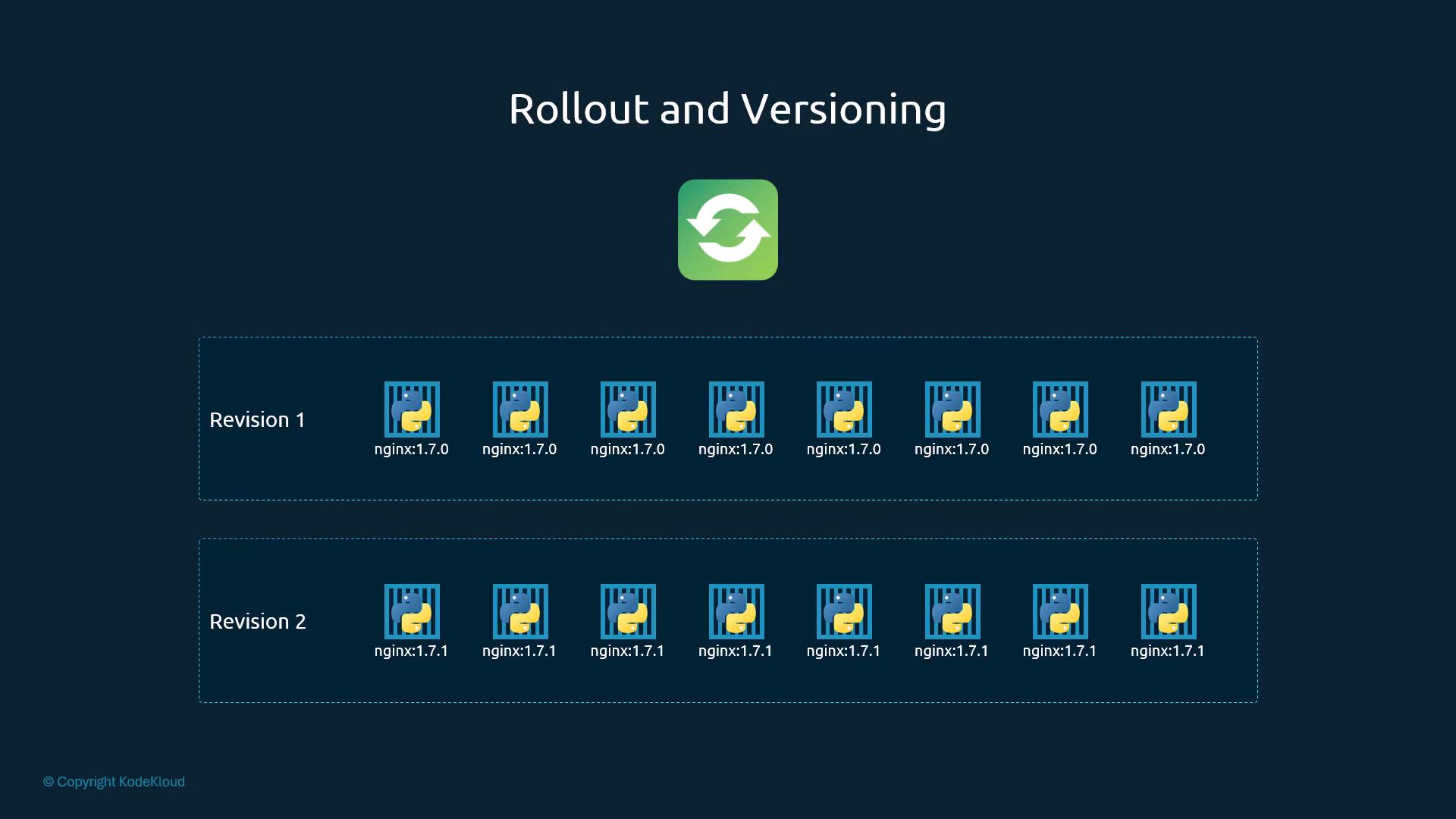
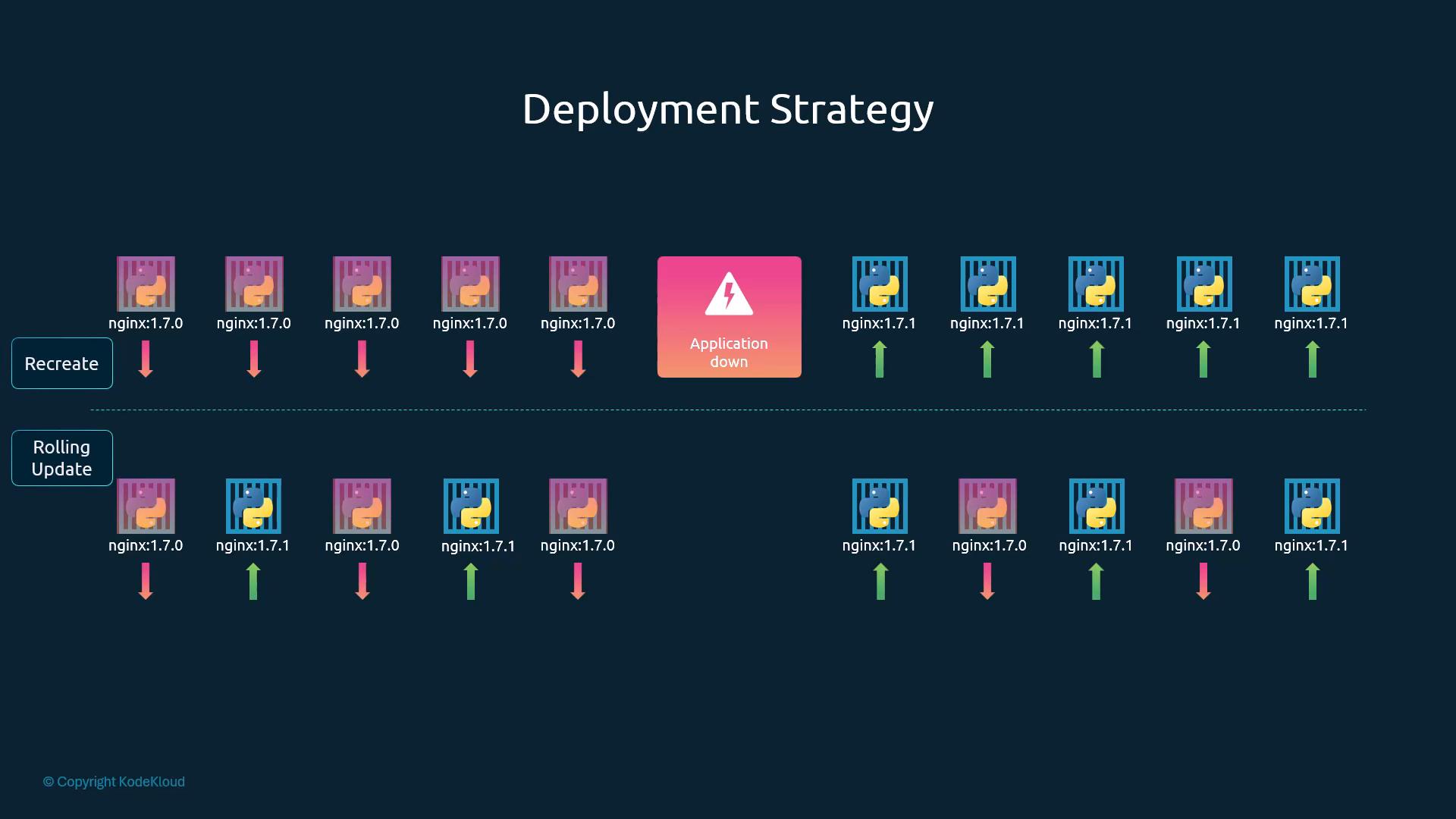
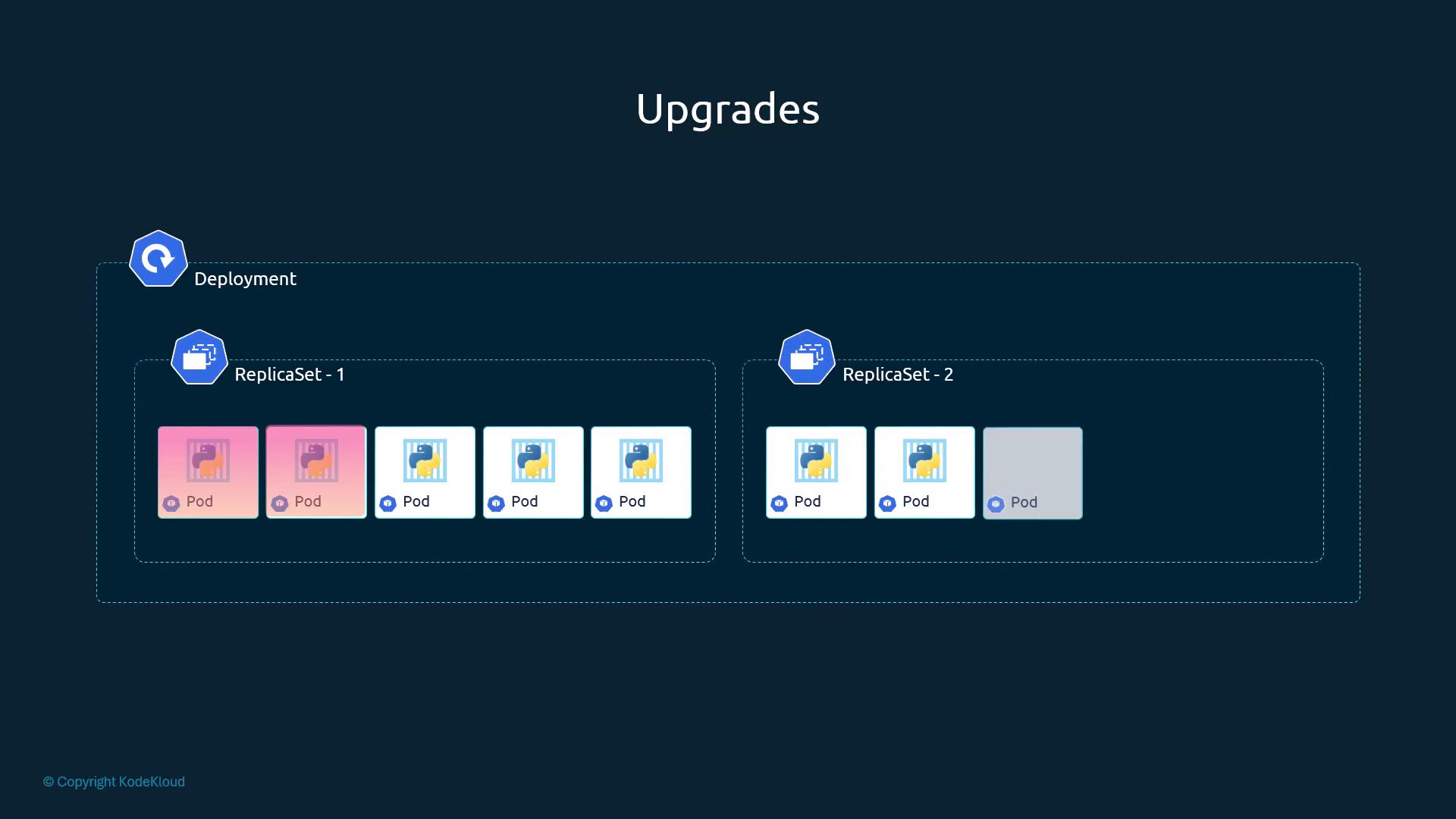
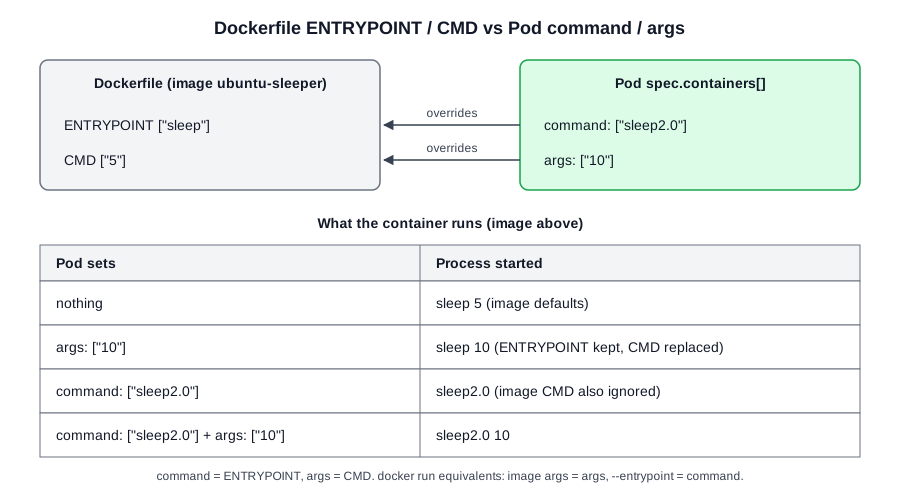 Diagram (new): field mapping and what the container actually runs for each combination (row 3 per Kubernetes docs).
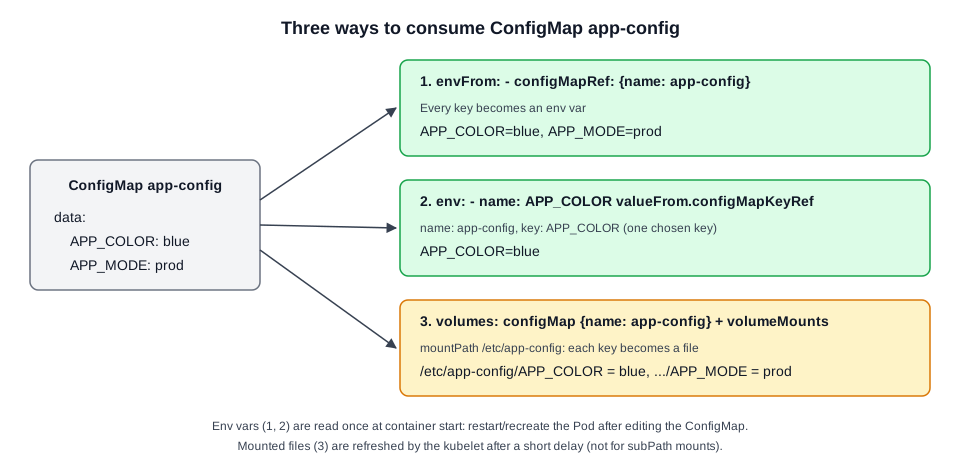 Diagram (new): the three consumption methods and what appears inside the container.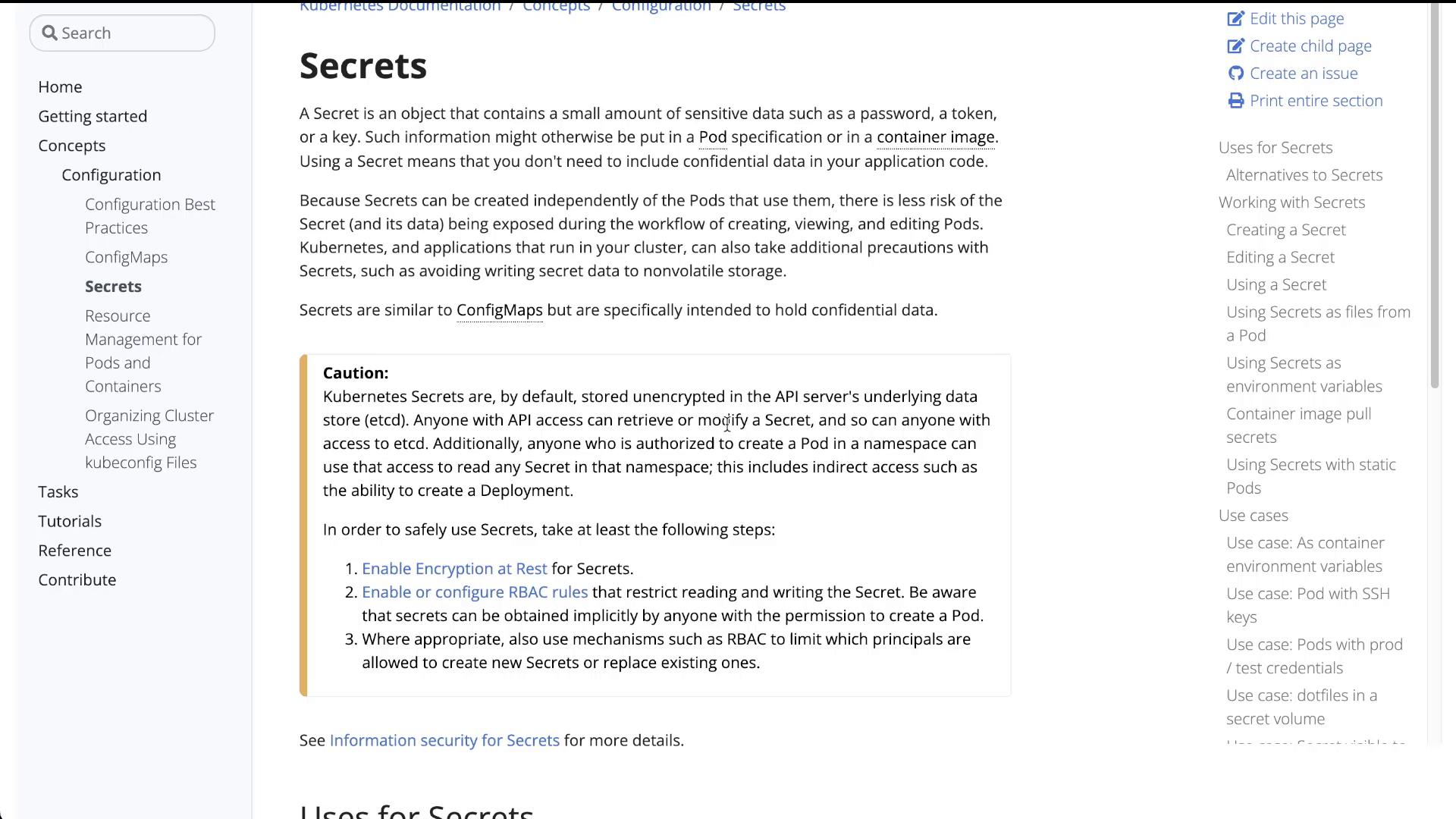
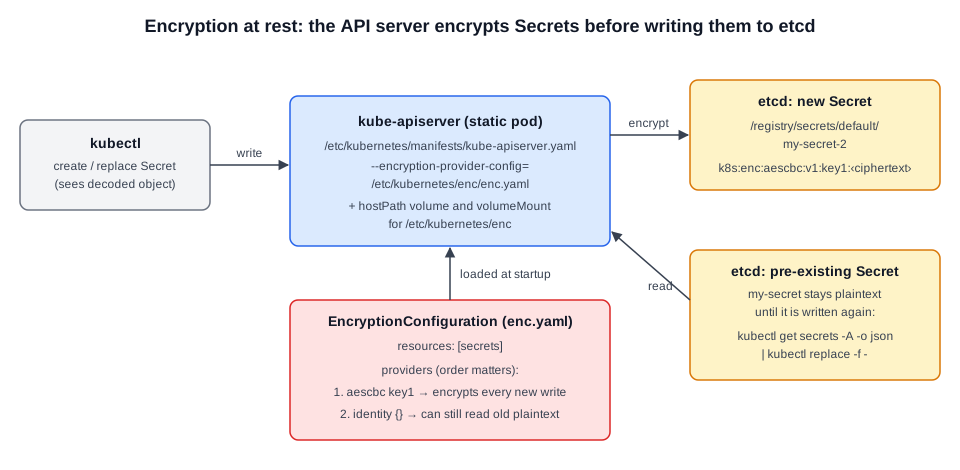 Diagram (new): the API server loads enc.yaml at startup and encrypts new Secret writes with the first provider. Secrets written earlier stay plaintext until they are rewritten.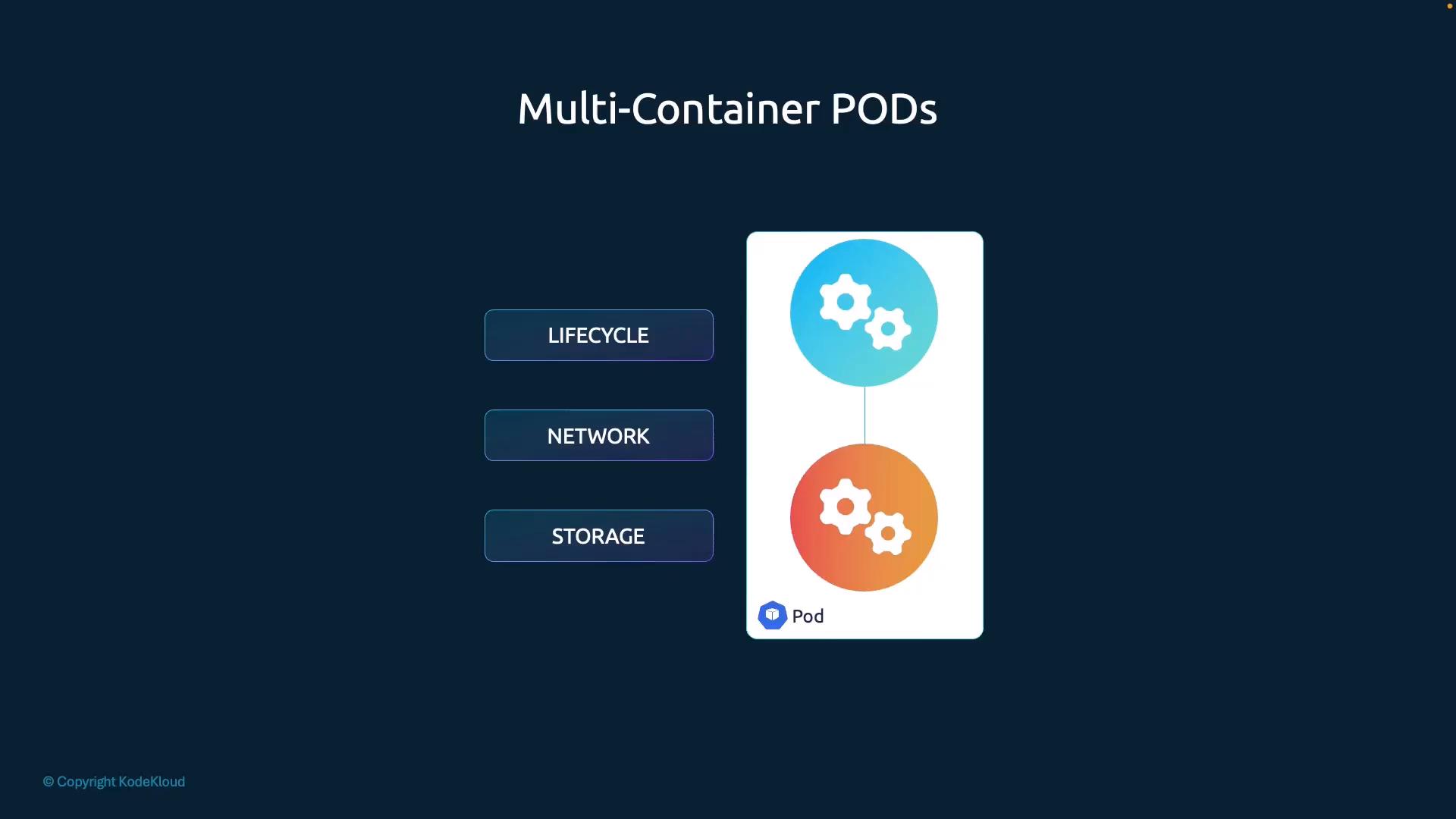
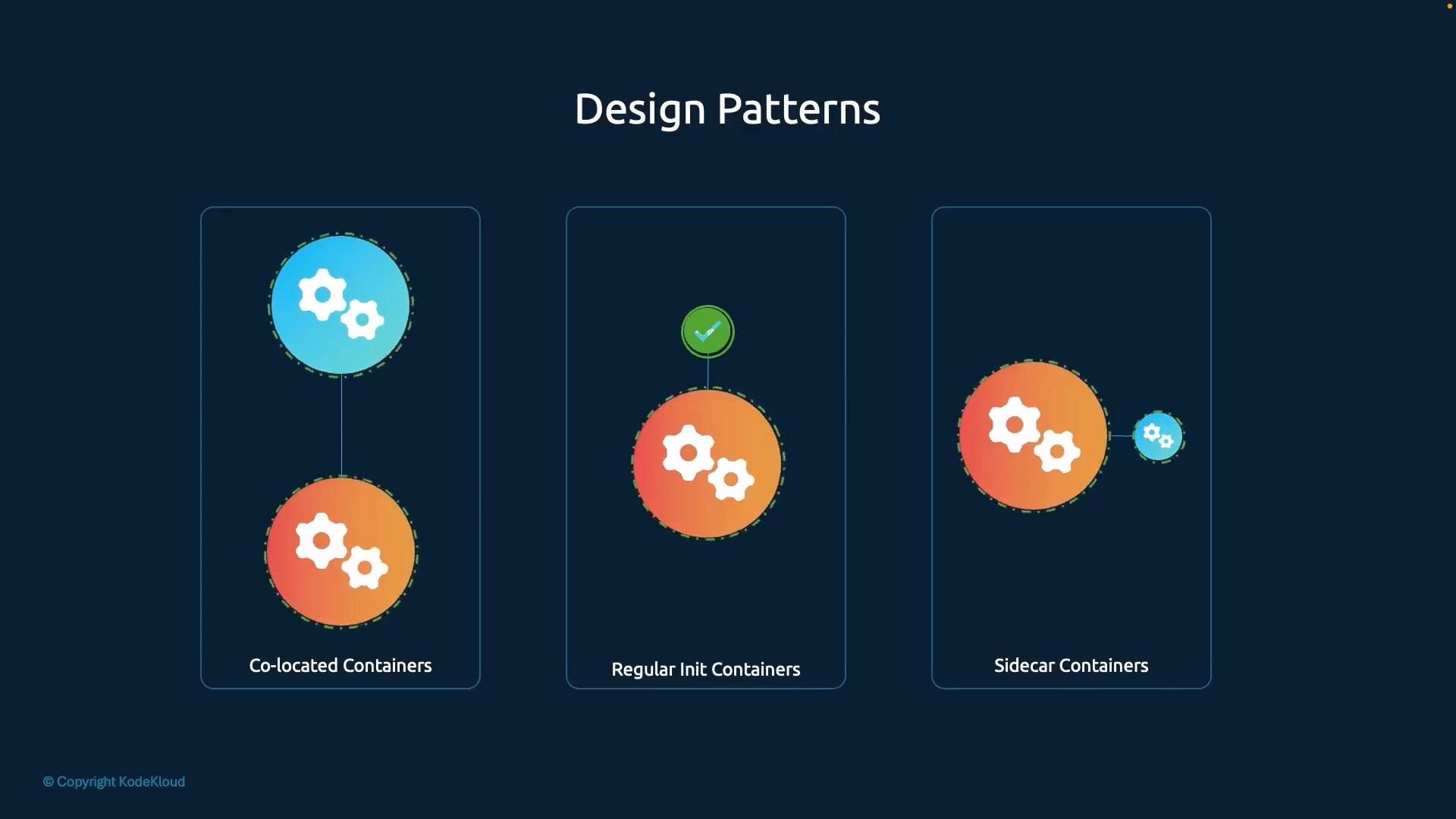
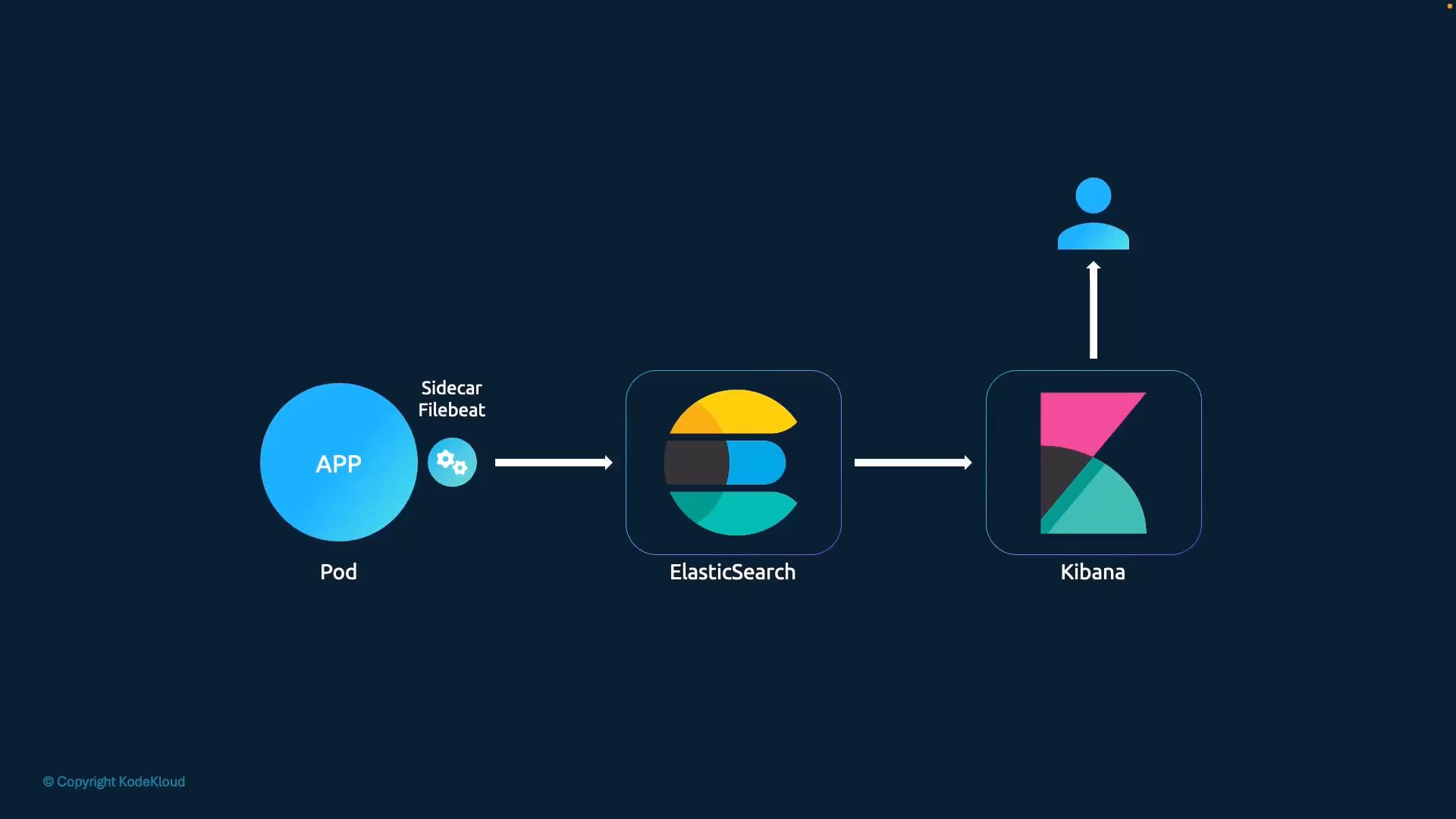
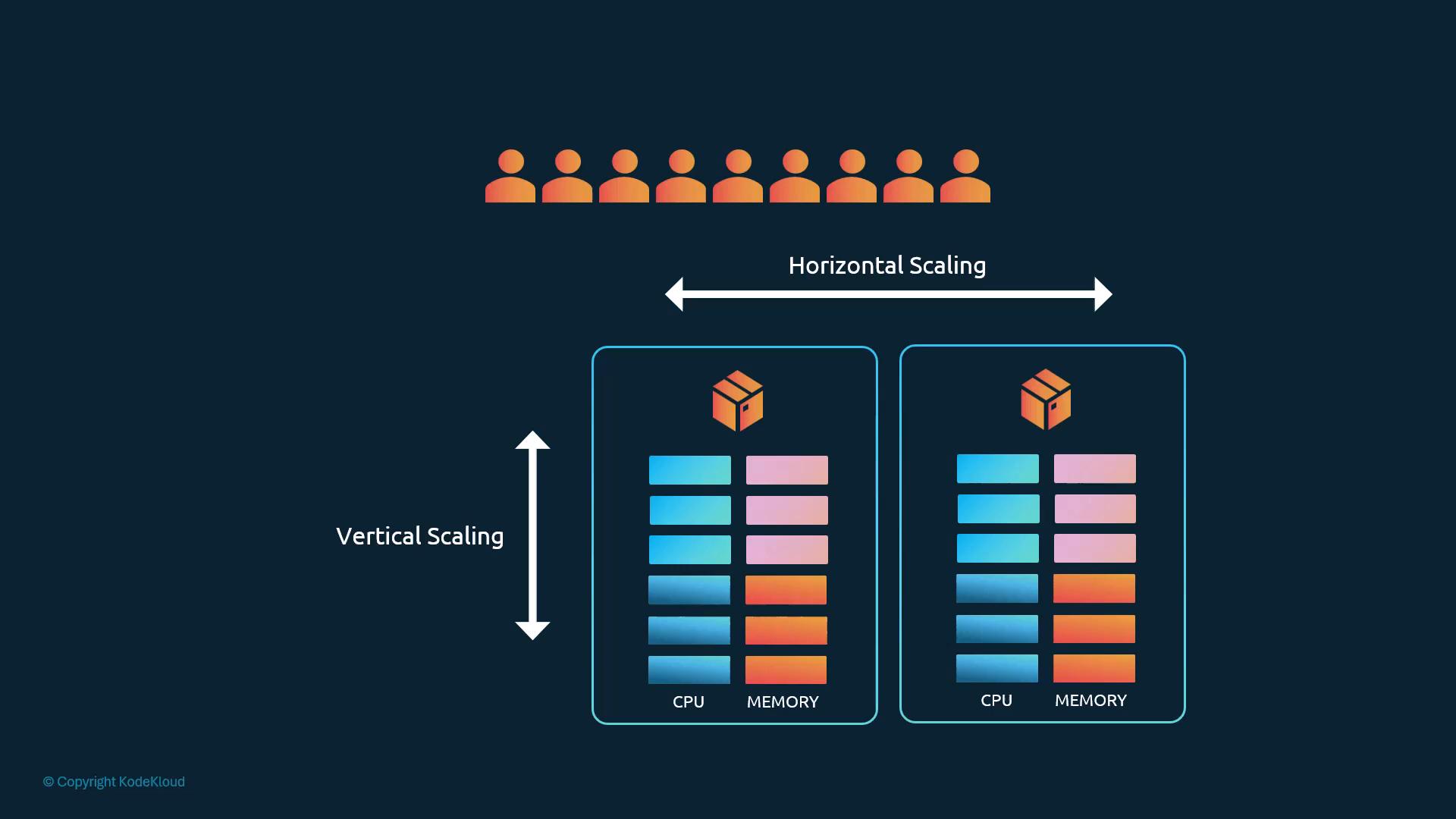
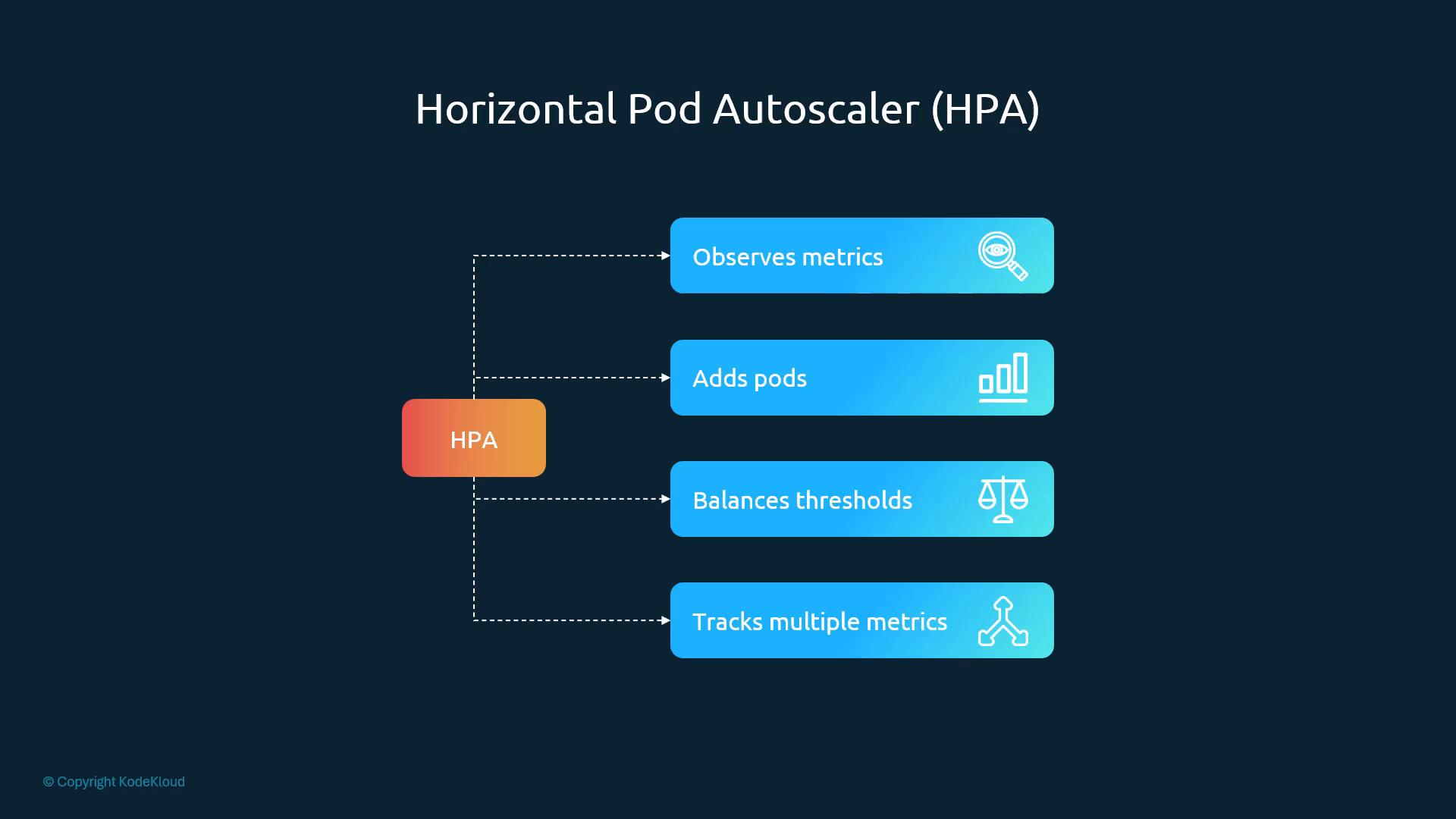
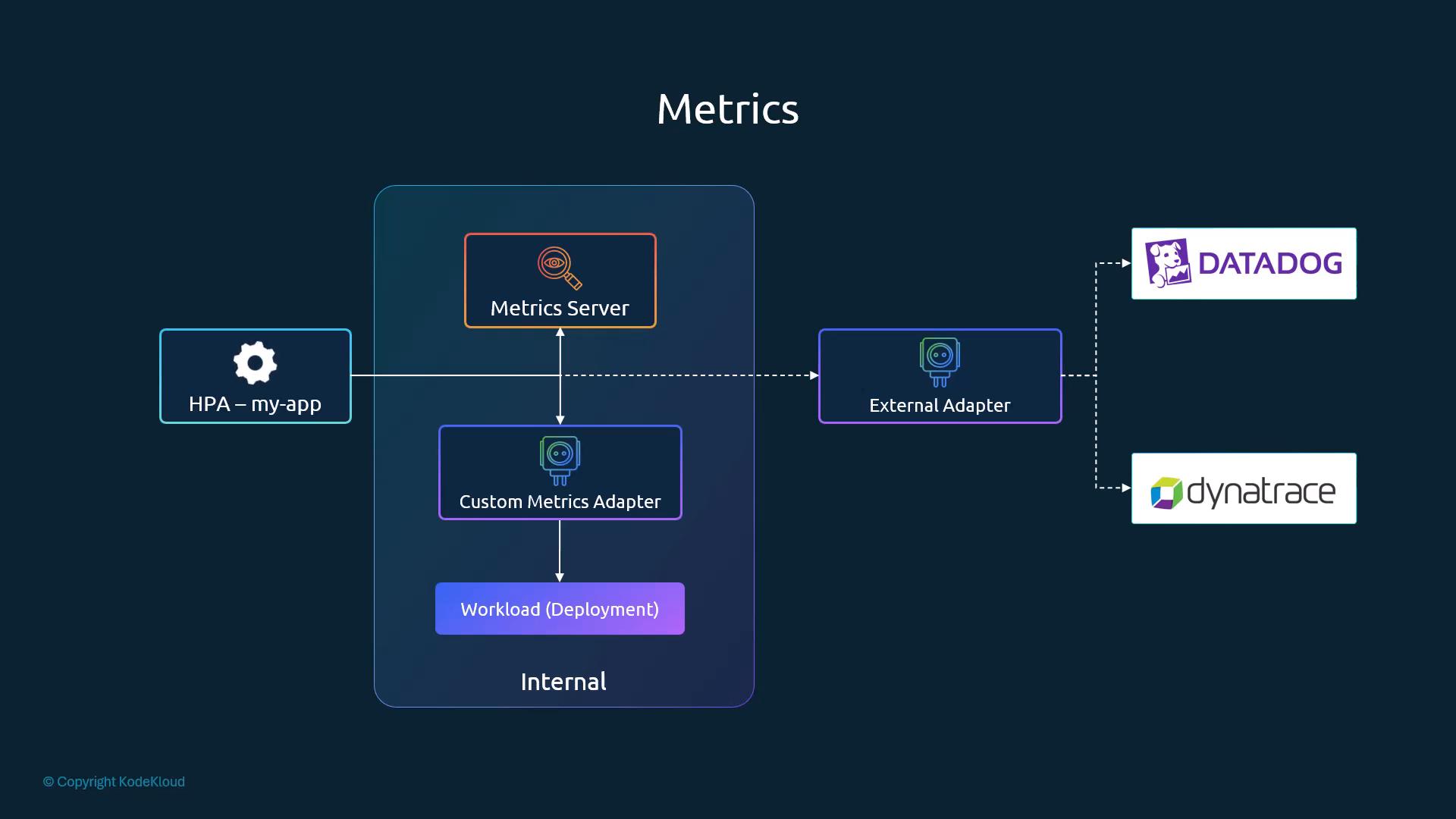
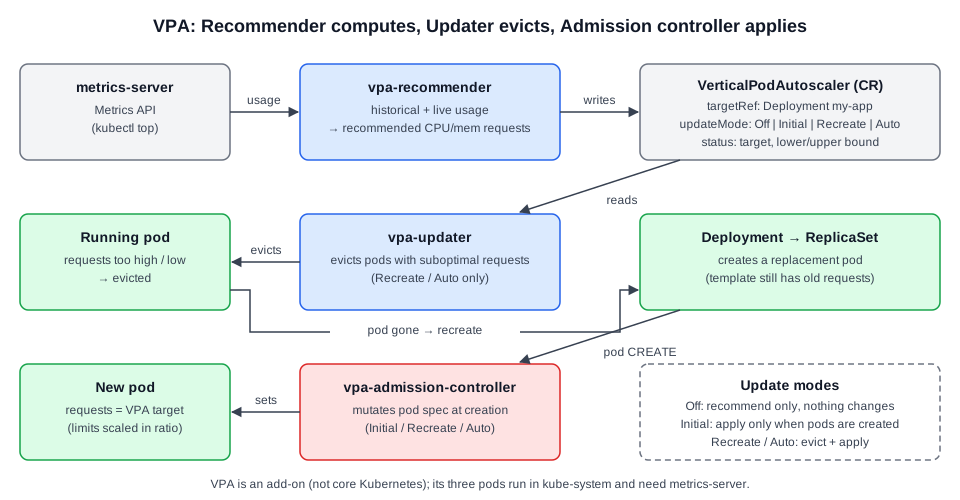 Diagram (new): the three VPA components and which update modes activate each one.