Network = hosts exchanging packets. Hosts A and B on the same switch + each has an interface with an IP in the same subnet → talk directly.
Switch forwards frames within one L2 broadcast domain (≈ one IP subnet). It cannot carry traffic to another subnet.
ip link # list interfaces (e.g. lo, eth0) and statesudo ip addr add 192.168.1.10/24 dev eth0 # on host Asudo ip addr add 192.168.1.11/24 dev eth0 # on host Bping 192.168.1.11 # from A → works via the switch
Router = device with an interface (IP) in each subnet (e.g. 192.168.1.1 and 192.168.2.1), forwards between them.
Gateway = a route entry telling a host "to reach network X, send to this router IP". Without a route: ping: connect: Network is unreachable.
route -n # kernel routing table (same as: ip route)sudo ip route add 192.168.2.0/24 via 192.168.1.1 # on A/B: reach 2.0 net via router's 1.x interfacesudo ip route add default via 192.168.2.1 # on a 192.168.2.0/24 host: default route → internet router
Destination Gateway Genmask Flags Metric Ref Use Iface0.0.0.0 192.168.2.1 0.0.0.0 UG 0 0 0 eth1 <- default / 0.0.0.0 route192.168.1.0 0.0.0.0 255.255.255.0 U 0 0 0 eth0 <- Gateway 0.0.0.0 = directly connected, no router192.168.2.0 0.0.0.0 255.255.255.0 U 0 0 0 eth1
Flags: U = up, G = uses a gateway.
Multiple routers (one internal, one internet): specific routes for internal nets + default for the rest:
sudo ip route add 192.168.1.0/24 via 192.168.2.2 # internal routersudo ip route add default via 192.168.2.1 # internet router
Internet connectivity problems → first check routing table and that a valid default gateway exists.
Setup: A 192.168.1.5 — B (eth0 192.168.1.6, eth1 192.168.2.6) — C 192.168.2.5.
# on A: reach C's network via Bsudo ip route add 192.168.2.0/24 via 192.168.1.6# on C: reach A's network via B (return path!)sudo ip route add 192.168.1.0/24 via 192.168.2.6# on B: Linux does NOT forward packets between interfaces by defaultcat /proc/sys/net/ipv4/ip_forward # 0 = disabled, 1 = enabledsudo sh -c 'echo 1 > /proc/sys/net/ipv4/ip_forward' # enable (temporary), or:sudo sysctl -w net.ipv4.ip_forward=1 # enable (temporary)echo 'net.ipv4.ip_forward=1' | sudo tee -a /etc/sysctl.conf # persistsudo sysctl -p # reload /etc/sysctl.conf
ip addr / ip route changes are lost on reboot. Persist via distro network config: Debian/Ubuntu /etc/network/interfaces or Netplan; RHEL/CentOS NetworkManager or /etc/sysconfig/network-scripts. IP forwarding → /etc/sysctl.conf.
Network namespace = own interfaces, routing table, firewall rules; containers use them for isolation. ip netns (list), ip netns exec <ns> <cmd>, then ip link/ip addr/ip route inside. Details §9.4.
[!WARNING]
Exam traps / remember:
Routes are needed in both directions (A→C and C→A) when using a host as router.
A Linux box with two NICs won't route until net.ipv4.ip_forward=1.
ip-command changes are not persistent; sysctl persistence = /etc/sysctl.conf + sysctl -p.
[!NOTE]
Beyond the course: kubeadm's install prerequisites require net.ipv4.ip_forward = 1 on every node (usually put in /etc/sysctl.d/k8s.conf, applied with sudo sysctl --system); preflight fails without it. Relevant if asked to build/repair a node (§11).
ping db # ping: unknown host dbecho '192.168.1.11 db' | sudo tee -a /etc/hostsping db # PING db (192.168.1.11) ...
Translating a name → IP (here via /etc/hosts) is name resolution.
/etc/hosts is local-only and trusted as-is: A uses the entry even if B's real hostname is host-2. You can even map www.google.com to 192.168.1.11 locally.
Many entries possible (web, db, nfs); used by ping, ssh, curl, etc.
Doesn't scale: every IP change must be edited on every host.
# /etc/resolv.confnameserver 192.168.1.100 # DNS server; several nameserver lines allowedsearch mycompany.com prod.mycompany.com # appended to short names
Name not in /etc/hosts → query the nameserver(s). IP change → update DNS server only.
/etc/hosts still usable alongside DNS for local/test names (e.g. 192.168.1.115 test).
Search domains:ping web tries web.mycompany.com, then web.prod.mycompany.com.
FQDN with trailing dot (web.mycompany.com.) = absolute → no search domains appended. ndots option also controls when search domains are tried.
Direct edits to /etc/resolv.conf may be overwritten by DHCP / NetworkManager / systemd-resolved → persist through those tools.
Host = house, namespaces = rooms: each child (container) sees only its room; parent (host) sees everything.
Container runtime creates a namespace per container → container sees only its own processes (e.g. nginx as PID 1) and network devices; the host sees the same process with a different PID (e.g. 3816) among all others.
A network namespace has its own interfaces, routing table and ARP table; the host keeps its own (e.g. eth0 192.168.1.2 on LAN 192.168.1.0).
ip netns add red; ip netns add blue # createip netns list # or: ip netnsip link # host: lo, eth0ip netns exec red ip link # inside red: only loip -n red link # shorthand for the sameip netns exec red arp # ARP table inside ns (also: arp -n)ip netns exec red route # routing table inside ns (also: ip -n red route)
ip link add veth-red type veth peer name veth-blue # create pairip link set veth-red netns red # move each end into a nsip link set veth-blue netns blueip -n red addr add 192.168.15.1/24 dev veth-redip -n blue addr add 192.168.15.2/24 dev veth-blueip -n red link set veth-red upip -n blue link set veth-blue upip netns exec red ping -c 1 192.168.15.2 # worksip netns exec blue arp -n # shows 192.168.15.1 on veth-bluearp -n # host ARP knows nothing of these
Diagram (new): namespaces joined via veth pairs to host bridge v-net-0; host forwards + NATs to eth0/LAN.
ip link add v-net-0 type bridge # bridge = just another interface on the hostip link set dev v-net-0 upip -n red link del veth-red # remove the old direct pair (deletes BOTH ends)ip link add veth-red type veth peer name veth-red-brip link add veth-blue type veth peer name veth-blue-brip link set veth-red netns redip link set veth-blue netns blueip link set veth-red-br master v-net-0 # attach host-side end to bridgeip link set veth-blue-br master v-net-0ip link set veth-red-br up; ip link set veth-blue-br upip -n red addr add 192.168.15.1/24 dev veth-redip -n blue addr add 192.168.15.2/24 dev veth-blueip -n red link set veth-red upip -n blue link set veth-blue up
[!CAUTION]
Correction: the notes delete the old pair with ip link delete veth-red. After veth-red was moved into red it no longer exists in the host namespace, so that fails ("Cannot find device"). Use ip -n red link del veth-red (the lecture's command). Deleting either end removes both.
Host eth0 192.168.1.2, bridge 192.168.15.5, blue 192.168.15.2.
ip netns exec blue ip route add 192.168.1.0/24 via 192.168.15.5 # LAN via hostip netns exec blue ip route add default via 192.168.15.5 # or: everything via hostsysctl -w net.ipv4.ip_forward=1 # host must forward (persist in /etc/sysctl.conf)iptables -t nat -A POSTROUTING -s 192.168.15.0/24 -j MASQUERADE # source-NAT to host IP so replies return# optionally restrict: ... -s 192.168.15.0/24 -o eth0 -j MASQUERADEip netns exec blue ping -c 1 8.8.8.8
Without NAT: packets reach the LAN host but it has no route back to 192.168.15.0/24 → no reply.
Docker implements -p with iptables NAT (DNAT) rules — same technique as §9.4.
[!CAUTION]
Correction: the notes show iptables -nvl -t nat; the list option is uppercase -L → iptables -nvL -t nat.
[!NOTE]
Beyond the course: dockershim was removed in v1.24; Kubernetes nodes run containerd/CRI-O, use crictl there, and the pod bridge is created by the CNI plugin (commonly cni0, not docker0) — see §9.8.
-p = --publish (docker run --publish 8080:80 nginx).
Docker, rkt, Mesos, Kubernetes all repeat the same steps: create netns → create bridge → create veth pair → attach one end to ns → other end to bridge → assign IPs → bring up → enable NAT/IP masquerade.
Idea: put those steps in one program (e.g. bridge) the runtime calls with the container's netns: bridge add 2e34dcf34 /var/run/netns/2e34dcf34 (illustrative).
CNI = the standard defining how plugins are written and how runtimes invoke them → any CNI runtime works with any CNI plugin.
Diagram (new): CNI invocation contract between container runtime, plugin and IPAM plugin.
bridge (Linux bridge, same L2), vlan (VLAN-segmented), ipvlan (lightweight L2/L3 split, high perf), macvlan (unique MAC on host NIC, directly on L2), Windows (win-bridge, win-overlay)
CNI plugin commands: ADD, DEL, CHECK. Runtime creates the netns; the plugin wires it up.
Config dir /etc/cni/net.d/; IPAM plugins = host-local, dhcp.
Docker = CNM, not CNI.
[!NOTE]
Beyond the course: plugin binaries live in /opt/cni/bin/ (§9.10). With dockershim gone (v1.24), the CRI runtime (containerd/CRI-O) invokes CNI directly — no --network=none trick. Current CNI spec versions are 1.0.x/1.1.x (also a VERSION command; 1.1 adds GC/STATUS). Weave Net is no longer maintained (Weaveworks shut down 2024); labs may still use it, but prefer Calico/Flannel/Cilium manifests when installing a CNI.
kubectl get nodes -o wide # INTERNAL-IP per nodeip addr show # all interfaces + IPsip link show eth0 # link details incl. MAC (link/ether)cat /sys/class/net/eth0/address # MAC onlyhostnamectl status # or: hostnamesudo ss -ltnp # listening TCP sockets + owning processsudo ss -ltnp | egrep '6443|10250|10259|10257|2379|2380'sudo nft list ruleset # nftablessudo iptables -L -n -v # legacy iptablessudo ufw status # ufwsudo firewall-cmd --list-all # firewalld
Test TCP reachability: ss, nc/telnet, curl (HTTP endpoints), e.g. from a worker:
nc -zv <control-plane-ip> 6443 # API server reachable from this node?curl -k https://<control-plane-ip>:6443/livez # HTTP-level check; extra endpoint explained below
Node IPs/hostnames unique and resolvable (DNS or /etc/hosts); cloned VMs have unique MACs.
Workers → control plane 6443; control plane ↔ control plane 2380 (+ 2379 as needed); control plane → kubelets 10250.
Check cloud security groups as well as host firewalls.
Then move on to CNI, Service-IP routing, overlay diagnostics (§12.8).
[!WARNING]
Exam traps / remember:
Blocking 2380 between etcd members breaks quorum → control plane down.
kubelet 10250 is on all nodes, not just workers.
Scheduler 10259, controller-manager 10257 (secure). Old insecure ports 10251/10252 are gone.
NodePort default range 30000–32767.
[!NOTE]
Beyond the course: kubeadm also requires a unique product_uuid per node (sudo cat /sys/class/dmi/id/product_uuid). Other common ports: kube-proxy health 10256 (all nodes). netstat -plnt is an alternative to ss -ltnp where installed.
[!NOTE]
Beyond the course:/livez and /readyz on the API server’s secure port are health checks (anonymous access depends on cluster authentication/RBAC policy). Scheduler/controller-manager insecure ports 10251/10252 are historical; current secure ports are 10259/10257.
Drill (example values from the lab; yours will differ):
#
Task
Command
How to read / example
1
Node count
kubectl get nodes
Count rows minus header → 2 (controlplane, node01)
2
Control-plane internal IP
kubectl get nodes -o wide
INTERNAL-IP column → 192.5.114.3
3
Interface used for cluster connectivity (control plane)
ip address show (on controlplane)
Interface holding the INTERNAL-IP → eth0
4
MAC of that interface
ip address show eth0
link/ether value → 52:54:00:72:06:aa
5
node01 IP
kubectl get nodes -o wide
192.5.114.6
6
node01 MAC
ssh node01 → ip address show eth0
Copy link/ether exactly
7
Bridge created by containerd/CNI
ip -d link show type bridge
cni0
8
State of cni0
ip link show cni0
Read the state field (lab: UP)
9
Default gateway (route to Google)
ip route
default via 172.25.0.1 dev eth1 → 172.25.0.1
10
kube-scheduler listening port
sudo ss -ltnp | grep kube-scheduler
127.0.0.1:10259 → 10259
ip a | grep -B2 192.5.114.3 # speed: find the interface that owns the node IPip route | grep default # gateway only
INTERNAL-IP = node/host IP; Pod/CNI addresses (e.g. 10.244.0.1/16 on cni0) are a separate network.
Default route may leave via a different interface (eth1) than the cluster interface (eth0).
[!WARNING]
Exam traps / remember:
Interface state ≠ the UP inside <...> flags: <...,UP> = administratively up; state UP/DOWN = operational. NO-CARRIER usually means no veth attached yet. Answer with the state field.
Node MAC questions: SSH to that node — kubectl doesn't show MACs.
10251 = old insecure scheduler port (removed); current = 10259.
[!NOTE]
Beyond the course: the live lab also asks which etcd port has more client connections — count with sudo netstat -anp | grep etcd | grep 2379 | wc -l vs ... grep 2380 ...; 2379 (client port, used by kube-apiserver) has far more. 2380 is peer-only.
kubectl get nodes -o wide also shows OS-IMAGE, KERNEL-VERSION, CONTAINER-RUNTIME (e.g. containerd://1.6.6) → quickest way to identify the node runtime/version without SSH.
default via 172.25.0.1 dev eth1 proto static # internet gateway (Q9)172.25.0.0/24 dev eth1 proto kernel scope link src 172.25.0.10192.5.114.0/24 dev eth0 proto kernel scope link src 192.5.114.3 # node/cluster network10.244.0.0/16 dev cni0 proto kernel scope link src 10.244.0.1 # pod network via CNI bridge
Starting point: control plane and kubelets are up and nodes can reach each other on the underlying network (firewalls / security groups open). Kubernetes does not ship pod networking itself; it delegates it to a pluggable CNI solution.
Per node: one bridge with a per-node subnet (node1 10.244.1.0/24, node2 10.244.2.0/24, …); per Pod: veth pair, IP, default route.
# 1) Node datapath: bridge + gateway IP for this node's pod subnetip link add v-net-0 type bridgeip link set dev v-net-0 upip addr add 10.244.1.1/24 dev v-net-0# 2) Per Pod: veth pair ("red" = the Pod's network namespace)ip link add veth-red type veth peer name veth-red-br# 3) Pod end into the namespace; IP + default route via the bridgeip link set veth-red netns redip -n red addr add 10.244.1.2/24 dev veth-redip -n red link set veth-red upip -n red route add default via 10.244.1.1# 4) Host end onto the bridgeip link set veth-red-br master v-net-0ip link set veth-red-br up
Inside a namespace always use ip -n <ns> … or ip netns exec <ns> ….
After this, Pods on the same node can talk; cross-node needs routing.
Each host needs a route to every other node's pod subnet via that node's IP:
# node1 (192.168.1.11) -> pods on node2ip route add 10.244.2.0/24 via 192.168.1.12# node2 (192.168.1.12) -> pods on node1ip route add 10.244.1.0/24 via 192.168.1.11
$ ping 10.244.2.2 # before the routeping: connect: Network is unreachable$ ping 10.244.2.2 # after the route64 bytes from 10.244.2.2: icmp_seq=1 ttl=64 time=0.50 ms
Per-Pod steps must be automatic and fast (thousands of Pods created/destroyed per minute) and coordinated with the container runtime → CNI is the integration contract.
Runtime executes the plugin binary on Pod lifecycle events, passing JSON config on stdin (Pod name, namespace, container ID, network config); plugin does the work and returns a JSON result incl. the allocated IP.
Command
Plugin must
ADD (attach Pod)
create veth pair → move one end into Pod netns → attach host end to datapath (bridge / VXLAN / kernel datapath) → allocate + assign IP via IPAM → default route + any iptables rules
DEL (Pod removed)
remove interface(s) → free the IP in IPAM
# ADD (template)ip link add veth0 type veth peer name veth0-brip link set veth0 netns <namespace>ip -n <namespace> addr add <pod-ip>/<prefix> dev veth0ip -n <namespace> link set veth0 upip -n <namespace> route add default via <bridge-ip>ip link set veth0-br master v-net-0ip link set veth0-br up# DEL (template)ip -n <namespace> link delete veth0 # deleting one end removes the pair# + release the IP in the plugin's IPAM store (plugin-specific)
Handshake (per CNI spec): config file + plugin-binary directory are configured on the node → Pod created → JSON prepared (pod name, ns, container ID, network config) → binary run with ADD → result JSON with IP → on deletion run with DEL. Standardised spec ⇒ any CNI works by dropping binaries + config into the right directories (§9.10).
Plugins ship an IPAM component and one of several datapaths: Linux bridge, VXLAN overlay, host-gw (routing), BGP routing, eBPF. Choose by cluster scale, performance and ops model.
[!WARNING]
Exam traps / remember:
Model = unique Pod IP + same-node + cross-node reachability + no NAT. Kubernetes doesn't pick the IP range — the CNI does.
Same-node traffic works via the bridge; cross-node needs routes / overlay / BGP — usually the CNI's job.
CNI verbs: ADD, DEL (and CHECK, see §9.12). Config arrives as JSON on stdin.
Per CNI spec: the component that creates the network namespace must also identify the network and invoke the plugin with the config.
In Kubernetes: Pod netns created via the container runtime (containerd / CRI-O); after that the configured CNI plugin attaches the Pod: veth pairs, attach to host bridge/overlay, assign IP, routes, NAT rules if requested.
Common plugins: Flannel, Calico, Weave, Cilium, Canal, …
Modern nodes run containerd as the CRI runtime (Docker historically used containerd internally).
Binaries present (and executable): ls /opt/cni/bin
Config present and sane: ls /etc/cni/net.d, cat the .conf/.conflist
Several config files → the first file in name order wins
cniVersion compatible with the plugin versions
[!CAUTION]
Correction: the original says the kubelet reads /etc/cni/net.d and executes the plugin. Since dockershim's removal (v1.24) the container runtime (containerd / CRI-O) loads the CNI config and invokes the binaries; kubelet only calls the runtime over CRI (RunPodSandbox). The directories are configured in the runtime (e.g. the CRI cni section of /etc/containerd/config.toml), not on kubelet.
[!NOTE]
Beyond the course: older videos find CNI settings with ps aux | grep kubelet → --network-plugin=cni, --cni-bin-dir=/opt/cni/bin, --cni-conf-dir=/etc/cni/net.d. Those kubelet flags were removed in v1.24; on current clusters just inspect the two directories. Weave Net is no longer maintained (Weaveworks shut down in 2024) — expect Flannel / Calico / Cilium in labs.
.conflist = plugin chain: runtime (via kubelet → CRI) calls each type in order when the Pod sandbox is created; portmap handles container port mappings (hostPort).
Runtime endpoint can also be confirmed in the kubelet systemd unit / /var/lib/kubelet/config.yaml.
[!WARNING]
Exam traps / remember: a plugin named in the conflist but missing (or not executable) in /opt/cni/bin ⇒ Pod sandbox creation fails, Pods stuck ContainerCreating.
[!NOTE]
Beyond the course: on newer kubeadm clusters the endpoint may not be on the command line — check containerRuntimeEndpoint in /var/lib/kubelet/config.yaml or /var/lib/kubelet/kubeadm-flags.env. --pod-infra-container-image is deprecated (the runtime decides the pause image).
The CNI plugin — per the CNI spec it must allocate IPs and guarantee no duplicates. Kubernetes itself does not assign Pod IPs.
Plugin responsibilities: support ADD / DEL / CHECK; accept params (container ID, network namespace…); manage Pod IP assignment; return results in the spec's format.
ADD: create veth pair, move container end into the netns, assign IP inside netns, add routes (default gateway), bring interfaces up.
DEL: remove the veth, release the allocated IP.
# ADD (script-style plugin)ip link add veth-host type veth peer name veth-podip link set veth-pod netns <container-netns>ip -n <container-netns> addr add <IP>/<prefix> dev veth-podip -n <container-netns> link set veth-pod upip -n <container-netns> route add default via <GATEWAY>ip link set veth-host master cni0ip link set veth-host up# DELip link del veth-host
[!CAUTION]
Correction: the original pseudocode names the container end cni0 (same name as the bridge) and never moves it into the container netns before configuring it there. The block above moves the peer first; the bridge keeps the name cni0.
Own allocator: locks / atomic allocation for concurrency; persist state across restarts/crashes; periodically reconcile to find leaked IPs.
Know whether the network model wants per-host subnets (e.g. Flannel host-gw) or a cluster-wide allocator.
Question
Answer
Who assigns Pod IPs?
The active CNI plugin
Where is state stored?
Plugin-dependent: node-local store or external allocator
Recommended
Standard IPAM plugin, e.g. host-local
Where configured?
ipam block of the CNI config in /etc/cni/net.d/
[!NOTE]
Beyond the course: the video's Weave example — Weave Net allocates from 10.32.0.0/12 by default (≈1M addresses, split between peers/nodes); overridable with IPALLOC_RANGE (shows as ipalloc-range in its logs, see §9.14).
[!WARNING]
Exam traps / remember: Pod IP range questions → look at the CNI (config ipam.subnet, CNI pod logs/args), not at the Service range. IPAM verbs come from CNI: ADD/DEL/CHECK.
Recap: each Pod gets a netns + veth + IP from its node's pod subnet; routing/overlay (VXLAN, IP-in-IP…) makes one cluster-wide Pod network (§9.9 route-table figure). Apps are normally reached via a Service: stable virtual IP + DNS name, cluster-wide (not tied to a node), reachable from any Pod unless NetworkPolicies block it.
Services are virtual: no process, namespace or interface owns the IP; it's just an API object.
On creation the API server assigns a ClusterIP from the Service CIDR: kube-apiserver flag --service-cluster-ip-range (kubeadm default 10.96.0.0/12).
Per node: kubelet (Pods + CNI) and kube-proxy (watches Services/Endpoints via the API server, programs rules mapping ServiceIP:port → one backend PodIP:port).
Service add: API server assigns IP → kube-proxy on every node programs kernel rules (iptables/IPVS) to DNAT that IP:port to an endpoint; Service removed → rules removed.
Set at start-up, e.g. kube-proxy --proxy-mode=iptables. The course also lists IPVS and historical userspace mode; supported modes depend on the binary version.
[!CAUTION]
Correction (version drift):userspace mode was removed in v1.26. Current modes: iptables (Linux default), ipvs, and nftables (GA in v1.33). IPVS has since been deprecated upstream in favour of nftables. In kubeadm clusters the mode lives in the kube-proxy ConfigMap (mode: empty ⇒ iptables), not on a command line.
kubectl get pods -o wide# NAME READY STATUS RESTARTS AGE IP NODE# db 1/1 Running 0 14h 10.244.1.2 node-1kubectl get service# NAME TYPE CLUSTER-IP PORT(S) AGE# db-service ClusterIP 10.103.132.104 3306/TCP 12h# Service CIDR is an API-server flagps aux | grep kube-apiserver # ... --service-cluster-ip-range=10.96.0.0/12# kube-proxy's NAT rules (iptables mode), node-localsudo iptables -t nat -L | grep db-service# KUBE-SVC-XA5OGUC7YRHOS3PU tcp -- anywhere 10.103.132.104 /* default/db-service: cluster IP */ tcp dpt:3306# DNAT tcp -- anywhere anywhere /* default/db-service: */ tcp to:10.244.1.2:3306# KUBE-SEP-JBWCWHHQM57V2WN7 all -- anywhere anywhere /* default/db-service: */
KUBE-SVC-* chain matches traffic to 10.103.132.104:3306; KUBE-SEP-* (service endpoint) chain holds the DNAT to 10.244.1.2:3306. Rules carry a comment with namespace/service, so grep <svc-name> works.
$ sudo cat /var/log/kube-proxy.logI0307 04:29:29.883941 1 server_others.go:140] Using iptables Proxier.I0307 04:29:29.912037 1 server_others.go:174] Tearing down inactive rules.I0307 04:29:30.027360 1 server.go:448] Version: v1.11.8I0307 04:29:30.049773 1 conntrack.go:98] Set sysctl 'net/netfilter/nf_conntrack_max' to 131072I0307 04:29:30.050701 1 proxier.go:294] Adding new service "default/db-service:3306" at 10.103.132.104:3306/TCP
Log shows the proxier in use and each Service/Endpoint add/remove. Location depends on how kube-proxy runs (systemd, static Pod, DaemonSet); raise verbosity with --v.
Rules missing? → kube-proxy running and connected to the API server? its logs + configured mode? Service and Endpoints exist (kubectl get svc, kubectl get endpoints)?
[!NOTE]
Beyond the course: kubeadm cluster: kubectl -n kube-system logs <kube-proxy-pod> | grep -i proxier for the mode (no /var/log/kube-proxy.log; container logs are under /var/log/pods/kube-system_kube-proxy-*/ on the node); sudo iptables-save | grep <svc-name> is a quicker dump than -L.
[!NOTE]
Beyond the course: NodePort default range 30000-32767 (kube-apiserver --service-node-port-range). Pod CIDR is set at install (kubeadm init --pod-network-cidr, kube-controller-manager --cluster-cidr); Service CIDR via kubeadm init --service-cidr (default 10.96.0.0/12), also on kube-controller-manager --service-cluster-ip-range. kubectl get endpoints is deprecated in favour of kubectl get endpointslices (v1.33+). In nftables mode inspect with sudo nft list ruleset.
[!WARNING]
Exam traps / remember:
Service range = kube-apiserver--service-cluster-ip-range (/etc/kubernetes/manifests/kube-apiserver.yaml). Pod range = CNI / --cluster-cidr. They must not overlap (e.g. Pods 10.244.0.0/16, Services 10.96.0.0/12).
Test Services at their IP and port with curl/nc. iptables/nftables rules handle that tuple; IPVS may bind ClusterIPs to kube-ipvs0 and answer ping. Ping alone does not prove backend reachability.
kube-proxy runs on every node; no kube-proxy rules ⇒ Services unreachable from that node.
Course API-server process example: --authorization-mode=Node,RBAC --service-cluster-ip-range=10.96.0.0/12. The second flag defines the Service IP pool; authorization mode controls API permissions, not the pool.
kubectl get all --all-namespaces / kubectl get ds -n kube-system → daemonset.apps/kube-proxy (node selector kubernetes.io/os=linux)
DaemonSet
# Fast versionskubectl get nodes -o wideip addr show eth0 # interface holding the node InternalIPgrep service-cluster-ip-range /etc/kubernetes/manifests/kube-apiserver.yamlkubectl -n kube-system logs <weave-pod> -c weave | grep ipalloc-rangekubectl -n kube-system logs <kube-proxy-pod> | grep -i proxierkubectl -n kube-system get ds
/24 ⇒ hosts .1–.254, network x.x.x.0/24.
DaemonSet = one Pod on each node matching its node selector / tolerations — that's why the kube-proxy count equals the node count (also true for the CNI DaemonSet, weave-net here).
[!NOTE]
Beyond the course: other ways to get the Pod range — grep cluster-cidr /etc/kubernetes/manifests/kube-controller-manager.yaml, kubectl get nodes -o jsonpath='{.items[*].spec.podCIDR}' (per-node slices, only if node CIDR allocation is enabled), or the CNI's own config (/etc/cni/net.d/*, Flannel's kube-flannel-cfg ConfigMap net-conf.json). The CNI's setting is authoritative: Weave ignores node podCIDR.
[!WARNING]
Exam traps / remember: multi-container CNI Pods (Weave: weave, weave-npc) — pass -c <container> or you may read the wrong log. Don't confuse node network (ip addr), Pod range (CNI) and Service range (apiserver flag).
Add after the 9.14 Q2 row: "Weave log lines to match: Command line options: ... ipalloc-range:10.244.0.0/16, plus adding entry 10.244.0.0/16 to weaver-no-masq-local (also confirms the range)."
Prereqs (§9.3): what DNS does, host / nslookup / dig, record types A and CNAME, domain hierarchy. Node hostnames/IPs (e.g. node1.kubecluster.org → 192.168.1.11) are managed by external DNS — out of scope; this is about in-cluster Pod ↔ Service ↔ Pod resolution. Kubernetes deploys a built-in DNS server (CoreDNS) by default.
Create Service web-service (ClusterIP 10.107.37.188) → DNS gets an A recordweb-service → ClusterIP. Node placement of client/backend Pods is irrelevant.
Same namespace: short name works. Other namespace: append the namespace.
curl http://web-service # client in same namespace as the Servicecurl http://web-service.apps # Service in namespace "apps"curl http://web-service.apps.svccurl http://web-service.apps.svc.cluster.local # FQDN, always unambiguous
Not created by default in many CoreDNS configs; when enabled: hostname = Pod IP with dots → dashes, under pod subdomain, keeping namespace + cluster domain.
curl http://10-244-2-5.apps.pod.cluster.local # Pod 10.244.2.5 in namespace apps
Topic
Notes
Default
Service A records exist; Pod records usually off (less DNS load)
Cluster domain
cluster.local by default; changeable at creation
Pod-record use
Debugging / legacy workflows; not a replacement for Services
[!CAUTION]
Correction: kubeadm's default CoreDNS Corefile does include pods insecure, so on kubeadm clusters (incl. exam clusters) <a-b-c-d>.<ns>.pod.cluster.local resolves out of the box. "Disabled" is the CoreDNS kubernetes plugin default when pods is omitted.
[!NOTE]
Beyond the course: an ExternalName Service yields a CNAME; a headless Service (clusterIP: None) returns the Pod IPs as A records instead of a ClusterIP, and StatefulSet Pods get <pod-name>.<headless-svc>.<ns>.svc.cluster.local. Named ports get SRV records _<port>._<proto>.<svc>.<ns>.svc.cluster.local.
[!WARNING]
Exam traps / remember:
Cross-namespace access needs at least <svc>.<ns>; the bare name only resolves in the client's own namespace.
Pod records use the IP with dashes, not the Pod name, and need the pod subdomain (use at least <a-b-c-d>.<ns>.pod; the cluster.local search suffix can complete it; FQDN is safest).
Order is service → namespace → svc → cluster.local: <svc>.<ns>.svc.cluster.local (not <svc>.svc.<ns>…).
Add to the 9.15 Exam traps callout: "- Pod records (pods insecure) add one DNS entry per Pod and extra load on CoreDNS. Enable them only for a clear need such as debugging or legacy workflows; use Services for discovery."
[!CAUTION]
Correction: the source’s “full FQDN required” rule is too strict: <a-b-c-d>.<ns>.pod can resolve via the usual cluster.local search suffix. Bare IP-with-dashes or <a-b-c-d>.<ns> does not add the missing pod component.
Could add entries to every Pod's /etc/hosts, but thousands of Pods churn → impractical. Instead: central DNS server; every Pod's /etc/resolv.conf points at it; new Services (and optionally Pods) get records automatically.
# /etc/hosts style (format: IP name)10.244.2.5 web10.244.1.5 test# /etc/resolv.conf in each Podnameserver 10.96.0.10
[!CAUTION]
Correction: the original lists /etc/hosts entries as web 10.244.2.5 (name first). The file format is IP first, then hostname(s), as above.
DNS server runs as Pods in kube-system; CoreDNS is the default since v1.12 (before: kube-dns).
Deployed as a Deployment (→ ReplicaSet), normally 2 replicas for redundancy.
Each Pod runs the coredns binary with config file /etc/coredns/Corefile, supplied by ConfigMap coredns (edit it to change behaviour; reload picks up changes).
Create dashed-IP Pod records (10-244-2-5…); off unless set
↳ upstream
Resolve external names (e.g. ExternalName targets) via upstream servers
↳ fallthrough in-addr.arpa ip6.arpa
Pass unanswered reverse (PTR) lookups to the next plugin
prometheus :9153
Metrics endpoint
forward . /etc/resolv.conf
Anything not cluster-internal (e.g. www.google.com) → nameservers in the CoreDNS Pod's/etc/resolv.conf (inherited from the node)
cache 30
Cache answers 30 s
reload
Auto-reload when the ConfigMap changes
[!CAUTION]
Correction:upstream inside the kubernetes block is obsolete in current CoreDNS (ignored/removed); upstream resolution is done by forward. A current kubeadm Corefile also has ready, loop, loadbalance, ttl 30 and health { lameduck 5s }.
CoreDNS exposed by Service kube-dns in kube-system (ClusterIP often 10.96.0.10; ports 53/UDP, 53/TCP, 9153/TCP).
kubelet writes each Pod's /etc/resolv.conf from its config clusterDNS (DNS Service IP) and clusterDomain (cluster.local) — in /var/lib/kubelet/config.yaml on kubeadm nodes.
# Pod /etc/resolv.conf (Pod in namespace default)search default.svc.cluster.local svc.cluster.local cluster.localnameserver 10.96.0.10
Search domains make web-service, web-service.default, web-service.default.svc all expand to web-service.default.svc.cluster.local (tried in order).
No pod search suffix → use at least <a-b-c-d>.<ns>.pod (with cluster.local in the search list); FQDN is safest.
Unresolvable in-cluster → forwarded to upstream (node's) nameservers.
Diagram (new): DNS answers name → ClusterIP; kube-proxy's rules then turn ClusterIP → Pod IP (§9.13).
Component
Role
Where
CoreDNS
Watches the API; serves Service (optionally Pod) records
Deployment/ReplicaSet in kube-system
kube-dns Service
Stable ClusterIP = cluster DNS server
kube-system
kubelet
Writes Pod /etc/resolv.conf (nameserver + search)
each node
coredns ConfigMap
Holds the Corefile
kube-system
[!NOTE]
Beyond the course: test resolution from a throwaway Pod:
kubectl run dns-test --image=busybox:1.28 --rm -it --restart=Never -- nslookup web-service.apps
(busybox 1.28: newer busybox nslookup is unreliable). Pod resolv.conf also has options ndots:5.
[!WARNING]
Exam traps / remember:
Service is named kube-dns even though the Pods are CoreDNS — kubectl get svc -n kube-system kube-dns.
Change DNS behaviour → kubectl -n kube-system edit cm coredns (not the Deployment); restart (kubectl -n kube-system rollout restart deploy coredns) if you can't wait for reload.
Wrong clusterDNS in kubelet config ⇒ Pods on that node can't resolve anything.
ClusterIP of kube-dns (ends up in Pods' /etc/resolv.conf)
10.96.0.10
5
Corefile location in the Pod
k describe pod coredns-74ff55c5b-9lxcv -n kube-system → Args: -conf /etc/coredns/Corefile; Mounts /etc/coredns from config-volume (ro)
/etc/coredns/Corefile
6
How the Corefile is passed in
same describe → Volumes: config-volume type ConfigMap, Name coredns
ConfigMap coredns
k get pods -n kube-systemk get svc -n kube-systemk describe pod <coredns-pod> -n kube-system # Args + Mounts + Volumesk get configmap coredns -n kube-system -o yaml # view the active Corefile (data.Corefile)
Corefile shows the forwarding rules and the cluster domain (kubernetes cluster.local … → root domain cluster.local).
[!NOTE]
Beyond the course: the describe output in the course also shows a coredns-token-xxxx Secret volume — that's pre-v1.24. Current clusters show a projected kube-api-access-xxxxx volume instead (no auto-created token Secret).
Storefront wear app = Deployment. MySQL = Pod behind a ClusterIP Service mysql-service, so it is reachable only inside the cluster.
wear-service as a NodePort (e.g. 30080): users would browse http://<node-ip>:30080. Scaling pods works because the Service load-balances across them.
Production needs things NodePort alone doesn't give you:
a DNS name pointing at one external IP instead of node IPs
standard ports 80/443 instead of 30000+
path- or host-based routing for several apps (/watch, watch.myonlinestore.com)
TLS terminated and certificates managed in one place
On a cloud, Service type: LoadBalancer provisions a cloud LB, and a NodePort is still created underneath. Giving each Service its own LB means more LBs to pay for, plus another LB in front to route by path (/apparel → LB-1, /video → LB-2) and to hold TLS. That is costly and spread across places.
Ingress = one HTTP(S) entry point inside the cluster. It routes by host/path to many Services and terminates TLS. It is configured with Kubernetes objects and exposed externally once.
The actual reverse proxy / L7 load balancer (NGINX, Traefik, Contour, HAProxy, GCE (GCP L7 LB), Istio). Runs as a Deployment or DaemonSet. It watches the API for Ingress objects and reconfigures itself (routing, LB, TLS, rewrites).
Ingress resource
Declarative rules (host/path → Service:port) plus TLS config. Pure configuration.
No Ingress controller ships with Kubernetes. Ingress objects do nothing until you deploy one. NGINX is the one used in course examples and labs.
Flow: deploy controller → expose it (NodePort/LoadBalancer, one-time) → create Ingress resources → controller enforces them. New routes and certs only require Ingress changes.
A controller needs:
a Deployment (or DaemonSet)
a Service exposing it (NodePort/LoadBalancer)
an optional ConfigMap for settings
a ServiceAccount + RBAC, so it can watch Ingresses, Services, Endpoints, Secrets and Pods
Diagram (new): external traffic → controller Service → controller pod (which watches Ingress objects) → backend Service by host/path, with unmatched requests going to the default backend.
[!CAUTION]
Correction: the quay.io/kubernetes-ingress-controller/nginx-ingress-controller:0.21.0 image is long obsolete. Current ingress-nginx images are registry.k8s.io/ingress-nginx/controller:<version>, and the project's official manifest or Helm chart creates all the RBAC, Services and the IngressClass for you. The hand-written manifest above is for understanding the components only.
kubectl create -f ingress-wear.yamlkubectl get ingress# NAME CLASS HOSTS ADDRESS PORTS AGE# ingress-wear * <none> 80 2s
Requests that match no host or path go to the default backend. Setups often deploy a small default-http-backend Service that serves a friendly 404 page.
Rules are per host. Each rule can contain several paths, for example wear. → /, /returns, /support and watch. → /, /movies, /tv. Anything else (listen., eat., drink.) falls through to the default backend (404).
Put the cert and key in a Secret of type kubernetes.io/tls, then reference it in spec.tls. TLS can be per host (recommended) or global, depending on what the controller supports.
cert-manager can obtain and renew certificates from Let's Encrypt automatically.
spec:
  tls:
  - hosts:
    - wear.my-online-store.com
    secretName: wear-tls-secret        # Secret type kubernetes.io/tls, same namespace as the Ingress
  rules: ...
Run one controller, or one per team/namespace if needed. Expose it once and manage everything else through Ingress resources.
Protect cert Secrets with RBAC and namespace scoping.
pathType: choose Prefix or Exact. Regex and advanced matching depend on the controller, so check its docs.
Troubleshoot with kubectl describe ingress and the controller pod logs.
[!NOTE]
Beyond the course (exam-relevant):
pathType is required in networking.k8s.io/v1. Values: Exact (exact path only), Prefix (matches by /-separated element, so /foo matches /foo and /foo/bar but not/foobar), ImplementationSpecific (controller decides; used with regex paths).
IngressClass: set spec.ingressClassName: nginx to choose the controller. kubectl get ingressclass lists the classes. A class annotated ingressclass.kubernetes.io/is-default-class: "true" is used when the field is omitted. The old kubernetes.io/ingress.class annotation is deprecated.
ingress-nginx (the community controller) retired in March 2026; maintenance and security fixes ended. Migrate deployments to a maintained controller/Gateway API (§9.21). This concerns the controller; the Ingress API remains stable. See the upstream retirement notice. Follow the controller provided by any lab/exam task.
[!WARNING]
Exam traps / remember:
Ingress object without a controller = accepted but ignored. Check kubectl get pods -A for the controller first.
The backend service.port.number is the Service port, not the containerPort.
Ingress and its backend Services, and its TLS Secret, must be in the same namespace. An Ingress cannot point at a Service in another namespace.
Host rules match the Host header. A rule with no host matches every host (*).
v1 backend syntax is service.name / service.port.number. The old serviceName/servicePort fields (v1beta1) were removed in 1.22.
When you kubectl edit, you will also see a status.loadBalancer.ingress[].ip block. It is controller-managed, so leave it alone, and don't include status in manifests you write yourself.
With rewrite-target: /, everything matched by /pay reaches the backend as /.
To keep subpaths (/pay/foo → /foo), add nginx.ingress.kubernetes.io/use-regex: "true", use a regex path with a capture group such as /pay/(.*), and set rewrite-target: /$1. Annotation behaviour differs between ingress-nginx versions, so test it.
[!NOTE]
Beyond the course:
The canonical ingress-nginx pattern is path: /pay(/|$)(.*) with rewrite-target: /$2. It handles both /pay and /pay/foo; /pay/(.*) does not match bare /pay. Regex paths should use pathType: ImplementationSpecific, because newer ingress-nginx versions reject regex characters in Prefix/Exact paths when strict path validation is on.
You can add an annotation without opening an editor: kubectl annotate ingress ingress-pay -n critical-space nginx.ingress.kubernetes.io/rewrite-target=/. You can also set it at creation time with kubectl create ingress ... --annotation=nginx.ingress.kubernetes.io/rewrite-target=/.
Default backend: default-http-backend:80 (<error: endpoints "default-http-backend" not found>) in describe is a display quirk of older kubectl, which looked in kube-system when spec.defaultBackend was unset. Newer kubectl prints <default> (§9.18). The controller uses its own default backend.
[!TIP]
Create each Ingress in the same namespace as its app. That avoids cross-namespace problems and lets each team own its routes. Debug 404s by reading the backend pod's log to see which path actually arrived.
Goal: deploy an NGINX ingress controller from scratch, expose it, and route /wear and /watch to the apps in app-space. To start with, only app-space pods (default-backend, webapp-video, webapp-wear) and system pods exist. Theory is in §9.18.
you get a random nodePort (e.g. 80:32741/TCP). If the task gives a specific one, kubectl edit svc ingress -n ingress-space and set spec.ports[0].nodePort
308 = HTTP→HTTPS redirect. The log includes upstream [app-space-video-service-8080] (<namespace>-<service>-<port>), confirming the route matched. If the controller forces redirects but the intended endpoint serves HTTP, add ssl-redirect: "false" (below); inspect controller and backend behavior to identify the loop
10
App logs show nothing
kubectl logs <webapp-pod> -n app-space shows only the Flask startup banner, Running on http://0.0.0.0:8080/
the request never reached the app, so the problem is at the ingress layer
kubectl edit ingress ingress-wear-watch -n app-space # add the two annotations# then browse http://<node-ip>:<nodePort>/wear and /watch
Hitting <node-ip>:<nodePort>/ with no matching path shows the default backend's "OOPS!! 404" page. That is expected, and it proves the controller is serving. If /wear or /watch themselves show that 404, inspect kubectl describe ingress -n app-space (host/path/pathType/backends), then controller and app logs.
[!TIP]
ssl-redirect: "false" only switches off the forced redirect. It does not provide TLS. If the app needs HTTPS, add a tls block with a cert Secret instead (§9.18).
[!NOTE]
Beyond the course:
Add both annotations in one command: kubectl annotate ingress ingress-wear-watch -n app-space nginx.ingress.kubernetes.io/ssl-redirect="false" nginx.ingress.kubernetes.io/rewrite-target=/.
To set a fixed nodePort without editing afterwards: kubectl expose ... --dry-run=client -o yaml > svc.yaml, add nodePort: 30080 under the port, then kubectl apply -f svc.yaml.
Exact matches only /wear, not /wear/ or /wear/x. Use Prefix (or --rule="/wear*=...") if subpaths must work.
[!WARNING]
Exam traps / remember:
The controller's ConfigMap name and namespace must match --configmap=$(POD_NAMESPACE)/nginx-configuration.
kubectl expose --port is the Service port and --target-port is the container port (80 for nginx).
Read logs in order: controller log first (does the request arrive? which status code?), then the app log (which path arrived?).
[!CAUTION]
Correction: the course’s controller image quay.io/kubernetes-ingress-controller/nginx-ingress-controller:0.21.0 predates networking.k8s.io/v1 and cannot serve this corrected example on current clusters. Use the controller installed/provided for the task; a complete deployment also needs its matching RBAC, flags and configuration. The YAML above is retained as a historical lab example (§9.18).
Single-resource ownership: one Ingress often carries the routes of many teams' Services (e.g. one object with both wear. and watch. host rules). Only one team can safely edit it, which makes it a point of conflict in multi-tenant clusters.
Annotation sprawl: advanced behaviour is written as controller-specific annotations that Kubernetes cannot validate and that don't port between controllers. Examples: SSL redirect, canary weights, CORS, header rewrites, rate limiting.
Ingress needs per-controller annotations, which are Ingress metadata.annotations only:
Controller
Annotations used
NGINX
nginx.ingress.kubernetes.io/enable-cors: "true", cors-allow-methods: "GET, PUT, POST", cors-allow-origin: "https://allowed-origin.com", cors-allow-credentials: "true" (all with the nginx.ingress.kubernetes.io/ prefix)
Traefik
traefik.ingress.kubernetes.io/headers.customresponseheaders: | with a multi-line list of Access-Control-Allow-Origin: '*', -Methods: GET,POST,PUT,DELETE,OPTIONS, -Headers: Content-Type,Authorization, -Credentials: true, Access-Control-Max-Age: 3600
Gateway API uses a portable filters block on the route rule:
Also listed with no status: Acnodal EPIC, Airlock Microgateway, HashiCorp Consul, LiteSpeed Ingress Controller
[!NOTE]
Beyond the course (exam-relevant):
Gateway API is not built into the cluster. Its CRDs are installed separately (standard-install.yaml from the kubernetes-sigs/gateway-api releases), and you also need a controller. Check with kubectl get crd | grep gateway.
Inspect with kubectl get gatewayclass (ACCEPTED), kubectl get gateway -A (ADDRESS, PROGRAMMED), kubectl get httproute -A, and kubectl describe httproute <name> (status shows whether the route was Accepted by its parent and whether ResolvedRefs succeeded).
Channels: GatewayClass, Gateway, HTTPRoute and GRPCRoute are in the standard channel (v1). TCPRoute and UDPRoute are experimental (v1alpha2), so use the apiVersion the installed CRD serves (kubectl explain tcproute).
allowedRoutes.namespaces.from defaults to Same. An HTTPRoute in a different namespace from the Gateway won't attach unless the listener sets from: All or from: Selector. The route's parentRefs also needs namespace:.
Cross-namespace backendRefs or certificateRefs need a ReferenceGrant in the target namespace.
parentRefs[].sectionName attaches a route to one specific listener. weight defaults to 1. A rule with no matches matches PathPrefix /.
Filter support: RequestHeaderModifier and RequestRedirect are Core; URLRewrite, RequestMirror and ResponseHeaderModifier are Extended. Check the controller’s conformance for the Gateway API version in use; see HTTPRoute filters.
The Traefik annotation in the course table is illustrative. Traefik v2+ configures headers through Middleware CRDs, which reinforces the course's point that annotations aren't portable.
The nginx canary annotations only work alongside a primary Ingress with the same host/path that points at the stable Service (app-v1).
[!WARNING]
Exam traps / remember:
Chain of references: Route parentRefs → Gateway; Gateway gatewayClassName → GatewayClass; GatewayClass controllerName → controller. A broken link anywhere means no traffic.
Route path match types are PathPrefix / Exact / RegularExpression, not Ingress's Prefix.
backendRefs takes name + port directly (no service: wrapper like Ingress).
Listener protocol: HTTPS with tls.mode: Terminate needs certificateRefs pointing at a TLS Secret.
[!CAUTION]
Correction: the course’s secure-app Ingress has spec.tls alone. The API requires rules or defaultBackend; the example above includes a routing rule.

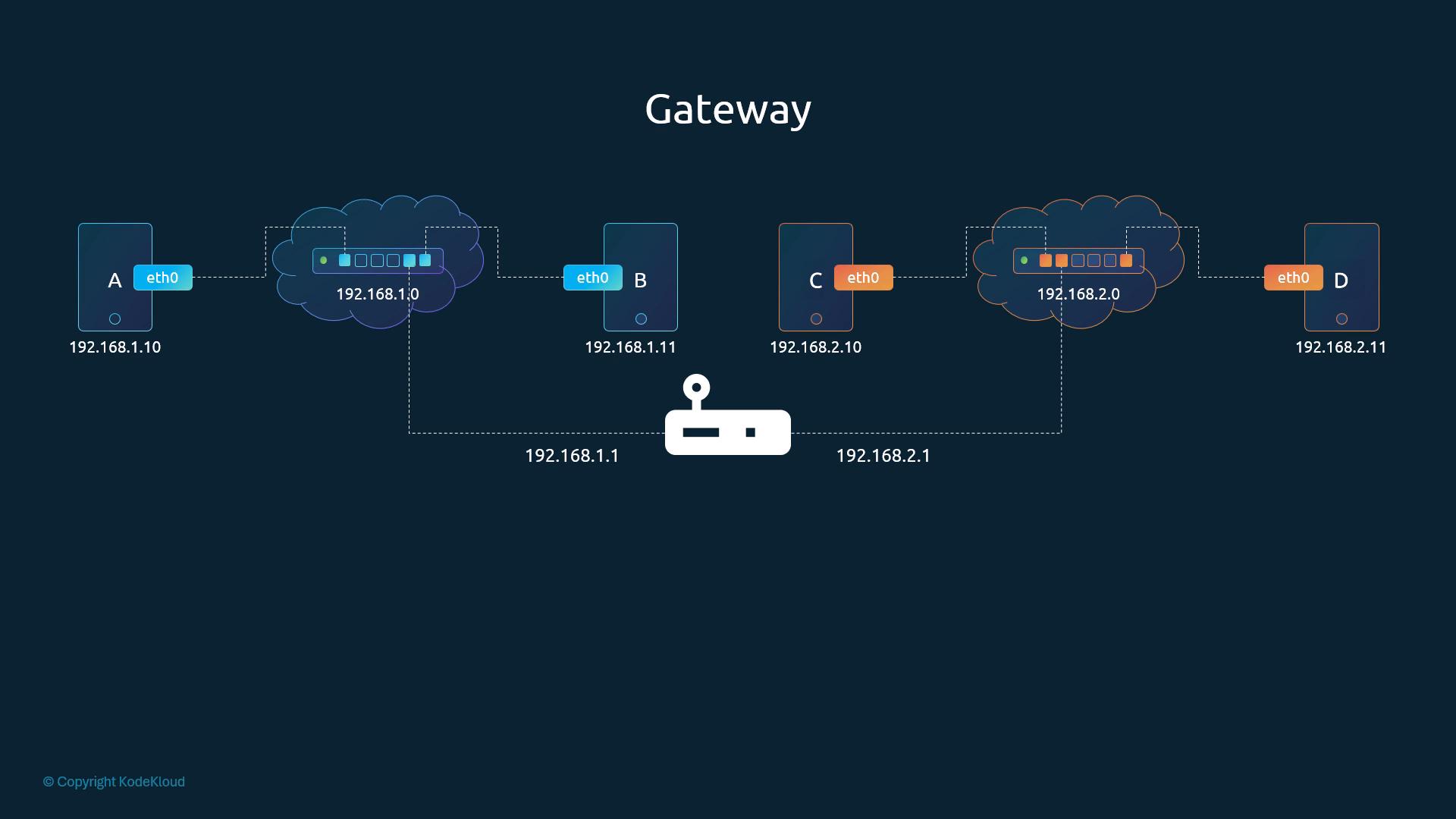
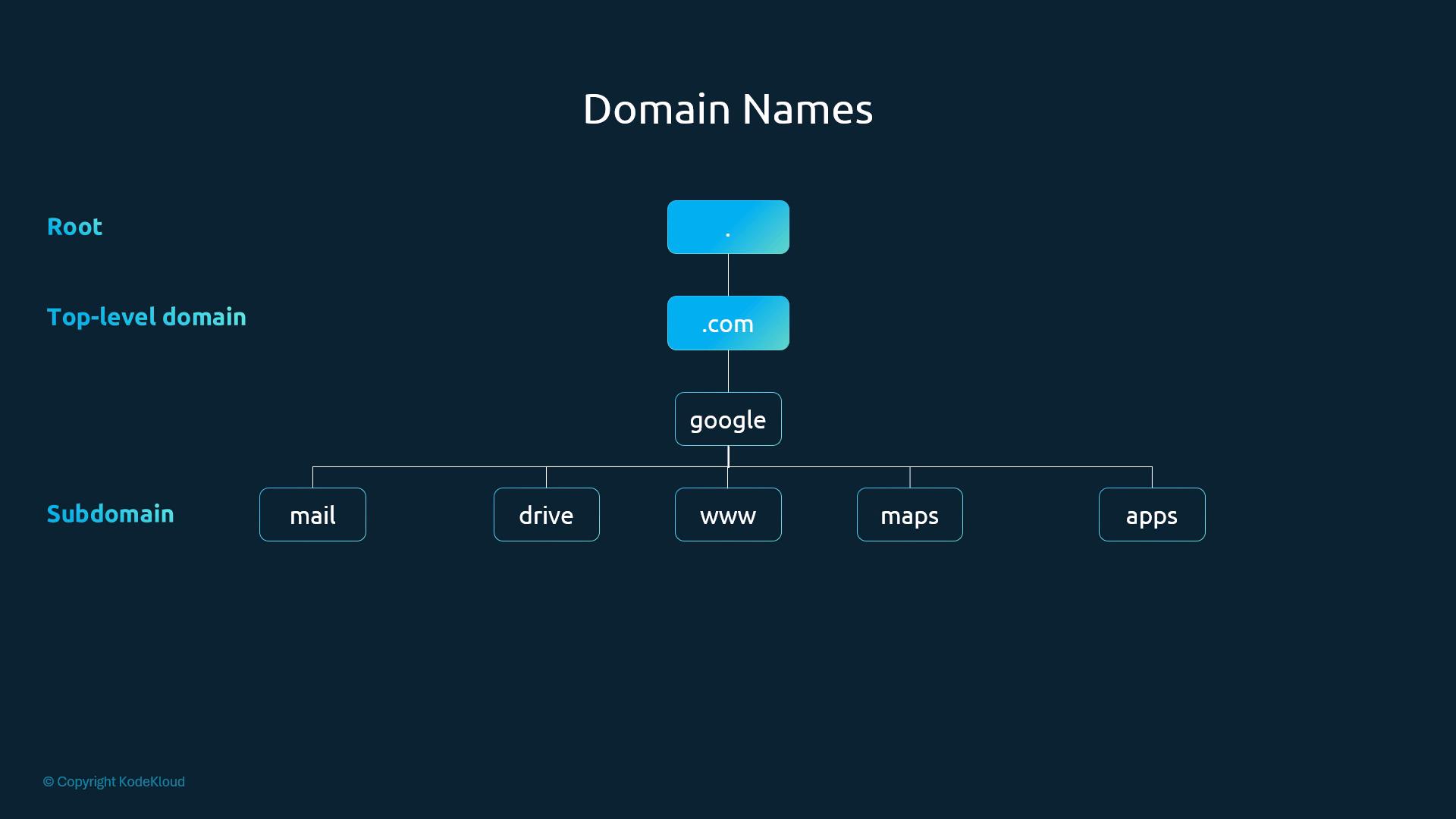
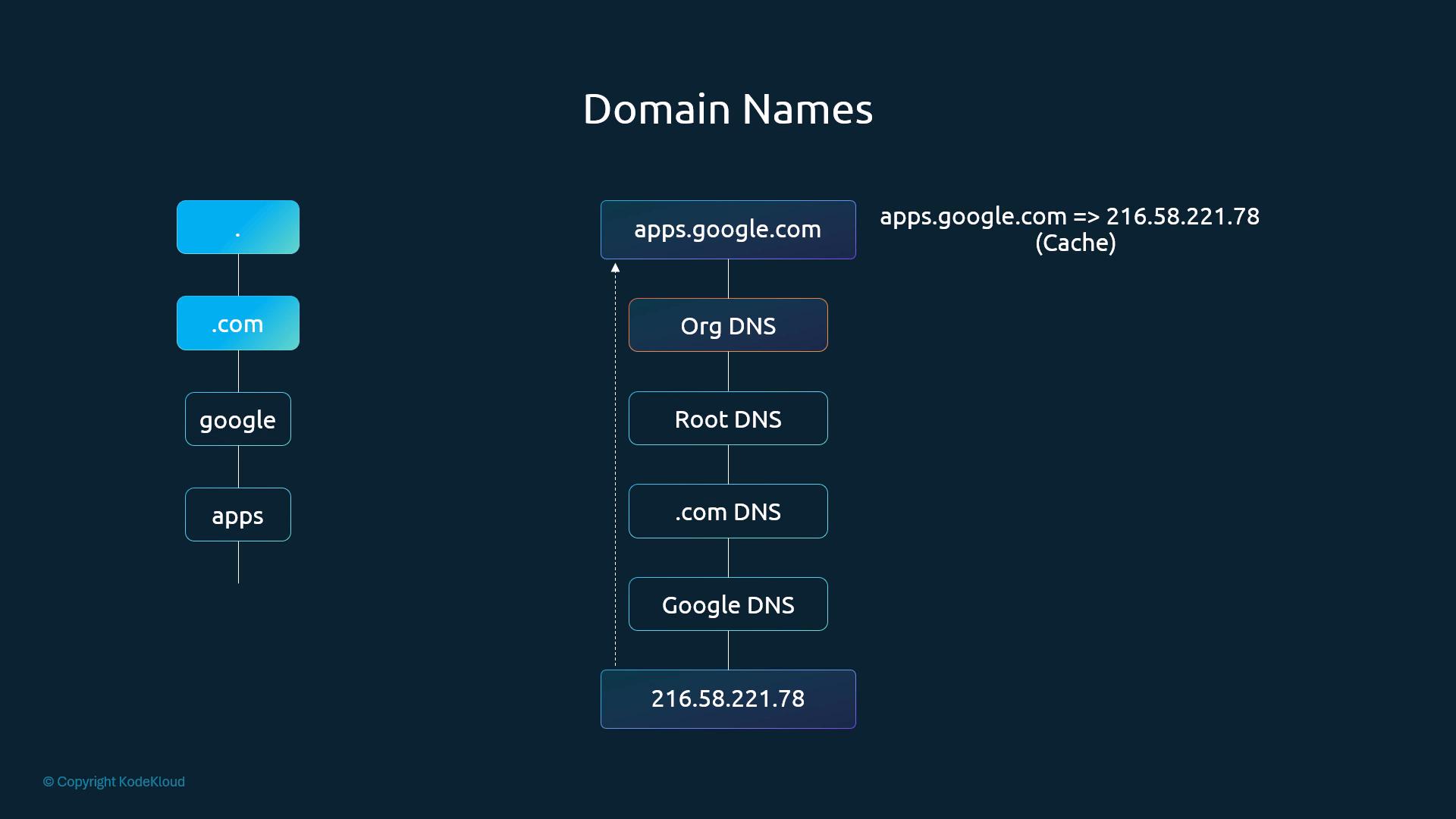
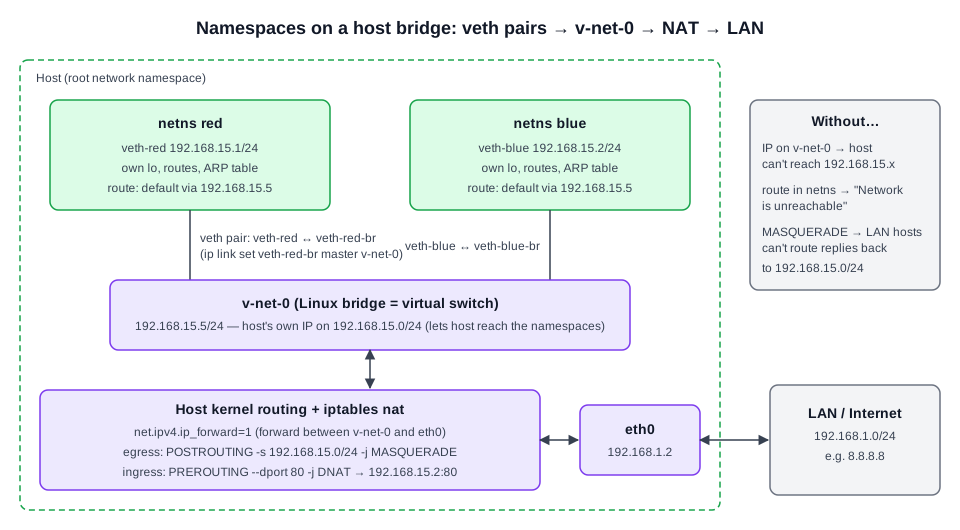 Diagram (new): namespaces joined via veth pairs to host bridge v-net-0; host forwards + NATs to eth0/LAN.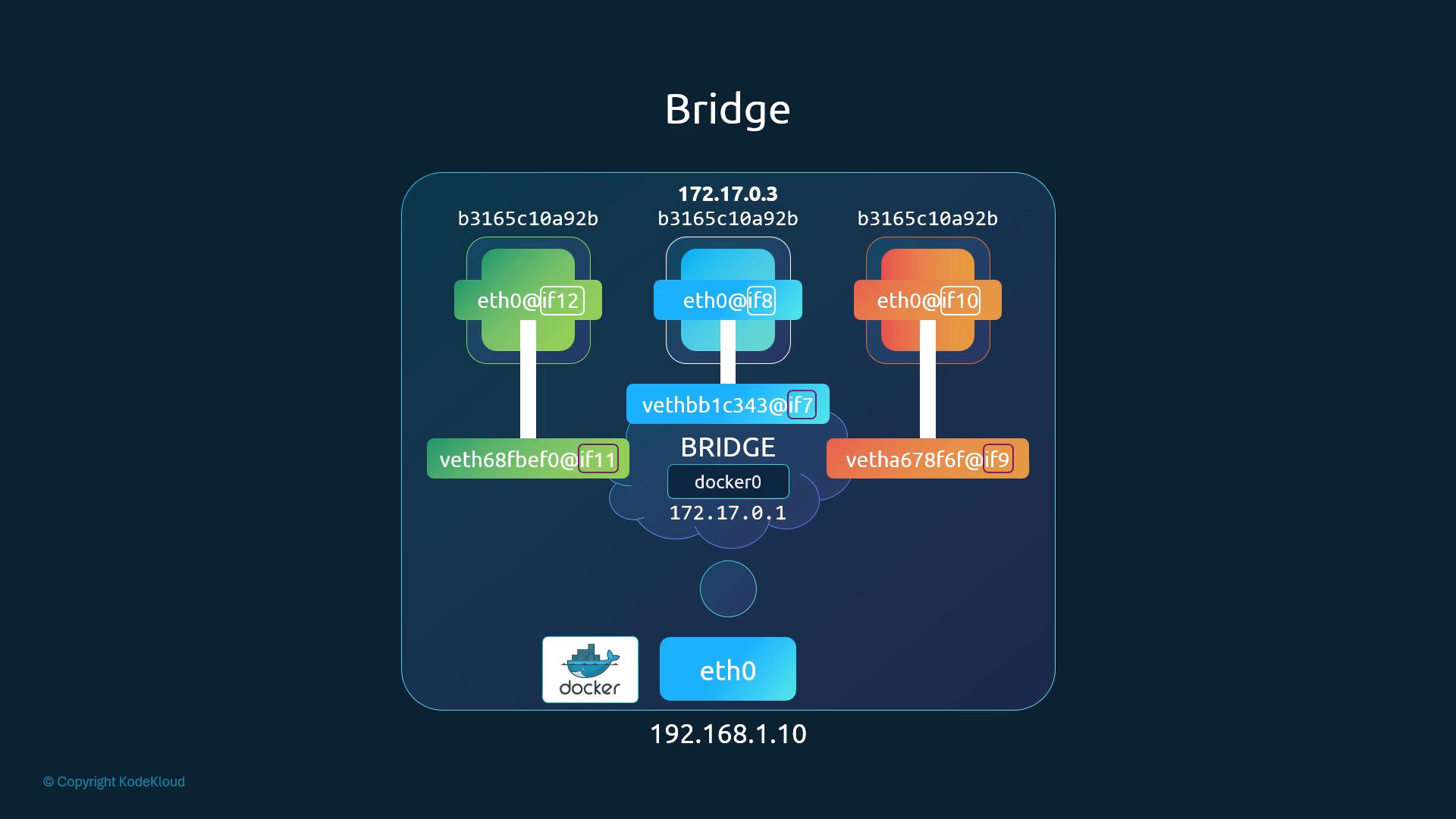
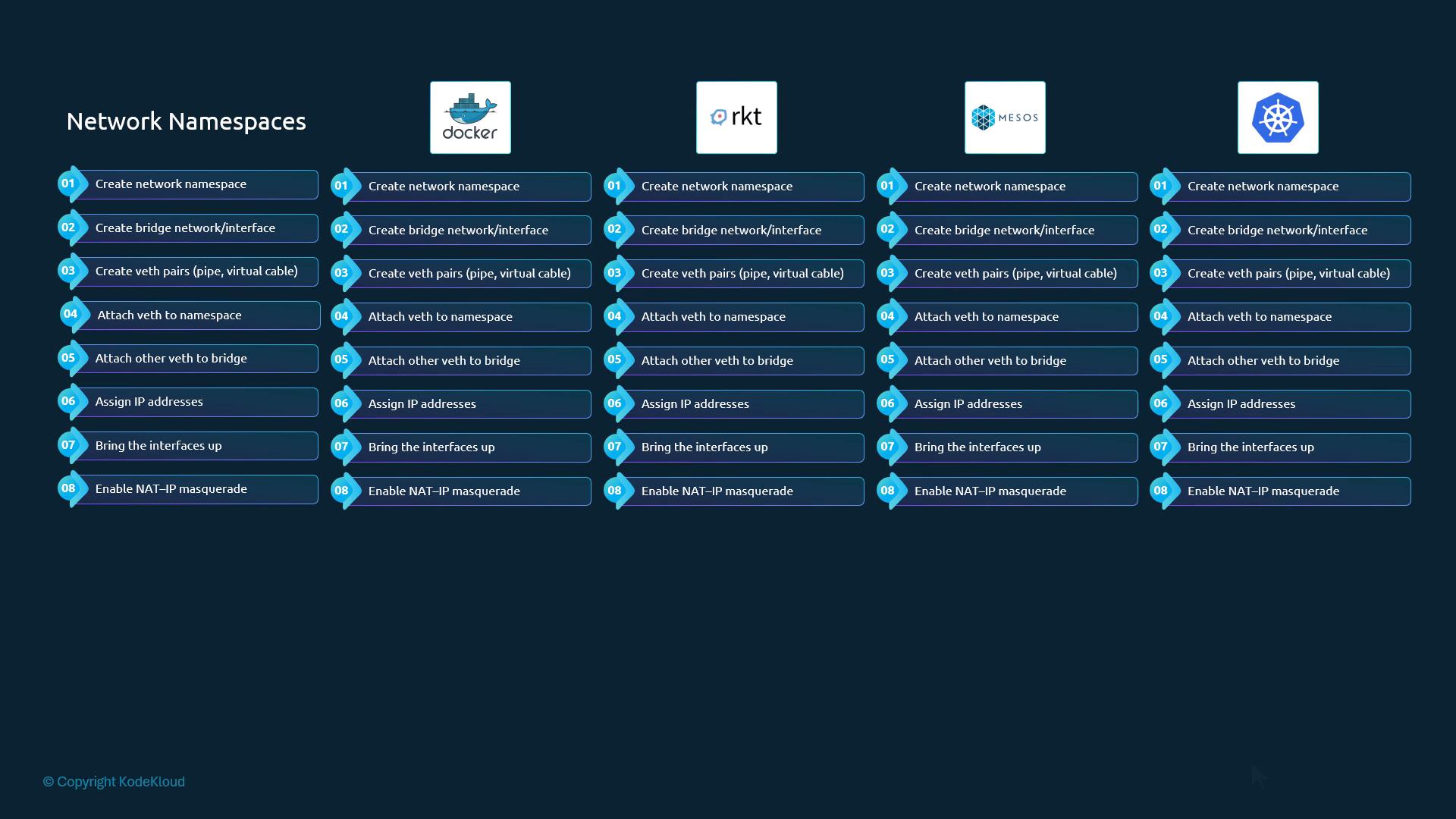
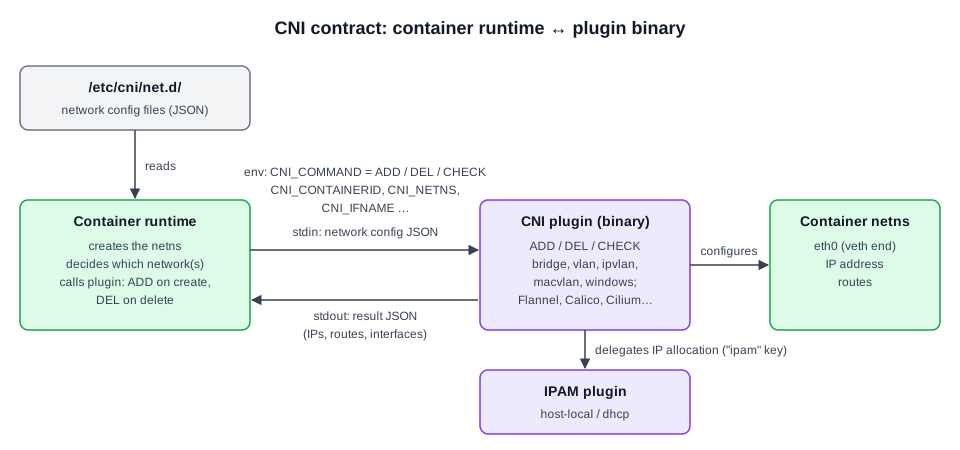 Diagram (new): CNI invocation contract between container runtime, plugin and IPAM plugin.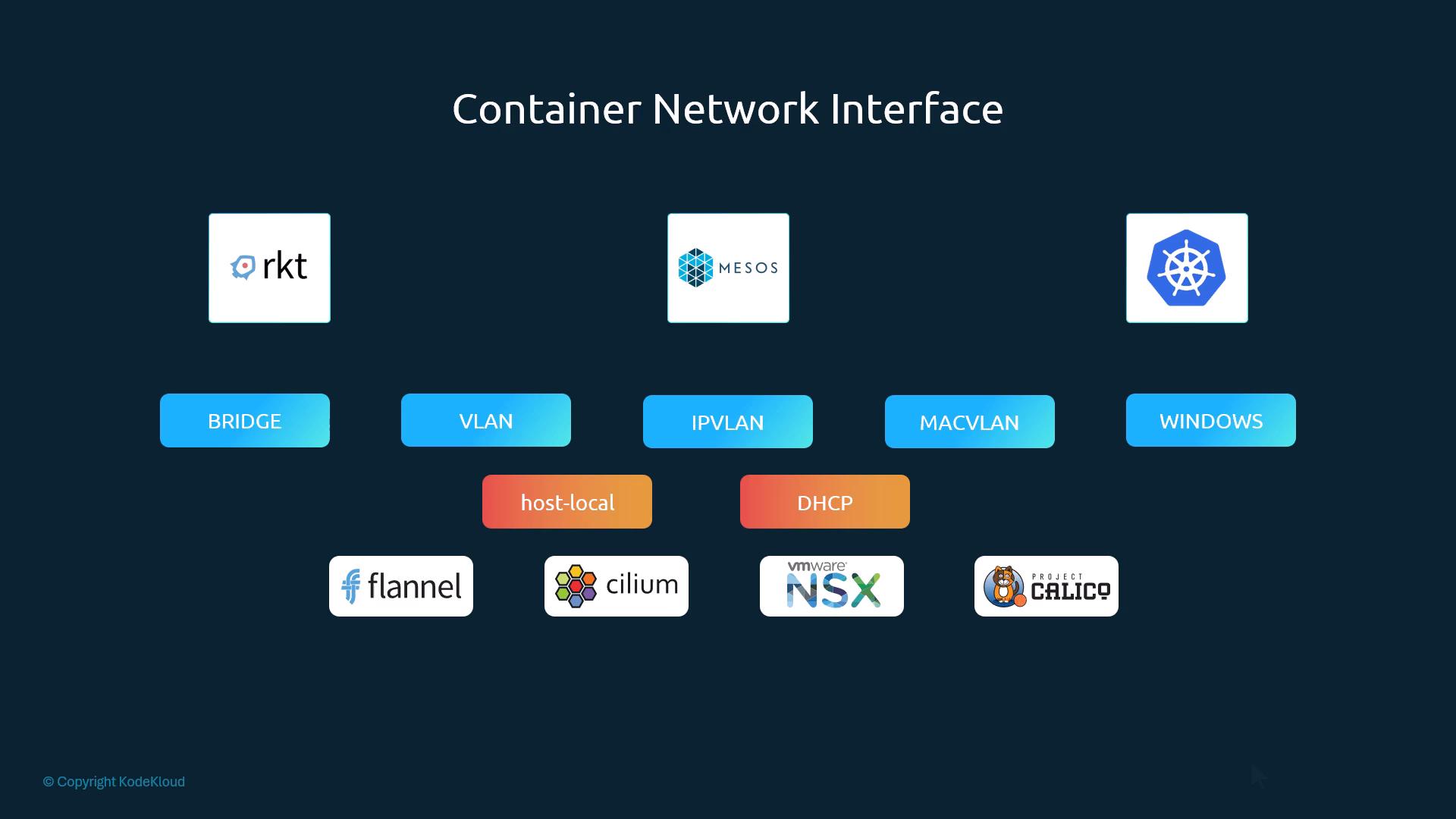
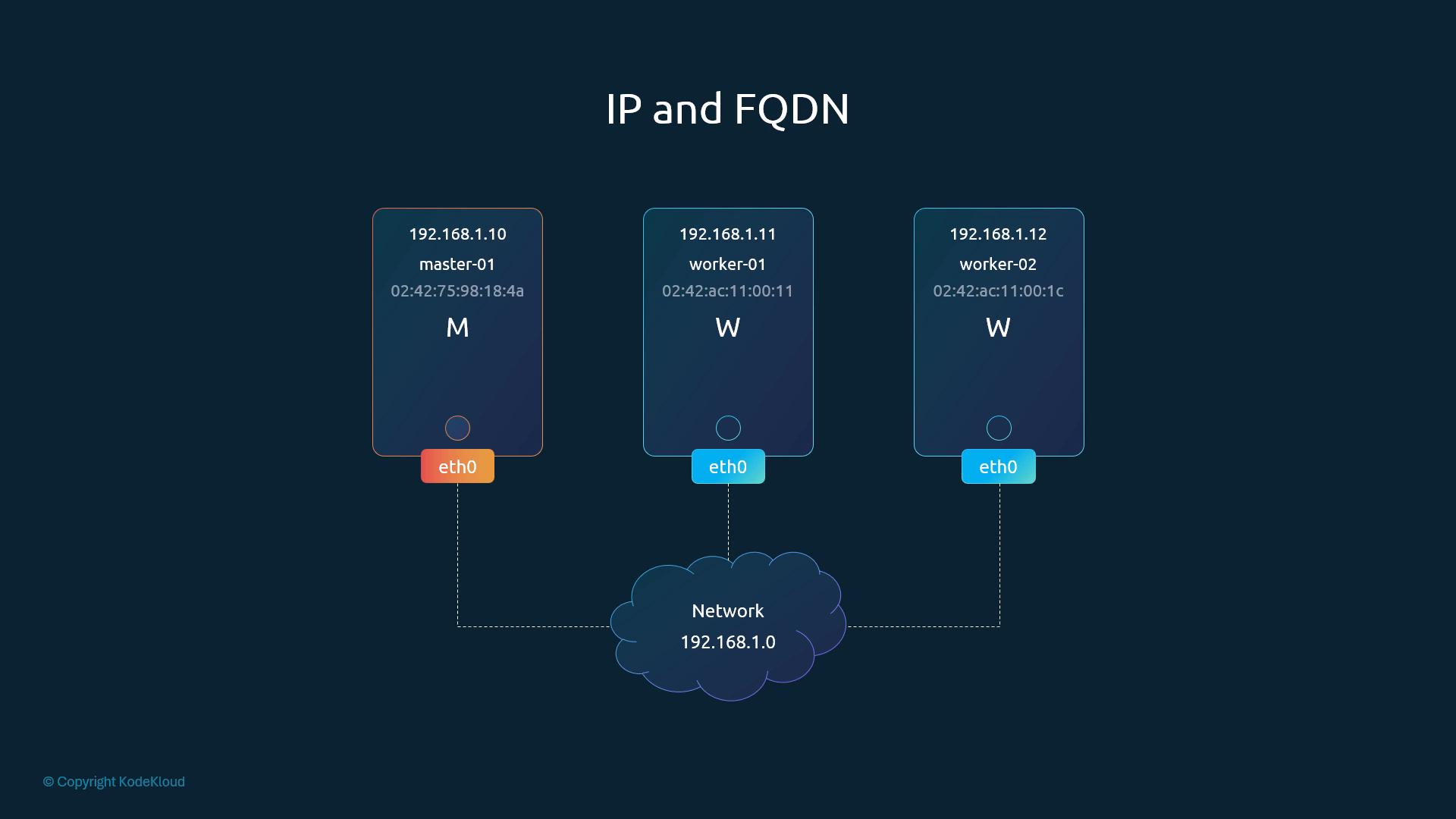
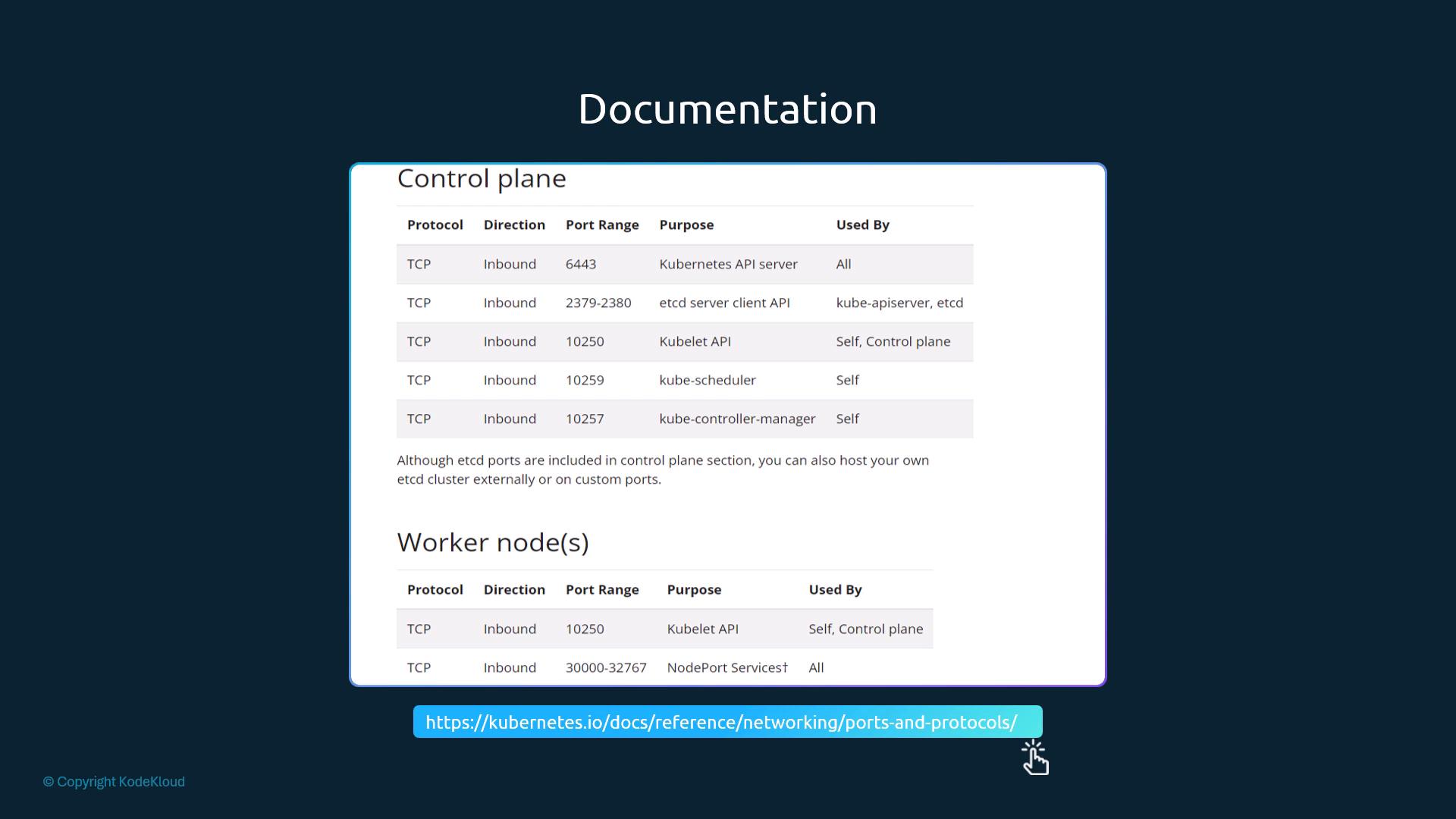
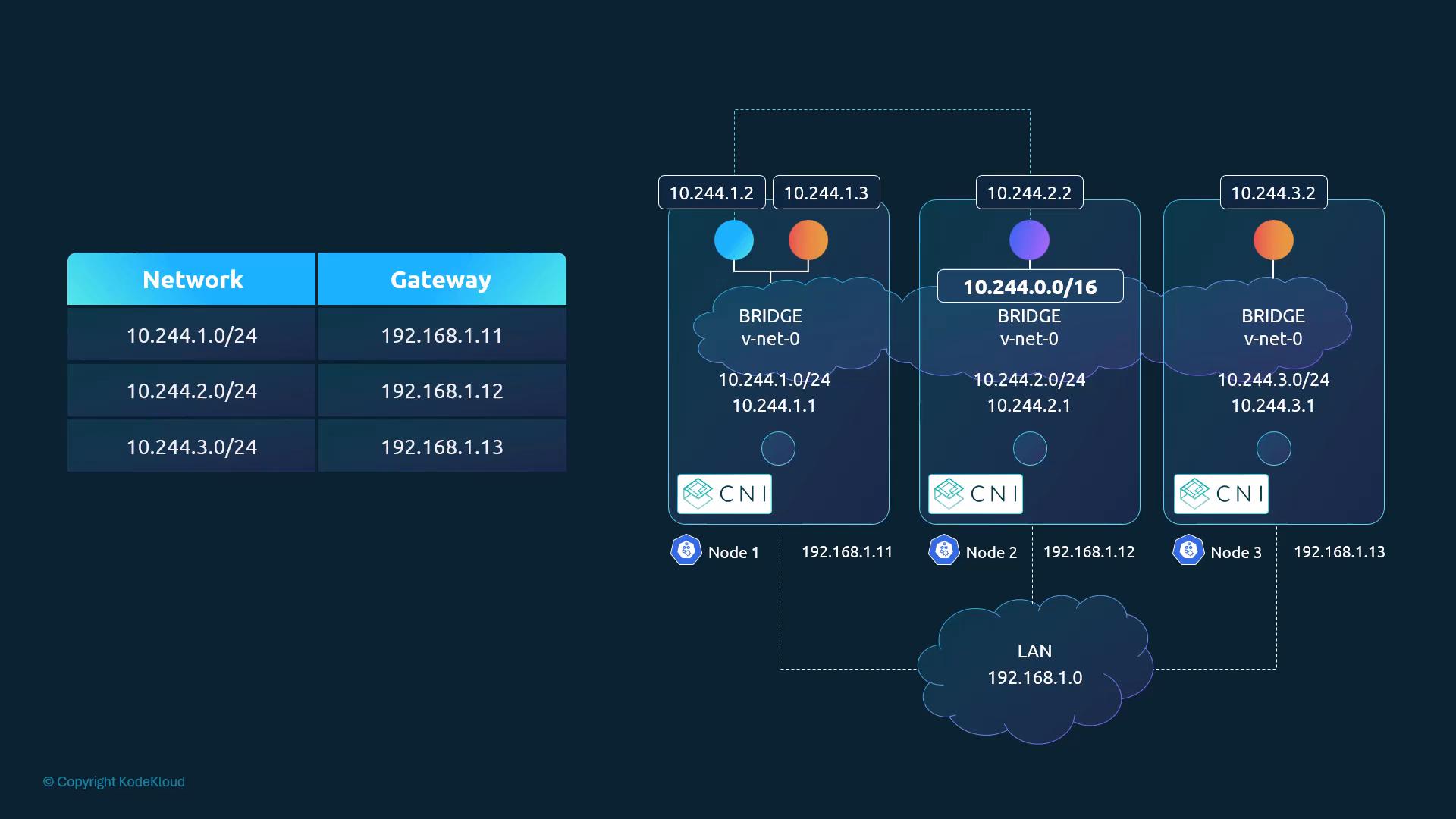
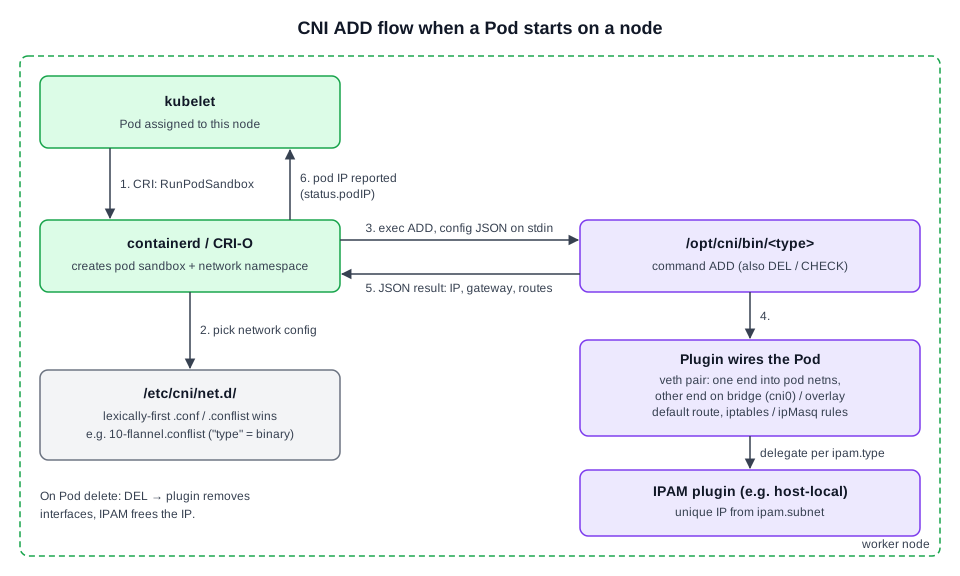 Diagram (new): who does what when a Pod is attached to the network (step numbers match the list).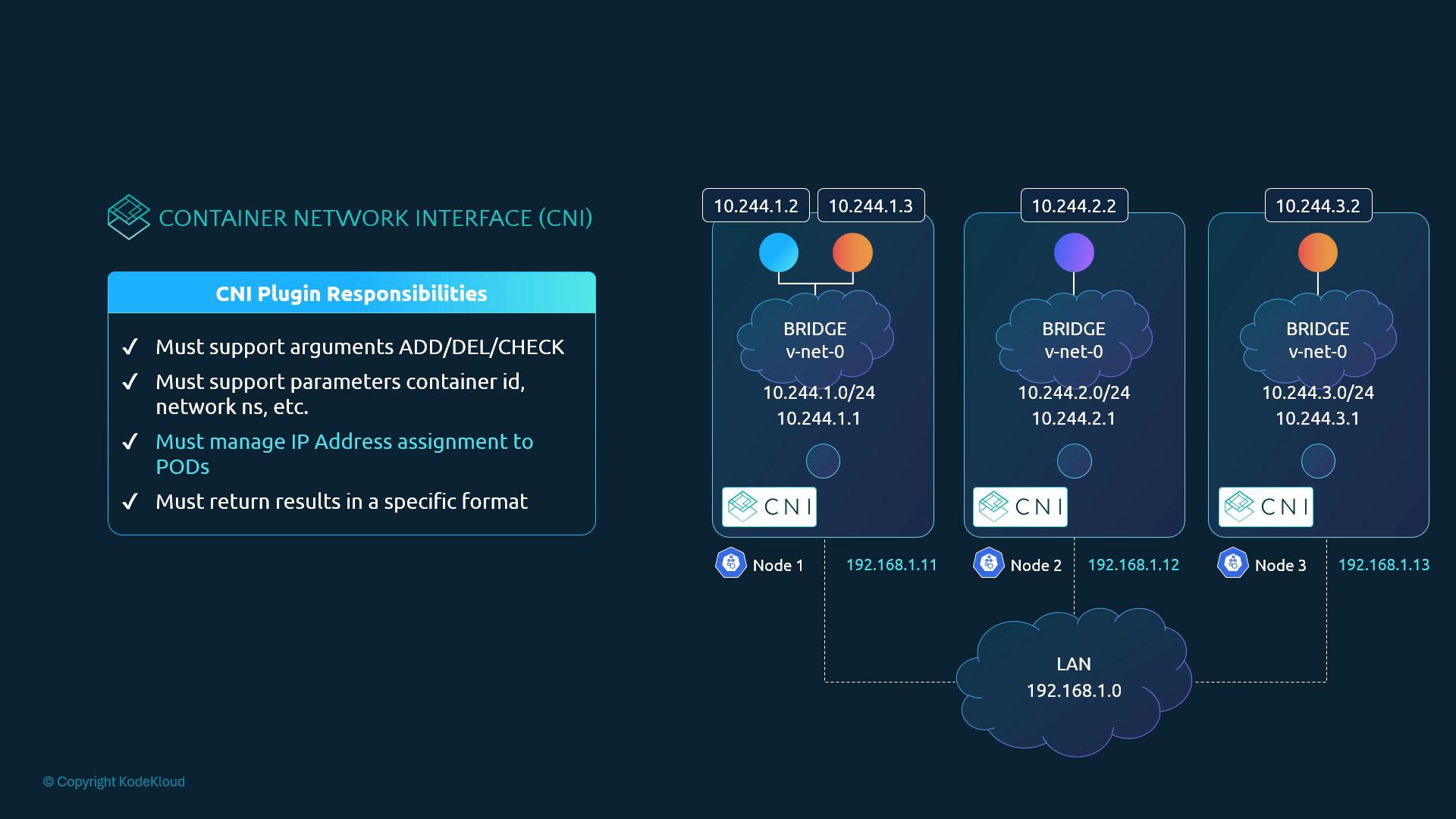
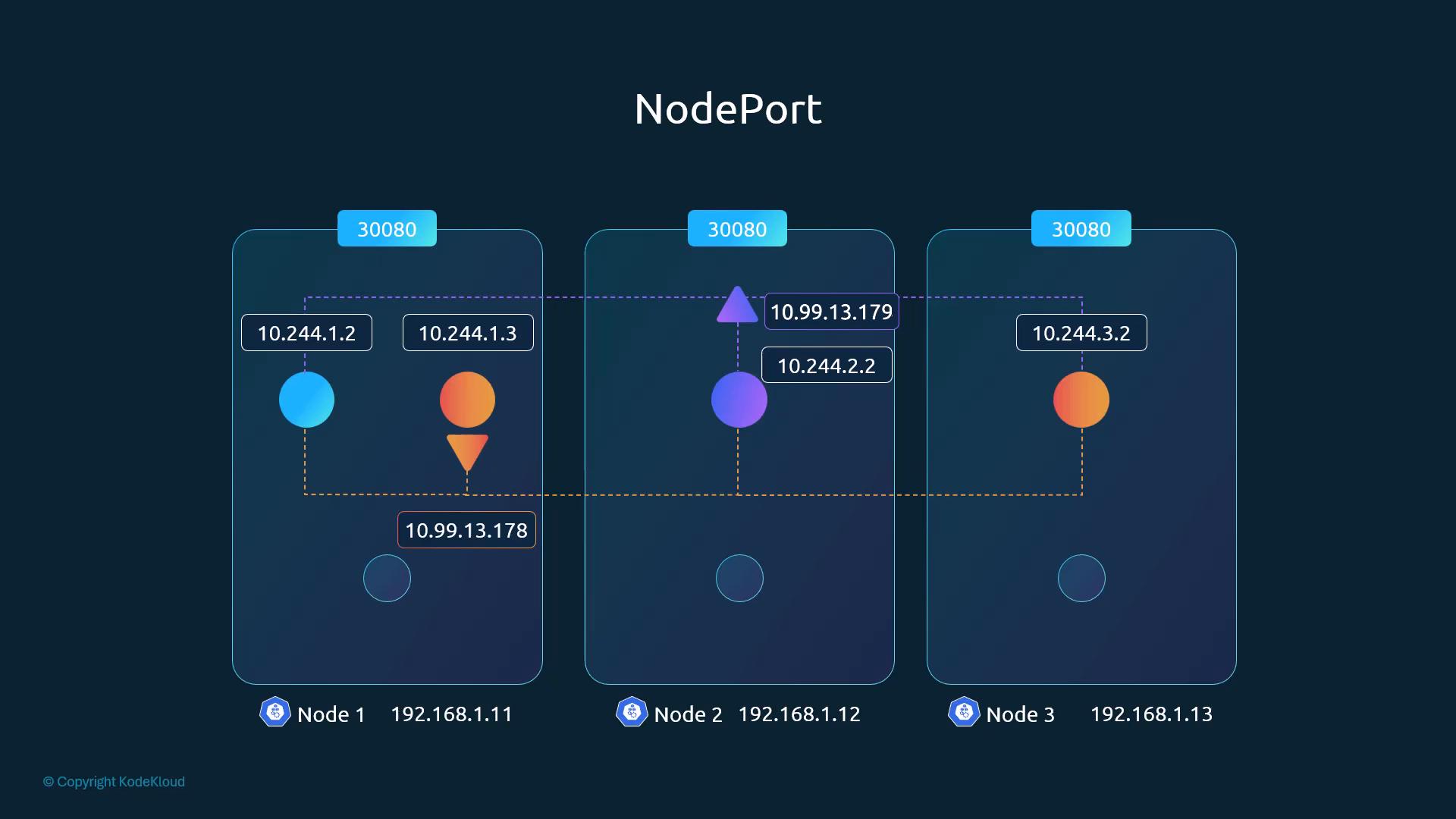
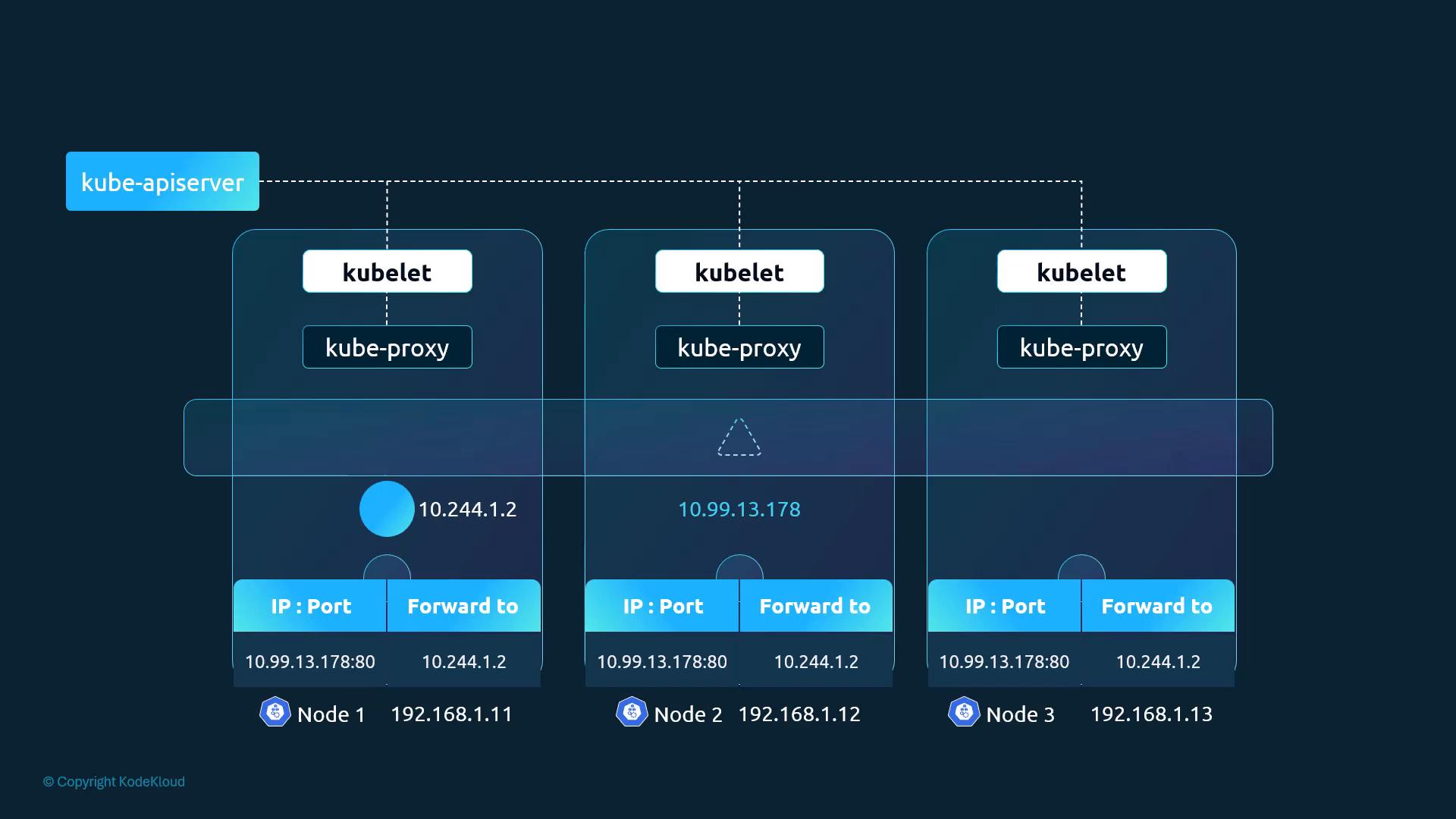
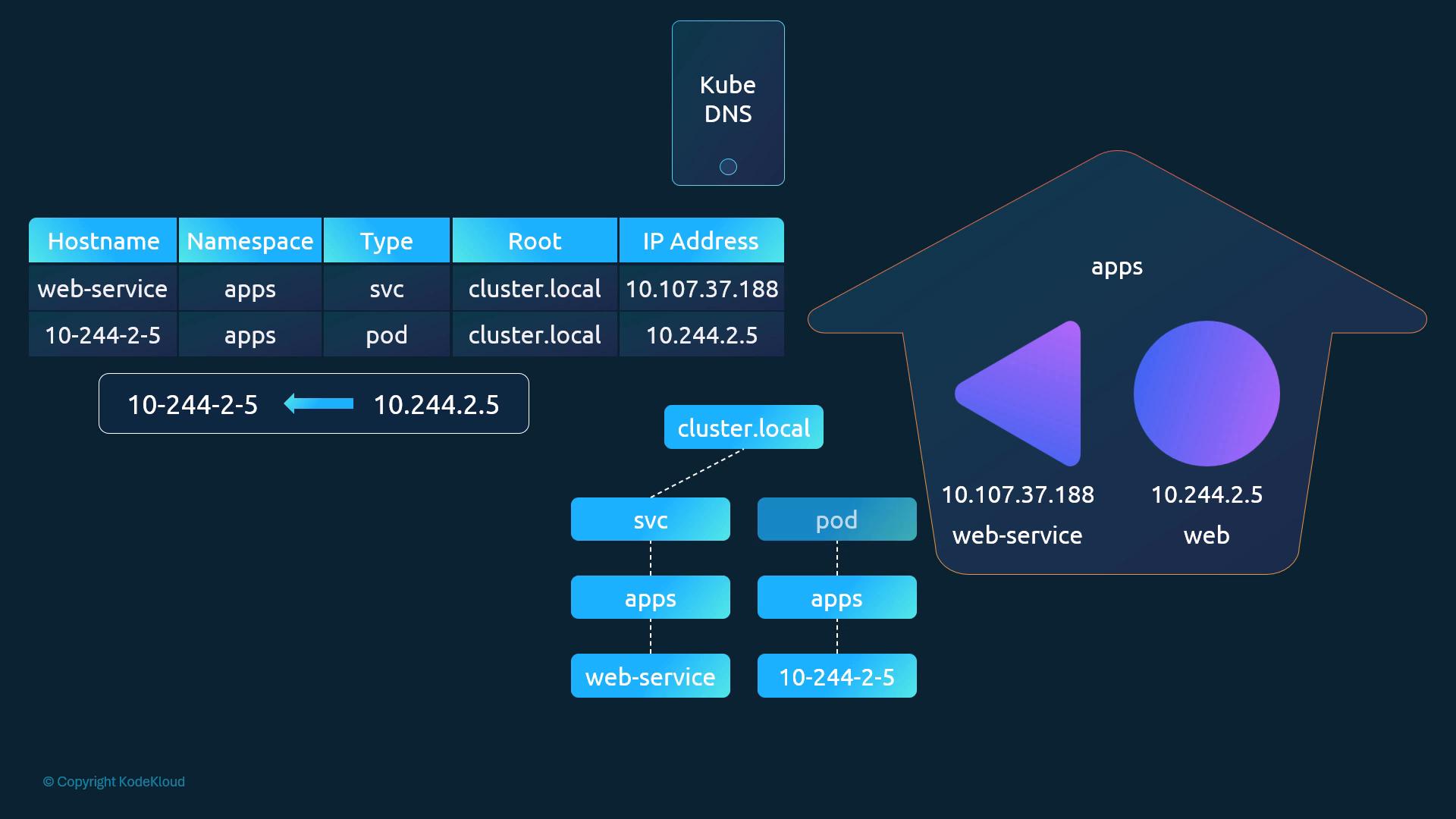
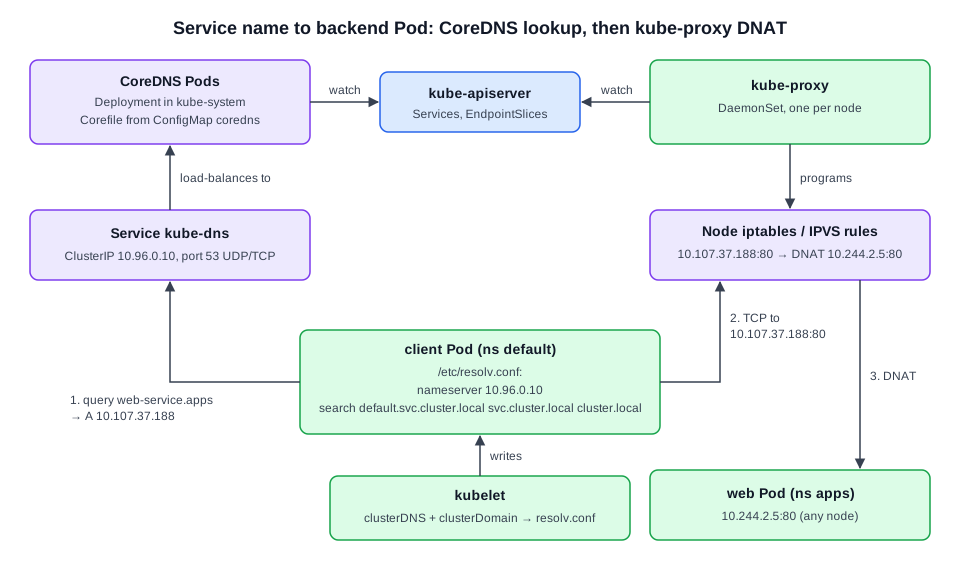 Diagram (new): DNS answers name → ClusterIP; kube-proxy's rules then turn ClusterIP → Pod IP (§9.13).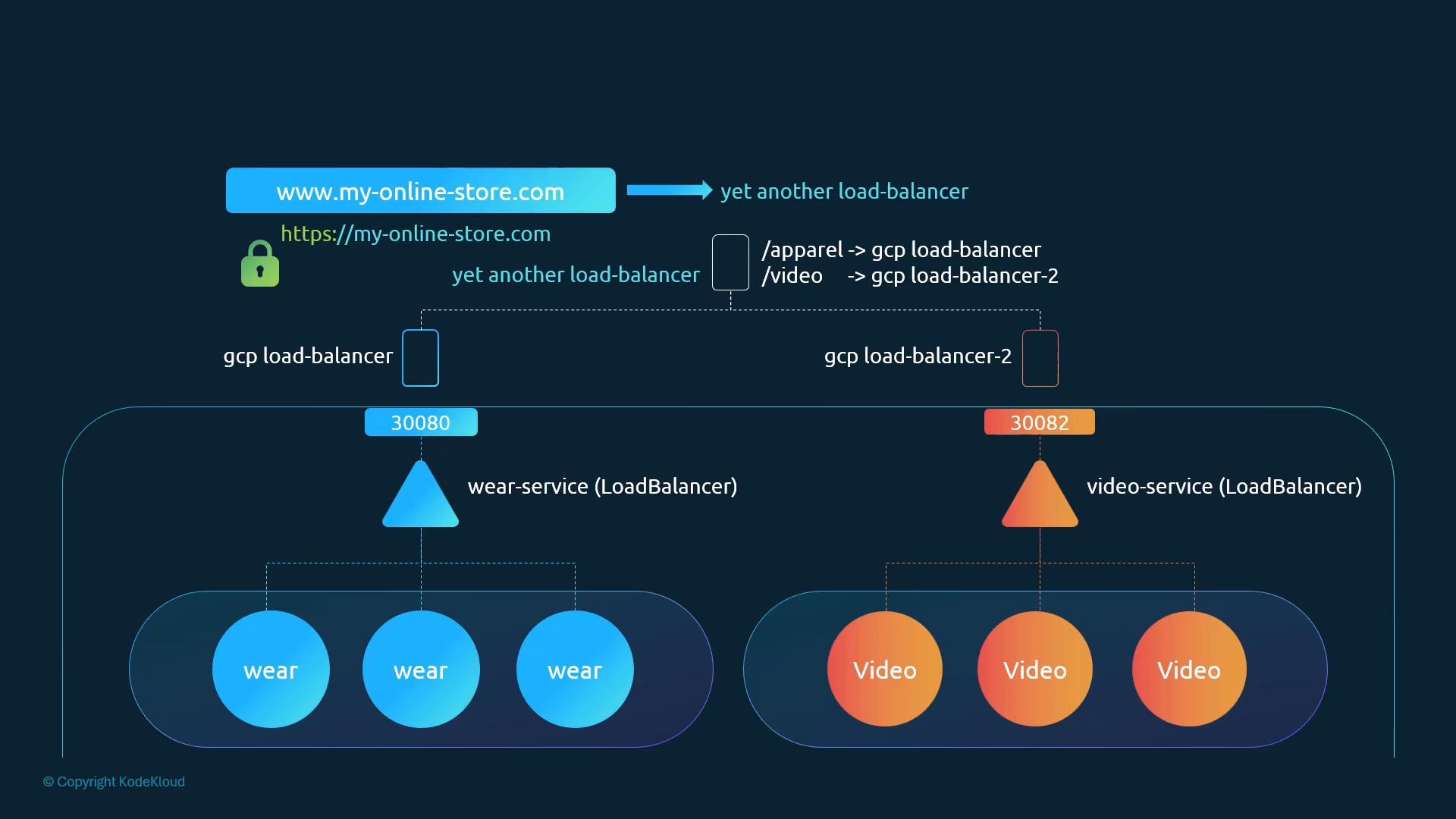
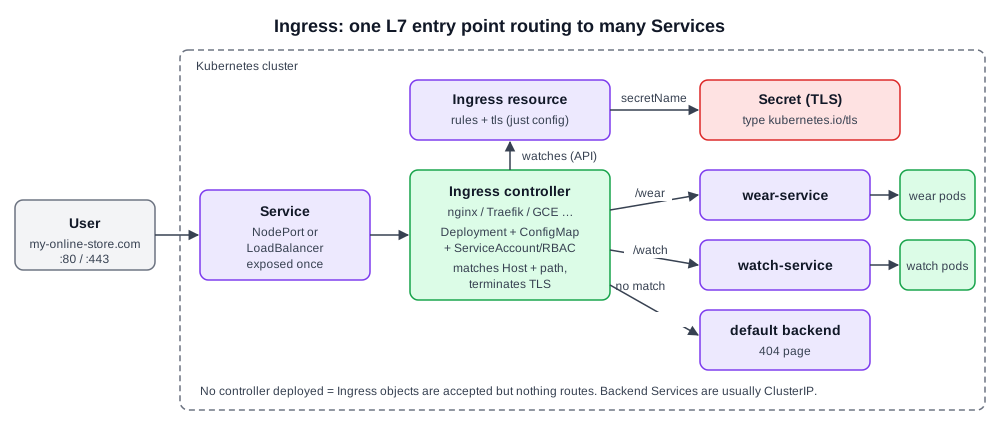 Diagram (new): external traffic → controller Service → controller pod (which watches Ingress objects) → backend Service by host/path, with unmatched requests going to the default backend.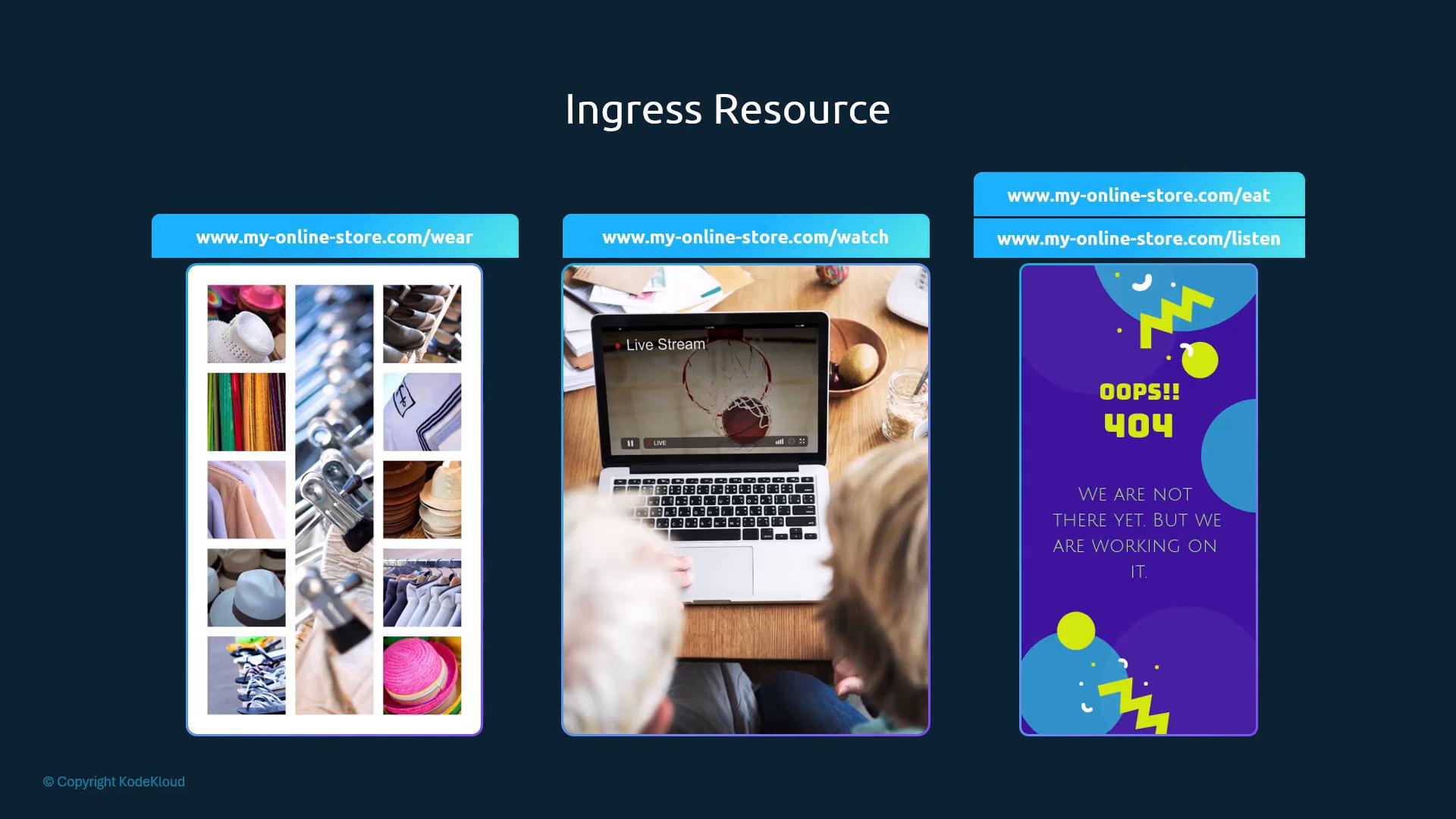
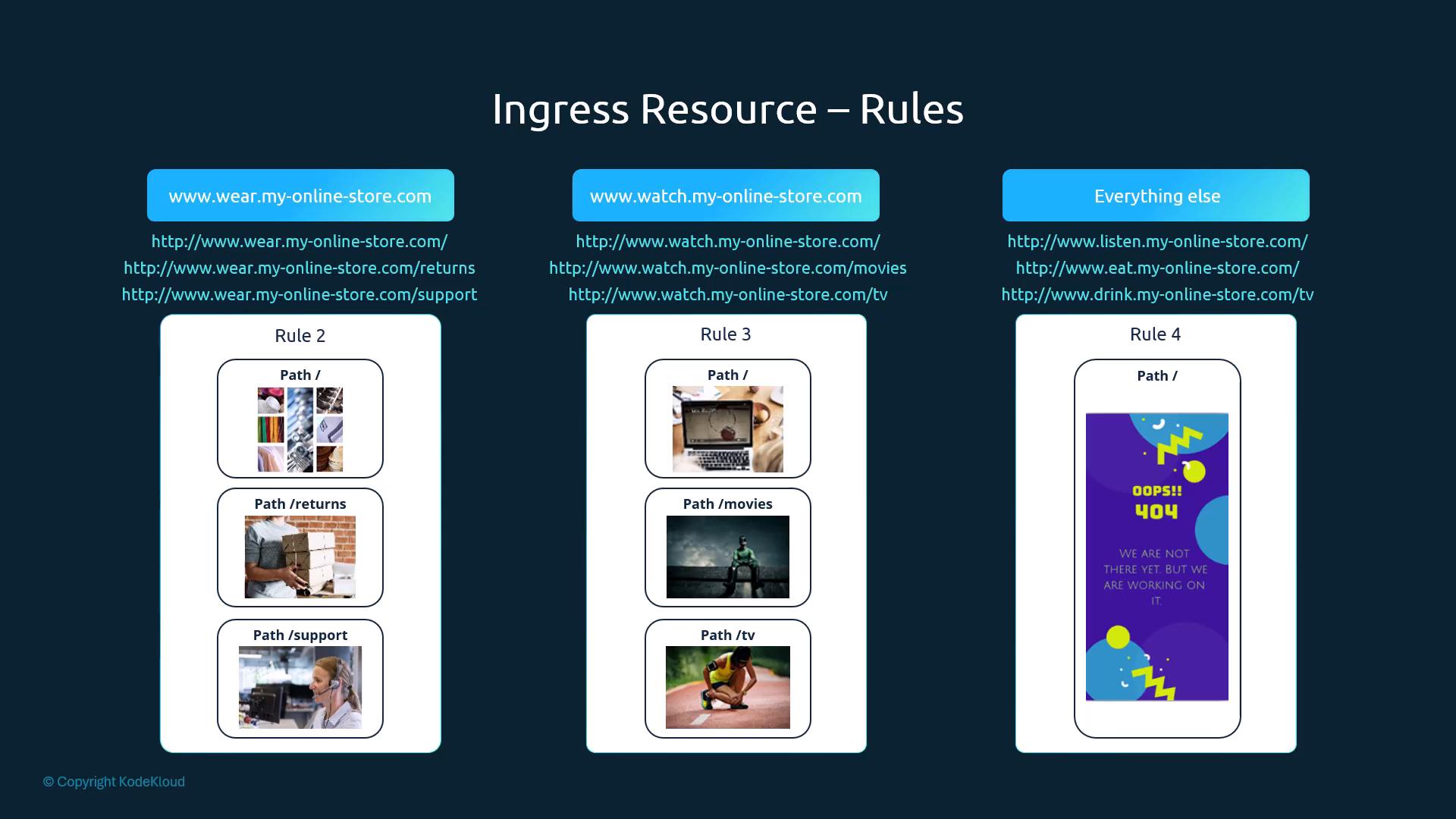
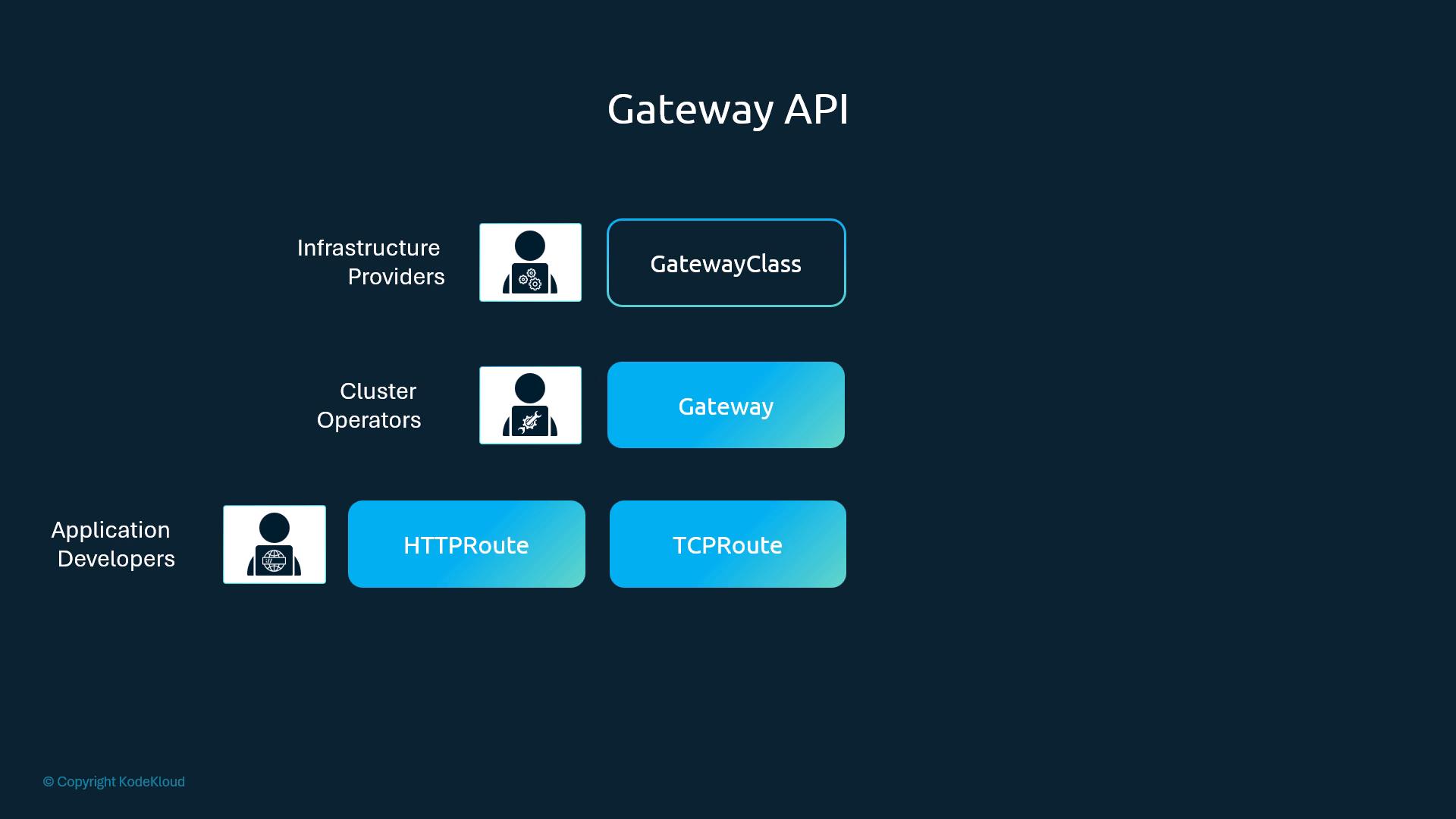
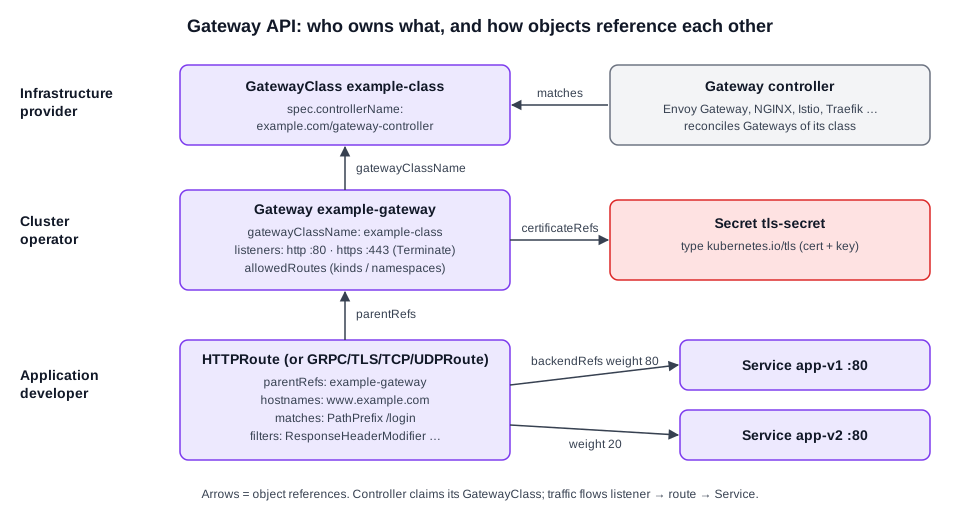 Diagram (new): Gateway API object references: HTTPRoute → Gateway (