[!CAUTION]
Correction: the original Secret uses password: CalksdIkeBGmxcv23kjsdlkjr== (27 chars, not valid base64 → the API server rejects it) and its PV has no volume source (not applyable). Replaced with a valid base64 value and a hostPath source above.
Helm = package manager for Kubernetes. Treats the app as one package (chart) of related manifests; installs/upgrades/uninstalls them as one unit (release).
Benefits:
package many manifests as a chart;
centralise configuration in values.yaml;
install / upgrade / rollback / uninstall with single commands;
tracks release revisions → safe rollbacks;
reuse the same chart across dev/stage/prod by supplying different values files.
Analogy: a desktop installer vs copying files by hand, plus versioning and lifecycle management.
# values.yaml - the single place to configure the appwordpressUsername: user# wordpressPassword: if not set, defaults to a random 10-char alphanumeric stringwordpressEmail: user@example.comwordpressFirstName: FirstNamewordpressLastName: LastNamewordpressBlogName: "User's Blog!"
[!WARNING]
Exam traps / remember: Helm knows which objects belong to a release, so helm uninstall removes the release’s managed resources; kept resources, CRDs and persistent data can remain (see §16.2). install / upgrade / template take <release-name> <chart> (release first); rollback takes <release> <revision>.
Running cluster (local or remote) + kubectl installed and configured; Helm uses the same kubeconfig / current context → it targets whatever cluster kubectl targets.
Verify first: kubectl get nodes must work. Fix kubeconfig/cluster access before blaming Helm.
# Snapsudo snap install helm --classic # --classic = no strict sandbox, can read ~/.kube/config# Debian/Ubuntu (APT, signed keyring) - as shown in the coursesudo apt-get updatesudo apt-get install -y apt-transport-https ca-certificates gnupgcurl https://baltocdn.com/helm/signing.asc | sudo gpg --dearmor -o /usr/share/keyrings/helm.gpgecho "deb [signed-by=/usr/share/keyrings/helm.gpg] https://baltocdn.com/helm/stable/debian/ all main" \ | sudo tee /etc/apt/sources.list.d/helm-stable-debian.list > /dev/nullsudo apt-get updatesudo apt-get install -y helm# FreeBSDsudo pkg install helm
[!NOTE]
Beyond the course: in 2025 the Helm project moved its Debian/Ubuntu APT repo off baltocdn.com to Buildkite. If the course URL fails, use the current instructions at helm.sh/docs/intro/install, e.g.:
curl -fsSL https://packages.buildkite.com/helm-linux/helm-debian/gpgkey | gpg --dearmor | sudo tee /usr/share/keyrings/helm.gpg > /dev/nullecho "deb [signed-by=/usr/share/keyrings/helm.gpg] https://packages.buildkite.com/helm-linux/helm-debian/any/ any main" | sudo tee /etc/apt/sources.list.d/helm-stable-debian.listsudo apt-get update && sudo apt-get install -y helm
Distro-agnostic alternative: the official script curl -fsSL https://raw.githubusercontent.com/helm/helm/main/scripts/get-helm-3 | bash.
helm version # Helm installed?helm list --all-namespaces # (-A) can Helm reach the cluster and list releases?helm repo add stable https://charts.helm.sh/stable # optional: add a repohelm repo update # refresh repo index cachehelm repo list # show configured repos
Auth/connectivity errors from helm → check kubectl first: kubectl config current-context, kubectl get nodes.
Snap: drop --classic only if you deliberately want strict sandboxing and have arranged other kubeconfig access.
[!CAUTION]
Correction: the course says helm version shows "client and server versions". That was Helm 2 (Tiller = server). Helm 3 has no server component; helm version prints only the client build (version.BuildInfo{Version:"v3.x.y", ...}) and does not contact the cluster — use helm list -A to prove cluster access.
[!NOTE]
Beyond the course: the stable repo (charts.helm.sh/stable) is archived/deprecated since Nov 2020 (no updates). Find maintained charts on Artifact Hub (§13.4, §13.6).
Helm 1.0 — Feb 2016 · Helm 2.0 — Nov 2016 · Helm 3.0 — Nov 2019.
Helm 1/2 predated mature Kubernetes RBAC and CRDs, so Helm implemented things itself (server-side Tiller). Once Kubernetes had those primitives, Helm 3 relied on the platform instead.
Helm 2: CLI → Tiller (in-cluster server) → kube-apiserver. Tiller acted with broad ("god-mode") privileges; release history stored by Tiller.
Helm 3: CLI talks directly to kube-apiserver with the caller's kubeconfig credentials → Kubernetes RBAC applies to the user/ServiceAccount running helm, exactly like kubectl.
Diagram (new): Helm 2 vs Helm 3 architecture and the Helm 3 three-way merge inputs.
helm install → revision 1 (snapshot of release state); each helm upgrade → new revision; helm rollback → another new revision that reverts to an earlier state.
Compared only the stored previous manifest vs the newly rendered chart (chart + values).
Live edits made outside Helm (e.g. kubectl set image) were never in Tiller's stored manifests → rollback could miss reverting them; upgrades could silently overwrite/lose them.
helm install wordpress ./wordpress-chart # rev 1: image wordpress:4.8-apachehelm upgrade wordpress ./wordpress-chart-v2 # rev 2kubectl set image deployment/wordpress wordpress=wordpress:5.8-apache # manual drift BEFORE rollbackhelm rollback wordpress 1 # rev 3; Helm 2 does not compare live drift
Inputs: (1) manifests of the target revision, (2) manifests of the currently deployed revision (last stored), (3) live state of the objects in the cluster.
Example: install rev 1 (wordpress:4.8-apache) → kubectl set image … wordpress:5.8-apache → helm rollback wordpress 1. Helm 3 sees live = 5.8 vs target = 4.8 and patches the image back to 4.8-apache.
Effects: drift is detected and reverted where needed; intentional live edits can be preserved during upgrades; more predictable upgrades/rollbacks where operators sometimes edit directly.
Feature
Helm 2
Helm 3
Server-side component
Tiller in cluster
none (client only)
Auth model
Tiller's privileges (Tiller RBAC)
caller's credentials; K8s RBAC on the caller
Upgrade/rollback diff
2-way (stored manifest vs rendered chart)
3-way (target rev, current rev, live state)
Manual live changes
often lost/ignored
considered in the merge
CRD / RBAC
implemented some features itself
uses Kubernetes-native CRDs + RBAC
[!WARNING]
Exam traps / remember: No Tiller in Helm 3 — no helm init, nothing to install in the cluster. If helm install gets forbidden, it is your RBAC that is missing, not Helm's.
[!NOTE]
Beyond the course: Helm 2-only commands/flags you may still see in old docs: helm init (installed Tiller), helm delete --purge (→ Helm 3 helm uninstall), --name <release> (→ positional release name). Helm 4 went GA in late 2025; it is also Tiller-less and the basic commands in this section are unchanged — check helm version in your environment.
snapshot of a release's state; new one per Helm change
created by helm upgrade / rollback
Repository
public/private hosting of charts
Artifact Hub, custom chart repo
Storage backend
where release metadata lives in-cluster
Secrets (default) or ConfigMaps
Release metadata stored in the cluster (Helm 3 default: Secrets in the release's namespace) → anyone with access to that namespace/cluster can list releases, see history and roll back; no local state to share.
[!NOTE]
Beyond the course: each revision is one Secret of type helm.sh/release.v1 named sh.helm.release.v1.<release>.v<revision> (kubectl get secrets -n <ns> -l owner=helm). Switch backend with HELM_DRIVER=configmap (also secret, memory, sql). Deleting those Secrets makes Helm "forget" the release.
artifacthub.io aggregates many publishers/repos (Bitnami, AppsCode, community, vendors). Use it to search (Redis, NGINX, WordPress, Prometheus), compare versions, see publisher metadata and Official / Verified Publisher badges (plus security rating), and copy install commands and values examples.
[!WARNING]
Exam traps / remember: Only Helm commands create revisions. kubectl scale/edit/set image on a Helm-managed object is not recorded in helm history. Release ≠ chart: one chart can have many releases; release names are unique per namespace.
Artifact Hub is not Helm-only. Filter by Kind = Helm charts (it also lists OLM operators, Krew plugins, OPA policies, Falco rules, Tekton tasks…) and tick the Official / Verified publishers filters. Each card shows VERSION (chart) and APP VERSION (app).
[!CAUTION]
Correction: fixed the course template’s metadata indentation: commonLabels needs nindent 4 under metadata.labels; annotations must be under metadata, not a top-level field.
apiVersion: v2 # CHART API version (v2 = Helm 3), NOT a K8s apiVersionappVersion: 5.8.1 # version of the app deployed (informational)version: 12.1.27 # version of the chart itselfname: wordpressdescription: Web publishing platform for building blogs and websites.type: application # or "library"dependencies: - condition: mariadb.enabled # dependency only rendered if this value is true name: mariadb repository: https://charts.bitnami.com/bitnami version: 9.x.xkeywords: - application - blog - wordpressmaintainers: - email: containers@bitnami.com name: Bitnamihome: https://github.com/bitnami/charts/tree/master/bitnami/wordpressicon: https://bitnami.com/assets/stacks/wordpress/img/wordpress-stack-220x234.png
Field
Meaning
apiVersion
chart API version; v2 for Helm 3 (enables dependencies in Chart.yaml, library charts)
name
chart name
version
chart version, managed by chart maintainer, independent of app
appVersion
version of the application (e.g. WordPress 5.8.1)
description
one-line description
type
application (deployable) or library (helpers only, not installable)
dependencies
other charts pulled from repos, optional condition toggle
Per-environment values in values files: helm upgrade --install <release> <chart> -f production-values.yaml (or --set for a few keys).
Render locally without installing: helm template <release> <chart>; validate against the API server: helm template <release> <chart> | kubectl apply --dry-run=server -f -.
Version the chart (version) independently of the app (appVersion).
[!WARNING]
Exam traps / remember:version = chart version (what --version selects); appVersion = app version (the APP VERSION column). Chart apiVersion: v2 ≠ Kubernetes apiVersion.
[!NOTE]
Beyond the course: Chart.yaml required fields are apiVersion, name, version. Helm 2 charts used apiVersion: v1 with dependencies in a separate requirements.yaml. helm create <name> scaffolds a chart (adds templates/_helpers.tpl, templates/NOTES.txt, .helmignore); helm lint <dir> checks it; helm package <dir> builds the .tgz.
Post-install NOTES are written by the chart author (rendered from templates/NOTES.txt): how to access the app, default credentials, next steps.
[!WARNING]
Exam traps / remember:helm search repo only searches repos you have added (run helm repo update if results look stale); helm search hub queries Artifact Hub (needs internet). Install references the chart as <repo-name>/<chart> — the repo name is whatever you chose in helm repo add.
[!NOTE]
Beyond the course — exam-useful flags:
helm install web bitnami/nginx -n apps --create-namespace # release in a namespace (created if missing)helm list -A # releases in all namespaces (default: current ns only)helm list -n apps -a # -a/--all: all states; default shows deployed + failedhelm search repo nginx --versions # all chart versions in added reposhelm status web -n apps # status + NOTES againhelm get values web -n apps # user-supplied values (--all for merged)helm get manifest web -n apps # rendered manifests of the current revisionhelm uninstall web -n apps # -n required if not in current namespace
Bitnami now publishes charts primarily as OCI artifacts (e.g. helm install my-release oci://registry-1.docker.io/bitnamicharts/wordpress) and in 2025 restricted its free image catalogue; older chart/image versions used in the course may no longer resolve in a fresh lab.
helm search hub <kw> lists the same app from several publishers (e.g. riftbit/… 12.1.16, bitnami-aks/… 12.1.18, bitnami/wordpress 12.1.27, all APP VERSION 5.8.1). Choose by publisher (Official / Verified badge), not by the first row.
[!TIP]
Fastest way to see what is configurable: helm show values bitnami/wordpress > values.yaml (dumps chart defaults without pulling the whole chart; also §13.8), edit, then helm install … -f values.yaml.
[!WARNING]
Exam traps / remember:--set beats -f regardless of order on the command line; among -f files the rightmost wins. A typo'd key (--set replicacount=3) is silently ignored — check with helm get values <release> or helm template.
[!NOTE]
Beyond the course:--set-string key=val forces string type (e.g. "0123", "true"); lists via --set 'list={a,b}' or --set servers[0].port=80; escape dots in keys with \. (e.g. annotations).
Prereq: Helm + kubectl installed, KUBECONFIG pointing at a working cluster.
A release = installed chart + the objects it created. Helm knows which objects belong to which release → upgrade, rollback (downgrade) and uninstall one release without touching others, even from the same chart.
[!CAUTION]
Correction: the original uses helm install my-SECOND-site …. Release names must be lowercase DNS-style names ([a-z0-9-.], max 53 chars); uppercase is rejected by Helm 3. Use my-second-site.
Rollback restores Kubernetes manifests (Deployments, StatefulSets, Services…), not data on PVs or in external databases.
For data-bearing apps: consistent backups (snapshots, DB dumps) before upgrading; pre-upgrade hooks (Jobs that snapshot DBs / copy data out, or validate/prepare before new manifests apply) or external backup tooling / operators.
Some charts refuse to upgrade without current credentials (DB migrations etc. need them):
$ helm upgrade wordpress-release bitnami/wordpressError: UPGRADE FAILED: ... PASSWORDS ERROR: You must provide your current passwords when upgrading the release. Note that even after reinstallation, old credentials may be needed as they may be kept in persistent volume claims.'wordpressPassword' must not be empty, please add '--set wordpressPassword=$WORDPRESS_PASSWORD' ...'mariadb.auth.rootPassword' must not be empty ...'mariadb.auth.password' must not be empty ...
# Retrieve current passwords from the release's Secrets, then pass them back on upgradeexport WORDPRESS_PASSWORD=$(kubectl get secret --namespace "default" wordpress-release -o jsonpath="{.data.wordpress-password}" | base64 --decode)export MARIADB_ROOT_PASSWORD=$(kubectl get secret --namespace "default" wordpress-release-mariadb -o jsonpath="{.data.mariadb-root-password}" | base64 --decode)export MARIADB_PASSWORD=$(kubectl get secret --namespace "default" wordpress-release-mariadb -o jsonpath="{.data.mariadb-password}" | base64 --decode)helm upgrade wordpress-release bitnami/wordpress \ --set wordpressPassword=$WORDPRESS_PASSWORD \ --set mariadb.auth.rootPassword=$MARIADB_ROOT_PASSWORD \ --set mariadb.auth.password=$MARIADB_PASSWORD
Before upgrading: read chart docs and defaults (helm show values <chart>), supply required parameters via --set/values file, back up PV-backed workloads.
Helm release = source of truth for the app's resource declarations (avoid out-of-band kubectl edits).
helm history + helm rollback for manifest-level reverts.
Data apps: read upgrade requirements (passwords, migrations), back up first, consider hooks/operators.
Test upgrades in staging before production.
[!WARNING]
Exam traps / remember:
helm upgrade without --version jumps to the latest chart; pin with --version when a task names one.
helm list's REVISION and helm history count every install/upgrade/rollback; after one upgrade + one rollback you are on revision 3.
Find a release's app/chart version from helm list (CHART / APP VERSION columns) or the Pod image (kubectl describe pod).
[!NOTE]
Beyond the course:helm rollback <release> with no revision → previous revision. helm upgrade --install creates the release if missing. If an upgrade passes any -f/--set, values set in earlier revisions but not repeated revert to chart defaults unless you add --reuse-values (with no overrides at all, Helm reuses the previous values). helm uninstall --keep-history retains revision Secrets. PVCs created from StatefulSet volumeClaimTemplates are not deleted by helm uninstall. The docker:// container IDs in the course output come from the old dockershim runtime; current nodes show containerd://.
The failure comes from the chart, not Kubernetes. Templates can call fail (here templates/NOTES.txt → common.errors.upgrade.passwords.empty) to abort helm upgrade at render time when required values are missing. The error text itself prints the exact export …=$(kubectl get secret … | base64 --decode) commands to run.
The course’s Bitnami nginx Pod listens on 8080/TCP (non-root image); compare Service targetPort and port-forward targets with the actual container listener.

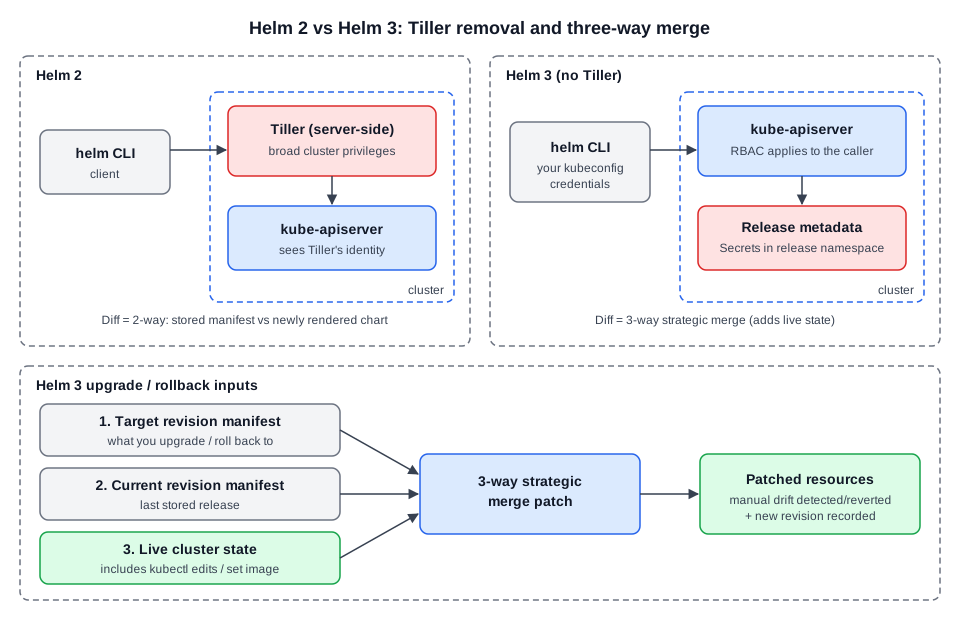 Diagram (new): Helm 2 vs Helm 3 architecture and the Helm 3 three-way merge inputs.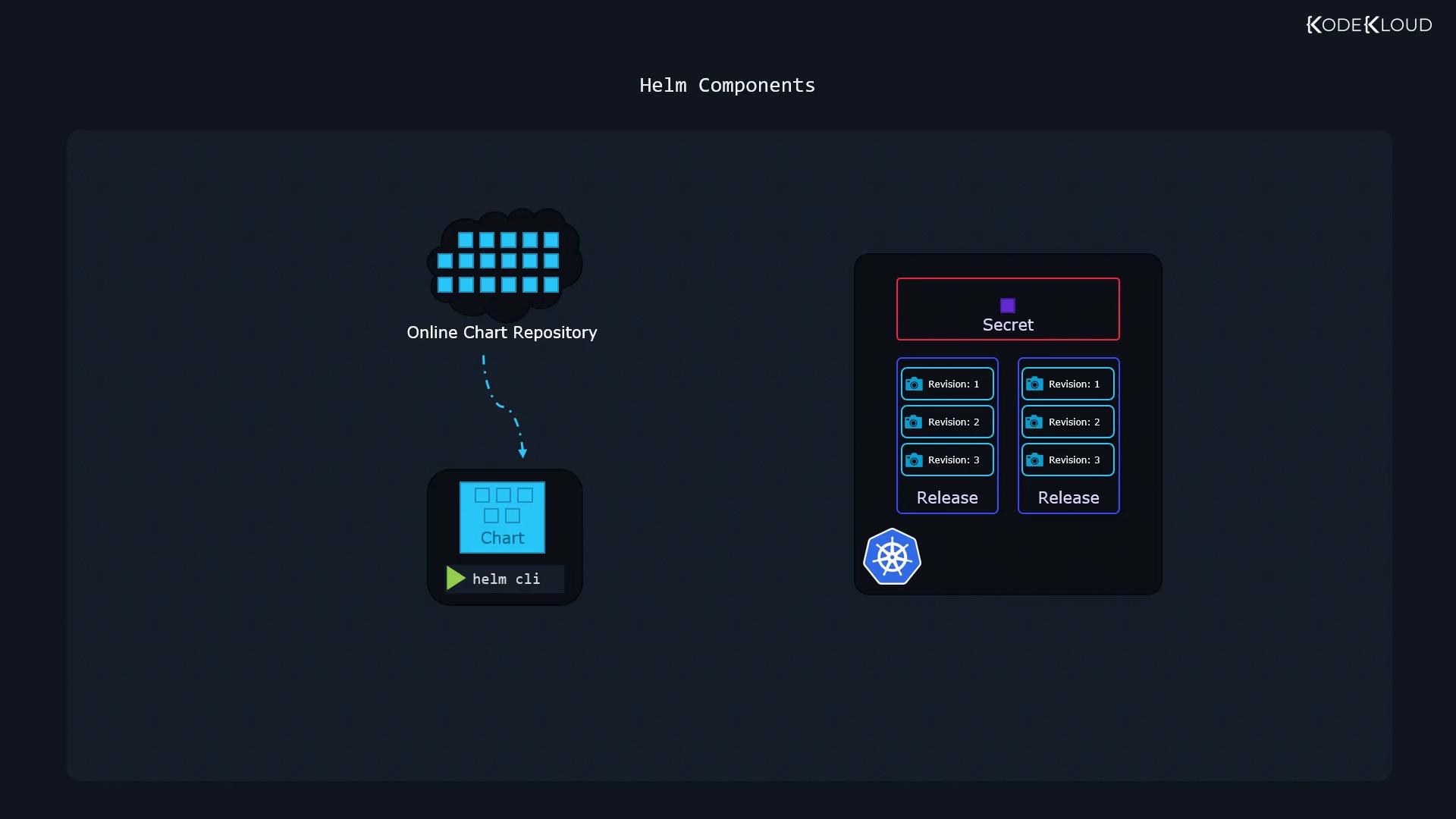
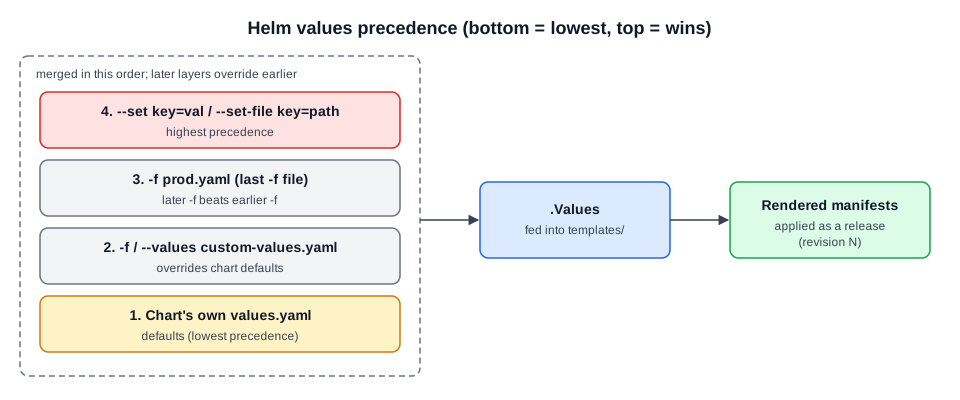 Diagram (new): values layers merged into
 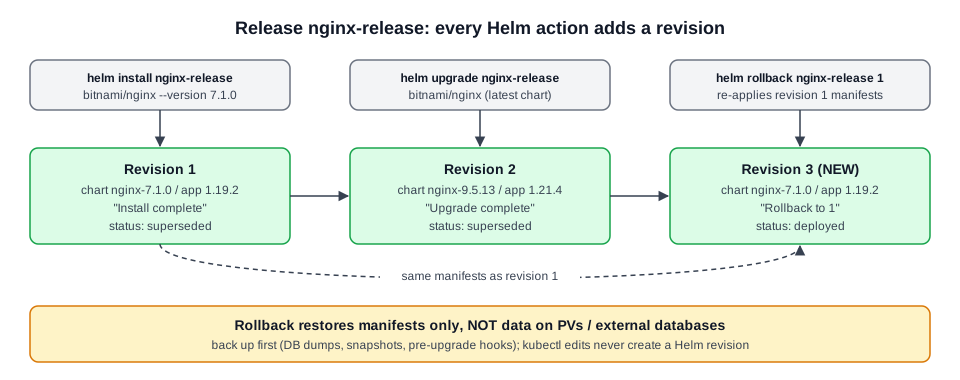 Diagram (new): how install/upgrade/rollback map to revisions and statuses.