
Core Concepts
← 01 Introduction · Index · 03 Scheduling →
Contents
- 2.1 Core Concepts Section Introduction
- 2.2 Cluster Architecture
- 2.3 Docker vs ContainerD
- 2.4 A Note on Docker Deprecation
- 2.5 etcd for Beginners
- 2.6 etcd in Kubernetes
- 2.7 Kube API Server
- 2.8 Kube Controller Manager
- 2.9 Kube Scheduler
- 2.10 Kubelet
- 2.11 Kube Proxy
- 2.12 Pods
- 2.13 Pods With YAML
- 2.14 Demo Pods With YAML
- 2.15 Practice Test Introduction
- 2.16 Lab Solution Pods optional
- 2.17 ReplicaSets
- 2.18 Lab Solution ReplicaSets optional
- 2.19 Deployments
- 2.20 Lab Solution Deploymentoptional
- 2.21 Services
- 2.22 Services Cluster IP
- 2.23 Services Loadbalancer
- 2.24 Lab Solution Services optional
- 2.25 Namespaces
- 2.26 Solution Namespaces optional
- 2.27 Imperative vs Declarative
- 2.28 Kubectl Explain Command
- 2.29 Lab Solution Imperative Commands optional
- 2.30 Kubectl Apply Command
- 2.31 A Quick Reminder
2.1 Core Concepts Section Introduction
Source: KodeKloud notes
Section roadmap
- Cluster architecture: control plane vs worker node components and how they interact (§2.2–§2.11).
- API primitives: Pods (anatomy, init containers), ReplicaSets (scaling), Deployments (rollouts/rollbacks) (§2.12–§2.20).
- Services & network primitives: service types
ClusterIP/NodePort/LoadBalancer, service discovery/DNS, exposure patterns (§2.21–§2.24); basic network policies (§7.27–§7.29).
- Learn in that order: architecture first explains why the objects exist.
- Prereqs: container/Docker basics,
kubectlpointed at a practice cluster (minikube, kind or cloud).
Quick reference
| Topic | Key concepts | Example command |
|---|---|---|
| Cluster architecture | control plane components, worker nodes, etcd, kubelet | kubectl get nodes |
| Pods | smallest deployable unit, container spec, init containers | kubectl describe pod <pod-name> |
| ReplicaSet | keeps N pod replicas running | kubectl scale replicaset <name> --replicas=3 |
| Deployment | declarative updates, rollouts, rollbacks | kubectl rollout status deployment/<name> |
| Services | ClusterIP, NodePort, LoadBalancer, DNS | kubectl expose deployment <name> --port=80 --target-port=8080 |
[!WARNING] Remember: practise in namespaces / throwaway clusters; never change objects on a production cluster unless you know what the change does.
2.2 Cluster Architecture
Source: KodeKloud notes
Big picture
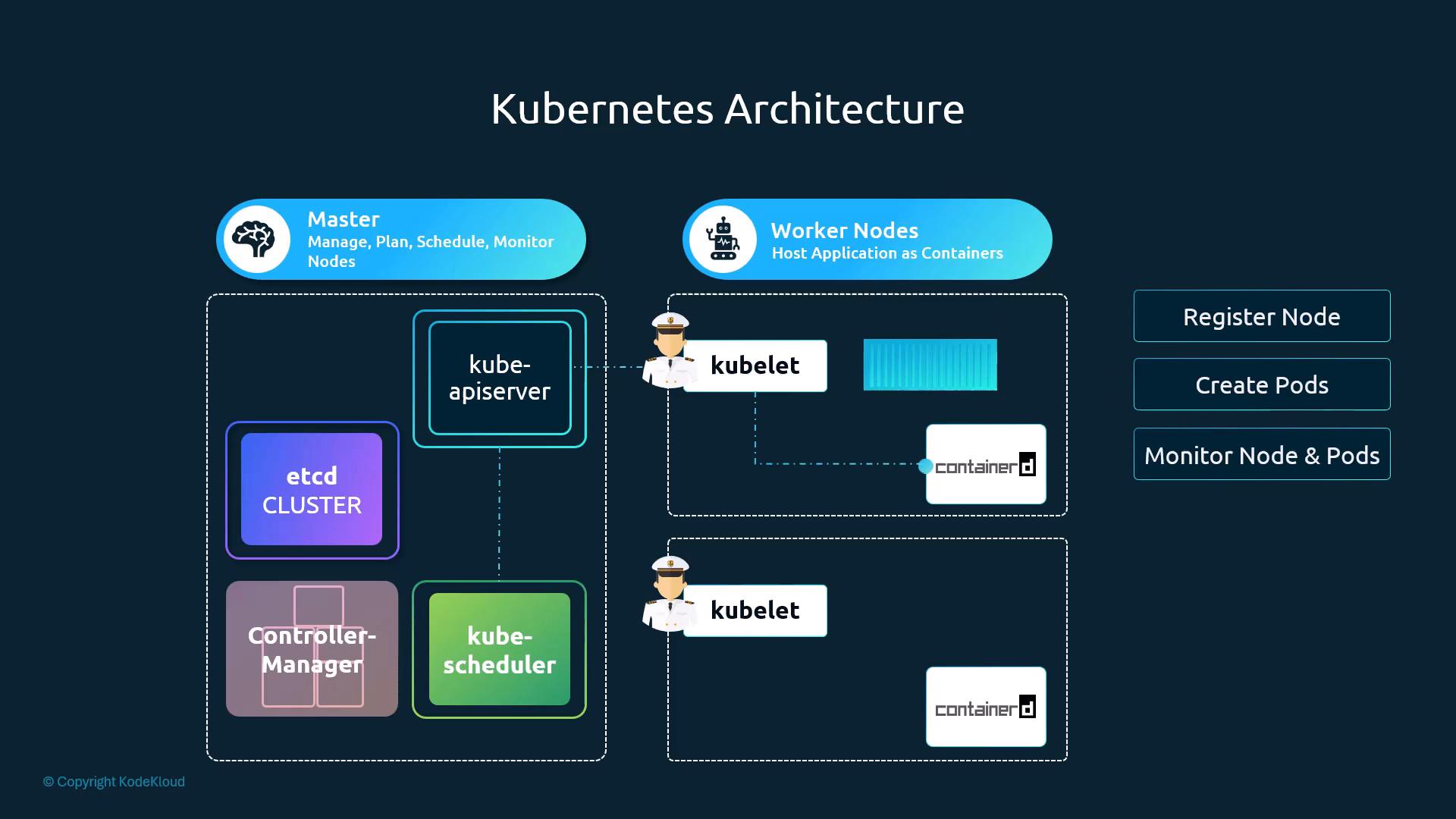
- Cluster = control plane ("brains": manage, plan, schedule, monitor nodes) + worker nodes ("muscle": host apps as containers). Course analogy: control ships coordinate cargo ships.
- Nodes may be physical or virtual, on-prem or cloud.
- Control plane duties: persist cluster state, schedule workloads, continuously reconcile desired vs actual state, expose the API.
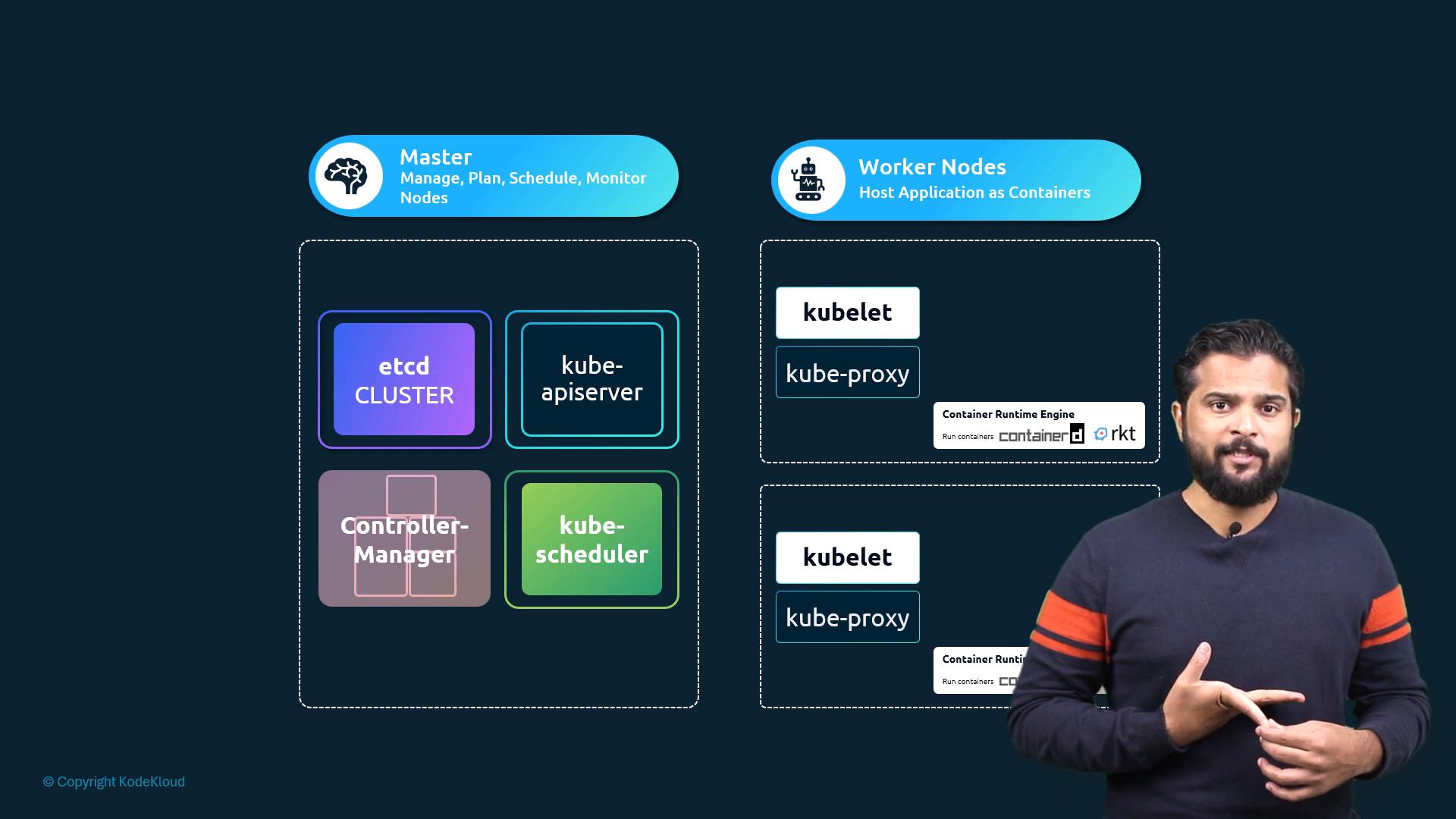
Components
| Component | Role | Runs on |
|---|---|---|
etcd | Distributed, HA key-value store holding all cluster state/config (nodes, pods, Services, ConfigMaps, Secrets…) | Control plane (stacked, or dedicated etcd hosts in HA) |
kube-apiserver | Front end / central hub; exposes the Kubernetes API used by admins, controllers, kubelets. All components read/write cluster state through it | Control plane |
kube-scheduler | Picks the best node for each Pod: resource requests vs node capacity, policies (taints/tolerations, node affinity) | Control plane |
kube-controller-manager | Runs controllers that reconcile desired vs actual state: Node controller (registration, unavailability, removal), Deployment/ReplicaSet (replica counts), ServiceAccount and others | Control plane |
kubelet | Node agent: registers node, receives Pod specs from API server, starts containers and keeps them healthy, reports node/Pod status back | Every node |
kube-proxy | Programs node networking rules so Pods/Services can talk; implements Service load-balancing via iptables or IPVS | Every node |
| Container runtime | Any CRI-compatible runtime (containerd, CRI-O); pulls images, starts containers, exposes lifecycle info to kubelet. Docker was historically common | Every node |
[!WARNING] Exam traps / remember:
- etcd is the authoritative source of truth: lose/corrupt it and the cluster state is gone. Back it up regularly and lock down access (see §6.8).
- Scheduler only decides placement; kubelet actually runs the Pod (see §2.9).
- Only the API server talks to etcd; everything else goes through the API server (see §2.7).
[!NOTE] Beyond the course: in kubeadm clusters the control plane node also runs kubelet, kube-proxy and a runtime, because the control plane components themselves run as static Pods launched by the kubelet (see §3.16). The old
masterrole/taint is nownode-role.kubernetes.io/control-plane. kube-proxy also has annftablesmode in recent releases.
2.3 Docker vs ContainerD
Source: KodeKloud notes
History: CRI, OCI, dockershim
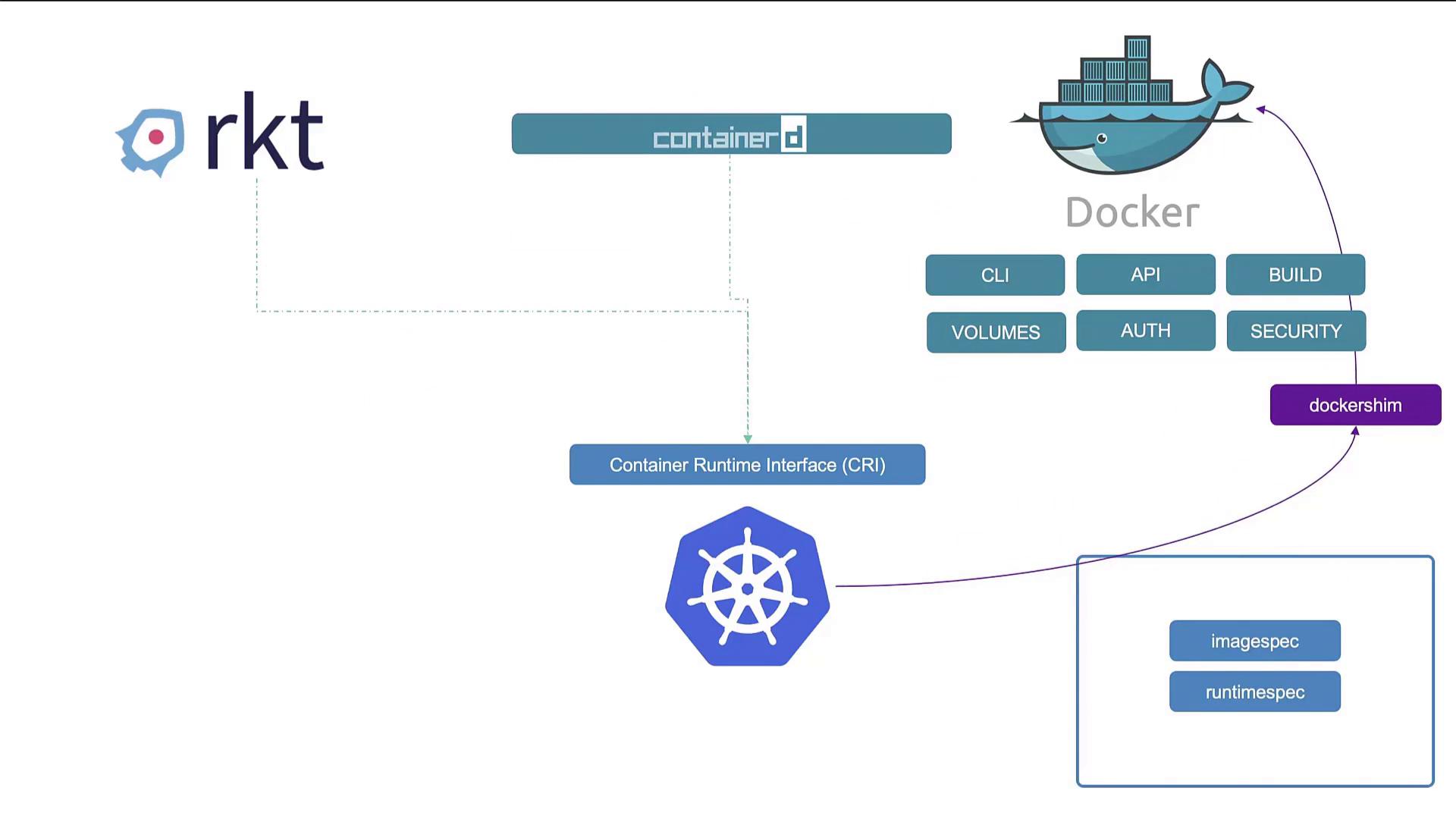
- Early on Docker (and alternatives such as rkt) dominated; Kubernetes was built to orchestrate Docker specifically, so the two were tightly coupled.
- CRI (Container Runtime Interface) was introduced so any compliant runtime could plug into Kubernetes.
- OCI (Open Container Initiative) defines two specs: imagespec (how images are built/stored) and runtimespec (how a runtime must behave). OCI-compliant runtimes can be used through CRI.
- Docker predates CRI and never implemented it, so Kubernetes kept a shim, dockershim, to drive Docker.
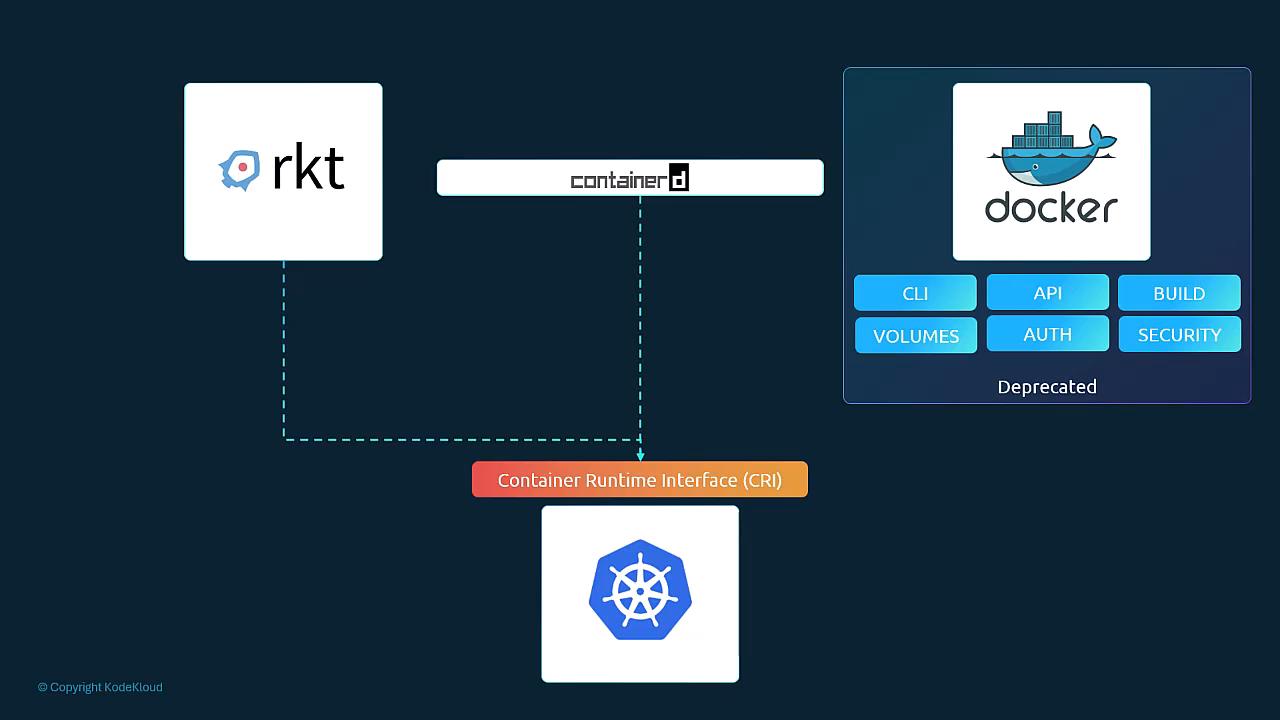
- Maintaining dockershim became pointless overhead → removed in v1.24; Docker Engine is no longer a supported node runtime.
- Docker-built images still work: they follow the OCI image spec, so containerd/CRI-O run them unchanged.
containerd
- Originally part of Docker; now a standalone graduated CNCF project. CRI-compatible, so Kubernetes uses it directly without Docker.
- Install containerd alone when you don't need Docker's extras (CLI, build, volumes, auth, security tooling).
# Extract release tarball into /usr/local (binaries land in /usr/local/bin)
tar -C /usr/local -xzvf containerd-1.6.2-linux-amd64.tar.gz
# bin/containerd  bin/ctr  bin/containerd-shim  bin/containerd-shim-runc-v1
# bin/containerd-shim-runc-v2  bin/containerd-stress
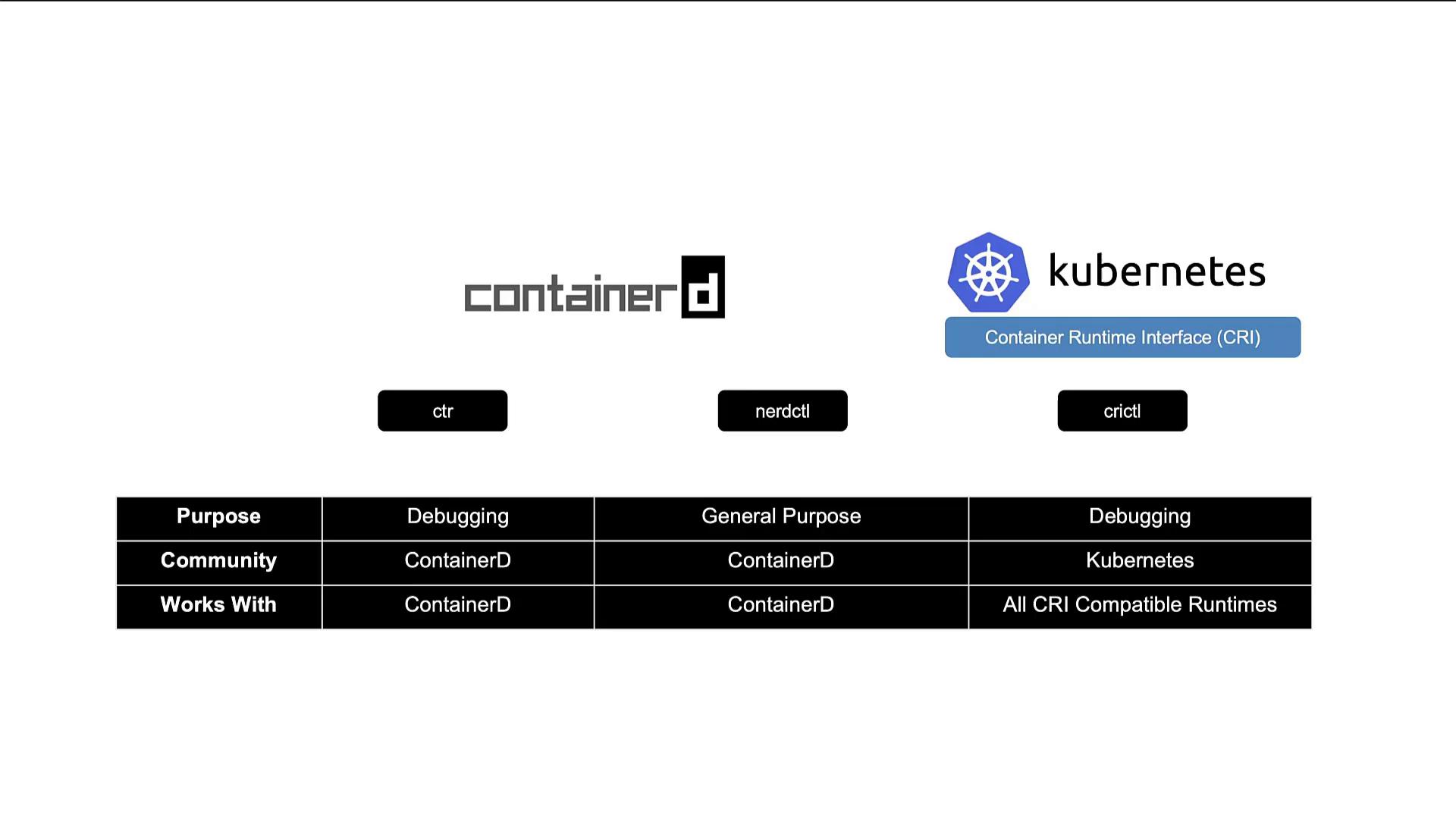
The three CLIs
ctr | nerdctl | crictl | |
|---|---|---|---|
| Purpose | Debugging containerd | General purpose (Docker-like) | Debugging CRI runtimes |
| Community | containerd | containerd | Kubernetes (cri-tools) |
| Works with | containerd only | containerd only | All CRI-compatible runtimes |
| Notes | Bundled with containerd; not user friendly; limited features | Supports docker compose + newest containerd features: encrypted images, lazy pulling, P2P image distribution, image signing/verifying, namespaces in Kubernetes | Installed separately; kubelet-aware; inspect/debug, not for creating containers |
ctr
ctr                                                            # list subcommands
ctr images pull docker.io/library/redis:alpine                 # needs fully-qualified image ref
ctr run --rm -t docker.io/library/redis:alpine redis /bin/sh # run container with ID "redis"- Intended for low-level containerd debugging only, not routine/production container management.
nerdctl (drop-in for docker)
| Docker | nerdctl |
|---|---|
docker | nerdctl (most subcommands map 1:1) |
docker run --name redis redis:alpine | nerdctl run --name redis redis:alpine |
docker run --name webserver -p 80:80 -d nginx | nerdctl run --name webserver -p 80:80 -d nginx |
crictl
crictl                               # list subcommands
crictl pull busybox                  # pull image
crictl images                        # list images
crictl ps -a                         # list containers (incl. exited)
crictl exec -i -t 3e025dd50a72 /bin/ls   # run command in container
crictl logs 3e025dd50a72             # container logs
crictl pods # list pods (docker has no equivalent)- Containers you create with
crictloutside a Pod get removed by the kubelet, which reconciles the node to its Pod list.
| docker | crictl | What | Unsupported / different in crictl |
|---|---|---|---|
| attach | attach | attach to running container | --detach-keys, --sig-proxy |
| exec | exec | run command in container | --privileged, --user, --detach-keys |
| images | images | list images | — |
| info | info | system-wide info | — |
| inspect | inspect | low-level container/image info | — |
| logs | logs | container logs | --details |
| ps | ps | list containers | — |
| stats | stats | resource usage | columns differ (NET/BLOCK I/O, PIDs) |
| version | version | runtime version | — |
Full mapping: https://kubernetes.io/docs/reference/tools/map-crictl-dockercli/
crictl runtime endpoint
- Old crictl tried default sockets in order:
unix:///var/run/dockershim.sock,unix:///run/containerd/containerd.sock,unix:///run/crio/crio.sock,unix:///var/run/cri-dockerd.sock. - After dockershim removal (v1.24) the defaults changed (cri-tools PR 869 / issue 868) → set the endpoint explicitly:
crictl --runtime-endpoint unix:///run/containerd/containerd.sock ps   # per command
export CONTAINER_RUNTIME_ENDPOINT=unix:///run/containerd/containerd.sock   # per shell
crictl ps
[!CAUTION] Correction: the original shows
crictl --runtime-endpoint <sock>with no subcommand, which only prints help. The flag must precede a subcommand (ps,pods, …) as above.
[!NOTE] Beyond the course:
- Persistent setting:
crictl config --set runtime-endpoint=unix:///run/containerd/containerd.sockwrites/etc/crictl.yaml(keysruntime-endpoint,image-endpoint). Exam/lab nodes usually already have this file (kubeadm itself does not create it); otherwise crictl falls back to probing default sockets with warnings.- Kubernetes-managed containers live in containerd namespace
k8s.io:ctr -n k8s.io containers ls,nerdctl -n k8s.io ps. Without-n k8s.ioyou see nothing.- Docker Engine can still back a node via the external cri-dockerd adapter (socket
unix:///var/run/cri-dockerd.sock).
[!TIP] On a node:
crictlfor anything Kubernetes-related (pods/containers the kubelet runs),nerdctlfor Docker-style day-to-day work on containerd,ctronly for deep containerd debugging. The node has nodockercommand in the exam.
2.4 A Note on Docker Deprecation
Source: KodeKloud notes
What was actually deprecated
- Docker (the product) = CLI, API, build tooling (BuildKit), image distribution/storage, volumes, auth, security, plus low-level runtime pieces.
- Docker Engine itself uses containerd (images + container lifecycle) and runc (creates/runs the container process).
- Kubernetes only needs the runtime part. Through CRI it talks straight to
containerdorCRI-O; Docker's higher layers are unnecessary on nodes. - dockershim (adapter letting kubelet drive Docker Engine): deprecation announced v1.20, removed v1.24.
- "Docker deprecation" means only that the dockershim adapter was removed. Docker images and Docker as a dev/CI tool are unaffected.
- Docker Desktop, the Docker CLI and Docker Build remain fine for development, CI/CD, image building and learning. Docker Engine just isn't needed on cluster nodes.
| Topic | Key point |
|---|---|
| Docker product vs runtime | Docker Desktop/CLI/Build are developer tools; nodes only need a CRI runtime |
| Common node runtimes | containerd, CRI-O (speak CRI directly) |
| Docker images | OCI-compliant → run unchanged on containerd / CRI-O |
| Local CLI alternative | nerdctl replaces most Docker commands on containerd-only hosts |
| Meaning of "deprecation" | dockershim removed, not Docker images or Docker as a build tool |
# Docker                                  # nerdctl on containerd (same syntax)
docker build -t my-app:latest .           # nerdctl build -t my-app:latest .
docker run --rm -it my-app:latest /bin/sh # nerdctl run --rm -it my-app:latest /bin/sh
[!NOTE] Beyond the course:
nerdctl buildneeds BuildKit (buildkitd) running on the host. rkt is archived and no longer a live option; it appears in the diagrams for history only.
2.5 etcd for Beginners
Source: KodeKloud notes
What etcd is
- Distributed, reliable key-value store: simple, secure, fast. Consistent storage for service discovery, leader election and critical config. Kubernetes uses it as its primary datastore.
- Lesson scope: what etcd is, what a KV store is, quick start, basic operation. Distributed-system behaviour, how etcd operates, Raft consensus and best-practice node counts are covered later (see §10.4).
Database models
- Relational (SQL): tables of rows/columns with strict schema. Adding a column changes the table for every row. Joins and complex SQL; strong transactional consistency.
- Document store: each record is a self-contained document (JSON/BSON) with its own fields. Schema changes are cheap; multi-document joins are awkward.
- Key-value store: value stored/retrieved by unique key; values can be strings, binary blobs or structured docs (JSON), all opaque to the store (the app interprets them). In Kubernetes, etcd holds cluster state, config and Secrets (unless an external secret store is used).
| Relational DB | Document store | Key-value store | |
|---|---|---|---|
| Schema | Yes (strict) | No (flexible) | No (schema-less) |
| Complex queries | Yes (SQL, joins) | Limited (no joins) | No (get by key) |
| Performance | Good | Good | Very fast |
| Flexibility | Rigid | Flexible | Very flexible |
| Best for | Structured, transactional data | Un/semi-structured, evolving data | Simple fast lookups: config, leader election, discovery |
[
  { "Key": "name",          "Value": "John Doe" },
  { "Key": "location",      "Value": "New York" },
  { "Key": "user:john_doe", "Value": "{\"name\": \"John Doe\", \"age\": 45, \"location\": \"New York\", \"salary\": 5000}" }
]
Quick start
curl -L https://github.com/etcd-io/etcd/releases/download/v3.5.0/etcd-v3.5.0-linux-amd64.tar.gz \
  -o etcd-v3.5.0-linux-amd64.tar.gz
tar xzvf etcd-v3.5.0-linux-amd64.tar.gz
cd etcd-v3.5.0-linux-amd64
./etcd # foreground, testing only; client port 2379 by default- Production: run as systemd service, managed container or Kubernetes Pod, with TLS, proper storage and clustering.
etcdctl
| Action | v3 command | v2 equivalent |
|---|---|---|
| Set a value | ./etcdctl put key1 value1 | set |
| Get a value | ./etcdctl get key1 | get |
| Delete | ./etcdctl del key1 | rm |
| Transactions | txn | not supported |
| Client/server version | ./etcdctl version | --version |
./etcdctl put key1 value1     # OK
./etcdctl get key1            # prints key then value:
# key1
# value1
./etcdctl del key1            # prints 1 (keys deleted)
ETCDCTL_API=3 ./etcdctl put key1 value1   # force v3 API on old etcdctl builds
[!CAUTION] Correction: the original output for
get key1shows onlykey1. etcdctl v3 prints the key line followed by the value line (value1).
Version history
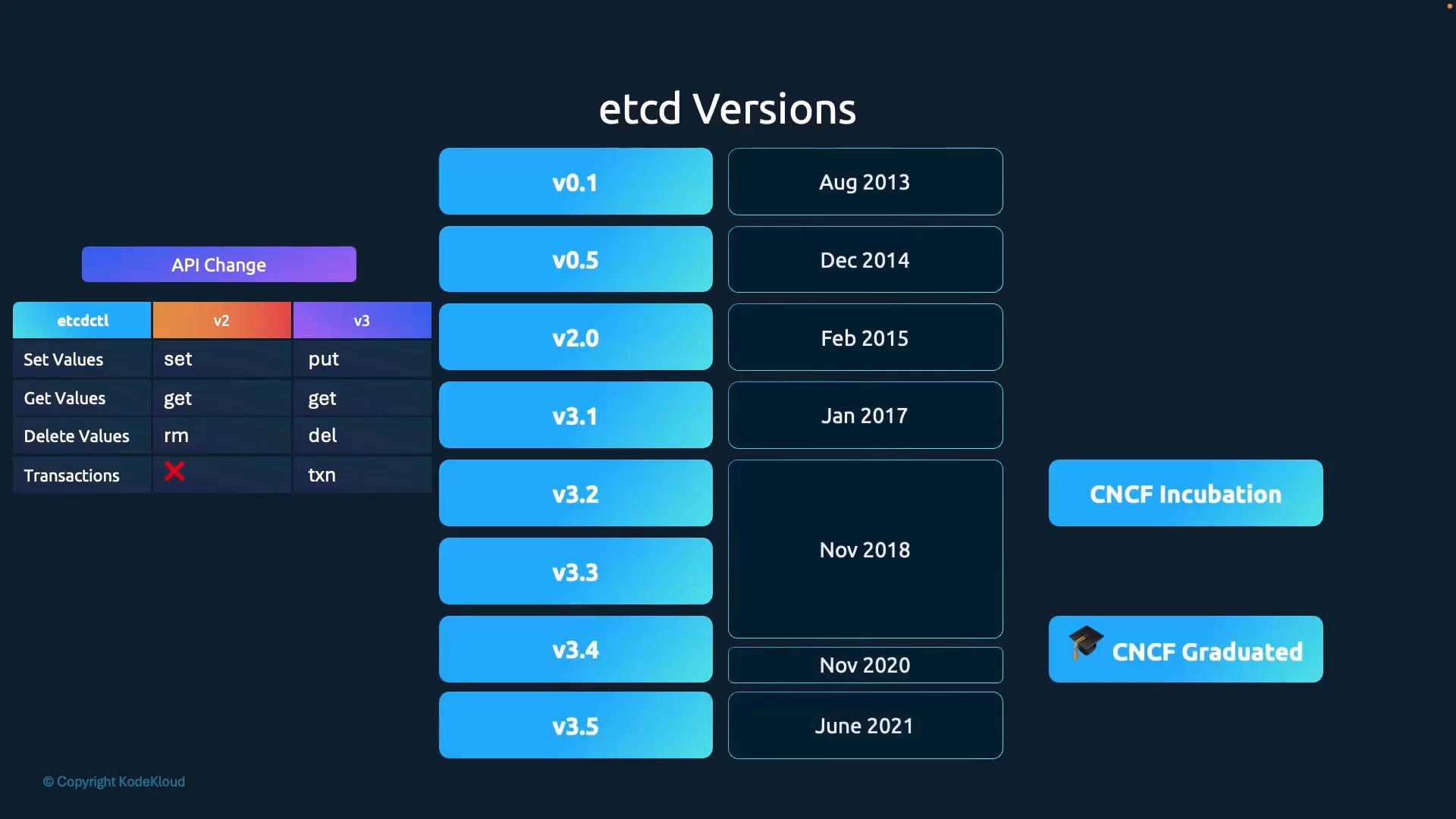
- v0.1 Aug 2013 · v0.5 Dec 2014 · v2.0 Feb 2015 (Raft redesigned, better write throughput) · v3.1 Jan 2017 (performance, new API, transactions) · CNCF incubation Nov 2018 · CNCF graduated Nov 2020 · v3.5 Jun 2021 (incremental optimisations).
- The v2 → v3 jump changed the API and the etcdctl commands (
set/rm→put/del).
[!WARNING] Exam traps / remember:
- Ports: 2379 = client (API server → etcd), 2380 = peer (etcd ↔ etcd).
- etcdctl ≤ 3.3 defaulted to API v2; etcd 3.4+ defaults to v3.
ETCDCTL_API=3is harmless either way, so set it when unsure.etcdctl version(v3) vsetcdctl --version(v2). Check which API you're on before copying commands.
2.6 etcd in Kubernetes
Source: KodeKloud notes
Role
- Stores desired and current state: Nodes, Pods, ReplicaSets, Deployments, ConfigMaps (configs), Secrets, ServiceAccounts (accounts), Roles, RoleBindings, and everything else.
kubectl get …→ API server reads from etcd. A change (create Pod, update ConfigMap, add Node) counts as complete only once written to etcd.- kube-apiserver ↔ etcd over client port 2379. All objects live under the
/registryroot key. - Plan for encryption, secure access and backups; losing etcd can make the cluster unrecoverable.
Deployment methods
| Method | How | Typical use |
|---|---|---|
| From scratch (manual) | Download binaries, install etcd/etcdctl on control-plane nodes, create TLS certs (client + peer), configure a systemd unit with advertised URLs, data dir, initial cluster | Production where you control every detail |
| kubeadm | kubeadm writes an etcd static Pod manifest; etcd runs as Pod etcd-<node> in kube-system | Labs (course practice tests use kubeadm), many kubeadm clusters |
- kubeadm only bootstraps etcd. Securing and backing it up is still your job.
wget -q --https-only "https://github.com/etcd-io/etcd/releases/download/v3.5.10/etcd-v3.5.10-linux-amd64.tar.gz"
kubectl get pods -n kube-system     # kubeadm: shows etcd-master (etcd-controlplane in labs)
Manual install: key systemd flags
[Service]
ExecStart=/usr/local/bin/etcd \
  --name ${ETCD_NAME} \
  --cert-file=/etc/etcd/kubernetes.pem \
  --key-file=/etc/etcd/kubernetes-key.pem \
  --peer-cert-file=/etc/etcd/kubernetes.pem \
  --peer-key-file=/etc/etcd/kubernetes-key.pem \
  --trusted-ca-file=/etc/etcd/ca.pem \
  --peer-trusted-ca-file=/etc/etcd/ca.pem \
  --peer-client-cert-auth \
  --client-cert-auth \
  --initial-advertise-peer-urls https://${INTERNAL_IP}:2380 \
  --listen-peer-urls https://${INTERNAL_IP}:2380 \
  --listen-client-urls https://${INTERNAL_IP}:2379,https://127.0.0.1:2379 \
  --advertise-client-urls https://${INTERNAL_IP}:2379 \
  --initial-cluster-token etcd-cluster-0 \
  --initial-cluster controller-0=https://${CONTROLLER0_IP}:2380,controller-1=https://${CONTROLLER1_IP}:2380 \
  --initial-cluster-state new \
--data-dir=/var/lib/etcd| Flag | Meaning |
|---|---|
--advertise-client-urls | Address clients (kube-apiserver) should use: https://<IP>:2379. This is what --etcd-servers on the API server points at |
--listen-client-urls | Where etcd listens for clients (2379) |
--initial-advertise-peer-urls / --listen-peer-urls | Peer traffic between members (2380) |
--initial-cluster | name=peerURL list of all members, used for discovery/quorum (HA) |
--initial-cluster-state new | Bootstrapping a new cluster |
--cert-file/--key-file/--trusted-ca-file, --peer-* | TLS for client and peer traffic |
--client-cert-auth, --peer-client-cert-auth | Require cert authentication |
--data-dir | Data location, /var/lib/etcd |
Exploring the keyspace
# Course form (works only if etcd accepts unauthenticated local clients)
kubectl exec -n kube-system etcd-master -- etcdctl get "" --prefix --keys-only

# Working form on a kubeadm cluster (TLS client auth enforced)
kubectl exec -n kube-system etcd-controlplane -- etcdctl \
  --cacert /etc/kubernetes/pki/etcd/ca.crt \
  --cert   /etc/kubernetes/pki/etcd/server.crt \
  --key    /etc/kubernetes/pki/etcd/server.key \
get /registry --prefix --keys-only --limit=10/registry/apiregistration.k8s.io/apiservices/v1.
/registry/apiregistration.k8s.io/apiservices/v1.apps
/registry/apiregistration.k8s.io/apiservices/v1.authentication.k8s.io
...--separates kubectl flags from the command run in the container.- Older etcdctl may need
ETCDCTL_API=3plus--endpoints,--cacert,--cert,--key. - Explore read-only. Never delete or modify keys on a live cluster.
[!CAUTION] Correction: kubeadm's etcd enforces client-certificate auth, so the course's bare
etcdctl get "" --prefix --keys-onlyfails with a TLS/handshake error. Always pass--cacert/--cert/--key(paths under/etc/kubernetes/pki/etcd/). Prefer passing flags rather thansh -c "ETCDCTL_API=3 …": recent etcd images may not ship a shell, and etcdctl 3.4+ already defaults to v3.
HA
- Run multiple etcd members across control-plane nodes; each must know its peers (
--initial-cluster) to form quorum. - Peer URLs on 2380 for server-to-server, client URLs on 2379 for API server/clients; TLS + cert auth on both.
- Back up regularly, keep snapshots off-cluster, and test restores (§6.8; HA design §10.4).
[!NOTE] Beyond the course: kubeadm paths: manifest
/etc/kubernetes/manifests/etcd.yaml, certs/etc/kubernetes/pki/etcd/, data/var/lib/etcd(hostPath). Secrets are stored in plaintext in etcd (base64 is only the API/YAML encoding) unless encryption at rest is configured (§5.12).
[!WARNING] Exam traps / remember: find etcd flags/cert paths from the manifest or the running process:
cat /etc/kubernetes/manifests/etcd.yamlorps aux | grep etcd. The pod name isetcd-<nodename>.
2.7 Kube API Server
Source: KodeKloud notes
Role
- Central API endpoint and primary management component.
kubectl, controllers, scheduler and kubelets all talk to it. - Per request: authenticate → authorize → validate (admission) → read/write etcd → respond.
- The only component that talks to etcd directly. Scheduler, controller-manager and kubelet read and update state only through it.
kubectl get nodes→ API server authenticates, validates, reads from etcd, returns result.
Pod creation flow
- Client (
kubectlor REST call) submits a Pod create request. - API server authenticates and validates, then writes the Pod object to etcd with no node assigned. Client gets "created".
- Scheduler (watching the API server) sees the Pod without a node, picks one, and updates the Pod via the API server (
spec.nodeName, a binding). - API server persists the assignment to etcd.
- The kubelet on that node (watching the API server) sees the Pod and creates it through the container runtime.
- Kubelet reports Pod
statusto the API server, which writes it to etcd.
- The same pattern (client → API server → etcd → scheduler/controller/kubelet → API server → etcd) covers most cluster changes.
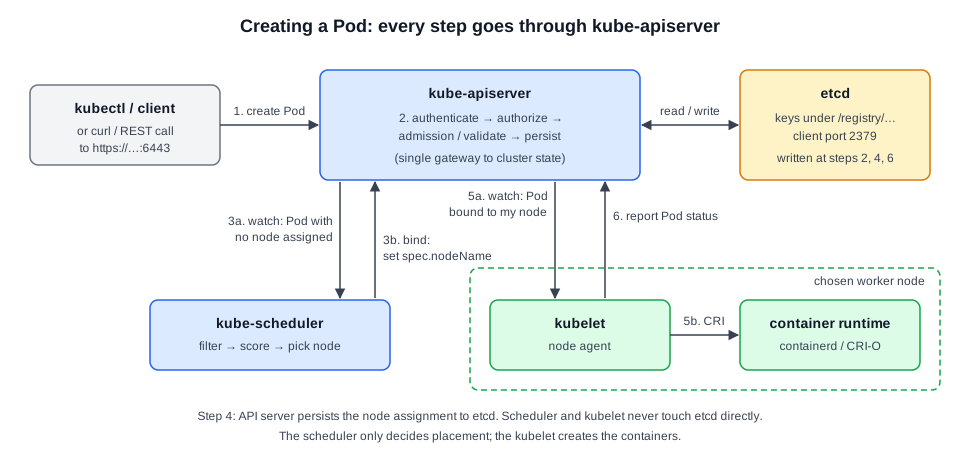 Diagram (new): numbered Pod-creation sequence; only kube-apiserver touches etcd.
Calling the API directly
curl -k -X POST https://127.0.0.1:6443/api/v1/namespaces/default/pods \
  -H "Content-Type: application/json" \
-d @pod.json # 6443 = API server secure port- Must use HTTPS and handle authentication yourself (client certs, tokens…).
-konly skips server-cert verification.
[!CAUTION] Correction: the course shows output
Pod created!; the API actually returns the created Pod object as JSON (HTTP 201), or 401/403 without valid credentials.
[!WARNING] Don't access etcd directly from tools or custom components. That bypasses API-server authentication, authorization and admission and can corrupt or expose state.
Key flags
Most flags point at certificate files securing control-plane links (TLS details: §7.6).
| Flag | Purpose / example |
|---|---|
--etcd-servers | etcd endpoints: https://127.0.0.1:2379 |
--etcd-cafile / --etcd-certfile / --etcd-keyfile | TLS to etcd |
--client-ca-file | CA to validate client certs: /var/lib/kubernetes/ca.pem |
--kubelet-certificate-authority | CA to verify kubelet serving certs |
--kubelet-client-certificate / --kubelet-client-key | API server's client cert to authenticate to kubelets |
--authorization-mode | Authorizers, e.g. Node,RBAC |
--enable-admission-plugins | Admission controllers, e.g. NamespaceLifecycle,NodeRestriction,LimitRanger,ServiceAccount,DefaultStorageClass,ResourceQuota |
--service-cluster-ip-range | ClusterIP Service CIDR: 10.32.0.0/24 |
--service-node-port-range | NodePort range, default 30000-32767 |
--advertise-address | IP advertised to cluster members |
--allow-privileged | Permit privileged containers |
--service-account-key-file | Key to verify ServiceAccount tokens |
--encryption-provider-config | Encryption-at-rest config (§5.12) |
--v=2 | Log verbosity |
Hard-way install (systemd)
- kubeadm: no binary to manage (API server runs as a static Pod from an image). Manual
wget+ systemd unit only for hard-way/custom installs.
# Course URL used storage.googleapis.com/kubernetes-release; current official URL:
wget https://dl.k8s.io/release/vX.Y.Z/bin/linux/amd64/kube-apiserver# /etc/systemd/system/kube-apiserver.service (course example; see CAUTION for stale flags)
[Unit]
Description=Kubernetes API Server
Documentation=https://kubernetes.io/docs
[Service]
ExecStart=/usr/local/bin/kube-apiserver \
--advertise-address=${INTERNAL_IP} \
--allow-privileged=true \
--apiserver-count=3 \
--authorization-mode=Node,RBAC \
--bind-address=0.0.0.0 \
--client-ca-file=/var/lib/kubernetes/ca.pem \
--enable-admission-plugins=Initializers,NamespaceLifecycle,NodeRestriction,LimitRanger,ServiceAccount,DefaultStorageClass,ResourceQuota \
--enable-swagger-ui=true \
--etcd-cafile=/var/lib/kubernetes/ca.pem \
--etcd-certfile=/var/lib/kubernetes/kubernetes.pem \
--etcd-keyfile=/var/lib/kubernetes/kubernetes-key.pem \
--etcd-servers=https://127.0.0.1:2379 \
--event-ttl=1h \
--experimental-encryption-provider-config=/var/lib/kubernetes/encryption-config.yaml \
--kubelet-certificate-authority=/var/lib/kubernetes/ca.pem \
--kubelet-client-certificate=/var/lib/kubernetes/kubernetes.pem \
--kubelet-client-key=/var/lib/kubernetes/kubernetes-key.pem \
--kubelet-https=true \
--runtime-config=api/all \
--service-account-key-file=/var/lib/kubernetes/service-account.pem \
--service-cluster-ip-range=10.32.0.0/24 \
--service-node-port-range=30000-32767 \
--v=2
Restart=on-failure
RestartSec=5
[Install]
WantedBy=multi-user.target[!CAUTION] Correction (outdated flags in the course unit):
--experimental-encryption-provider-config→ now--encryption-provider-config.Initializersadmission plugin,--enable-swagger-uiand--kubelet-httpsare removed.--apiserver-countis deprecated (lease-based endpoint reconciler is the default).--runtime-config=api/all→ current syntaxapi/all=true.- Since v1.20 the API server also requires
--service-account-issuerand--service-account-signing-key-file.- The course itself says some flags may be deprecated; always check the docs for your version.
Viewing the running options
| Install type | Where to look |
|---|---|
kubeadm (static Pod kube-apiserver-<node> in kube-system) | /etc/kubernetes/manifests/kube-apiserver.yaml |
| systemd (hard way) | /etc/systemd/system/kube-apiserver.service |
| Any | ps aux | grep kube-apiserver (effective flags of the live process) |
kubectl get pods -n kube-system                        # kube-apiserver-master, etcd-master, kube-controller-manager-master, kube-scheduler-master, kube-proxy-*, coredns-*, weave-net-*
sudo cat /etc/kubernetes/manifests/kube-apiserver.yaml # kubeadm
sudo cat /etc/systemd/system/kube-apiserver.service    # systemd
ps aux | grep kube-apiserver                           # any
[!WARNING] Exam traps / remember:
- Control-plane connectivity/auth problems: check API server flags, certs and logs first.
- kubeadm: editing
/etc/kubernetes/manifests/kube-apiserver.yamlmakes the kubelet recreate the Pod automatically, so nokubectl apply. While it restartskubectlfails ("connection refused" on :6443), which is expected for a minute.- Course output shows
ROLES master; current clusters showcontrol-plane.
[!NOTE] Beyond the course: if the API server doesn't come back after a manifest edit,
kubectlis useless. Usecrictl ps -a | grep kube-apiserver,crictl logs <id>, or/var/log/pods/kube-system_kube-apiserver-*/on the node (§12.4).
2.8 Kube Controller Manager
Source: KodeKloud notes
Controllers
- A controller = control loop: watch status of its resources → compare with desired state → remediate via API-server calls.
- Each is like a department with one job. Examples: Node, ReplicaSet, ReplicationController, Deployment, Namespace, Endpoint, Job, CronJob, StatefulSet, ServiceAccount, PV-Binder, PV-Protection controllers.
- All run as loops inside one process/binary:
kube-controller-manager.
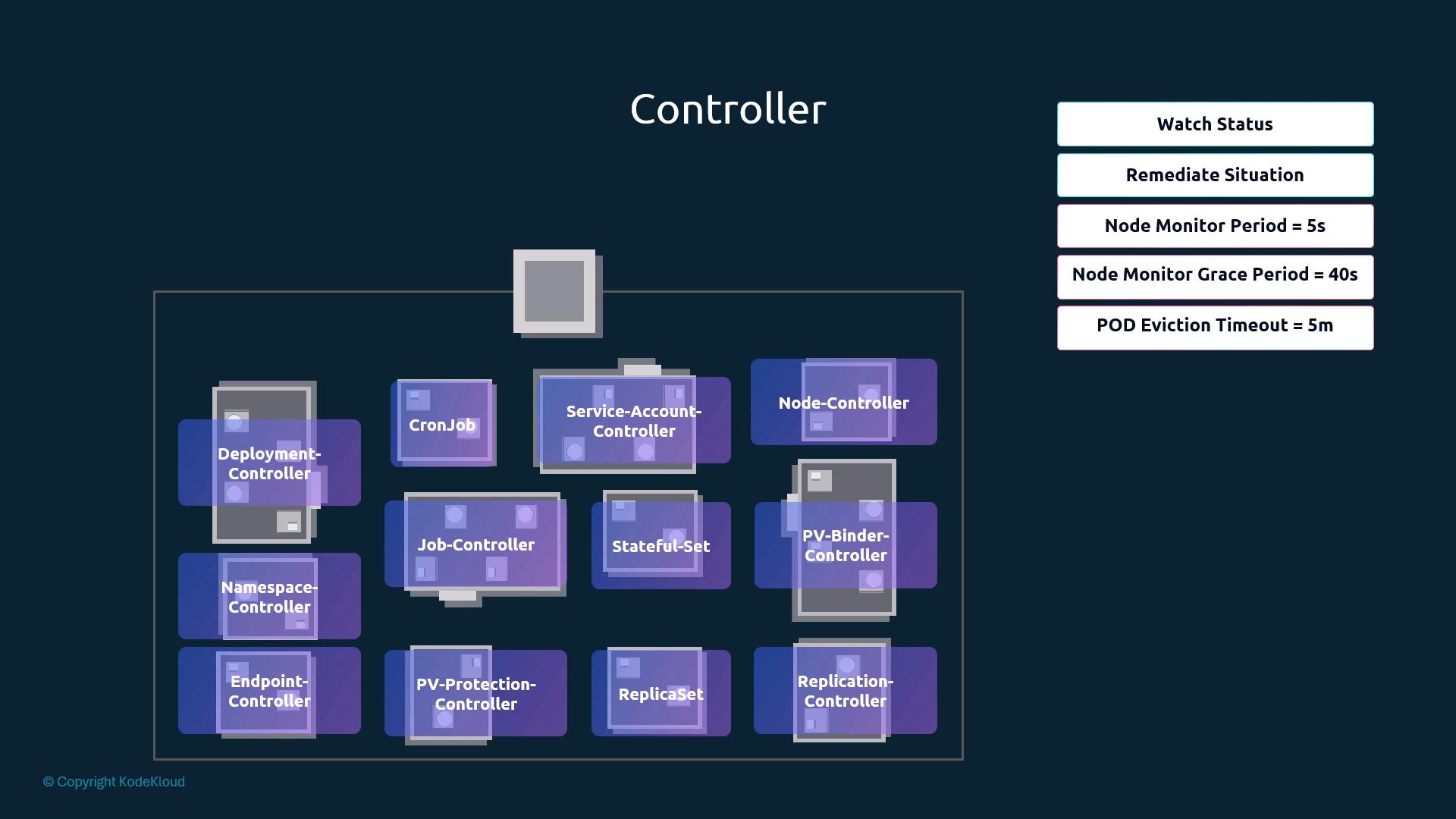
Node controller
| Flag | Default (course) | Meaning |
|---|---|---|
--node-monitor-period | 5s | How often node status is checked |
--node-monitor-grace-period | 40s | No heartbeat for this long → node marked unreachable (NotReady) |
--pod-eviction-timeout | 5m | After being marked unreachable, wait this long before evicting its Pods; controller-owned Pods (RS/Deployment) are recreated on healthy nodes |
$ kubectl get nodes
NAME STATUS ROLES AGE VERSION
worker-1 Ready <none> 8d v1.13.0
worker-2 NotReady <none> 8d v1.13.0 # heartbeats stopped > grace period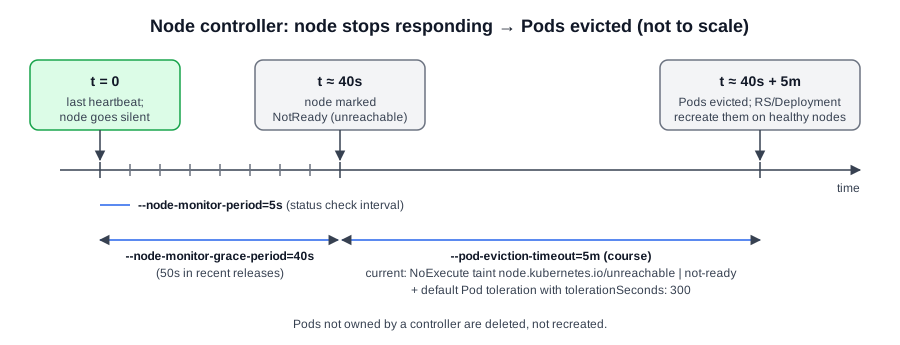 Diagram (new): node controller timings from last heartbeat to Pod eviction (not to scale).
[!CAUTION] Correction (current behaviour):
--pod-eviction-timeoutwas removed from kube-controller-manager (v1.27). Eviction is now taint-based: the node controller taints the nodenode.kubernetes.io/unreachableornode.kubernetes.io/not-ready(effectNoExecute), and every Pod gets default tolerations for those taints withtolerationSeconds: 300. The net result is still about 5 minutes; tune it per Pod viatolerationSeconds. Recent releases also raised the--node-monitor-grace-perioddefault to50s.
ReplicationController / ReplicaSet controller
- Keeps the declared number of replicas running; a failed or deleted Pod gets replaced.
- Deployments, Services/Endpoints, Namespaces, PVs, Jobs, StatefulSets and more are all implemented by controllers.
Installing / running
wget https://dl.k8s.io/release/v1.xx.0/bin/linux/amd64/kube-controller-manager # course used storage.googleapis.com/kubernetes-release# /etc/systemd/system/kube-controller-manager.service
[Service]
ExecStart=/usr/local/bin/kube-controller-manager \
--address=0.0.0.0 \
--cluster-cidr=10.200.0.0/16 \
--cluster-name=kubernetes \
--cluster-signing-cert-file=/var/lib/kubernetes/ca.pem \
--cluster-signing-key-file=/var/lib/kubernetes/ca-key.pem \
--kubeconfig=/var/lib/kubernetes/kube-controller-manager.kubeconfig \
--leader-elect=true \
--root-ca-file=/var/lib/kubernetes/ca.pem \
--service-account-private-key-file=/var/lib/kubernetes/service-account-key.pem \
--service-cluster-ip-range=10.32.0.0/24 \
--use-service-account-credentials=true \
--node-monitor-period=5s \
--node-monitor-grace-period=40s \
--pod-eviction-timeout=5m0s \
--v=2
Restart=on-failure
RestartSec=5| Flag | Purpose |
|---|---|
--cluster-cidr | Pod network CIDR (used by node IPAM) |
--service-cluster-ip-range | Service CIDR (must match API server) |
--cluster-signing-cert-file / --cluster-signing-key-file | CA used to sign approved CSRs (Certificates API §7.10) |
--kubeconfig | How the controller-manager reaches the API server |
--leader-elect=true | Only one active instance in HA control planes |
--root-ca-file | CA bundle put into ServiceAccount token data |
--service-account-private-key-file | Key that signs ServiceAccount tokens |
--use-service-account-credentials | Each controller uses its own ServiceAccount |
--controllers (choose which controllers run)
--controllers stringSlice    Default: [*]
'*' = all on-by-default controllers, 'foo' enables foo, '-foo' disables foo.
All controllers: attachdetach, bootstrapsigner, clusterrole-aggregation, cronjob, csrapproving,
csrcleaner, csrsigning, daemonset, deployment, disruption, endpoint, garbagecollector,
horizontalpodautoscaling, job, namespace, nodeipam, nodelifecycle, persistentvolume-binder,
persistentvolume-expander, podgc, pv-protection, pvc-protection, replicaset, replicationcontroller,
resourcequota, root-ca-cert-publisher, route, service, serviceaccount, serviceaccount-token,
statefulset, tokencleaner, ttl, ttl-after-finished
Disabled-by-default: bootstrapsigner, tokencleaner- e.g.
--controllers=*,-replicasetdisables only the ReplicaSet controller. The list varies by version.
Viewing options
kubectl get pods -n kube-system                                   # kube-controller-manager-master (static Pod)
cat /etc/kubernetes/manifests/kube-controller-manager.yaml        # kubeadm
cat /etc/systemd/system/kube-controller-manager.service           # systemd / hard way
ps aux | grep kube-controller-manager # effective flags# kubeadm manifest excerpt (/etc/kubernetes/manifests/kube-controller-manager.yaml)
spec:
containers:
- command:
- kube-controller-manager
- --address=127.0.0.1 # now --bind-address=127.0.0.1
- --cluster-signing-cert-file=/etc/kubernetes/pki/ca.crt
- --cluster-signing-key-file=/etc/kubernetes/pki/ca.key
- --controllers=*,bootstrapsigner,tokencleaner # kubeadm enables the two off-by-default ones
- --kubeconfig=/etc/kubernetes/controller-manager.conf
- --leader-elect=true
- --root-ca-file=/etc/kubernetes/pki/ca.crt
- --service-account-private-key-file=/etc/kubernetes/pki/sa.key
- --use-service-account-credentials=true[!CAUTION] Correction:
--address(insecure serving) is removed from kube-controller-manager and kube-scheduler. Current kubeadm manifests use--bind-address=127.0.0.1(secure port 10257 for controller-manager).
[!WARNING] Exam traps / remember:
- Deployments/ReplicaSets not creating Pods, or nodes never marked NotReady → suspect kube-controller-manager (check its Pod/logs and manifest).
- kubeadm CA files:
/etc/kubernetes/pki/ca.crt/ca.key; SA signing key:/etc/kubernetes/pki/sa.key.
2.9 Kube Scheduler
Source: KodeKloud notes
Role
- Picks which node each unscheduled Pod goes to. It does not start the Pod: the kubelet on the chosen node creates it via the runtime.
- Why needed: many nodes and Pods. Placement must respect capacity, dedicated hardware and policies.
| Use case | Scheduler enforces | Example |
|---|---|---|
| Resource capacity | Node has enough CPU/memory | Pod requesting 2 CPU not placed on node with 1 free |
| Dedicated workloads | Specialised Pods on specific nodes | GPU Pods on nodes labelled gpu=true |
| Constraints & policies | taints/tolerations, nodeSelector, affinity/anti-affinity | Keep sensitive Pods apart; place Pods near their data |
Filter → score → bind
- Filter (predicates): drop nodes failing hard requirements: insufficient CPU/memory, nodeSelector/nodeAffinity mismatch, untolerated taints, unsatisfiable topology constraints.
- Score/rank (priorities): score remaining nodes with priority functions (spread Pods, prefer more spare capacity, soft affinity/anti-affinity, data locality); scores are normalised and aggregated, and the highest wins.
- Bind: scheduler issues a binding API call (sets the node); kubelet on that node runs the Pod.
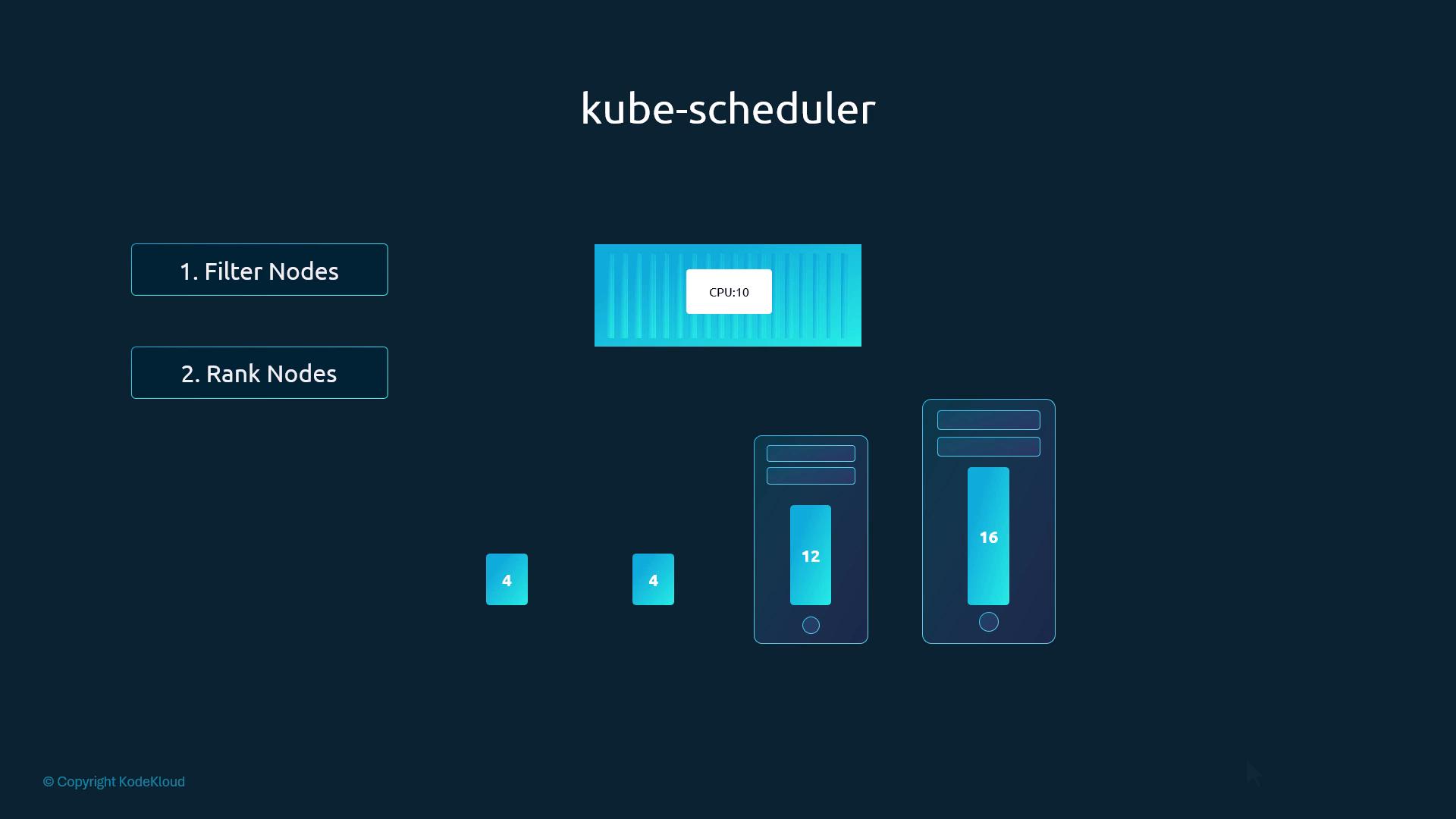
- Worked example: Pod needs 10 CPU; nodes have 4, 4, 12, 16.
- Filter removes the two 4-CPU nodes.
- Rank by CPU left after placement: 12 → 2 free, 16 → 6 free → 16-CPU node wins.
Customising
- Tune plugins/behaviour with a scheduler config file (
--config; profiles §3.21). - Run your own scheduler and select it per Pod with
spec.schedulerName(§3.19). - Placement levers: resource
requests/limits(§3.12), taints & tolerations (§3.6),nodeSelector(§3.8),nodeAffinity(§3.9),podAffinity/podAntiAffinity.
Installing / inspecting
wget https://dl.k8s.io/release/v1.xx.0/bin/linux/amd64/kube-scheduler   # course: storage.googleapis.com/kubernetes-release
chmod +x kube-scheduler
sudo mv kube-scheduler /usr/local/bin/# systemd unit ExecStart
ExecStart=/usr/local/bin/kube-scheduler \
--config=/etc/kubernetes/config/kube-scheduler.yaml \
--v=2# kubeadm static Pod: /etc/kubernetes/manifests/kube-scheduler.yaml (trimmed, current form)
apiVersion: v1
kind: Pod
metadata:
name: kube-scheduler
namespace: kube-system
spec:
hostNetwork: true
containers:
- name: kube-scheduler
image: registry.k8s.io/kube-scheduler:v1.xx.0 # course: k8s.gcr.io/...
command:
- kube-scheduler
- --bind-address=127.0.0.1 # course: --address=127.0.0.1
- --kubeconfig=/etc/kubernetes/scheduler.conf # credentials to reach the API server
- --leader-elect=true # one active scheduler in HA
volumeMounts:
- name: kubeconfig
mountPath: /etc/kubernetes/scheduler.conf
readOnly: true
volumes:
- name: kubeconfig
hostPath:
path: /etc/kubernetes/scheduler.conf
type: FileOrCreatesudo cat /etc/kubernetes/manifests/kube-scheduler.yaml # kubeadm config
ps aux | grep kube-scheduler # live flags (or pgrep / pidof / ps -ef)
kubectl get pods -n kube-system # kube-scheduler-<node>[!CAUTION] Correction: image registry
k8s.gcr.iois frozen →registry.k8s.io.--addressis removed →--bind-address. The course fragment mounted the whole/etc/kubernetesdir; kubeadm actually mounts justscheduler.conf(either works for the API).
[!WARNING] Exam traps / remember:
- Pods stuck in
Pendingwith no node → scheduler down/broken (checkkube-scheduler-<node>in kube-system) or no node passes filtering (kubectl describe pod→ Events:FailedScheduling … Insufficient cpu/ untolerated taint).- Without a scheduler you can still place a Pod by setting
spec.nodeNameyourself (§3.2).- Scheduler sets the node; kubelet starts the containers. Don't mix them up.
2.10 Kubelet
Source: KodeKloud notes
Role
- Node agent ("captain of the ship") on every worker node; sole point of contact with the control plane (kube-apiserver).
- Responsibilities:
- Register the node with the cluster and report node status.
- Watch for PodSpecs assigned to its node → tell the container runtime (containerd / CRI-O / any CRI implementation) to pull the image and run containers.
- Monitor pods and containers continuously; report node + pod status back to kube-apiserver.
- Run liveness/readiness probes, manage pod lifecycle.
- Optionally bootstrap its own TLS credentials for secure API server communication.
Installation
- kubeadm does NOT install/deploy the kubelet. Each node needs a supported container runtime + kubelet installed and running before
kubeadm init/kubeadm join. - Install via package manager / distro repos, or manually as a binary:
# download a specific kubelet release binary (course example version)
wget https://storage.googleapis.com/kubernetes-release/release/v1.13.0/bin/linux/amd64/kubelet
chmod +x kubelet
sudo mv kubelet /usr/local/bin/- Run as a systemd service (course example unit — adapt flags to your version, see CAUTION below):
# /etc/systemd/system/kubelet.service
[Unit]
Description=Kubernetes Kubelet
Documentation=https://kubernetes.io/docs/
After=network.target

[Service]
ExecStart=/usr/local/bin/kubelet \
  --config=/var/lib/kubelet/kubelet-config.yaml \
  --container-runtime=remote \
  --container-runtime-endpoint=unix:///var/run/containerd/containerd.sock \
  --image-pull-progress-deadline=2m \
  --kubeconfig=/var/lib/kubelet/kubeconfig \
  --network-plugin=cni \
  --register-node=true \
  --v=2
Restart=always
StartLimitInterval=0

[Install]
WantedBy=multi-user.targetsudo systemctl daemon-reload
sudo systemctl enable --now kubelet # enable at boot + start nowCommon kubelet flags
| Flag | Meaning |
|---|---|
--config | Path to KubeletConfiguration file (kubelet-config.yaml) |
--kubeconfig | kubeconfig the kubelet uses to talk to the API server |
--container-runtime | Runtime type, e.g. remote |
--container-runtime-endpoint | CRI socket, e.g. unix:///var/run/containerd/containerd.sock |
--network-plugin | e.g. cni |
--register-node | Whether kubelet registers the node with the API server |
--v | Log verbosity |
Verify / troubleshoot
| Command | Purpose |
|---|---|
sudo systemctl status kubelet | Service running? |
sudo journalctl -u kubelet -f | Follow kubelet logs |
ps aux | grep kubelet | Running process + effective command-line flags |
kubectl get nodes | Node registered from control-plane view |
Config and TLS
- Config comes from a static file (
--config); the course also mentions a dynamic config mechanism (see CAUTION). - Production: kubelet ↔ API server over TLS; kubelet supports TLS bootstrapping and certificate rotation.
- Keep kubelet and control-plane versions compatible; mismatched versions or unsupported flags can stop a node joining.
[!CAUTION] Correction (outdated flags in the course unit file):
--network-pluginand--image-pull-progress-deadlinewere dockershim-only flags and were removed in v1.24.--container-runtime=remotewas removed in v1.27, because remote CRI is now the only mode. Only--container-runtime-endpointremains. Dynamic Kubelet Configuration was also removed (v1.24). Today the static--configfile is the only config-file mechanism. Thestorage.googleapis.com/kubernetes-releaseURL is legacy; the current download host isdl.k8s.io(e.g.https://dl.k8s.io/release/v1.xx.y/bin/linux/amd64/kubelet).
[!NOTE] Beyond the course (kubeadm node layout, exam-relevant):
- Package install via
pkgs.k8s.iorepos (apt install kubelet kubeadm kubectl). The kubelet runs as a systemd service, not a pod, so it never shows inkubectl get pods -n kube-system.- Files: config
/var/lib/kubelet/config.yaml; kubeconfig/etc/kubernetes/kubelet.conf; kubeadm drop-in/usr/lib/systemd/system/kubelet.service.d/10-kubeadm.conf(path varies by distro, e.g./etc/systemd/system/kubelet.service.d/); extra flags/var/lib/kubelet/kubeadm-flags.env; static pod manifestsstaticPodPath: /etc/kubernetes/manifests(see §3.16).- Kubelet API port 10250. kubeadm enables client cert rotation (
rotateCertificates: true); certs live in/var/lib/kubelet/pki/.- Node
NotReady→ SSH to the node:systemctl status kubelet,journalctl -u kubelet. Typical causes are a stopped service, a wrong path in the config/kubeconfig, or bad certs (see §12.6). After editing the unit/drop-in:systemctl daemon-reload && systemctl restart kubelet.
[!WARNING] Exam traps / remember:
- kubeadm won't install the kubelet: install it (plus a runtime) on every node before
kubeadm init/join.ps aux | grep kubeletshows the effective flags, including--config/--kubeconfigpaths.
2.11 Kube Proxy
Source: KodeKloud notes
Why it exists
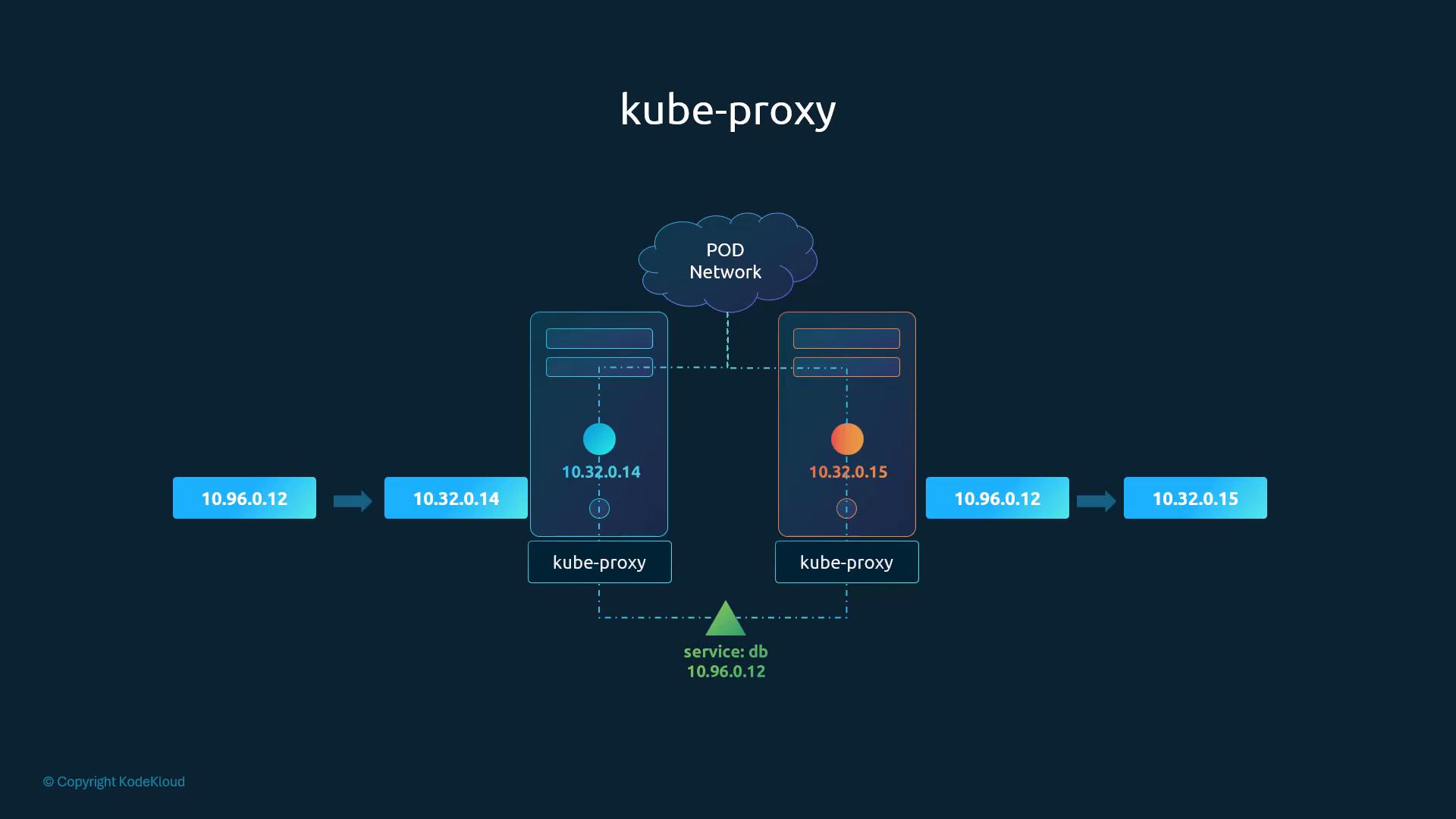
- A cluster-wide pod network (implemented by a network plugin) lets every pod reach every other pod across nodes. Pod IPs are ephemeral, so they change when pods are rescheduled.
- A Service (e.g.
db→ ClusterIP10.96.0.12) gives a stable IP/name that forwards to backend pods. - A Service is virtual: it has no interface, no process, and doesn't join the pod network. It exists only as an API object. Something on every node must install forwarding rules for the Service IP, and that is kube-proxy.
- kube-proxy runs on every node. It:
- Watches the API for Service and Endpoints / EndpointSlice changes.
- Translates each Service into node-local rules, e.g.
10.96.0.12:5432→ backend pod IPs (10.32.0.14,10.32.0.15). - Implements the datapath (iptables, IPVS, …) and load-balances across the backends.
Deployment patterns
| Pattern | How |
|---|---|
| Manual (hard way) | Download the binary, run as a systemd service with flags + kubeconfig |
| kubeadm | DaemonSet kube-proxy in kube-system → one pod per node |
# manual install (illustrative)
curl -LO https://dl.k8s.io/v1.26.0/kubernetes-server-linux-amd64.tar.gz
tar -xzf kubernetes-server-linux-amd64.tar.gz
sudo cp kubernetes/server/bin/kube-proxy /usr/local/bin/
sudo chmod +x /usr/local/bin/kube-proxy
# then create a kube-proxy systemd unit with the right flags/kubeconfig

# kubeadm cluster: inspect
kubectl get daemonset -n kube-system kube-proxy
kubectl get pods -n kube-system -l k8s-app=kube-proxy          # one per node
kubectl -n kube-system get configmap kube-proxy -o yaml        # proxy mode + settings
Proxy modes
| Mode | Characteristics | When |
|---|---|---|
iptables | iptables rules per node; stable, widely used | Default in many clusters |
ipvs | Linux IPVS; higher-performance load balancing | High connection rates / large scale |
| eBPF | Efficient eBPF packet processing | Needs kernel + tooling support |
userspace | Legacy; proxies traffic through a userspace process | Deprecated, avoid |
- Mode is set in the kube-proxy configuration. On kubeadm clusters that is the
kube-proxyConfigMap.
Troubleshooting
- Check kube-proxy pods and their logs in
kube-system. - Check the ConfigMap for the configured mode.
- iptables mode:
iptables-save(beyond the course: look forKUBE-SVC-*/KUBE-SEP-*chains). IPVS mode:ipvsadm -L -non the node.
[!CAUTION] Correction:
userspacemode isn't just deprecated: it was removed in v1.26. eBPF is not a kube-proxy mode. eBPF datapaths come from CNI plugins (e.g. Cilium) that replace kube-proxy. Valid Linuxmodevalues today areiptables(default when empty),ipvsandnftables(GA in v1.33). Upstream has started deprecatingipvsin favour ofnftables.
[!NOTE] Beyond the course: in the ConfigMap the mode is under
data.config.conf→mode: ""(empty = iptables).kubectl logs -n kube-system <kube-proxy-pod>prints the proxier in use (e.g. "Using iptables Proxier"). After editing the ConfigMap, restart the pods:kubectl -n kube-system rollout restart ds kube-proxy. Services and networking are covered in detail in §2.21 and §9.13.
2.12 Pods
Source: KodeKloud notes
Assumptions
- App already built into an image and pushed to a registry (e.g. Docker Hub); a working cluster (single- or multi-node) with all services running.
Pod basics
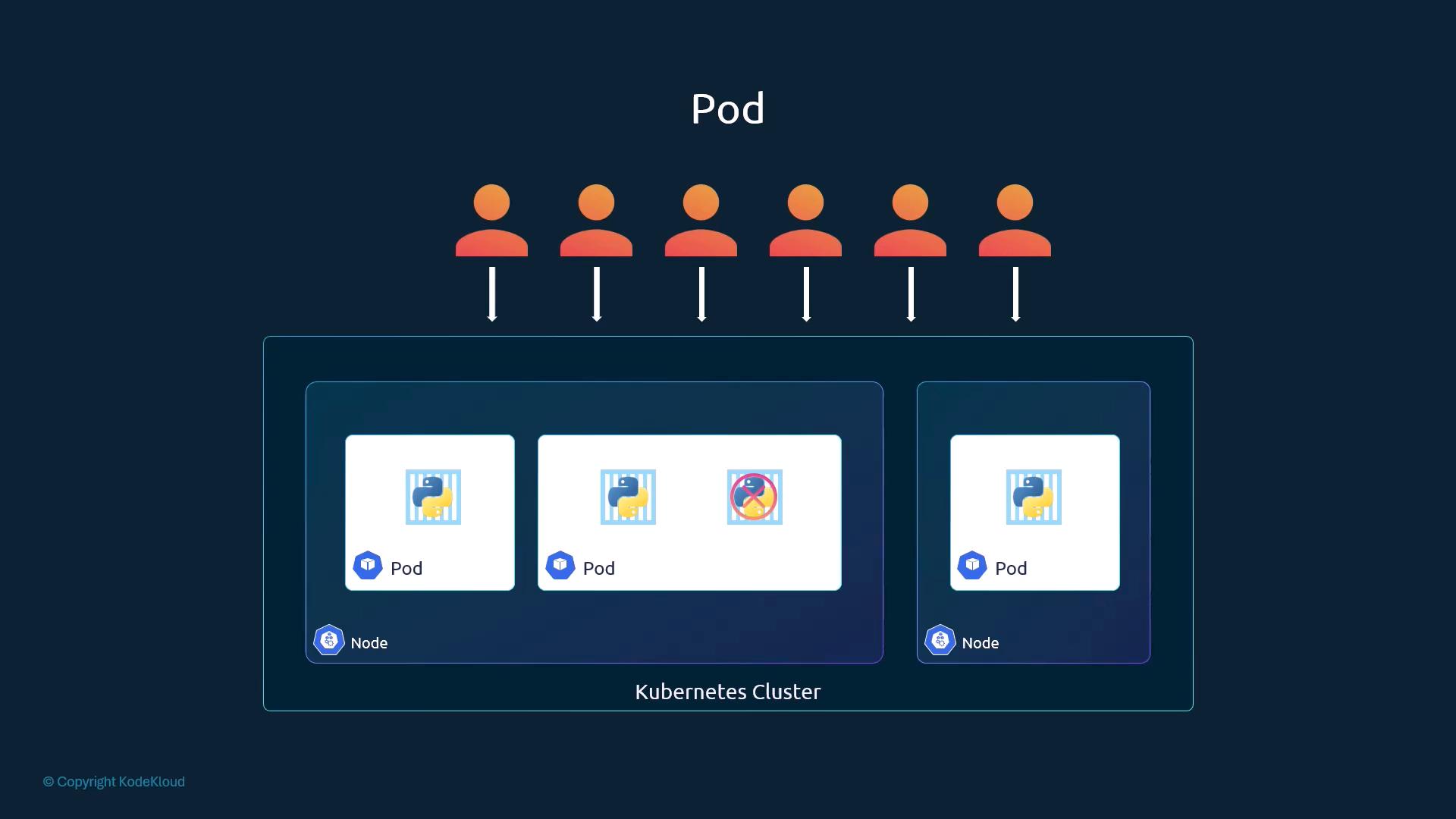
- Kubernetes never deploys containers directly. They are wrapped in a Pod, the smallest deployable object, usually 1 pod = 1 instance of the application.
- Scale by adding/removing pods, never by adding containers to an existing pod. New pods may land on the same node or on new nodes as capacity grows.
- Pod:container is usually 1:1.
Multi-container pods
- Used for helper / sidecar containers tightly coupled to the app, e.g. logging, monitoring agents, data fetchers and file processors. Relatively uncommon.
- Containers in one pod:
- are created and destroyed together (shared lifecycle);
- share the network namespace, so they reach each other via
localhost; - can mount the same volumes.
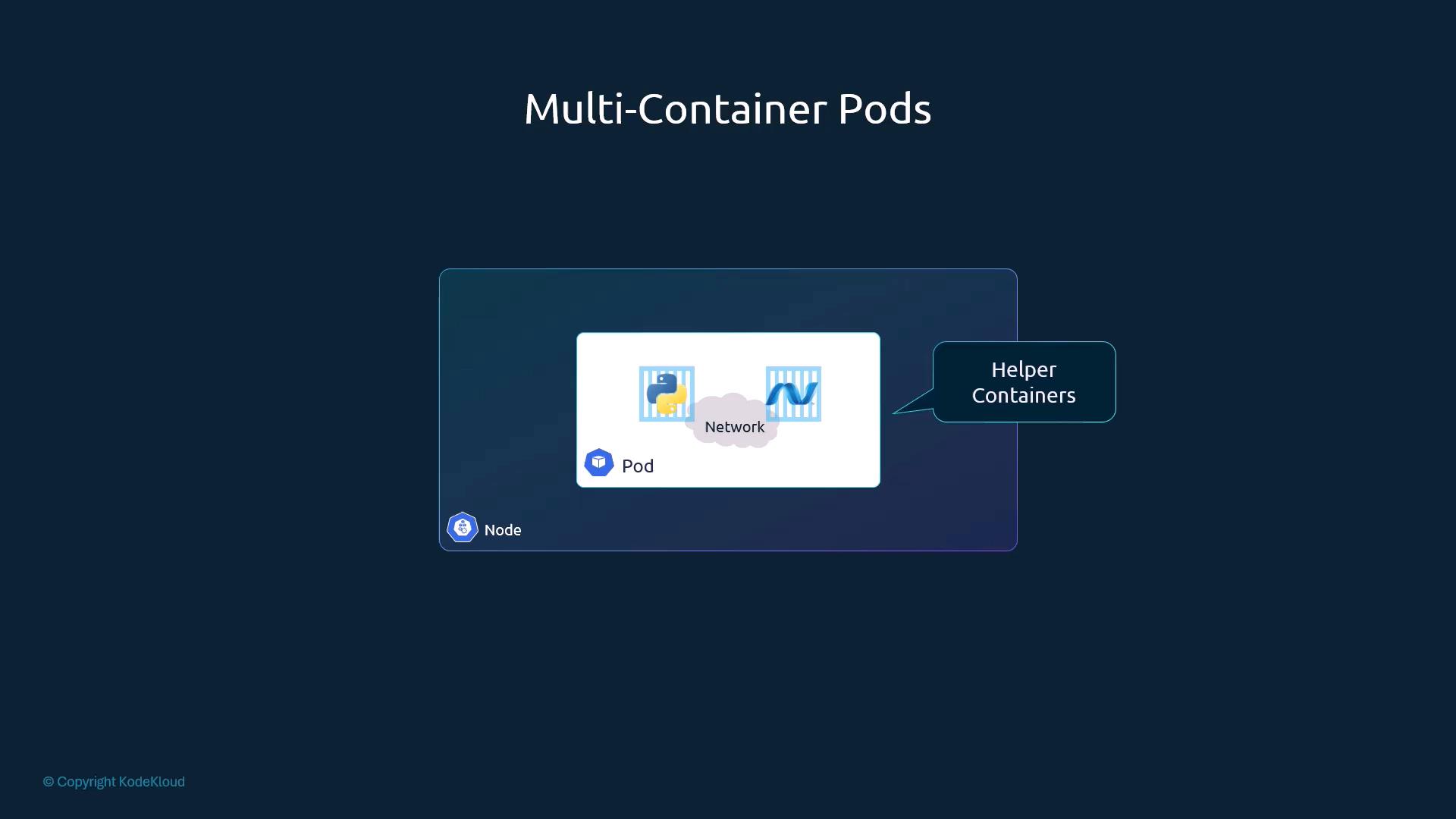
| Characteristic | Meaning |
|---|---|
| Deployable unit | Smallest object you create; wraps 1+ containers |
| Network | Shared network namespace → localhost between containers |
| Storage | Containers can mount the same volumes |
| Lifecycle | Co-scheduled, created/terminated together |
Why pods (plain Docker comparison)
- With plain Docker you would run app and helper containers yourself, link them (
--link), create shared volumes, and keep their lifecycles in sync by hand. For example, if an app dies you must kill its helper too:
docker run --name app1 python-app
docker run --name helper1 --link app1:app helper-image # one helper per app, linked manually- Each app instance needs its own helper and its own volume (App1 + Helper1 + Vol1, …), and you track that mapping yourself. A pod declares this once, and Kubernetes handles creation, networking, volumes and lifecycle. Even single-container apps get pods, so future changes need no redesign.
kubectl
kubectl run nginx --image=nginx          # creates a pod; image pulled from Docker Hub/configured registry
kubectl get pods # STATUS: ContainerCreating → Running- The course also shows
kubectl run nginx --image=nginx --restart=Neverto "force" a plain pod (see CAUTION). - The pod isn't exposed to users yet. It's reachable in-cluster (or via port-forward); Services come later (§2.21).
- Practice: convert imperative
kubectl runinto YAML (pod.yaml) andkubectl apply -f pod.yaml; try a sidecar pod sharinglocalhost/volumes.
[!CAUTION] Correction: the course says
kubectl runmay create other resource types depending on flags. That was true before v1.18 (--generator, which created Deployments). Todaykubectl runalways creates only a Pod.--restart=Neverjust setsrestartPolicy: Never; it isn't needed to get a pod. Usekubectl create deploymentfor Deployments.docker run --linkis a legacy Docker feature.
[!WARNING] Exam traps / remember:
- Scaling = more pods. Adding containers to a pod is for helpers only.
- Beyond the course: containers in the same pod share an IP, so two containers cannot listen on the same port.
2.13 Pods With YAML
Source: KodeKloud notes
Top-level fields (every manifest)
| Field | Purpose | Example |
|---|---|---|
apiVersion | API group/version for the kind | v1 (Pod, Service), apps/v1 (ReplicaSet, Deployment) |
kind | Resource type (case-sensitive) | Pod |
metadata | Dictionary: name, namespace, labels, annotations | name: myapp-pod |
spec | Desired state; content depends on kind | Pod: containers, volumes, … |
apiVersion,kind,metadataare always required;specis required for kinds that need configuration (Pods, Deployments, …).- YAML and JSON manifests are both accepted.
Minimal Pod
apiVersion: v1                # Pods are in the core group
kind: Pod
metadata:
  name: myapp-pod             # unique within the namespace
  labels:                     # sibling of name; arbitrary key/values for selection
    app: myapp
    type: front-end
spec:
  containers:                 # LIST: each item starts with "-"
    - name: nginx-container
image: nginx # pin a tag in production, e.g. nginx:1.21metadataonly accepts the fields the API defines (name, labels, …).labelscan hold any key/value pairs.containersis a list. Each item hasnameandimage, plus optionalports,env,resources, …
Indentation pitfalls
- YAML is whitespace-sensitive. Children are indented further than their parent; siblings align.
nameandlabelsare siblings undermetadata.appis a child oflabels(indented further).- Invalid field names, wrong indentation or wrong
apiVersionare the commonest manifest errors.
Create and inspect
kubectl create -f pod-definition.yaml          # create from file
kubectl get pods                               # list
kubectl get pods -o wide                       # + node, pod IP
kubectl describe pod myapp-pod                 # labels, IP, containers, Events (image pull/start errors)
kubectl logs myapp-pod -c nginx-container      # container logs (-c for a specific container)
kubectl apply --dry-run=client -f pod-definition.yaml   # validate without creating
Best practices
- Use the correct
apiVersionfor your cluster version (v1for Pods). - Always add
labels, which Deployments, Services and NetworkPolicies select on later. - Set container
resources(requests/limits) in production to help the scheduler. - Pin image tags (
nginx:1.21) and scan images. - Validate with
--dry-run=clientor linters such askube-score/kubeval.
[!NOTE] Beyond the course: unknown fields are no longer silently ignored. kubectl uses server-side strict field validation by default (
--validate=strict), so a typo likecontianersis rejected.kubevalis unmaintained; its successor iskubeconform.kubectl explain pod.spec.containersshows valid fields in the exam (§2.28).
[!NOTE] Beyond the course: generate instead of typing:
kubectl run myapp-pod --image=nginx -l app=myapp,type=front-end --dry-run=client -o yaml > pod.yaml.
2.14 Demo Pods With YAML
Source: KodeKloud notes
Drill
| Task | Command / detail |
|---|---|
| Write manifest | Any editor (vi/vim/nano; Notepad++ on Windows); syntax highlighting helps. In vim: Esc, :wq |
| Create | kubectl apply -f pod.yaml → pod/nginx created |
| Watch status | kubectl get pods: ContainerCreating (pulling image) → Running 1/1 |
| Inspect | kubectl describe pod nginx → conditions, volumes, QoS, tolerations, events |
apiVersion: v1                # case-sensitive
kind: Pod                     # case-sensitive
metadata:
  name: nginx
  labels:
    app: nginx
    tier: frontend
spec:
  containers:
  - name: nginx               # unique within the pod
    image: nginx              # private/other registry: full path, e.g. myregistry.example.com/myimage:tag
Pod STATUS values
| STATUS | Meaning |
|---|---|
Pending | Accepted, containers not running yet (e.g. pulling image) |
ContainerCreating | Kubelet setting up container / pulling image |
Running | Bound to a node, all containers created, at least one running/starting/restarting (READY may still be < total; course: "or some completed for Jobs") |
CrashLoopBackOff | Container repeatedly failing and restarting |
Completed | Container exited successfully (batch jobs) |
Failed | Container terminated with failure, won't restart |
What describe shows (trimmed)
Conditions: Initialized True | Ready True | ContainersReady True | PodScheduled True
Volumes:
  default-token-f5ntk:  Type: Secret
QoS Class:       BestEffort                     # no requests/limits set
Node-Selectors:  <none>
Tolerations:     node.kubernetes.io/not-ready:NoExecute for 300s
                 node.kubernetes.io/unreachable:NoExecute for 300s
Events:
  Normal  Scheduled  default-scheduler  Successfully assigned default/nginx to minikube
  Normal  Pulling    kubelet            Pulling image "nginx"
  Normal  Pulled     kubelet            Successfully pulled image "nginx"
  Normal  Created    kubelet            Created container nginx
Normal Started kubelet Started container nginx- Events read top-down as the lifecycle: scheduler assigns the node → kubelet pulls → creates → starts. This is the first place to look when a pod is stuck.
[!WARNING] Exam traps / remember:
- No tabs in YAML, only spaces (2 is conventional).
kubectl create -ffails if the object already exists.kubectl apply -fis idempotent and preferred for declarative workflows.
[!CAUTION] Correction: the
default-token-xxxxxSecret volume is pre-v1.24 output. Pods now get a projected volumekube-api-access-xxxxx(time-bound ServiceAccount token + CA + namespace).
[!NOTE] Beyond the course:
Completed,CrashLoopBackOffandContainerCreatingare STATUS-column reasons. The actual podstatus.phasevalues are onlyPending,Running,Succeeded,Failed,Unknown.
2.15 Practice Test Introduction
Source: KodeKloud notes
Lab layout and behaviour
- Use a laptop/desktop (no mobile). Click Start; the lab usually loads in under 30 s, occasionally a few minutes.
- Layout: quiz portal (left) with question, answers, navigation and progress; interactive terminal (right).
- Terminal types: Linux shell (shell scripting, Git), Docker host, Kubernetes control plane (
kubectl). - About 5–15 questions per topic; count and progress are shown at the top.
- Some tasks show a web-portal link above the terminal for accessing deployed apps, if the lab exposes them.
- Sessions are ephemeral, around 1 h (varies by lab). Work is lost when the session ends. Refreshing usually reconnects; long idle or a long-closed browser terminates the lab. You can restart from Q1 anytime. Don't store credentials there.
Question types
| Type | You do | Example |
|---|---|---|
| Information lookup | Query the environment, pick the answer | Pod states, node labels |
| Hands-on changes | Create/modify resources, verify | Deploy pods/services, check with kubectl get |
| Spec-driven configuration | Resource must match the given spec exactly | Create from a provided YAML |
| Scenario multiple-choice | Conceptual/troubleshooting/design | — |
UI controls
| Control | Notes |
|---|---|
| Skip | Skips the question; often final, you may not be able to return |
| New Terminal | Open an additional shell |
| Progress indicator | Questions done / total |
Commands shown
kubectl get pods                                   # "No resources found in default namespace."
kubectl expose pod nginx --port=80 --type=NodePort # expose a pod as a NodePort service
vi essentials (exam editor)
- Open
vi file.yaml→iinsert →Esc:wqEntersave+quit →Esc:q!Enterquit without saving.
Study approach
- The practice UI is an emulator and differs from the real exam platform; the terminal skills transfer.
- Labs may include topics not in lectures on purpose: use the docs and man pages.
- If stuck: re-read the question for the exact required state, inspect with
kubectl, consult the docs, retry. Every task has Hints and Solutions, and tests can be retaken.
[!WARNING] Exam traps / remember: the exam checks exact matches, so get names, kinds, labels, namespaces and indentation exactly as asked. Practise with the editors actually available (vi/vim).
[!NOTE] Beyond the course: add
set expandtab tabstop=2 shiftwidth=2to~/.vimrcat exam start to avoid tab/indent errors when editing YAML.
2.16 Lab Solution Pods optional
Source: KodeKloud notes
Quick reference
| Action | Command |
|---|---|
| List pods | kubectl get pods (other namespace: -n kube-system) |
| With node/IP | kubectl get pods -o wide |
| Details | kubectl describe pod <pod> |
| Create | kubectl run <name> --image=<image> |
| Delete | kubectl delete pod <pod> |
| Generate YAML | kubectl run <name> --image=<image> --dry-run=client -o yaml |
| Change image | kubectl set image pod/<pod> <container>=<image> |
| Syntax help | kubectl run --help (examples incl. --port=5701, --dry-run=client) |
Drill
| # | Task | How / answer technique |
|---|---|---|
| 1 | How many pods? | kubectl get pods → "No resources found in default namespace." = 0 |
| 2 | Create nginx pod | kubectl run nginx --image=nginx → pod/nginx created. Re-check kubectl get pods → 4 pods: nginx + newpods-llstt/pnnx8/k87fx (created by the lab meanwhile, ContainerCreating) |
| 3 | Image used by newpods-* pods | kubectl describe pod newpods-llstt → Containers: → Image: busybox |
| 4 | Node the pods run on | describe → Node: controlplane/172.25.0.47, or kubectl get pods -o wide → NODE column |
| 5 | Containers in pod webapp | READY column 1/2 → 2 containers (ready/total); describe lists nginx + agentx. get pods shows webapp 1/2 ImagePullBackOff |
| 6 | Images in webapp | describe → nginx, agentx |
| 7 | State of agentx | describe → State: Waiting, Reason: ErrImagePull, Ready: False. STATUS column (ImagePullBackOff) and describe reason (ErrImagePull) differ only because the reason flips between the two while the kubelet retries |
| 8 | Why is it failing? | describe Events: Failed to pull image "agentx" → image doesn't exist on Docker Hub (docker.io/library/agentx) |
| 9 | Meaning of READY | Ready containers / total containers in the pod (readiness probe if defined, else running) |
| 10 | Delete webapp | kubectl delete pod webapp |
| 11 | Create pod redis with image redis123 via YAML | Generate YAML, then create (below) → STATUS ErrImagePull |
| 12 | Fix image to redis | kubectl set image, or edit file and apply, or delete + recreate (below) |
# 11: generate, save, create
kubectl run redis --image=redis123 --dry-run=client -o yaml > redis.yaml
kubectl create -f redis.yaml

# 12: any one of
kubectl set image pod/redis redis=redis       # container name "redis" = image
# or: vi redis.yaml (image: redis) && kubectl apply -f redis.yaml
# or: kubectl delete pod redis && kubectl create -f redis.yaml
kubectl get pods                              # redis 1/1 Running
Generated YAML (note the defaults kubectl fills in):
apiVersion: v1
kind: Pod
metadata:
  creationTimestamp: null
  labels:
    run: redis              # kubectl run adds label run=<name>
  name: redis
spec:
  containers:
  - image: redis123
    name: redis
    resources: {}
  dnsPolicy: ClusterFirst
  restartPolicy: Always
status: {}
[!WARNING] Exam traps / remember:
ErrImagePull/ImagePullBackOffmean a wrong image name, an image missing from the registry, or registry auth/network problems. The cause is indescribe→ Events.- Plain
--dry-runis deprecated; use--dry-run=client.
[!NOTE] Beyond the course:
kubectl applyon an object made withcreateworks but warns about the missinglast-applied-configurationannotation (it gets patched in). Only a few pod fields are mutable in place (image,activeDeadlineSeconds, tolerations additions…). For other changes,kubectl editsaves a copy to/tmp/and you then runkubectl replace --force -f <file>(deletes and recreates).
- Other
kubectl runhelp flags in the lab:--annotations=key=valueattaches metadata;--attach=truewaits and attaches to the container (--attach=falseby default unless interactive flags imply attachment).
2.17 ReplicaSets
Source: KodeKloud notes
Why replication
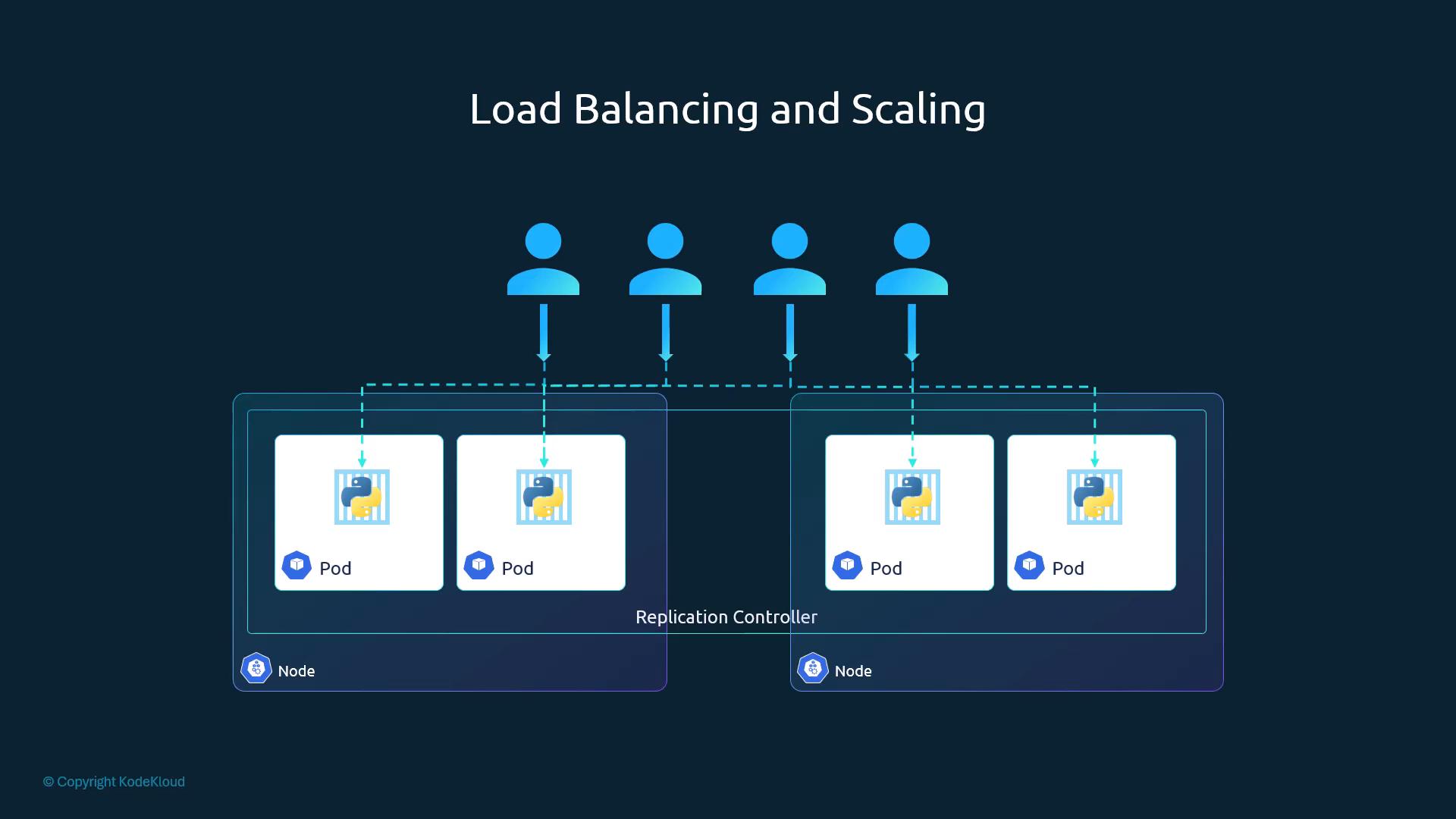
- Controllers are control-plane processes that continuously reconcile objects to their desired state. ReplicationController and ReplicaSet keep N pod replicas running.
- Benefits:
- High availability: other replicas keep serving if one crashes. Even a single pod is recreated if it fails.
- Fault tolerance: replacements are created for crashed pods or failed nodes.
- Load balancing / scaling: replicas spread across pods and nodes.
- Autoscaling: enables manual and automated scaling.
ReplicationController vs ReplicaSet
| ReplicationController | ReplicaSet | |
|---|---|---|
apiVersion | v1 | apps/v1 |
selector | Optional (defaults to template labels) | Required (selector.matchLabels) |
| Status | Legacy, kept for backward compatibility | Preferred; managed by Deployments |
| Short name | rc | rs |
ReplicationController
spec.replicassets the desired count.spec.templateholds the pod template: the pod'smetadata+specmoved undertemplate. Twometadatasections: the RC's own and the pod template's.
# rc-definition.yml
apiVersion: v1
kind: ReplicationController
metadata:
  name: myapp-rc
  labels:
    app: myapp
    type: front-end
spec:
  replicas: 3
  template:                  # pod template (pod metadata + spec)
    metadata:
      name: myapp-pod
      labels:
        app: myapp
        type: front-end
    spec:
      containers:
      - name: nginx-container
image: nginxkubectl create -f rc-definition.yml
kubectl get replicationcontrollers # DESIRED CURRENT READY
kubectl get pods # myapp-rc-41vk9 ... (names prefixed with RC name)ReplicaSet
# replicaset-definition.yml
apiVersion: apps/v1          # v1 here → error (see traps)
kind: ReplicaSet
metadata:
  name: myapp-replicaset
  labels:
    app: myapp
    type: front-end
spec:
  replicas: 3
  selector:                  # REQUIRED for ReplicaSet
    matchLabels:
      type: front-end        # must match template labels
  template:
    metadata:
      name: myapp-pod
      labels:
        app: myapp
        type: front-end
    spec:
      containers:
      - name: nginx-container
image: nginxkubectl create -f replicaset-definition.yml
kubectl get replicasets # DESIRED CURRENT READY
kubectl get pods # pods matched by the selectorLabels, selectors, template
- The selector tells the RS which pods to manage, including existing pods it didn't create whose labels match. They are adopted and count toward
replicas. - RC defaulted the selector to the template labels; RS requires it explicitly.
- Why keep
templateif matching pods already exist? The RS needs it to create replacements whenever a pod fails later.
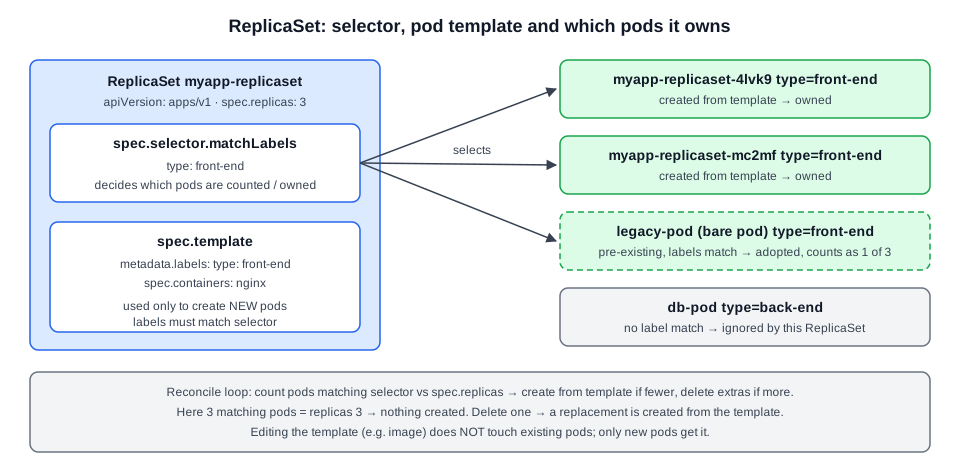 Diagram (new): how selector, template labels and existing pods determine what a ReplicaSet owns.
Scaling
# 1) edit file (replicas: 6), then:
kubectl replace -f replicaset-definition.yml
# 2) without editing the file:
kubectl scale --replicas=6 -f replicaset-definition.yml     # file on disk still says 3!
kubectl scale --replicas=6 replicaset myapp-replicaset # by type/name- Automatic scaling on metrics → Horizontal Pod Autoscaler (§5.17).
Command reference
| Action | Command |
|---|---|
| Create | kubectl create -f replicaset-definition.yml |
| List | kubectl get replicasets (rs) |
| Delete (also deletes its pods) | kubectl delete replicaset myapp-replicaset |
| Update from file | kubectl replace -f replicaset-definition.yml |
| Scale from file | kubectl scale --replicas=6 -f replicaset-definition.yml |
| Scale by name | kubectl scale --replicas=6 replicaset myapp-replicaset |
[!WARNING] Exam traps / remember:
- RS
apiVersionisapps/v1, notv1(RC isv1). Withv1, older kubectl (lecture):error: unable to recognize "replicaset-definition.yml": no matches for /, Kind=ReplicaSet; newer kubectl:no matches for kind "ReplicaSet" in version "v1". Same fix.selector.matchLabelsmust matchtemplate.metadata.labels, or creation fails with a validation error.kubectl scale -f filechanges the live object only, not the file.- Bare pods with matching labels are adopted, so the RS may create fewer pods than you expect.
[!NOTE] Beyond the course: RS selectors also support
matchExpressions(In,NotIn,Exists,DoesNotExist). The RS selector is immutable after creation inapps/v1. There's nokubectl create replicaset: generate a Deployment (kubectl create deployment … --dry-run=client -o yaml) and changekindtoReplicaSet(removestrategy). In practice you use Deployments (§2.19), which manage ReplicaSets for you.
2.18 Lab Solution ReplicaSets optional
Source: KodeKloud notes
Theory: see §2.17.
Drill
| # | Task | How / answer technique |
|---|---|---|
| 1 | Pods? | kubectl get pods → 0 |
| 2 | ReplicaSets? | kubectl get replicaset → 0; later new-replica-set DESIRED 4 / CURRENT 4 / READY 0 |
| 3 | Image used by the RS | kubectl describe replicaset new-replica-set → Pod Template → Image: busybox777 (Selector name=busybox-pod; Command sh -c echo Hello Kubernetes! && sleep 3600). Events SuccessfulCreate replicaset-controller Created pod: new-replica-set-7r2aw (one per pod) list exactly which pods this RS owns |
| 4 | Pods ready? | READY 0; describe → Pods Status: 0 Running / 4 Waiting / 0 Succeeded / 0 Failed |
| 5 | Why not ready? | kubectl describe pod new-replica-set-7r2aw → State: Waiting, Reason: ImagePullBackOff; Events: pull access denied, repository does not exist for docker.io/library/busybox777:latest, i.e. the image doesn't exist. Events show kubelet retries: Pulling image "busybox777" (x4) → Failed ... Error: ErrImagePull → Error: ImagePullBackOff → BackOff Back-off pulling image. ErrImagePull = a failed attempt; ImagePullBackOff = kubelet waiting increasingly longer before the next retry. Same root cause |
| 6 | Delete a pod, observe | kubectl delete pod new-replica-set-wkzjh → RS immediately creates a replacement (still 4 pods) |
| 7 | Create RS from /root/replicaset-definition-1.yaml | Error no matches for kind "ReplicaSet" in version "v1" → kubectl explain replicaset shows apps/v1 → fix apiVersion: apps/v1 → create |
| 8 | Fix /root/replicaset-definition-2.yaml | Error selector does not match template labels (selector tier: frontend, template tier: nginx) → set template label tier: frontend → create |
| 9 | Delete both new RSs | kubectl delete rs replicaset-1 replicaset-2 |
| 10 | Fix new-replica-set image to busybox | kubectl edit rs new-replica-set → image: busybox, then delete the old pods so they are recreated from the new template |
| 11 | Scale to 5 | kubectl scale rs new-replica-set --replicas=5 (or kubectl edit rs → spec.replicas: 5) |
| 12 | Scale to 2 | kubectl edit rs new-replica-set → spec.replicas: 2; the controller terminates the extra pods |
# 7/8: inspect + fix + create
ls /root                                         # replicaset-definition-1.yaml  replicaset-definition-2.yaml  sample.yaml
kubectl create -f /root/replicaset-definition-1.yaml
kubectl explain replicaset | head                # GROUP: apps, VERSION: v1  → apps/v1
vi /root/replicaset-definition-1.yaml            # apiVersion: apps/v1
kubectl create -f /root/replicaset-definition-1.yaml   # replicaset.apps/replicaset-1 created
kubectl get rs

# 10: template change doesn't touch running pods
kubectl edit rs new-replica-set                  # image: busybox
kubectl delete pod new-replica-set-vpkh8 new-replica-set-tn2mp new-replica-set-7r2aw new-replica-set-hcmbw
kubectl get pods --watch                         # new pods → 1/1 Running
kubectl get rs                                   # 4 4 4
Fixed file 2 (key part):
apiVersion: apps/v1
kind: ReplicaSet
metadata:
  name: replicaset-2
spec:
  replicas: 2
  selector:
    matchLabels:
      tier: frontend
  template:
    metadata:
      labels:
        tier: frontend          # was "nginx" → must equal selector
    spec:
      containers:
      - name: nginx
        image: nginx
[!WARNING] Exam traps / remember:
- Editing an RS template does not update existing pods. Delete the pods (or delete and recreate the RS, not recommended for live workloads). Deployments do this automatically via rollouts.
- Deleting an RS-managed pod only triggers a replacement. To get rid of the pods, delete or scale the RS.
- Use
kubectl explain <kind>to find the rightapiVersionfast.
[!NOTE] Beyond the course: delete all RS pods by label in one go with
kubectl delete pod -l name=busybox-pod, using the RS'sSelectorfromdescribe.
2.19 Deployments
Source: KodeKloud notes
Hierarchy and what Deployments add
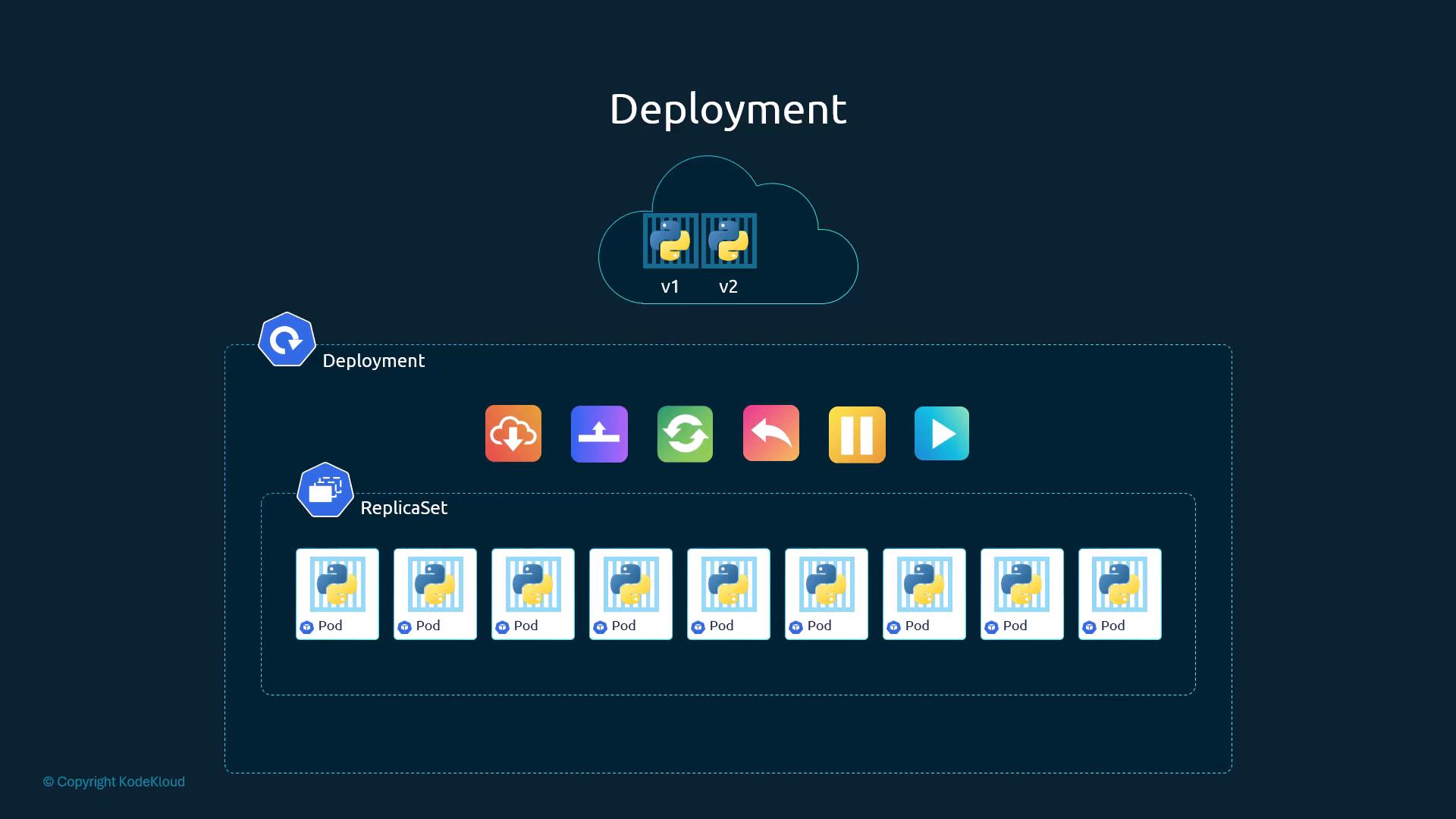
- Deployment → creates/manages a ReplicaSet → ReplicaSet manages Pods. Higher-level object for production apps.
- Features on top of a ReplicaSet:
- multiple instances (availability + load distribution);
- rolling updates: Pods replaced gradually, not all at once;
- rollback to a previous revision when an update goes wrong;
- pause/resume: batch several changes (image, scaling, resources) into a single rollout.
Manifest
Identical to a ReplicaSet manifest except kind: Deployment (see §2.17).
apiVersion: apps/v1               # Deployments live in apps/v1
kind: Deployment
metadata:
  name: myapp-deployment
  labels:
    app: myapp
    type: front-end
spec:
  replicas: 3                     # desired Pod count
  selector:                       # REQUIRED in apps/v1
    matchLabels:
      app: myapp
      type: front-end
  template:                        # Pod template (metadata + spec of a Pod)
    metadata:
      labels:                      # must match spec.selector.matchLabels
        app: myapp
        type: front-end
    spec:
      containers:
        - name: nginx-container
          image: nginx:latest
Commands
kubectl create -f deployment-definition.yml        # create
kubectl get deployments                            # READY  UP-TO-DATE  AVAILABLE  AGE
kubectl get replicasets                            # RS auto-created: <deploy-name>-<pod-template-hash>
kubectl get pods                                   # Pods: <deploy-name>-<hash>-<random>, e.g. myapp-deployment-6795844b58-5rbj1
kubectl get all # Deployments, RS, Pods, Services... in current namespace| Operation | Command |
|---|---|
| Create from file | kubectl create -f deployment-definition.yml |
| Update image (triggers rolling update) | kubectl set image deployment/myapp-deployment nginx-container=nginx:1.21 |
| Watch rollout progress | kubectl rollout status deployment/myapp-deployment |
| Roll back to previous revision | kubectl rollout undo deployment/myapp-deployment |
| Pause / resume rollout | kubectl rollout pause deployment/myapp-deployment · kubectl rollout resume deployment/myapp-deployment |
| Scale | kubectl scale deployment/myapp-deployment --replicas=5 |
set imagesyntax is<container-name>=<image>— the container name, not the deployment name. Rollouts/rollbacks in depth: §5.2.
[!WARNING] Exam traps / remember:
spec.selector.matchLabelsmust matchspec.template.metadata.labels, otherwise the Deployment can't identify/manage its Pods.selectoris mandatory forapps/v1Deployments.
[!NOTE] Beyond the course: a mismatched selector is rejected at creation (
selector does not match template labels). Deleting a Deployment cascades to its ReplicaSet(s) and Pods. Fastest manifest:kubectl create deployment myapp --image=nginx --replicas=3 --dry-run=client -o yaml > deploy.yaml, then edit.
2.20 Lab Solution Deploymentoptional
Source: KodeKloud notes
| Task | Command / technique | Answer / gotcha |
|---|---|---|
| How many Pods / ReplicaSets / Deployments? (initial) | kubectl get pods · kubectl get rs · kubectl get deployments | No resources found in default namespace. → 0 each |
After frontend-deployment is created: count again | same three commands | 1 Deployment (READY 0/4), 1 RS frontend-deployment-7fd8cdb696 (DESIRED 4, READY 0), 4 Pods |
| How many Pods are ready? | READY column of kubectl get pods | 0/4 — statuses ErrImagePull / ImagePullBackOff |
| Image used by the Pods? | kubectl describe pod <pod> → Containers: … Image: | busybox888 (container busybox-container, command sh -c "echo Hello Kubernetes! && sleep 3600") |
| Why are Pods not ready? | describe → State: Waiting, Reason: ErrImagePull | Image busybox888 doesn't exist / can't be pulled |
Fix deployment-definition-1.yaml and create it | Correct kind casing + apiVersion, then kubectl create -f deployment-definition-1.yaml | Broken file had wrong case in kind (e.g. deployment) → API error |
Create httpd-frontend, 3 replicas, image httpd:2.4-alpine | kubectl create deployment httpd-frontend --image=httpd:2.4-alpine --replicas=3 | kubectl get deploy → goes from 0/3 to 3/3 after image pull |
describe podalso showsControlled By: ReplicaSet/<rs-name>and the auto-added labelpod-template-hash=7fd8cdb696— proof of the Deployment → RS → Pod chain.
Corrected manifest:
apiVersion: apps/v1
kind: Deployment            # capital D — kinds are case-sensitive
metadata:
  name: deployment-1
spec:
  replicas: 2
  selector:
    matchLabels:
      name: busybox-pod
  template:
    metadata:
      labels:
        name: busybox-pod
    spec:
      containers:
      - name: busybox-container
        image: busybox888   # still the bad image from the exercise → Pods stay ErrImagePull
        command:
        - sh
        - "-c"
        - echo Hello Kubernetes! && sleep 3600
[!WARNING] Exam traps / remember:
kindvalues are case-sensitive (Deployment, notdeployment);apiVersionmust fit the kind (apps/v1for Deployment).ErrImagePull/ImagePullBackOff→ check image name and tag, and that the registry is reachable / credentials exist (private registry).- A Deployment can be created successfully yet show
0/NREADY — always check Pod status, not just "created".
[!NOTE] Beyond the course: a wrong-case kind fails with
error: resource mapping not found … no matches for kind "deployment" in version "apps/v1". Fix a running Deployment's image withkubectl set image deployment/<name> <container>=<image>.
2.21 Services
Source: KodeKloud notes
Why Services
- Stable network endpoint for a group of Pods; decouples clients from Pod restarts/rescheduling/scaling (Pod IPs change).
- Uses: expose front-end to users; front-end → back-end; connect to external data sources; distribute load across replicas.
- Example network: node
192.168.1.2, laptop192.168.1.10, Pod network10.244.0.0/16, Pod10.244.0.2.curl http://10.244.0.2works from the node only — Pod IPs are internal. A Service (first-class object like Pod/Deployment) maps a node port to the Pod → NodePort.
Service types
| Type | What it does | Typical use |
|---|---|---|
ClusterIP (default) | Virtual IP reachable only inside the cluster | Service-to-service (microservices) — §2.22 |
NodePort | Opens a static port on every node, forwards to the Service | Simple external access, on-prem, demos |
LoadBalancer | Asks the cloud provider for an external LB | Production external access on supported clouds — §2.23 |
NodePort: the three ports
| Field | Lives on | Meaning / example |
|---|---|---|
targetPort | Pod/container | Port the app listens on (80) |
port | Service (its ClusterIP) | Service's own port (80) → forwards to targetPort |
nodePort | Every node | External port; range 30000–32767 (e.g. 30008) |
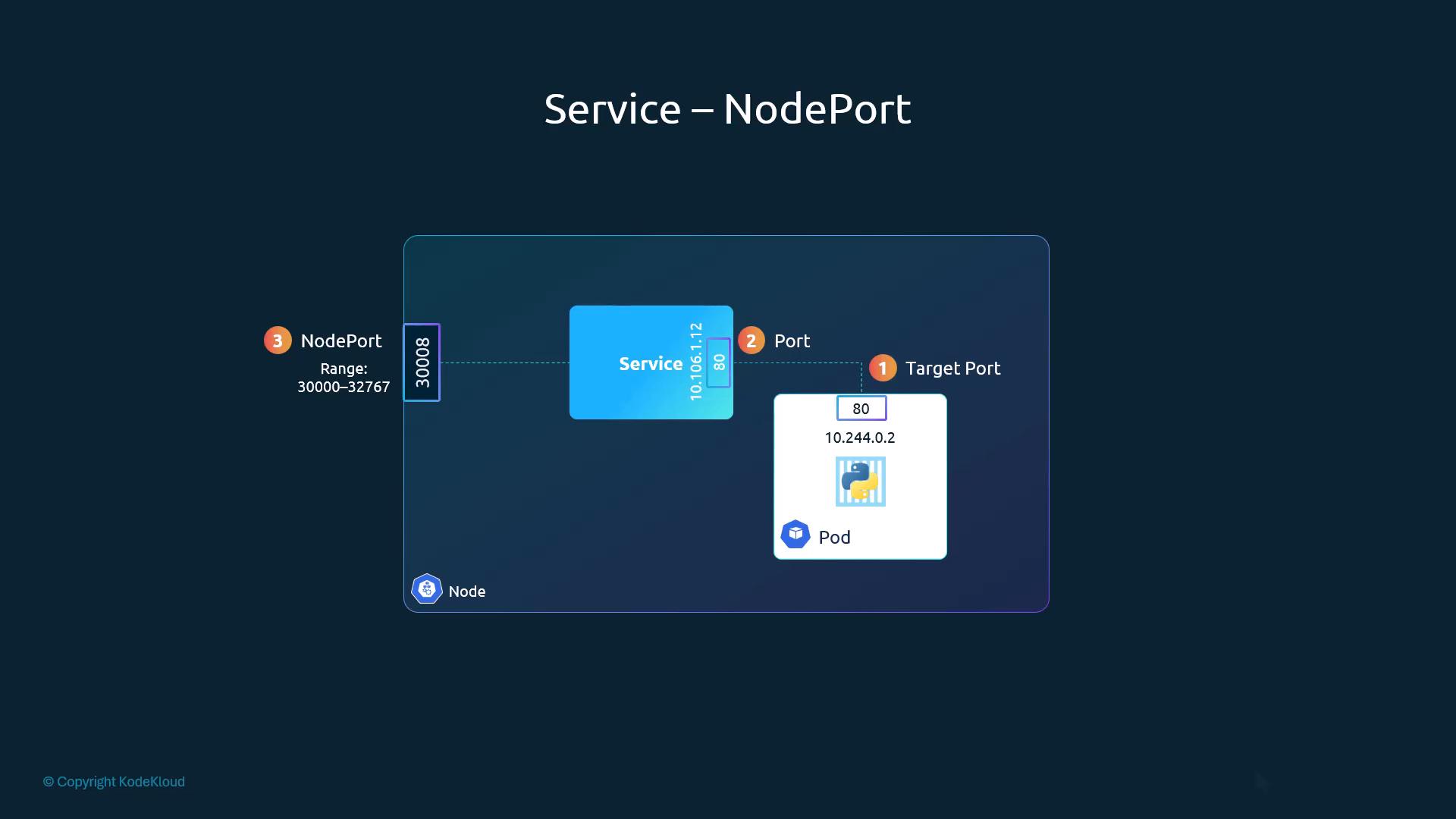
- Ports are named from the Service's viewpoint.
spec.portsis an array; each entry needs onlyport(mandatory).targetPortomitted → defaults toport.nodePortomitted → a free port from the range is auto-assigned.- Pods are linked by
spec.selector= Pod labels (copy them from the Pod/templatemetadata.labels).
apiVersion: v1
kind: Service
metadata:
  name: myapp-service
spec:
  type: NodePort
  ports:
    - targetPort: 80      # container port (defaults to port)
      port: 80            # service port (mandatory)
      nodePort: 30008     # 30000-32767 (auto-assigned if omitted)
  selector:               # = labels of the target Pods
    app: myapp
    type: front-end
---
apiVersion: v1
kind: Pod
metadata:
  name: myapp-pod
  labels:
    app: myapp
    type: front-end
spec:
  containers:
    - name: nginx-container
      image: nginx
      ports:
- containerPort: 80kubectl create -f service-definition.yml
kubectl get services # myapp-service NodePort 10.106.127.123 <none> 80:30008/TCP
# (also the built-in: kubernetes ClusterIP 10.96.0.1 443/TCP)
curl http://192.168.1.2:30008 # <node-ip>:<nodePort> → "Welcome to nginx!"Multiple Pods / multiple nodes
- All Pods matching the selector become backends; the Service load-balances across them automatically — no extra config. Endpoints update as Pods come and go.
- Load distribution is done by kube-proxy (§2.11):
iptablesmode = random/probabilistic endpoint choice;ipvsmode = round-robin and other algorithms. - Pods spread across nodes: the Service spans all nodes and the same nodePort is open on every node, even nodes with no matching Pod; traffic to any node is forwarded to a Pod (possibly on another node).
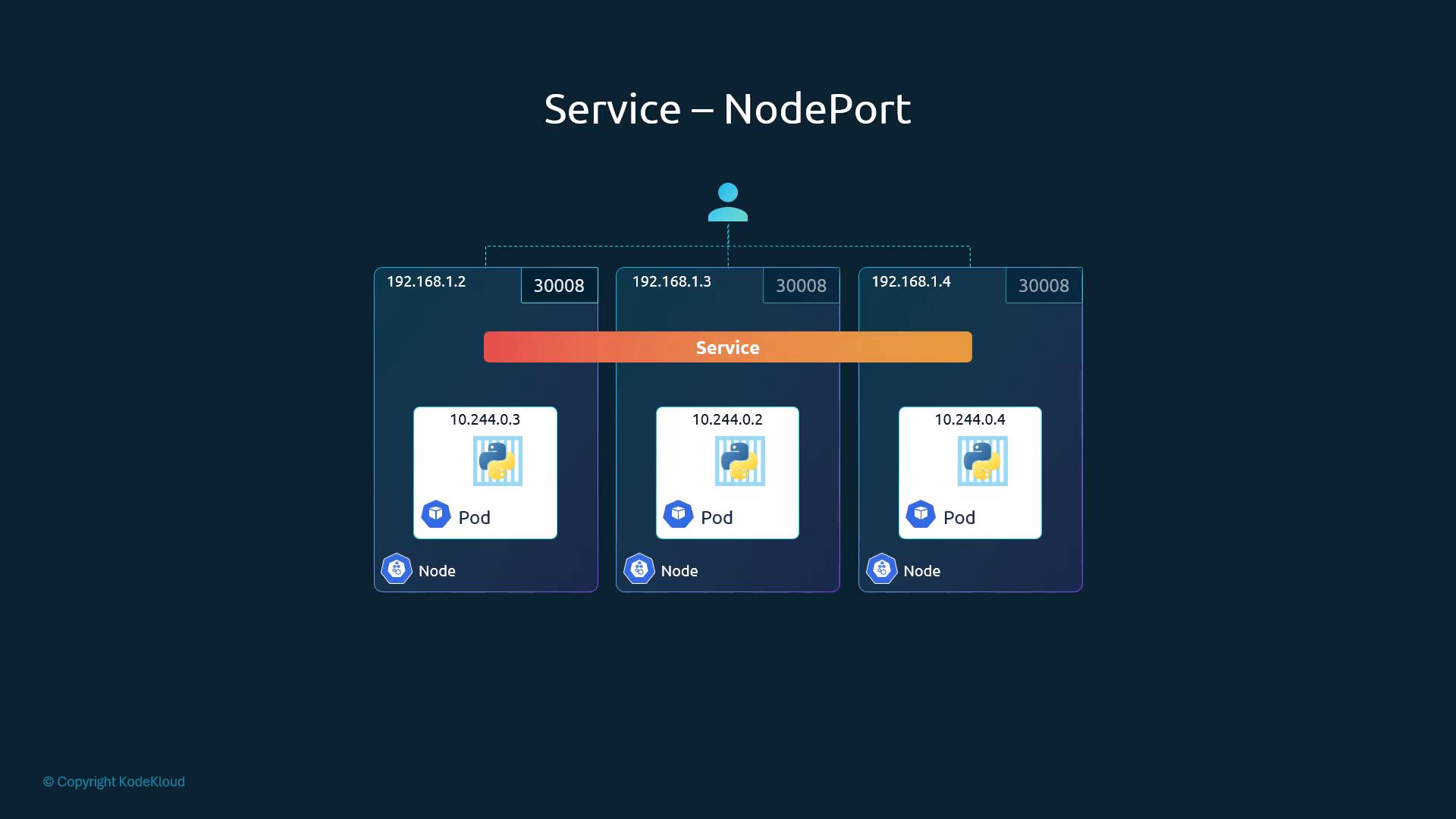
curl http://192.168.1.2:30008
curl http://192.168.1.3:30008
curl http://192.168.1.4:30008   # any node IP + same nodePort works
[!WARNING] Exam traps / remember:
- NodePort range
30000–32767.- Selector must match the Pod labels, otherwise the Service has no Pods to send traffic to.
kubectl get svcPORT(S) readsport:nodePort/TCP(e.g.80:30008/TCP).- NodePort opens the port on every node → for production prefer LoadBalancer/Ingress with TLS and auth, plus firewall rules/NetworkPolicies; NodePort is fine on-prem/debug.
[!NOTE] Beyond the course: a nodePort outside the range is rejected by the API server; the range is set by kube-apiserver
--service-node-port-range. A selector mismatch gives no error at creation — the Service just has empty Endpoints. targetPort shows only inkubectl describe svc. kube-proxy also supportsnftablesmode in newer releases.
2.22 Services Cluster IP
Source: KodeKloud notes
- Multi-tier app (front-end, back-end, Redis, MySQL): Pod IPs are ephemeral, and a front-end Pod (e.g.
10.244.0.3) has no way to pick a back-end Pod. - A Service groups the Pods of a tier behind one stable ClusterIP + DNS name; requests are load-balanced across its endpoints by kube-proxy (algorithm depends on kube-proxy mode). Create one per tier (back-end, redis, db…); clients use the Service name or ClusterIP.
- Tiers can scale, move or be replaced without breaking internal communication.
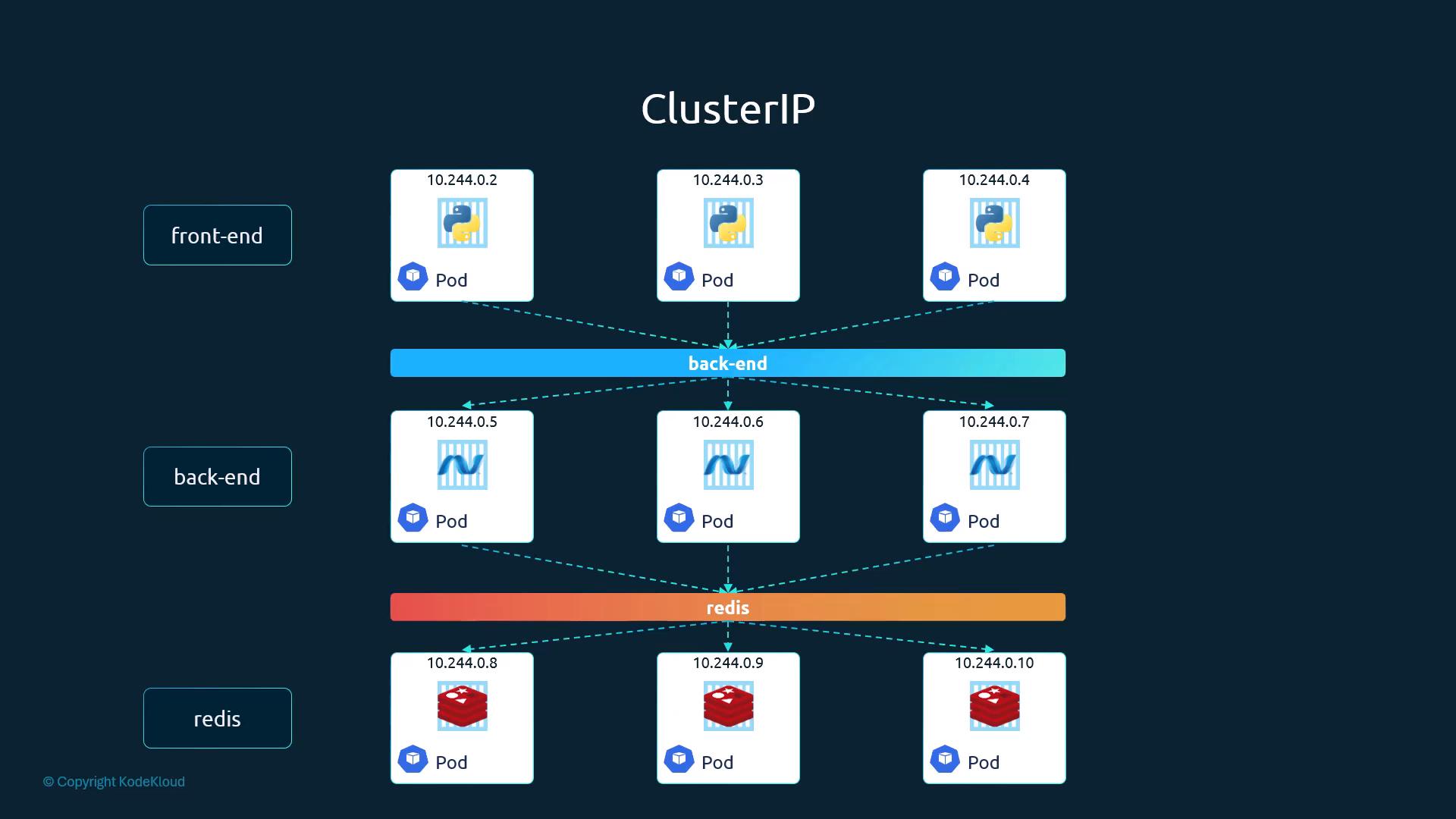
apiVersion: v1
kind: Service
metadata:
  name: back-end
spec:
  type: ClusterIP        # optional — ClusterIP is the default
  ports:
    - port: 80           # port exposed by the Service inside the cluster
      targetPort: 80     # port on the Pod/container
  selector:              # must match the back-end Pods' labels
    app: myapp
type: back-end# pod.yaml — labels must match the back-end Service selector
apiVersion: v1
kind: Pod
metadata:
name: myapp-pod
labels:
app: myapp
type: back-end
spec:
containers:
- name: nginx-container
image: nginx
ports:
- containerPort: 80kubectl apply -f pod.yaml # back-end Pod (above)
kubectl apply -f service.yaml
kubectl get services
kubectl describe service back-end # check Selector, TargetPort, Endpoints| Field | Purpose |
|---|---|
spec.type | Exposure type: ClusterIP / NodePort / LoadBalancer |
spec.ports[].port | Port the Service exposes in-cluster |
spec.ports[].targetPort | Container port receiving the traffic |
spec.selector | Labels choosing the backing Pods |
- DNS: same namespace →
back-end; fully qualified →back-end.<namespace>.svc.cluster.local(e.g.back-end.default.svc.cluster.local). See §2.25, §9.15. - Traffic path: Service = stable IP/name → kube-proxy programs node rules → traffic redirected to one endpoint Pod.
[!WARNING] Exam traps / remember: ClusterIP is reachable only inside the cluster (no external access). Omitting
typegives ClusterIP.
[!CAUTION] Correction: the notes list kube-proxy modes as iptables, ipvs or userspace —
userspacemode was removed in v1.26. Current modes:iptables(default on Linux),ipvs, and newernftables.
2.23 Services Loadbalancer
Source: KodeKloud notes
Problem with NodePort for end users
- 4-node cluster, voting app on nodePort
30035, result app on31061→ 8 valid URLs (http://192.168.56.70–73:30035,…:31061). - NodePort is open on all node IPs even if the app's Pods run only on
.70and.71. - Users want one URL (
http://example-vote.com,http://example-result.com). Options:- Own LB: a VM with HAProxy/NGINX, DNS points at it, it forwards to node IPs:nodePorts (you configure and maintain it).
type: LoadBalancer→ on a supported cloud (GCP, AWS, Azure) Kubernetes asks the cloud (via cloud controller) to provision an external LB with a single external IP/hostname.
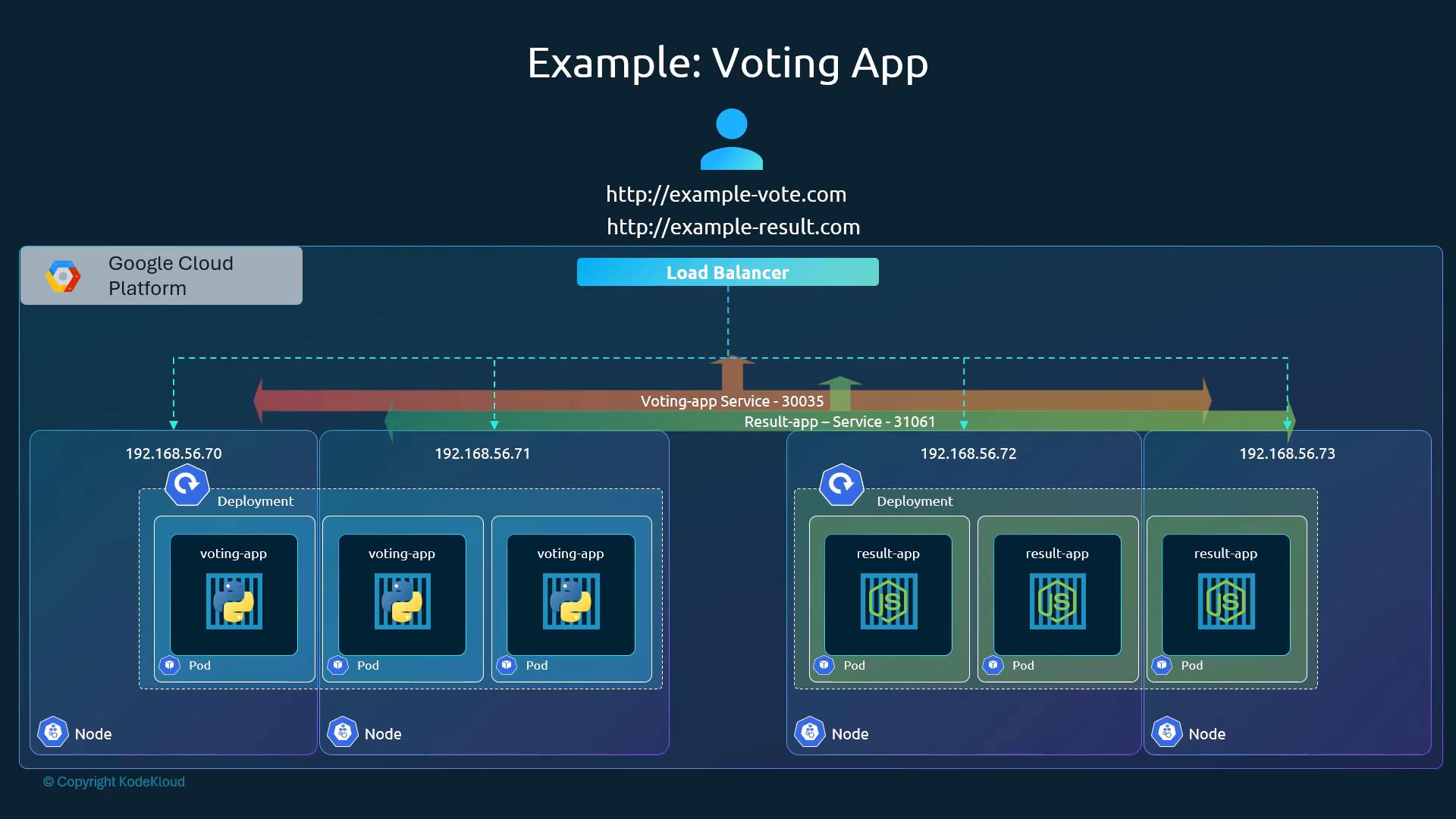
apiVersion: v1
kind: Service
metadata:
  name: voting-service
spec:
  type: LoadBalancer
  selector:
    app: voting
  ports:
    - port: 80
targetPort: 80kubectl get svc voting-service
# NAME TYPE CLUSTER-IP EXTERNAL-IP PORT(S) AGE
# voting-service LoadBalancer 10.0.0.123 34.68.123.45 80:30035/TCP 5m- Unsupported environments (VirtualBox, bare metal without a cloud controller, some local tools): no external LB is provisioned; the Service behaves like NodePort. Alternatives: external reverse proxy (HAProxy/NGINX), MetalLB (LoadBalancer semantics for bare metal), minikube/kind LB mechanisms/plugins.
| Feature | NodePort | LoadBalancer |
|---|---|---|
| Single external IP/hostname | No — many nodeIP:port combos | Yes (cloud-provided) |
| Needs external proxy for single endpoint | Yes | No (on supported cloud) |
| Works on bare metal/local without extras | Yes | Only with an LB implementation (MetalLB, external proxy…) |
| Typical use | Testing, small clusters, internal tooling | Public-facing services on cloud |
[!WARNING] Exam traps / remember: a LoadBalancer Service still gets a ClusterIP and a nodePort (note
80:30035/TCP) — it builds on NodePort. Without a cloud/LB implementation it is reachable externally only via<node-ip>:<nodePort>(EXTERNAL-IP stays<pending>).
[!NOTE] Beyond the course: on unsupported platforms
EXTERNAL-IPstays<pending>indefinitely — that's the visible symptom of "falls back to NodePort".
2.24 Lab Solution Services optional
Source: KodeKloud notes
| Question | How to find | Answer |
|---|---|---|
| How many Services in current namespace? | kubectl get svc | 1 — the built-in kubernetes Service |
Type of the kubernetes Service (default type)? | TYPE column | ClusterIP |
targetPort of kubernetes Service? | kubectl describe svc kubernetes → TargetPort | 6443/TCP (Port https 443/TCP) |
Labels on kubernetes Service? | describe → Labels | 2: component=apiserver, provider=kubernetes |
| Endpoints attached? | describe → Endpoints | 1: 10.53.180.9:6443 (count the IP:port pairs) |
Deployments in default? | kubectl get deploy | 1: simple-webapp-deployment (4 replicas) |
| Image of the Deployment? | kubectl describe deploy simple-webapp-deployment → Pod Template → Image | kodekloud/simple-webapp:red (container port 8080, Pod label name=simple-webapp) |
| Web UI reachable now? | open app tab | No — "Bad Gateway"; nothing exposes the Pods yet |
Expose app: webapp-service, NodePort 30080, port/targetPort 8080, selector name=simple-webapp | edit service-definition-1.yaml, kubectl create -f service-definition-1.yaml | service/webapp-service created → http://<node-ip>:30080 |
apiVersion: v1
kind: Service
metadata:
  name: webapp-service
spec:
  type: NodePort
  ports:
    - targetPort: 8080
      port: 8080
      nodePort: 30080
  selector:
    name: simple-webapp     # = Pod template label of the Deployment (from describe deploy)
Endpoints
- Endpoints = the IP:port of every Pod whose labels match the Service
selector; multiple matches → multiple entries. - Wrong selector → empty Endpoints → Service forwards nothing. A Pod accidentally carrying matching labels becomes an endpoint too (selection is purely by label).
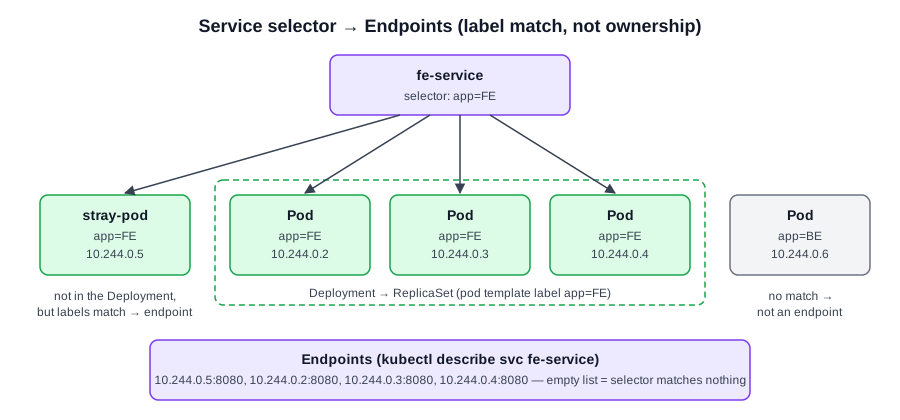 Diagram (new): Endpoints are every Pod whose labels match the selector, regardless of which controller created it.
- Extra info read from
describe deploy:StrategyType: RollingUpdate,RollingUpdateStrategy: 25% max unavailable, 25% max surge(defaults),Selector: name=simple-webapp, annotationdeployment.kubernetes.io/revision: 1,NewReplicaSet: simple-webapp-deployment-7b59598d59. kubectl get svc→kubernetes ClusterIP 10.43.0.1 <none> 443/TCP(CLUSTER-IP =IP:in describe).kubectl get deploy→simple-webapp-deployment 0/4right after lab start (Pods still coming up);describe deploylater showsNewReplicaSet … (4/4 replicas created).describe svc kubernetesfields to know:Selector,Type,IP/IPs,IP Family Policy: SingleStack,IP Families: IPv4,Port,TargetPort,Endpoints,Session Affinity: None.- Test from inside the cluster: curl the ClusterIP:port, or from a Pod curl a node IP:nodePort.
Generate Service YAML imperatively
kubectl create service clusterip redis --tcp=6379:6379 --dry-run=client -o yaml            # --tcp=<port>:<targetPort>
kubectl create service nodeport nginx --tcp=80:80 --node-port=30080 --dry-run=client -o yaml
kubectl expose pod nginx --type=NodePort --port=80 --name=nginx-service --dry-run=client -o yaml
kubectl expose pod redis --port=6379 --name=redis-service --dry-run=client -o yaml           # default type ClusterIP
[!WARNING] Exam traps / remember:
- The Service selector must use the Pod template labels (
name=simple-webapp), not the Deployment's ownmetadata.labels(here<none>).- Verify after creating:
kubectl describe svc webapp-service→ Endpoints must list 4 Pod IPs:8080.
[!NOTE] Beyond the course:
kubectl create service …sets selectorapp=<service-name>(may not match your Pods) and can't take a different selector;kubectl exposereuses the Pod/Deployment's labels as selector but has no--node-portflag → generate YAML, then editnodePort/selector.- The
kubernetesService hasSelector: <none>; its endpoint (the API server IP:6443) is maintained by the API server itself.- Endpoints objects are superseded by EndpointSlices (
kubectl get endpointslices);kubectl get endpointsprints a deprecation warning on newer clusters but still works.
2.25 Namespaces
Source: KodeKloud notes
Concept
- Analogy: two "Mark"s in different houses (Smith, Williams) — first name inside the house, full name from outside. House = namespace; inside a namespace use short names, from outside use the namespace-qualified name.
- Namespaced objects (Pods, Deployments, Services, ConfigMaps…) live in a namespace; unspecified →
default.
| Namespace (auto-created) | Purpose |
|---|---|
default | User workloads when no namespace is given |
kube-system | System components (networking, DNS, controllers) — separated to prevent accidental changes |
kube-public | Resources meant to be readable by all users (rarely used) |
kube-node-lease | Also present (seen in the lab, §2.26) |
- Small clusters/learning:
defaultis fine. Larger/production: separate namespaces (dev,staging,prod) for:- resource isolation (e.g. dev and prod share the cluster without touching each other's objects);
- per-namespace policies: RBAC, NetworkPolicy, etc.;
- ResourceQuota per namespace (CPU, memory, number of Pods…), so one tenant can't starve the others.
DNS across namespaces
- Same namespace: use the bare Service name, e.g.
db-service. - Other namespace:
<service>.<namespace>.svc.<cluster-domain>, e.g.db-service.dev.svc.cluster.local. - Parts: Service name · namespace ·
svc(subdomain for Services) ·cluster.local(default cluster domain). DNS records are created automatically when the Service is created.
mysql.connect("db-service") # same namespace (default)
mysql.connect("db-service.dev.svc.cluster.local") # Service in namespace dev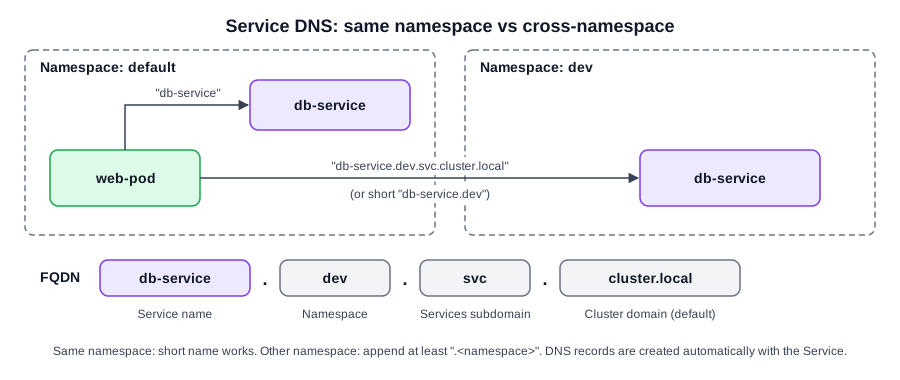 Diagram (new): short name within a namespace vs FQDN across namespaces, and what each FQDN label means.
kubectl and namespaces
kubectl get pods                                  # current namespace (default unless changed)
kubectl get pods --namespace=kube-system          # or: -n kube-system
kubectl get pods --all-namespaces                 # or: -A
kubectl create -f pod-definition.yml              # created in current namespace
kubectl create -f pod-definition.yml --namespace=dev
kubectl create namespace dev                      # imperative
kubectl create -f namespace-dev.yml               # from manifest
kubectl config set-context $(kubectl config current-context) --namespace=dev # make dev the default for this context- Or pin it in YAML with
metadata.namespace— the object always lands there (the namespace must already exist):
# namespace-dev.yml — kubectl create -f namespace-dev.yml
apiVersion: v1
kind: Namespace
metadata:
  name: dev
---
# Pod pinned to dev (in one multi-doc file the Namespace must come first: docs are applied in order)
apiVersion: v1
kind: Pod
metadata:
  name: myapp-pod
  namespace: dev          # explicit target namespace
  labels:
    app: myapp
    type: front-end
spec:
  containers:
    - name: nginx-container
image: nginx- A context = cluster + user (+ namespace);
set-context … --namespacechanges only that context. Contexts in depth: §7.12.
ResourceQuota
apiVersion: v1
kind: ResourceQuota
metadata:
  name: compute-quota
  namespace: dev          # quota applies to this namespace
spec:
  hard:
    pods: "10"
    requests.cpu: "4"
    requests.memory: 5Gi
    limits.cpu: "10"
limits.memory: 10Gikubectl create -f compute-quota.yaml # resourcequota/compute-quota created[!WARNING] Exam traps / remember:
- Namespaces are not a security boundary on their own — combine with RBAC, NetworkPolicies, admission controllers. Quotas only cap consumption; they don't stop a misconfigured workload hurting cluster stability.
- Cross-namespace access needs the namespace in the DNS name; the bare name only resolves within the caller's namespace.
[!TIP] If you'll work in one namespace for a while, set it on the context instead of typing
-nevery time.
[!NOTE] Beyond the course:
-n/--namespaceconflicting with a differentmetadata.namespacein the file → error (namespace mismatch).- Shorter:
kubectl config set-context --current --namespace=dev; check withkubectl config view --minify | grep namespace:.<service>.<namespace>(e.g.db-service.dev) also resolves from Pods thanks to DNS search domains.- Imperative quota:
kubectl create quota compute-quota -n dev --hard=pods=10,requests.cpu=4,requests.memory=5Gi,limits.cpu=10,limits.memory=10Gi. Once a quota covers cpu/memory requests/limits, new Pods must declare them (or get defaults from a LimitRange) or they are rejected.kubectl describe quota -n devshows Used vs Hard.kube-node-leaseholds the Lease objects used for node heartbeats.- Some objects are cluster-scoped (Nodes, PVs, Namespaces, ClusterRoles, StorageClasses) —
-nis ignored for them; list them withkubectl api-resources --namespaced=false.
2.26 Solution Namespaces optional
Source: KodeKloud notes
| Task | Command | Answer / gotcha |
|---|---|---|
| How many namespaces? | kubectl get namespaces (short: kubectl get ns) | 10: default, kube-system, kube-public, kube-node-lease, finance, marketing, dev, prod, manufacturing, research — count rows minus header |
Pods in research? | kubectl get pods --namespace=research / -n research | 2 (dna-1, dna-2, both CrashLoopBackOff) |
Create Pod redis (image redis) in finance | kubectl run redis --image=redis -n finance | Verify: kubectl get pods -n finance |
| Inspect other namespaces | kubectl get pods -n marketing · kubectl get svc -n marketing · kubectl get svc -n dev | marketing: Pods redis-db, blue; Services blue-service NodePort 8080:30082, db-service NodePort 6379:30758. dev: db-service ClusterIP 6379/TCP |
- Debug failing Pods in a namespace:
kubectl describe pod <pod> -n research,kubectl logs <pod> -n research. - Alternative for the Pod task: write a manifest and
kubectl apply -f <pod-manifest.yaml>. - The marketing/dev outputs set up the DNS question type:
blue(marketing) reaches its own DB asdb-service, the dev DB asdb-service.dev.svc.cluster.local(see §2.25).
[!CAUTION] Correction: the notes say
kubectl runmay create a Deployment unless--restart=Neveris added. Since kubectl v1.18kubectl runonly creates a Pod (all generators except run-pod/v1 removed in v1.18; the--generatorflag was later dropped entirely).--restart=Neverisn't needed — and it changes the Pod'srestartPolicytoNever, which may not be what the task wants. Usekubectl run redis --image=redis -n finance.
2.27 Imperative vs Declarative
Source: KodeKloud notes
Concept
- Imperative = specify how, step by step (taxi with turn-by-turn directions). Declarative = specify the end state (rideshare app: just the destination); the system works out the steps.
- IaC: imperative = run steps (provision VM → install nginx → configure → start). Declarative = describe the result and let tooling reconcile:
# informal declarative spec
VM Name: web-server
Package: nginx:1.18
Port: 8080
Path: /var/www/nginx
Code: GIT Repo - X- Declarative-first tools: Terraform, Puppet. Usable either way: Ansible, Chef.
- A good declarative system applies only the minimal changes needed to reach the new desired state (and handles "already exists"/"doesn't exist" itself).
Imperative in Kubernetes
| Command | Purpose |
|---|---|
kubectl run --image=nginx nginx | Create a Pod |
kubectl create deployment --image=nginx nginx | Create a Deployment |
kubectl expose deployment nginx --port=80 | Create a Service for a Deployment |
kubectl edit deployment nginx | Edit the live object in an editor |
kubectl scale deployment nginx --replicas=5 | Scale |
kubectl set image deployment nginx nginx=nginx:1.18 | Change image |
kubectl create -f nginx.yaml | Create from file (imperative object config) |
kubectl replace -f nginx.yaml | Replace object from file |
kubectl delete -f nginx.yaml | Delete objects defined in file |
- Pros: fast for simple/one-off tasks — ideal under exam time pressure.
- Cons: awkward for complex specs (multi-container Pods, many env vars, volumes); commands live only in shell history → hard to track/share.
kubectl edit vs editing the file
- Local manifest, created with
kubectl create -f nginx.yaml:
# nginx.yaml (local file, before the change)
apiVersion: v1
kind: Pod
metadata:
  name: myapp-pod
  labels:
    app: myapp
    type: front-end
spec:
  containers:
    - name: nginx-container
      image: nginx           # no status block in the local file
kubectl editopens the live object (includes server-managedstatusand other fields), not your local file. Changes apply to the cluster only.
# what kubectl edit pod myapp-pod shows after changing the image (excerpt)
apiVersion: v1
kind: Pod
metadata:
  name: myapp-pod
  labels:
    app: myapp
    type: front-end
spec:
  containers:
    - name: nginx-container
      image: nginx:1.18
status:
  conditions:
    - lastProbeTime: null
      status: "True"
type: Initialized- Better: change the local manifest (version-controlled, reviewable, revertible), then
kubectl replace -f nginx.yamlorkubectl apply -f nginx.yaml.
Declarative: kubectl apply
- Compares local desired state with the live object and makes only the needed changes; creates if missing, patches if present.
kubectl apply -f nginx.yaml               # single file
kubectl apply -f /path/to/config-files # every manifest in a directory- Change
image: nginx→image: nginx:1.18in the file, re-runapply→ cluster updated. How apply tracks state: §2.30.
| Aspect | Imperative | Declarative |
|---|---|---|
| How | Commands that perform actions | Desired state in files |
| Best for | Quick tasks, one-off changes, exam shortcuts | Long-lived infra, teams, CI/CD |
| Auditability | Low (unless commands captured) | High (manifests in source control) |
| Examples | kubectl run, create, edit | kubectl apply, Terraform, Puppet |
| Reconciliation | Manual | Controllers converge to desired state |
- Kubernetes docs "Manage Kubernetes Objects" (Tasks) covers: declarative management with config files; declarative with Kustomize; imperative commands; imperative management with config files; in-place updates with
kubectl patch(strategic merge or JSON merge patch).
[!WARNING] Exam traps / remember:
kubectl editchanges are not in your local file — a laterapply/replaceof the old file silently reverts them. Update the file afterwards if the change must persist.- Exam strategy: imperative (
run,create deployment,expose) for simple objects; YAML +apply -ffor complex ones (multi-container, env, ConfigMaps/Secrets, volumes).
[!NOTE] Beyond the course:
kubectl create -ferrors withAlreadyExistsif the object exists;kubectl replace -ferrors if it doesn't.kubectl replace --force -f file.yamldeletes and recreates — the standard way to change immutable Pod fields after a failedkubectl edit(which saves your edit to/tmp/kubectl-edit-*.yaml).
2.28 Kubectl Explain Command
Source: KodeKloud notes
What it does
kubectl explainprints a resource's fields, types and descriptions from the OpenAPI schema served by your cluster's API server, so output matches the cluster's version/API groups, not the online docs.- Use it when you don't remember a field name, its nesting, the resource's full/short name or its API version.
- Workflow:
kubectl api-resourcesto find the name →kubectl explain <name or shortname>→ drill down with dot notation →--recursivefor the whole tree.
Discover resources: kubectl api-resources
Columns: NAME · SHORTNAMES · APIVERSION · NAMESPACED · KIND. Either NAME or SHORTNAMES works with explain (and get, etc.).
| NAME | SHORTNAMES | APIVERSION | NAMESPACED | KIND |
|---|---|---|---|---|
| bindings | – | v1 | true | Binding |
| componentstatuses | cs | v1 | false | ComponentStatus |
| configmaps | cm | v1 | true | ConfigMap |
| endpoints | ep | v1 | true | Endpoints |
| events | ev | v1 | true | Event |
| limitranges | limits | v1 | true | LimitRange |
| namespaces | ns | v1 | false | Namespace |
| nodes | no | v1 | false | Node |
| replicationcontrollers | rc | v1 | true | ReplicationController |
| resourcequotas | quota | v1 | true | ResourceQuota |
| controllerrevisions | – | apps/v1 | true | ControllerRevision |
| daemonsets | ds | apps/v1 | true | DaemonSet |
| deployments | deploy | apps/v1 | true | Deployment |
Commands
kubectl api-resources                      # names, shortnames, API group/version, namespaced?, kind
kubectl explain pods                       # top-level fields + types (apiVersion, kind, metadata, spec, status)
kubectl explain pods.spec                  # dot notation: one field's description and its sub-fields
kubectl explain pods --recursive           # entire field tree (names + types only, no descriptions)
Output shape (trimmed):
$ kubectl explain pods
KIND:       Pod
VERSION:    v1
FIELDS:
  apiVersion  <string>
  kind        <string>
  metadata    <ObjectMeta>
  spec        <PodSpec>      # desired behaviour of the pod
  status      <PodStatus>    # most recently observed status; may be stale

$ kubectl explain pods.spec
FIELD: spec <PodSpec>
FIELDS:
  activeDeadlineSeconds        <integer>   # max seconds pod may be active (relative to StartTime) before marked failed
  affinity                     <Affinity>  # scheduling constraints
  automountServiceAccountToken <boolean>
  ...

$ kubectl explain pods --recursive
  metadata <ObjectMeta>
    annotations <map[string]string>
    labels      <map[string]string>
    managedFields <[]ManagedFieldsEntry> ...
  spec <PodSpec>
    containers <[]Container>
      name  <string>
      image <string>
      ports <[]ContainerPort>
        containerPort <integer>
  status <PodStatus>
    phase <string>
[!WARNING] Exam traps / remember:
- Output reflects only what the API server exposes: if your user can't read an API group, or a CRD publishes no OpenAPI schema, the resource/fields may be missing.
- Field differs from online docs? Check the group/version in
kubectl api-resourcesand the cluster version.--recursivegives no descriptions; drop it once you've found the path.
[!TIP] Combine dot path + recursive to get a compact skeleton of just the part you need, then grep:
kubectl explain deploy.spec.strategy --recursive,kubectl explain pod.spec --recursive | grep -i -A3 toleration.
[!NOTE] Beyond the course:
kubectl explain <res> --api-version=apps/v1selects a specific group/version;kubectl api-resources --namespaced=falselists cluster-scoped kinds;kubectl api-resources -o wideadds VERBS;kubectl api-versionslists group/versions. Type hints:<[]X>= list (YAML-items),<map[string]string>= key/value map,<PodSpec>-style = nested object.componentstatuses(cs) still appears in the list but is deprecated.
2.29 Lab Solution Imperative Commands optional
Source: KodeKloud notes
Theory: see §2.27 (imperative vs declarative), §2.21–2.22 (Services).
Drill
| # | Task | Command | Verify / gotcha |
|---|---|---|---|
| 1 | Pod nginx-pod, image nginx:alpine | kubectl run nginx-pod --image=nginx:alpine | → pod/nginx-pod created |
| 2 | Pod redis, redis:alpine, label tier=db | kubectl run redis --image=redis:alpine --labels="tier=db" | label = future Service selector; kubectl get pod redis --show-labels |
| 3 | ClusterIP Service redis-service on 6379 for pod redis | kubectl expose pod redis --port=6379 --name=redis-service | expose copies the pod's labels into the selector (tier=db); check kubectl describe svc redis-service → Selector + Endpoints = pod IP:6379 |
| 4 | Deployment webapp, kodekloud/webapp-color, 3 replicas | kubectl create deployment webapp --image=kodekloud/webapp-color --replicas=3 | kubectl get deploy webapp → wait until 3/3 READY (0/3 at first is normal) |
| 5 | Pod custom-nginx, nginx, container port 8080 | kubectl run custom-nginx --image=nginx --port=8080 | --port only sets containerPort; no Service created |
| 6 | Namespace devns | kubectl create namespace devns | (kubectl create ns devns) |
| 7 | Deployment redis-deploy in devns, redis, 2 replicas | kubectl create deployment redis-deploy --image=redis --replicas=2 -n devns | kubectl get deployment -n devns → 2/2 |
| 8 | Pod httpd (httpd:alpine) + ClusterIP Service httpd on port 80, fewest steps | kubectl run httpd --image=httpd:alpine --port=80 --expose=true | prints pod/httpd created + service/httpd exposed; --expose requires --port; selector = run=httpd |
Verification output to recognise:
$ kubectl get svc redis-service
NAME            TYPE        CLUSTER-IP     EXTERNAL-IP   PORT(S)    AGE
redis-service   ClusterIP   10.43.56.187   <none>        6379/TCP   12s

$ kubectl describe svc redis-service
Selector:   tier=db            # taken from pod labels by kubectl expose
Type:       ClusterIP
Port:       <unset>  6379/TCP
TargetPort: 6379/TCP           # defaults to --port when --target-port not given
Endpoints: 10.42.0.10:6379 # pod IP(s) matching the selector; empty = selector mismatchkubectl get pods httpd; kubectl get svc httpd; kubectl describe svc httpd # task 8 checksOther ways to get a Service
kubectl create service clusterip ...with explicit flags, or- generate YAML, edit (selector / targetPort), then apply:
kubectl expose pod redis --port=6379 --name=redis-service --dry-run=client -o yaml > svc.yaml
kubectl apply -f svc.yaml- For quick tasks
kubectl exposeorkubectl run ... --exposeis fastest.
[!CAUTION] Correction:
- The page says some
kubectlversions makekubectl runcreate a Deployment and you need--restart=Neverfor a Pod. That was pre-v1.18 behaviour (--generatoris gone). Currentkubectl runalways creates a Pod; usekubectl create deploymentfor Deployments. (--restart=Neveronly sets the pod'srestartPolicy.)- The page claims
--port"withkubectl runorkubectl expose" sets the container'scontainerPort. True only forkubectl run. Withkubectl expose,--portis the Service port (--target-port= container port, defaults to--port).
[!WARNING] Exam traps / remember:
kubectl run --portdoes not publish anything: it only fillscontainerPort. A Service is still needed.kubectl expose podbuilds the selector from the pod's labels (task 3:tier=db; task 8:run=httpd).- Always add
-n <ns>when the task names a namespace; check withkubectl get ... -n <ns>.
[!NOTE] Beyond the course:
kubectl create service clusterip redis --tcp=6379:6379cannot take a selector; it setsapp=redis(from the name), which often matches nothing.kubectl runaddsrun=<name>only when--labelsis not given. Preferkubectl expose, or--dry-run=client -o yamland fix the selector.
2.30 Kubectl Apply Command
Source: KodeKloud notes
kubectl apply -f nginx.yaml                 # single file
kubectl apply -f /path/to/config-files      # every manifest in a directory
The three configurations
| Source | What it is | Where it lives |
|---|---|---|
| Local configuration | The YAML/JSON you pass to apply -f | Your filesystem (nginx.yaml) |
| Live configuration | Current object incl. status and server-managed fields | API server / etcd (kubectl get pod myapp-pod -o yaml) |
| Last-applied configuration | JSON snapshot of the manifest from the previous apply | Annotation kubectl.kubernetes.io/last-applied-configuration on the live object |
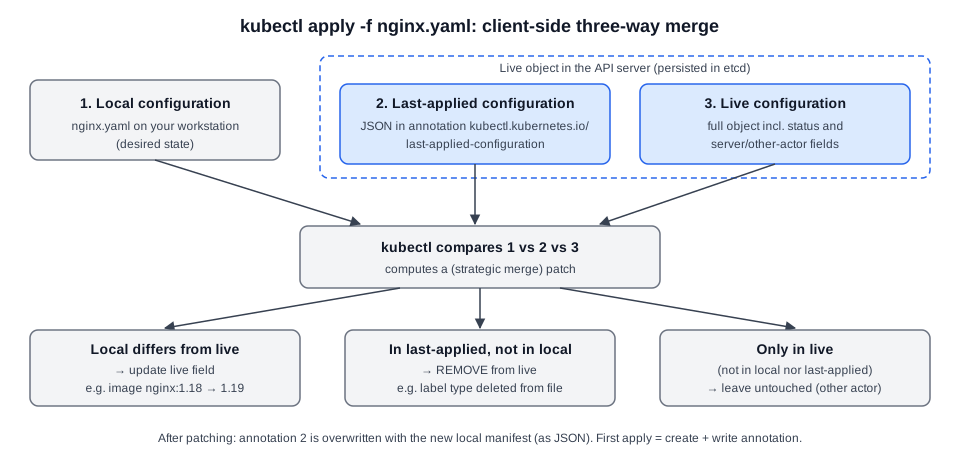 Diagram (new): how kubectl apply compares local, last-applied and live configs and what each outcome does.
What kubectl apply does
- Object absent → create. The live object is stored, and kubectl writes the local manifest (converted to JSON) into the last-applied annotation.
- Object exists → three-way compare local vs last-applied vs live → compute a patch (strategic merge patch for supported kinds) → apply only the needed changes → overwrite the annotation with the new manifest JSON.
Merge rules
- Field in local differs from live → live updated (e.g.
image: nginx:1.18→nginx:1.19; only that field is patched). - Field in last-applied but missing from local → treated as deliberate removal → deleted from live (e.g. remove label
typefrom the file → label removed from the pod). - Field in live but in neither local nor last-applied → assumed set by someone else → left alone.
- This is why the last-applied snapshot exists: without it kubectl can't tell "I removed it" from "someone else added it".
Example manifest and the removal case:
# nginx.yaml (v2: image bumped, label "type: front-end-service" removed)
apiVersion: v1
kind: Pod
metadata:
  name: myapp-pod
  labels:
    app: myapp
    # type: front-end-service  <- was in v1; still in last-applied -> apply deletes it from live
spec:
  containers:
    - name: nginx-container
image: nginx:1.19 # was nginx:1.18 -> apply patches only this field{"apiVersion":"v1","kind":"Pod","metadata":{"annotations":{},"labels":{"app":"myapp","type":"front-end-service"},"name":"myapp-pod"},"spec":{"containers":[{"image":"nginx:1.19","name":"nginx-container"}]}}(Last-applied annotation value before the label-removal apply: type is present here but not in the local file → removed from live.)
Live object (kubectl get pod myapp-pod -o yaml) = local fields + server-managed ones, e.g.:
status:
  conditions:
    - lastProbeTime: null
      status: "True"
      type: Initialized   # set by the cluster; never in local file or last-applied -> apply leaves it alone
Practical notes
kubectl create/replace/editdon't create the annotation unless you pass--save-config. If it already exists,replace/editrewrite it from the edited object.- Changes made outside the annotation (
kubectl scale/set/patch, controllers, other clients) are invisible to the snapshot → mixing them withapplyon the same fields causes unexpected overrides or removals.
[!CAUTION] Correction: the page says only that
create/replacedon't set the annotation and warns against mixingkubectl edit/patchwithapply. More precisely: kubectl updates an existing last-applied annotation onreplace/edit, soeditchanges do reach the snapshot; drift comes frompatch/scale/set, controllers and other clients. The "don't mix on the same fields" advice still stands.
- Classic
apply= client-side three-way merge via the annotation. Server-side apply (SSA) is newer: tracks field ownership inmetadata.managedFields, different semantics. Consider SSA or clear field ownership when controllers/operators also modify the resource.
[!WARNING] Exam traps / remember:
- Annotation key:
kubectl.kubernetes.io/last-applied-configuration(stored on the live object, not locally).- Deleting a field from your file removes it from the cluster only if it was previously applied.
[!NOTE] Beyond the course:
kubectl apply view-last-applied <type>/<name>prints the snapshot;kubectl create -f x.yaml --save-configwrites the annotation so laterapplyworks cleanly;kubectl apply --server-side -f x.yamluses SSA (avoids the 256 KiB annotation size limit hit by large objects such as big CRDs);kubectl diff -f x.yamlpreviews whatapplywould change. Applying to an object made withkubectl create/run(no annotation) prints a warning and patches the annotation in.
2.31 A Quick Reminder
Source: KodeKloud notes
Course guidance, no new Kubernetes content:
- Use the provided labs first. They give a consistent environment and avoid setup problems. Build your own local cluster later, once the course gives instructions for it.
| Provided labs | Own local setup |
|---|---|
| Early lessons; consistent workflow, no setup issues | After core labs; custom tooling / advanced experiments |
| Follow instructor's images/commands | Local Docker, Kubernetes or VMs tailored to needs |
| Certification prep, timed exercises | Portfolio projects, performance tuning, extra services |
- Typical
docker imageslisting on a lab machine: redis, ubuntu, mysql, nginx (alpine/latest), alpine, postgres,kodekloud/simple-webapp-mysql,kodekloud/simple-webapp;docker run redisstarts one.
[!NOTE] Beyond the course: On Kubernetes nodes (v1.24+, containerd/CRI-O) inspect images with
crictl images, notdocker images(see §2.3–2.4).
← 01 Introduction · Index · 03 Scheduling →
Reference
Based on the KodeKloud Certified Kubernetes Administrator (CKA) course notes.