Same manifests deployed to dev (local), stg (staging), prod; only a few values differ per environment.
Environment
Replicas
dev
1
stg
2
prod
5
Naive approach: copy every manifest into dev/, stg/, prod/ (each holding nginx-depl.yml + service.yml) and edit only the env-specific values, then kubectl apply -f <env>/.
Breaks down as resources grow (Services, ConfigMaps, Secrets, more Deployments): every new or changed file must be copied/synced into every env folder → missed copies → drift and inconsistent environments.
# overlays/stg/replicas-patch.yaml (prod: identical but replicas: 5)apiVersion: apps/v1kind: Deploymentmetadata: name: nginx-deployment # must match the base resource name (+ kind) to target itspec: replicas: 2
# overlays/stg/kustomization.yaml (each overlay needs one)apiVersion: kustomize.config.k8s.io/v1beta1kind: Kustomizationresources: - ../../base # pull in the base directory (it has its own kustomization.yaml)patchesStrategicMerge: - replicas-patch.yaml
[!CAUTION]
Correction:patchesStrategicMerge is deprecated since Kustomize v5 (bundled in kubectl ≥ 1.27). It still works but prints a warning. Current form:
Workflow: shared manifests in base/ → one folder per env under overlays/ → each overlay references base + only its patches/extra resources → build/apply per env.
kubectl apply -k overlays/stg # build + apply one environmentkubectl kustomize overlays/stg # render only (same as: kustomize build overlays/stg)
Built into kubectl (kubectl kustomize, kubectl apply -k), no extra package needed. The embedded version lags the standalone release, so install the standalone kustomize CLI if you need the newest features/flags (releases).
No complex, hard-to-read templating system to learn (unlike Helm).
Every artifact is plain YAML, so it can be validated and processed as such.
[!NOTE]
Beyond the course: the CKA curriculum lists "use Helm and Kustomize to install cluster components". Don't assume the standalone kustomize binary exists in the exam terminal; kubectl kustomize <dir> and kubectl apply -k <dir> always work. kubectl version --client shows the embedded Kustomize version.
Helm is a package manager for apps (like apt/yum), not just a per-environment customiser: charts, release lifecycle (install/upgrade/rollback), repositories/registries.
Concepts: Chart = packaged app · Templates = manifests with Go template markers {{ ... }} · Values = config in values.yaml, overridden with -f / --set · Release = deployed instance of a chart.
Extra features: conditionals, loops, functions, hooks.
[!CAUTION]
Correction: the install script drops the kustomize binary in the current directory (or a directory passed as an argument). It does not put it on PATH, so the mv step is normally required.
kustomize version # course used --short: kustomize/v4.4.1 2021-11-11T23:36:27Zkubectl version --client # includes Kustomize Versionkustomize build . # in a dir with a kustomization.yaml: should print YAML
No output? Reopen the terminal, check echo $PATH (Windows echo %PATH%), move the binary to /usr/local/bin + chmod +x, re-run.
[!CAUTION]
Correction:kubectl version --short was removed in kubectl 1.28; use kubectl version --client. Its output also includes a Kustomize Version: line. In Kustomize v5, plain kustomize version prints only v5.x.y, and --short is deprecated or gone depending on the release.
Pointing Kustomize at a dir does not process every YAML in it. It reads only the explicit entry point kustomization.yaml (also accepted: kustomization.yml, Kustomization).
Contains two things: (1) resources, the list of manifests (relative paths) to manage; (2) customizations/transformations to apply to them.
Field
Purpose
Example
resources
Files (or dirs) to include
- nginx-deployment.yaml
commonLabels
Add labels to every resource
company: KodeKloud
namePrefix / nameSuffix
Prefix/suffix every name
namePrefix: prod-
patchesStrategicMerge
Apply YAML patches
- deployment-patch.yaml
images
Change image names/tags
- name: nginx / newTag: "1.21"
# k8s/kustomization.yamlresources: # kubernetes resources to be managed by kustomize - nginx-deployment.yaml - nginx-service.yamlcommonLabels: # customization: label added to every resource company: KodeKloud
kustomize build combines the manifests and applies the transformations. It does not apply/deploy anything. To deploy, pipe it:
kustomize build k8s/ | kubectl apply -f - # check kubectl context/namespace first: this changes the live cluster
[!WARNING]
Exam traps / remember:
No kustomization.yaml in the dir → build fails; extra YAML files in the dir are ignored unless listed in resources.
commonLabels also rewrites selectors (Service spec.selector, Deployment spec.selector.matchLabels). Adding or changing it on an already-deployed Deployment hits the immutable selector error on apply.
[!NOTE]
Beyond the course:commonLabels is deprecated in Kustomize v5 in favour of labels: (- pairs: {company: KodeKloud} with includeSelectors: true for the same selector behaviour). kustomize edit fix migrates deprecated fields. images tags must be strings (newTag: "1.21") or YAML may parse them as numbers.
| sends left command's stdout to right command's stdin. -f - = read manifests from stdin.
kubectl apply -k k8s/ = read k8s/kustomization.yaml, run kustomize, apply; same result as the pipe.
Troubleshooting: ensure kustomization.yaml exists in the target dir. If -k fails on a newer field, the kubectl-bundled kustomize may be too old → use the standalone binary.
[!TIP]
Exam speed: kubectl kustomize k8s/ to preview, kubectl apply -k k8s/ to apply, kubectl delete -k k8s/ to clean up. No standalone binary needed.
[!NOTE]
Beyond the course:kubectl diff -k k8s/ shows what an apply would change. Output is sorted by kind (Namespaces, ConfigMaps/Secrets, Services… before Deployments) rather than resources order, which is why Services print before Deployments.
apiVersion: kustomize.config.k8s.io/v1beta1 # optional but recommendedkind: Kustomization # always this value for kustomization filesresources: - deployment.yaml - service.yaml
Field
Purpose
Value
apiVersion
Kustomize API schema used to parse/validate the file
kustomize.config.k8s.io/v1beta1
kind
Marks the file as a kustomization, removing ambiguity for tooling
Kustomization
resources
Files or directories to include
- deployment.yaml
Both fields are optional: kustomize/kubectl infer defaults if omitted. Set them explicitly for clarity, portability, and stable behaviour across Kustomize/kubectl versions and CI pipelines.
Kustomize evolves (new fields/behaviour), so apiVersion pins the intended schema. When upgrading Kustomize (or the kubectl that bundles it), check whether a new API version (e.g. v1) exists and update the files.
Errors like "unknown field" / "unsupported apiVersion" → check the kubectl-bundled or standalone Kustomize version, then align apiVersion or tooling versions.
[!NOTE]
Beyond the course:kind: Kustomization is still kustomize.config.k8s.io/v1beta1; there is no v1 Kustomization yet. Components use apiVersion: kustomize.config.k8s.io/v1alpha1, kind: Component (§14.17).
Diagram (new): the root lists directories, each subdirectory's kustomization lists its files, and one build feeds one apply.
Approach
Command
When
Flat directory apply
kubectl apply -f k8s/
Small repos, one-offs
Kustomize build pipe
kustomize build k8s/ | kubectl apply -f -
Standalone binary / custom render steps
kubectl embedded Kustomize
kubectl apply -k k8s/
Simple native workflow; convenient in CI
Best practices: keep each kustomization.yaml next to the resources it lists. Treat each directory (service, database, cache) as a logical unit. Prefer kubectl apply -k in CI unless you need features missing from the embedded version.
[!WARNING]
Exam traps / remember:
Each directory listed in resourcesmust contain its own kustomization file, or the build errors.
resources paths are relative to the kustomization file that lists them, not to your shell's cwd.
The YAML block above shows two files separated by --- for brevity. Each is a separate file on disk.
[!NOTE]
Beyond the course: without Kustomize, kubectl apply -R -f k8s/ (--recursive) applies all subdirectories in one go.
kustomize build k8s/ # same combined output as step 2kubectl apply -k k8s # or: kustomize build k8s/ | kubectl apply -f -kubectl get pods
Approach
Pros
Cons
Single root kustomization
Quick for small projects; one central list
Grows large, harder to maintain
Per-directory kustomizations (recommended)
Modular, per-component team ownership, supports overlays/env customizations
A few more files, much cleaner at scale
[!CAUTION]
Correction: the demo names the files Kustomization.yaml (capital K). Kustomize only recognises kustomization.yaml, kustomization.yml or Kustomization (no extension). That spelling only resolves on a case-insensitive filesystem (e.g. macOS default); the source does not establish which filesystem the demo used. On Linux, including exam nodes, the build fails with "unable to find one of 'kustomization.yaml'…". Use lowercase kustomization.yaml.
[!NOTE]
Beyond the course: the demo keeps the Mongo password in a ConfigMap. Credentials belong in a Secret (secretKeyRef), which Kustomize can also generate (secretGenerator).
Apply the same change (label, annotation, namespace, name prefix/suffix) to every resource referenced by a kustomization, set once in kustomization.yaml instead of hand-editing each file. Kustomize ships built-in common transformers and also supports custom ones. Image transformer: §14.10.
Transformer
Effect
Example
commonLabels
Adds label(s) to all resources (+ pod templates, selectors)
# 2. namespace → every resource gets metadata.namespace: labresources: - service.yamlnamespace: lab # does NOT create the Namespace; include a Namespace manifest for that
The course's expected output leaves the Service selector unchanged. commonLabelsdoes add the label to Service spec.selector too, as the §14.4 output shows (company: KodeKloud in the selector). Corrected above.
namePrefix: KodeKloud- renders fine, but Kubernetes object names must be lowercase RFC 1123 names, so kubectl apply rejects KodeKloud-api-service-dev. Use lowercase prefixes, e.g. kodekloud-.
[!WARNING]
Exam traps / remember:
Transformers only affect resources referenced by that kustomization. Use overlays or separate kustomization directories for env-specific transforms (§14.16).
namespace:overrides any namespace already set in the manifests and doesn't create the Namespace object.
namePrefix/nameSuffix also update references Kustomize knows about (e.g. ConfigMap names in a Deployment's configMapKeyRef). A hard-coded name inside an arbitrary string won't be rewritten.
Field names are plural (commonLabels, commonAnnotations). The slide's "commonLabel" is a typo.
[!NOTE]
Beyond the course:commonLabels is deprecated in Kustomize v5 in favour of labels: (includeSelectors: true reproduces selector injection; omit it to label metadata only, which avoids immutable-selector errors on existing Deployments).
[!NOTE]
Beyond the course: known references (configMapKeyRef, Secret/Service names, etc.) are renamed only when the referenced resource is part of the same Kustomize build; external objects are left unchanged.
Rewrites container image name and/or tag in rendered manifests without touching the source YAML. Use cases: per-environment overrides, CI/CD pipelines, swapping an image across many manifests from one place.
images[].name matches the image reference (image: nginx), not the container name: (name: web is irrelevant to matching).
Fields: newName (replace image name), newTag (replace tag). Either or both.
Multiple entries allowed in the images: list → transform several base images at once.
Base Deployment (deployment.yaml):
apiVersion: apps/v1kind: Deploymentmetadata: name: web-deploymentspec: replicas: 1 selector: matchLabels: component: web template: metadata: labels: component: web spec: containers: - name: web # container name: NOT used for image matching image: nginx # <- this is what images[].name matches
# kustomization.yamlapiVersion: kustomize.config.k8s.io/v1beta1kind: Kustomizationresources: - deployment.yamlimages: - name: nginx # image to match newName: haproxy # optional: new image name newTag: "2.4" # optional: new tag — ALWAYS quote
Put per-environment image overrides in overlays (§14.16) so the base stays immutable.
[!NOTE]
Beyond the course (verified with kubectl v1.33 / kustomize v5.6):name: nginx also matches nginx:1.21 (existing tag is ignored and replaced by newTag), but does not match gcr.io/myproj/nginx — a registry-prefixed image needs the full path in name. A digest: field also exists (pins image@sha256:…). Imperative edit: kustomize edit set image nginx=haproxy:2.4.
[!WARNING]
Exam traps / remember:
images[].name = image name, not container name.
Unquoted numeric tag (newTag: 2.4) fails: cannot unmarshal number into Go struct field … newTag of type string. Quote it.
Container name: is never changed by the image transformer — only image:.
Theory of each transformer: see §14.9 / §14.10. Key lesson here: placement = scope. A transformer in a kustomization affects only the resources that kustomization pulls in (its own resources + child kustomizations).
Moving the images: block from db/ to root → every mongo image anywhere in the output becomes postgres:4.2.
[!WARNING]
Exam traps / remember:
Scope is decided by whichkustomization.yaml holds the transformer, not by where the file sits on disk.
commonLabels also injects labels into Service selector and Deployment spec.selector.matchLabels + pod template labels.
Prefix/suffix renames are propagated to references (configMapKeyRef, etc.) automatically.
Forgetting the - in namePrefix/nameSuffix concatenates names (KodeKloudapi-deployment).
[!CAUTION]
Correction: the course prefix KodeKloud- renders fine but kubectl apply rejects it — object names must be lowercase RFC 1123 ([a-z0-9-.]). Use e.g. kodekloud- in practice.
[!NOTE]
Beyond the course: kustomize v5 (embedded in kubectl ≥ 1.27) warns 'commonLabels' is deprecated. Please use 'labels' instead. Equivalent: labels: [{pairs: {department: engineering}, includeSelectors: true}] (includeSelectors: false = metadata only, safer for existing Deployments since selectors are immutable). commonLabels still works.
fine-grained ops with explicit paths; predictable element-level list ops
Strategic merge
partial K8s YAML with only fields to change
readability; conventional K8s fields
# Strategic merge patch, inline, via patches:patches: - target: kind: Deployment name: api-deployment patch: |- apiVersion: apps/v1 kind: Deployment metadata: name: api-deployment # identifies the object when no explicit target is given spec: replicas: 5 # only the changed field
Without target:, Kustomize identifies a strategic merge patch’s resource from its own metadata; with target:, resource selection follows the explicit target.
[!WARNING]
Exam traps / remember:
Strategic merge on lists merges by merge key (containers → name); a wrong assumption can replace or duplicate list items. Use JSON 6902 for exact element-level list ops (§14.15).
remove has no value.
patch: |- content must be correctly indented under patch:.
[!NOTE]
Beyond the course: a JSON 6902 patch requires a target (error: must specify a target for JSON patch); a strategic merge patch may omit target (matched by its kind/metadata.name). JSON Pointer escaping: / in a key → ~1, ~ → ~0 (e.g. /metadata/labels/app.kubernetes.io~1name). add fails if the parent map doesn't exist (e.g. /metadata/labels/x when there are no labels).
[!NOTE]
Beyond the course: an explicit target: takes precedence over the strategic merge patch’s metadata.name; broad targets can apply one patch to several matching resources.
readable merges of typical fields (replicas, labels, spec/metadata)
both; external for many
Best practices: keep kustomization.yaml short (external files for long/numerous patches); validate JSON 6902 arrays as valid JSON (CI/lint).
[!NOTE]
Beyond the course:patchesJson6902 and patchesStrategicMerge are deprecated in kustomize v5 (kubectl ≥ 1.27 prints 'patchesStrategicMerge' is deprecated. Please use 'patches' instead); they still work. kustomize edit fix converts them. Unified patches: equivalents (both verified):
SMP preserves all unspecified fields; JSON 6902 does exactly one atomic op per entry.
[!CAUTION]
Correction: the course writes patches: followed by a bare filename (- label-patch.yaml). Kustomize rejects that (cannot unmarshal string into Go struct field Kustomization.patches of type types.Patch). Under patches: each item must be an object: - path: label-patch.yaml. (Bare filenames are valid only under the deprecated patchesStrategicMerge:.)
[!WARNING]
Exam traps / remember:
Changing pod-template labels does not change spec.selector.matchLabels (still component: api after the replace). Update the selector too if the Deployment must select the new pods.
Beyond the course: the "replace" result as rendered (selector component: api, template component: web) is rejected by the API server (selector does not match template labels); and spec.selector of an existing Deployment is immutable, so changing it means delete + recreate. Adding a label (org) is safe.
SMP delete of a map key = key: null; JSON 6902 delete = op: remove.
apiVersion: kustomize.config.k8s.io/v1beta1kind: Kustomizationresources: - api-depl.yamlpatchesJson6902: - target: group: apps version: v1 kind: Deployment name: api-deployment patch: |- # 1) Replace container at index 0 (both name and image change) - op: replace path: /spec/template/spec/containers/0 value: name: haproxy image: haproxy
Exercises 2 and 3 are alternativepatch: bodies: replace exercise 1, using each exercise’s original base. Combining them would create duplicate container names; exercise 3 uses the web + database base.
      # 2) Append a container (use /containers/0 to insert first, /containers/1 for second ...)
      - op: add
        path: /spec/template/spec/containers/-
        value:
          name: haproxy
          image: haproxy
      # 3) Remove the 2nd container (database at index 1) — no value
      - op: remove
        path: /spec/template/spec/containers/1
(Each SMP file also needs the apiVersion/kind/metadata.name: api-deployment header shown in the first one.)
[!WARNING]
Exam traps / remember:
Index ops are fragile: if anything reorders the list, /containers/0 hits the wrong item. Prefer SMP by name when changing fields.
JSON 6902 replace at an index swaps the entire item; SMP changes only listed fields.
SMP item with an unknownname is added, not an error — a typo in the name silently adds a broken container.
List delete in SMP = $patch: delete; map-key delete = key: null (§14.14).
[!NOTE]
Beyond the course: with current kustomize use patches: instead of the deprecated patchesJson6902 / patchesStrategicMerge (see §14.13 note); the patch bodies are identical.
Base can be split into feature subdirs (base/db/, base/api/, each with its own kustomization.yaml), and overlays can mirror it (overlays/dev/db/{db-patch.yaml,kustomization.yaml}, overlays/dev/api/…). Each kustomization imports what it needs; keep env patches next to the overlay they modify.
Best practices: keep base minimal; env settings in overlays; relative paths for portability; env-only components (monitoring, debug tools) as overlay resources.
[!WARNING]
Exam traps / remember:
Build/apply the overlay dir (overlays/dev), not base — applying base skips all env changes.
Path is relative to the overlay's own kustomization.yaml; ../base vs ../../base mistakes → must build at directory: not a valid directory … no such file or directory.
Overlay-only resources must be listed in the overlay's resources: — just placing the file in the dir does nothing.
[!NOTE]
Beyond the course: in current kustomize prefer patches: [- path: replica-patch.yaml] over deprecated patchesStrategicMerge; bases: is deprecated in favour of resources:. Kustomize by default refuses to load files outside the kustomization root except via another kustomization dir (--load-restrictor LoadRestrictionsRootOnly default) — so reference ../../base (a dir with a kustomization), not ../../base/nginx-depl.yaml (error: security; file … is not in or below …).
Component = self-contained, reusable bundle (resources + generators e.g. secrets + patches) for one optional feature.
Use when a feature belongs in some overlays, not all → avoids copy-pasting the same config into multiple overlays. Needed in every overlay → put it in the base.
Example: overlays dev, premium, standalone (self-hosted); features caching (Redis) → premium + standalone; external DB (Postgres) → dev + premium.
# overlays/dev/kustomization.yamlapiVersion: kustomize.config.k8s.io/v1beta1kind: Kustomizationresources: - ../../base # base still via resourcescomponents: - ../../components/db # opt-in features
Overlay
components:
dev
../../components/db
premium
../../components/db, ../../components/caching
standalone
../../components/caching
kustomize build overlays/premium # test each overlay that imports components
[!CAUTION]
Correction: the course says a Component may use apiVersion: kustomize.config.k8s.io/v1beta1 and lists its patch as patches: - deployment-patch.yaml. Both fail on kustomize v5.6 (kubectl v1.33): apiVersion for Component should be kustomize.config.k8s.io/v1alpha1, and bare strings under patches: are rejected → use apiVersion: kustomize.config.k8s.io/v1alpha1 and - path: deployment-patch.yaml. (The course's own warning — check apiVersion/kind compatibility and test with kustomize build — applies.)

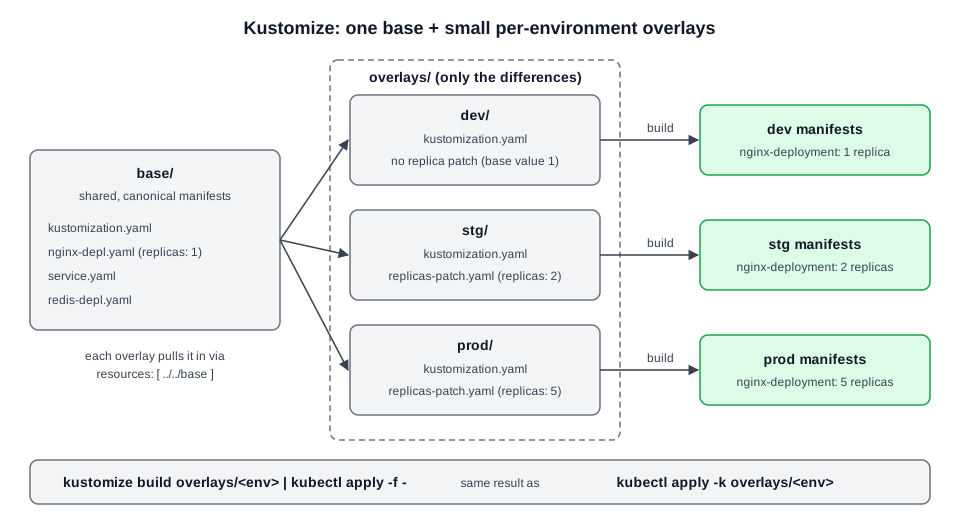 Diagram (new): base manifests are referenced by each overlay; building an overlay yields that environment's manifests.
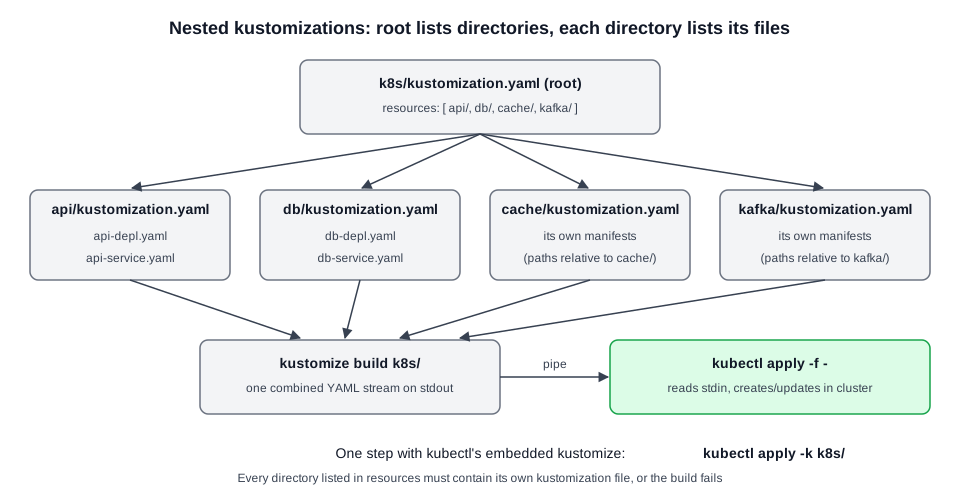 Diagram (new): the root lists directories, each subdirectory's kustomization lists its files, and one build feeds one apply.
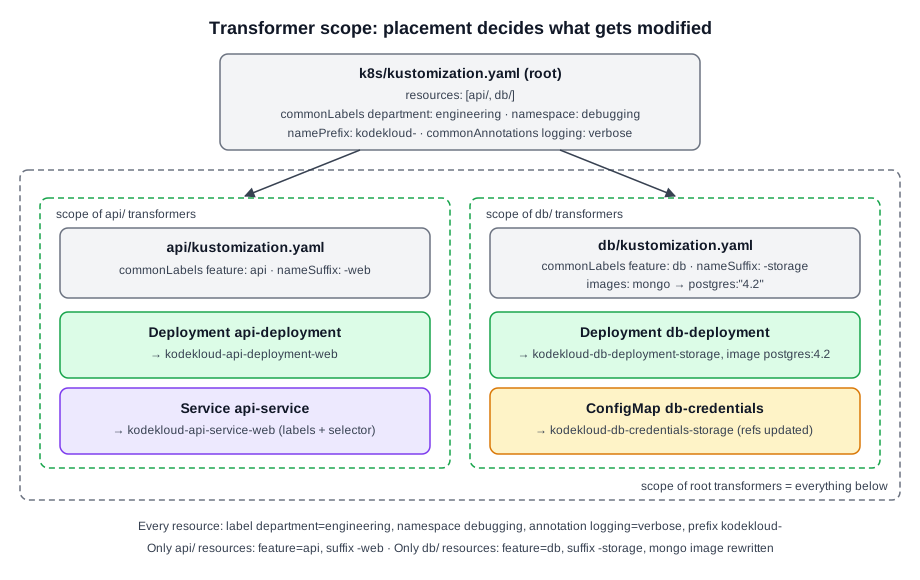 Diagram (new): root-level transformers hit every resource; subdirectory transformers hit only that directory's resources.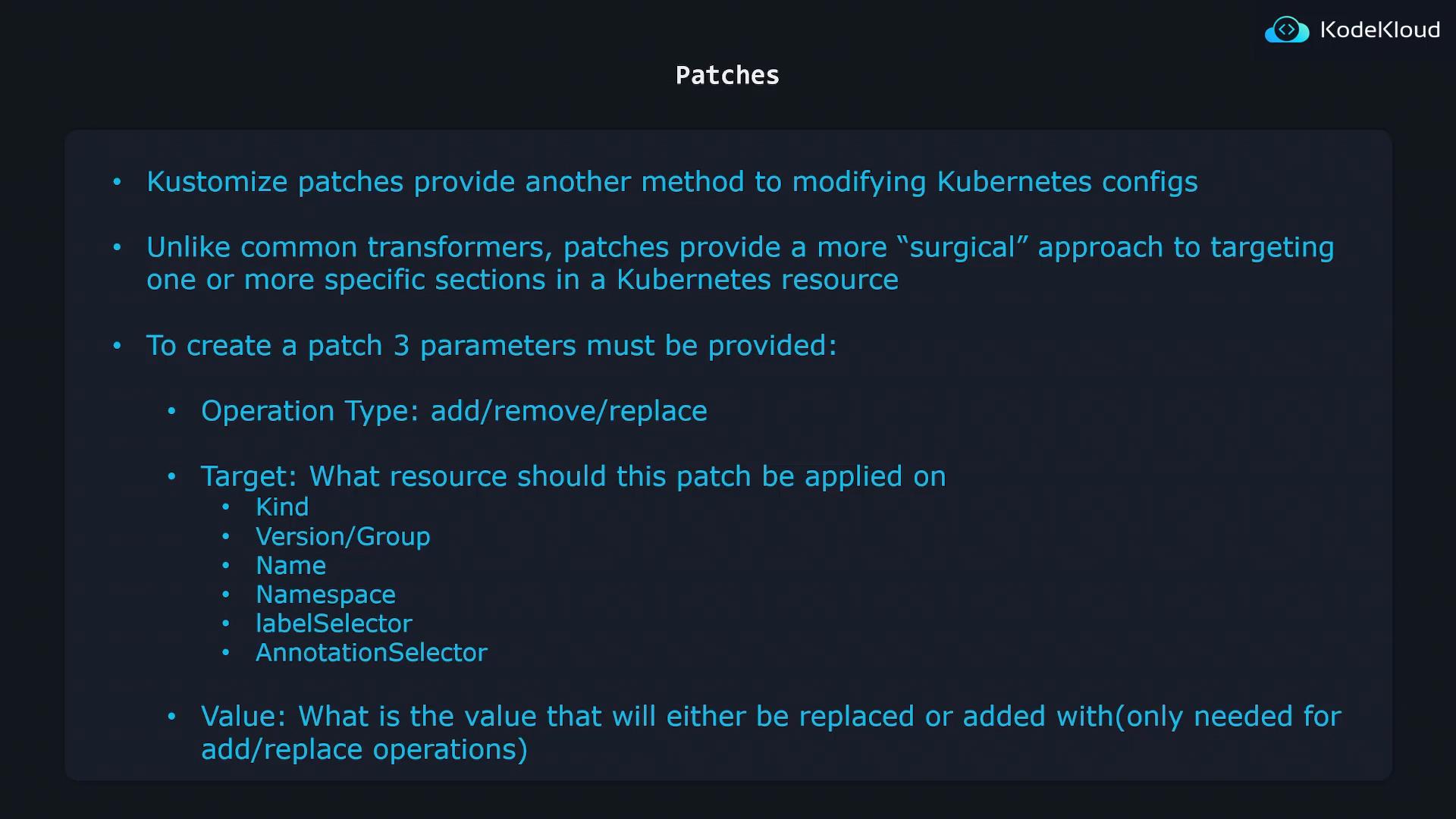
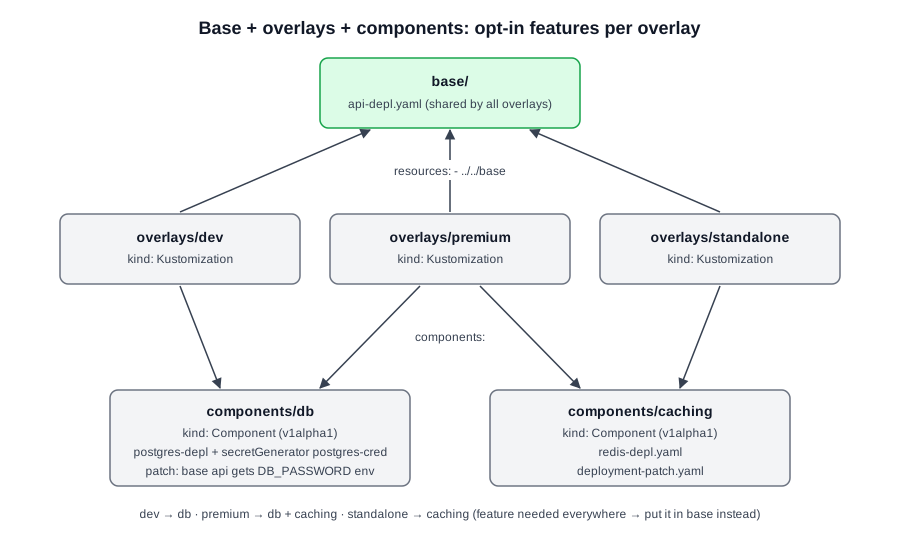 Diagram (new): every overlay imports the base via