Pod-to-pod segmentation, limits lateral movement (§7.27)
Section goals: understand how users and components authenticate. Read and interpret certificate config and logs. Apply least-privilege RBAC. Harden workloads with security contexts and image policies. Restrict traffic with NetworkPolicies.
TLS gets extra depth, from basics through to cluster-level troubleshooting. Certificate problems are the most common issue when you build or debug a cluster yourself. If you already know TLS, focus on the Kubernetes-specific parts and on authorization.
All traffic between etcd, kube-apiserver, kube-controller-manager, kube-scheduler, kubelet and kube-proxy is TLS-encrypted. Production clusters use mutual TLS (mTLS).
Protect etcd with TLS and restricted access. Enable encryption at rest (§5.12).
Use mTLS between apiserver ↔ kubelet and between control plane components.
Automate certificate rotation and lifecycle.
Expose the API server only to trusted networks/load balancers. Use API aggregation and admission controllers (e.g. PodSecurity, OPA/Gatekeeper) for extra enforcement.
Default: all pods can reach all pods across the cluster. Restrict with NetworkPolicy (details in §7.27).
Enforcement is done by the CNI plugin. If the CNI doesn't support NetworkPolicy, policies are accepted but have no effect.
Principles: start with default-deny ingress/egress per namespace, then allow only the traffic you need. Select with labels. Test in non-prod. Audit traffic with policy logging or flow exporters.
Actors: admins, developers, end users, third-party services/bots. End-user auth to apps is handled by the apps themselves and is out of scope. This lesson covers management access to kube-apiserver.
Two identity types:
Humans (admins, developers): Kubernetes has no User object. You can't create users with kubectl or list them. Identity comes from outside the cluster: static files, X.509 certs, or an IdP (OIDC/LDAP/Kerberos).
Robots (processes, controllers, CI/CD, integrations): ServiceAccounts. These are real API objects that the cluster creates and manages (§7.20).
Every request (kubectl, SDK, curl) is authenticated by kube-apiserver before authorization and admission:
kubectl get pods --all-namespacescurl -k https://kube-server-ip:6443/ # -k = skip server cert verification (labs only)
# kube-apiserver flag (systemd ExecStart or static-pod command)--token-auth-file=/path/to/user-token-details.csv# use the token as a bearer tokencurl -k -H "Authorization: Bearer KpjcVbI7rCFAHYPkByTIzRb7gu1cUc4B" https://master-node-ip:6443/
Basic-auth file (concept from the course): maps usernames to plaintext passwords plus uid/groups.
kubeadm runs kube-apiserver as a static pod (systemd setups run it as a host process), so the CSV has to be reachable where the apiserver runs. For a static pod, mount it into the container or follow your distribution's method for supplying extra files.
[!NOTE]
Beyond the course: a hostPath mount for the token file in a kubeadm static pod:
# /etc/kubernetes/manifests/kube-apiserver.yaml (relevant fragments only)spec: containers: - command: - kube-apiserver - --token-auth-file=/tmp/users/user-token-details.csv # path as seen inside the container volumeMounts: - mountPath: /tmp/users name: usr-details readOnly: true volumes: - hostPath: path: /tmp/users # directory on the control-plane host holding the CSV type: DirectoryOrCreate name: usr-details
A token only proves identity. The user still needs authorization, e.g. RBAC Role + RoleBinding (§7.16).
Production: certificates for machine identities, OIDC/LDAP for humans. Both give better security, auditability and IdP integration.
[!CAUTION]
Correction: the basic-auth (password) file flag --basic-auth-file was removed in v1.19. Only --token-auth-file still exists for static credentials, and it is insecure (clear text, no rotation, apiserver restart needed for changes).
[!WARNING]
Exam traps / remember:
"List all users" is impossible: there is no User resource. ServiceAccounts are the only identities stored in the cluster.
Static token and password files store credentials in clear text. Fine for labs, never for production.
When you add a flag to a static-pod manifest that points at a file, also add a volume/volumeMount, or the apiserver won't start.
ssh-keygen # creates id_rsa (private) + id_rsa.pub (public)cat ~/.ssh/authorized_keys # on the server: public keys allowed to log in# ssh-rsa AAAAB3NzaC1yc...KhtUBfoTz1BqR V1NThvOo4opzEwRQo1mWx user1ssh -i id_rsa user1@server1 # authenticate with your private key
The same public key can go on many servers. Other users generate their own pairs, and you add their public keys to authorized_keys.
Whoever holds your private key can log in as you.
[!NOTE]
Beyond the course: OpenSSH ≥ 9.5 ssh-keygen defaults to Ed25519 (id_ed25519/id_ed25519.pub). Use ssh-keygen -t rsa for the classic id_rsa names.
Diagram (new): PKI in two phases: CA issuance of the server certificate, then the per-connection handshake with symmetric session key.
Client connects and asks for a secure session.
Server sends its certificate (public key + identity).
Client validates the chain against its trust store and checks the hostname against the SANs and the expiry.
Key exchange produces a shared symmetric session key, by either:
RSA key transport: the client encrypts a symmetric key with the server's public key, or
ephemeral Diffie-Hellman (ECDHE): preferred in modern TLS because it gives forward secrecy.
All further traffic uses the symmetric key.
Why signatures matter: anyone can create a certificate that claims to be my-bank.com. A phishing or man-in-the-middle server can present one. Clients only trust certificates signed by a CA in their trust store.
Self-signed cert: signed by its own key and not trusted by default. The browser shows "Your connection is not private" (also shown for expired or untrusted-CA certs).
Public CAs (Symantec, DigiCert, GlobalSign, Comodo…): their public certs ship with browsers and operating systems.
Private/internal CA: for internal sites. Its CA certificate must be distributed to every client (e.g. installed in employee browsers) before clients trust what it issues.
Getting a cert: generate key + CSR → send the CSR to the CA → the CA validates domain ownership and signs with the CA's private key → certificate.
Fields to read on a certificate (openssl x509 -in my-bank.crt -text -noout, trimmed):
Serial Number: 420327018966204255Signature Algorithm: sha256WithRSAEncryptionIssuer: CN=<signing CA>Validity Not After : Feb 9 13:41:28 2020 GMTSubject: CN=my-bank.comX509v3 Subject Alternative Name: DNS:mybank.com, DNS:i-bank.com, DNS:we-bank.comSubject Public Key Info: ...
mTLS: the server also requires a client certificate signed by a CA it trusts. Common in internal and enterprise APIs (and throughout Kubernetes), rare on public websites.
The two keys of a pair are mathematically linked:
Confidentiality: encrypt with the recipient's public key. Only their private key decrypts it.
Authenticity/integrity: sign (a hash) with your private key. Anyone verifies with your public key. Signing ≠ encrypting the whole message with the private key. Never share private keys.
PKI (Public Key Infrastructure) = the whole system of keys, certificates, CAs, issuance and validation.
Rule of thumb: "key" in the file name = private key. No "key" = certificate/public key.
A stolen private key lets an attacker impersonate the server. Without forward secrecy, it can also decrypt previously captured sessions. Store keys securely and rotate them if compromised.
kube-apiserver is the only component that talks to etcd. To etcd it is a client. The apiserver can reuse its serving cert/key for this or get a dedicated client pair. Separate pairs make rotation and auditing easier.
Grouping: client certs (users and components → apiserver) and server certs (apiserver, etcd, kubelet).
openssl genrsa -out ca.key 2048 # CA private keyopenssl req -new -key ca.key -subj "/CN=KUBERNETES-CA" -out ca.csr # CA CSRopenssl x509 -req -in ca.csr -signkey ca.key -out ca.crt -days 3650 # self-sign with its own key (10 y)
-signkey = self-signed (signed by its own key). All later certs use -CA ca.crt -CAkey ca.key.
The root cert should carry Basic Constraints CA:TRUE so that TLS clients accept it as a CA. Set this through an OpenSSL config v3_ca section or -extensions/-extfile. The plain command above does not explicitly add basicConstraints = CA:TRUE; check the generated certificate and the active OpenSSL configuration.
Protect ca.key: if it is lost you can't sign new certs. If it leaks, everything it signed must be reissued. Use strict file permissions or a secret store.
[!NOTE]
Beyond the course: two ways to get CA:TRUE, both checked with OpenSSL 3.x/4.x:
CN = the user name the apiserver sees (in audit logs and RBAC). Any name works, e.g. kube-admin / kubernetes-admin.
O (organization) = group. system:masters is a built-in group with full cluster-admin rights. This is what separates the admin from an ordinary user.
-CAcreateserial creates ca.srl (serial-number file) on first use.
The same pattern (key → CSR → sign with the CA) applies to the other clients.
[!NOTE]
Beyond the course: system components need the system: prefix in CN so that the built-in RBAC roles match: CN=system:kube-scheduler, CN=system:kube-controller-manager, CN=system:kube-proxy.
[!CAUTION]
Correction: the original notes put the group in OU (/CN=kubernetes-admin/OU=system:masters, /CN=system:node:node01/OU=system:nodes). Kubernetes reads groups from the O (Organization) field only. An OU value is ignored, so the cert authenticates but gets no system:masters or system:nodes rights. Use /O=system:masters and /O=system:nodes.
[!NOTE]
Beyond the course: since kubeadm v1.29, /etc/kubernetes/admin.conf uses O=kubeadm:cluster-admins (bound to the cluster-admin ClusterRole by a ClusterRoleBinding). The break-glass super-admin.conf keeps O=system:masters. Members of system:masters bypass RBAC entirely, and a cert can't be revoked short of rotating the CA.
Using the cert pair:
curl https://kube-apiserver:6443/api/v1/pods \
  --key admin.key --cert admin.crt --cacert ca.crt          # client key + cert, CA to verify the server
apiVersion: v1kind: Configclusters:- name: kubernetes cluster: certificate-authority: ca.crt # CA used to verify the apiserver server: https://kube-apiserver:6443users:- name: kubernetes-admin user: client-certificate: admin.crt client-key: admin.keycontexts: # added so the file is usable as-is (kubeconfig details: §7.12)- name: kubernetes-admin@kubernetes context: cluster: kubernetes user: kubernetes-admincurrent-context: kubernetes-admin@kubernetes
Every component and client needs a copy of ca.crt to verify the peer it talks to.
File(s)
Purpose
ca.key, ca.crt
Root CA. Signs all cluster certs
admin.key, admin.crt
Admin client cert (CN = admin user name, O=system:masters)
apiserver.key, apiserver.crt
kube-apiserver serving cert. Must include SANs
kubelet.key, kubelet.crt
Per-node kubelet serving cert (identifies the node)
IPs: the kubernetes Service ClusterIP (first IP of the service CIDR, e.g. 10.96.0.1) and the host/advertise IP (e.g. 172.17.0.87). Add any LB name/IP too.
openssl genrsa -out apiserver.key 2048openssl req -new -key apiserver.key -subj "/CN=kube-apiserver" -out apiserver.csr -config openssl.cnfopenssl x509 -req -in apiserver.csr -CA ca.crt -CAkey ca.key -CAcreateserial \ -out apiserver.crt -extensions v3_req -extfile openssl.cnf -days 1000 # SANs are applied at signing time
[!CAUTION]
Correction: the original openssl.cnf fragment references distinguished_name = req_distinguished_name but has no [req_distinguished_name] section. OpenSSL then fails with "Unable to get 'req_distinguished_name' section". An empty section (as above) fixes it. Also, openssl x509 -req does not copy extensions from the CSR, so the -extensions v3_req -extfile openssl.cnf at signing time is what puts the SANs into the certificate.
[!CAUTION]
Correction (outdated flags):--kubelet-https and --enable-swagger-ui have been removed from current kube-apiserver releases, and --apiserver-count is deprecated. Don't copy them into a modern manifest. Current apiservers also require --service-account-issuer and --service-account-signing-key-file (see the kubeadm manifest in §7.9).
Server cert (apiserver → kubelet HTTPS): one per node (node01, node02, node03), named after the node (CN or SAN). Pass it with kubelet flags.
Client cert (kubelet → apiserver): CN = system:node:<nodeName>, O = system:nodes, e.g. /CN=system:node:node01/O=system:nodes. The apiserver needs this format to give the kubelet node permissions through the Node authorizer.
Put the client cert/key and ca.crt into each kubelet's kubeconfig.
Self-sign the CA with -signkey ca.key. Sign everything else with -CA ca.crt -CAkey ca.key.
Group = O, user = CN. Admin → O=system:masters. Nodes → CN=system:node:<name>, O=system:nodes. System components → CN=system:kube-scheduler and the like.
A missing SAN (e.g. a new LB name) → "x509: certificate is valid for …, not …". Re-issue with the SAN added.
Distribute ca.crt everywhere. Keep *.key private. Rotate before expiry and keep an inventory.
[!NOTE]
Beyond the course: kubelet serving-certificate flags are --tls-cert-file / --tls-private-key-file; the KubeletConfiguration fields are tlsCertFile / tlsPrivateKeyFile.
In this manual setup a single pair (kubernetes.pem/kubernetes-key.pem) acts as the serving cert and the etcd/kubelet client cert: one cert reused for several roles.
For every cert record: path, CN, SANs (alt names), Organization (O), Issuer, Expiration (UTC), purpose. This shows certs that expire soon or were issued by the wrong CA.
[!CAUTION]
Correction: the original inventory’s last two rows misidentify the etcd CA and issuer: kubeadm uses CN etcd-ca, with a 10-year CA lifetime, and apiserver-etcd-client.crt is issued by that CA rather than self-signed. The 2017 expiry in the source is a typo. Inspect the actual certificates (§7.9).
Reference for expected CN, parent CA, O, kind and SANs per cert, plus the recommended paths and the flag that consumes each one: Kubernetes PKI best practices.
Certificate:
    Data:
        Version: 3 (0x2)
        Serial Number: 3147495682089747350 (0x2bae26a58f090396)
    Signature Algorithm: sha256WithRSAEncryption
        Issuer: CN=kubernetes                          <- signing CA
        Validity
            Not Before: Feb 11 05:39:19 2019 GMT
            Not After : Feb 11 05:39:20 2020 GMT       <- expiry
        Subject: CN=kube-apiserver                     <- identity (and O= groups, if any)
    X509v3 extensions:
        X509v3 Key Usage: critical
            Digital Signature, Key Encipherment
        X509v3 Extended Key Usage:
            TLS Web Server Authentication              <- server vs client cert
    X509v3 Subject Alternative Name:
        DNS:master, DNS:kubernetes, DNS:kubernetes.default,
        DNS:kubernetes.default.svc, DNS:kubernetes.default.svc.cluster.local,
        IP Address:10.96.0.1, IP Address:172.17.0.27
journalctl -u etcd.service -l # systemd-managedkubectl logs etcd-controlplane -n kube-system # kubeadm static pod (pod name = etcd-<node>)crictl ps -a # apiserver/etcd down → kubectl fails → go to the runtimecrictl logs <container-id>
[!CAUTION]
Correction (outdated lab output):--insecure-port was removed from kube-apiserver in v1.24, so it is absent from current manifests. Images now come from registry.k8s.io (the k8s.gcr.io registry is frozen).
Anything absent from the list, e.g. kube-master. Present: controlplane, kubernetes, kubernetes.default, kubernetes.default.svc, kubernetes.default.svc.cluster.local, 10.96.0.1, 10.46.98.9
embed: ClientTLS: cert = /etc/kubernetes/pki/etcd/server-certificate.crt, key = /etc/kubernetes/pki/etcd/server.key, ...C | etcdmain: open /etc/kubernetes/pki/etcd/server-certificate.crt: no such file or directory
ls /etc/kubernetes/pki/etcd shows the file is really server.crt. Fix: in /etc/kubernetes/manifests/etcd.yaml set --cert-file=/etc/kubernetes/pki/etcd/server.crt and save. The kubelet notices the change and recreates the static pod. etcd binds 127.0.0.1:2379 and 10.46.98.9:2379, the apiserver reconnects, and kubectl works again.
Check both manifests: /etc/kubernetes/manifests/kube-apiserver.yaml and etcd.yaml.
Every referenced path must exist (ls /etc/kubernetes/pki, ls /etc/kubernetes/pki/etcd). A wrong path stops the static pod from starting, and the container log (or kubelet log) names the missing file.
mTLS alignment: etcd serves etcd/server.crt and trusts etcd/ca.crt. The apiserver must use --etcd-cafile=/etc/kubernetes/pki/etcd/ca.crt and present apiserver-etcd-client.crt/.key (signed by the etcd CA).
Compare the Issuer: of a cert with the CA file the other side is configured with. A mismatch is the classic cause.
etcd not running/listening → etcd logs, check its manifest paths
TLS handshake timeout / tls: bad certificate
CA mismatch or invalid/expired client cert → compare issuers and CA files
no such file or directory on a .crt/.key
Typo in a manifest path
[!CAUTION]
Correction: the lab uses docker ps -a | grep kube-apiserver and docker logs <id>. Since dockershim was removed (v1.24), nodes run containerd/CRI-O, so use crictl ps -a and crictl logs <id>. The flags are the same.
[!NOTE]
Beyond the course:
After editing a static-pod manifest, wait. The kubelet recreates the pod by itself (watch with watch crictl ps). If nothing appears, check journalctl -u kubelet for YAML or path errors.
Back up a manifest outside/etc/kubernetes/manifests before editing it. A copy inside the directory gets run as a second static pod.
x509: certificate signed by unknown authority → compare the peer certificate’s Issuer: with the configured CA; for etcd use etcd/ca.crt, not the Kubernetes ca.crt.
Inspect the etcd server cert with openssl x509 -in /etc/kubernetes/pki/etcd/server.crt -text -noout. Course sample: Apr 17 2022 → Apr 17 2023, SANs controlplane, kubernetes, kubernetes.default, kubernetes.default.svc, kubernetes.default.svc.cluster.local, IPs 10.96.0.1, 10.46.98.9. Treat these as sample output, not required SANs for every etcd server.
etcd static-Pod metadata: name etcd, namespace kube-system, labels component=etcd,tier=control-plane; find it with kubectl -n kube-system get pods -l component=etcd.
PKI map legend: blue marks serving certificates; red marks signing CAs/client certificates. This diagram uses certificate type, rather than component role, for colour.
The cluster signing CA (CA private key + root cert) is the crown jewel: whoever holds the key can mint certs for any identity, including privileged ones. Keep it on a dedicated CA server or in a key-management solution.
kubeadm keeps the CA pair on the control-plane node (/etc/kubernetes/pki/ca.crt, ca.key), so that node effectively is the CA server.
Signing CSRs by hand (openssl x509 -req -CA ..., see §7.7) does not scale. The Certificates API makes it an auditable workflow: CSRs become API objects that admins review, approve or deny, and the cluster signs approved ones automatically.
# jane-csr.yamlapiVersion: certificates.k8s.io/v1kind: CertificateSigningRequestmetadata: name: jane-csrspec: signerName: kubernetes.io/kube-apiserver-client # client cert for authenticating to the API server expirationSeconds: 600 # optional: requested cert lifetime in seconds usages: - client auth request: LS0tLS1CRUdJTiBDRVJUSUZJQ0FURSBSRVFVRVNULS0tLS0K... # base64 of the whole PEM CSR, one line
kubectl apply -f jane-csr.yamlkubectl get csr # NAME AGE SIGNERNAME REQUESTOR REQUESTEDDURATION CONDITION -> Pendingkubectl describe csr jane-csrkubectl certificate approve jane-csr # or: kubectl certificate deny jane-csrkubectl get csr jane-csr -o yaml # status.conditions[type=Approved, reason=KubectlApprove] + status.certificatekubectl get csr jane-csr -o jsonpath='{.status.certificate}' | base64 --decode > jane.crt
After approval, status.conditions gets type: Approved, status: "True", reason: KubectlApprove; status.certificate is filled once signed (CONDITION Approved,Issued).
Give jane.key + jane.crt to the user (use in kubeconfig, §7.12).
client auth, server auth, key encipherment, digital signature
[!CAUTION]
Correction: the notes name kubernetes.io/kube-apiserver-serving as a serving signer. Kubernetes has no such built-in signer. The built-in signers are kubernetes.io/kube-apiserver-client, kubernetes.io/kube-apiserver-client-kubelet (kubelet client certs, can be auto-approved), kubernetes.io/kubelet-serving (kubelet serving certs, never auto-approved) and kubernetes.io/legacy-unknown (legacy v1beta1 only; cannot be requested using certificates.k8s.io/v1 and was never auto-approved). For users authenticating to the API, always use kubernetes.io/kube-apiserver-client with client auth.
All Certificates API automation lives in kube-controller-manager controllers. They expose pending CSRs for review, can auto-approve some CSRs by configured rules, and sign approved CSRs.
Signing requires the CA files on the controller manager:
--cluster-signing-cert-file (CA cert)
--cluster-signing-key-file (CA key)
Anyone who can read those files or change controller-manager flags/startup files can mint identities, so lock down access to them.
spec.request = base64 of the entire PEM file (including the BEGIN/END lines), on one line (base64 -w0 or | tr -d '\n'). A multi-line value breaks the object.
signerName is mandatory in certificates.k8s.io/v1. usages must match the signer (client auth for kube-apiserver-client).
Approval alone does not mean issued: CONDITION goes Pending → Approved → Approved,Issued. status.certificate is base64, so decode it.
CSRs are cluster-scoped (no -n).
Signing is done by kube-controller-manager, using --cluster-signing-cert-file / --cluster-signing-key-file.
[!NOTE]
Beyond the course:
expirationSeconds minimum is 600 (10 min). Unset means the signer default, which kube-controller-manager caps with --cluster-signing-duration (default 1 year).
On kubeadm the flags are in /etc/kubernetes/manifests/kube-controller-manager.yaml and point to /etc/kubernetes/pki/ca.crt and /etc/kubernetes/pki/ca.key.
Usages reflect the purpose: client auth, server auth, digital signature, etc.
After cleanup kubectl get csr still lists csr-8mfn8, signer kubernetes.io/kube-apiserver-client-kubelet, requestor system:node:controlplane, Approved,Issued. That is the node's own kubelet client CSR, created and auto-approved when the node joined. Leave it alone.
Useful fields to check before approving: spec.groups, spec.usages, spec.signerName, spec.username.
[!CAUTION]
Correction: the lab text says approving makes "the API server" sign the certificate. The signer for kubernetes.io/kube-apiserver-client is the CSR signing controller in kube-controller-manager, using --cluster-signing-cert-file / --cluster-signing-key-file (§7.10).
[!WARNING]
Exam traps / remember:
Check spec.groups before approving. system:masters in a CSR is a red flag, so deny it.
base64 -d (GNU) vs base64 -D (BSD/macOS). The exam terminal is Linux, so use -d / -w 0.
server, certificate-authority or certificate-authority-data
users
client credentials
client-certificate / client-key or client-certificate-data / client-key-data
contexts
which user talks to which cluster (+ default namespace)
cluster, user, namespace (optional)
current-context (top level)
default context kubectl uses
context name
In the curl example: server + ca.crt → clusters; admin.key/admin.crt → users; a context my-kube-admin@my-kube-playground ties them together.
A kubeconfig only tells kubectl which credentials to present to which server. Adding a user or context creates nothing in the cluster and grants no permissions.
Context names are free text. user@cluster is just a convention.
apiVersion: v1kind: Configcurrent-context: dev-user@google # default contextclusters:- name: my-kube-playground cluster: server: https://my-kube-playground:6443 certificate-authority: /path/to/ca.crt- name: development cluster: server: https://dev.example.com:6443 certificate-authority: /path/to/dev-ca.crt- name: production cluster: server: https://prod.example.com:6443 certificate-authority: /path/to/prod-ca.crt- name: google # added: the context below references it cluster: server: https://google.example.com:6443 certificate-authority: /path/to/google-ca.crtcontexts:- name: my-kube-admin@my-kube-playground context: cluster: my-kube-playground # must match a clusters[].name user: my-kube-admin # must match a users[].name- name: dev-user@google context: cluster: google user: dev-user- name: prod-user@production context: cluster: production user: prod-userusers:- name: my-kube-admin user: client-certificate: /path/to/admin.crt client-key: /path/to/admin.key- name: dev-user user: client-certificate: /path/to/dev.crt client-key: /path/to/dev.key- name: prod-user user: client-certificate: /path/to/prod.crt client-key: /path/to/prod.key
(The original example's dev-user@google context referenced a google cluster that was never defined. A cluster entry has been added here so the file is valid.)
unset KUBECONFIG first, then cp -a ~/.kube/config ~/.kube/config.backup then mv /root/my-kube-config ~/.kube/config → kubectl config current-context = research
Back up first. KUBECONFIG is the non-destructive alternative
kubectl get nodes fails with research
compare users[dev-user] paths with ls -la /etc/kubernetes/pki/users/dev-user/ → files are dev-user.crt dev-user.csr dev-user.key, config says developer-user.crt
Path mismatch: kubectl can't load the client cert
Fix the cert path
kubectl config set-credentials dev-user --client-certificate=/etc/kubernetes/pki/users/dev-user/dev-user.crt --client-key=/etc/kubernetes/pki/users/dev-user/dev-user.key (add --kubeconfig=/root/my-kube-config right after kubectl if the file was not moved)
Or vi the file and fix developer-user.crt → dev-user.crt
Verify
kubectl config view --minify (current context only) → kubectl get nodes works
[!TIP]
When kubectl auth fails, check the users: entry first: do the client-certificate / client-key paths exist? (ls them.) Then check whether the cert is valid for this cluster's CA.
Every interaction (kubectl, client libraries, curl) goes to kube-apiserver. Resources are organised by API group and version.
curl -k https://kube-master:6443/version # {"major":"1","minor":...,"gitVersion":"v1.x.y",...}curl -k https://kube-master:6443/api/v1/pods # PodList from the core group
Top-level paths include /api, /apis, /healthz, /logs, /metrics, /openapi/v2, /version.
Hierarchy: API group → version → resource → verbs. Verbs (actions) include list, get, create, delete, update, watch. Authorization rules are written against exactly these (group, resource, verb). See §7.16.
kubectl proxy # Starting to serve on 127.0.0.1:8001curl http://localhost:8001 # no certs needed: proxy uses your kubeconfig credentialscurl http://localhost:8001/api/v1/namespaces/default/pods
kube-proxy
kubectl proxy
What
cluster component on every node
client-side local HTTP proxy
Does
programs node network rules for Service → Pod traffic
forwards local requests to kube-apiserver using kubeconfig creds
Port
—
127.0.0.1:8001 default
[!WARNING]
Exam traps / remember:
Core group is the empty string"" in RBAC rules and plain v1 in apiVersion. Deployments are in apps, not core.
Don't confuse kubectl proxy (local API access, port 8001) with kube-proxy (Service networking).
[!NOTE]
Beyond the course:
kubectl api-resources # NAME, SHORTNAMES, APIVERSION, NAMESPACED, KINDkubectl api-resources --api-group=apps # resources of one group ("" = core)kubectl api-resources --namespaced=false # cluster-scoped resourceskubectl api-versions # all group/version pairskubectl get --raw /apis | head # raw API call with kubeconfig creds, no proxy neededkubectl explain deployment # shows GROUP/VERSION of a kind
extensions (shown on the slide) no longer serves any resources: Deployments/DaemonSets/ReplicaSets moved to apps/v1, Ingress to networking.k8s.io/v1 (removed in v1.16 / v1.22).
metadata.selfLink in the sample output was removed in v1.24.
Discovery paths returned: /api, /api/v1, /apis, /apis/, /healthz, /logs, /metrics, /openapi/v2, /swagger-2.0.0.json. /version is a separate endpoint.
Authentication = who you are (§7.3). Authorization = what an authenticated user or service account may do.
Goals: developers can deploy apps but not touch nodes, networking or storage config. CI/CD (e.g. Jenkins) and monitoring get the minimum needed. Users are restricted to their namespaces.
Kubelets authenticate with certs whose CN is system:node:<nodeName> and O is system:nodes (the system: prefix and system:nodes group are what the Node authorizer looks for).
Enabled with --authorization-mode=ABAC --authorization-policy-file=<file>.
[!CAUTION]
Correction: the course's ABAC lines omit apiVersion and use "resource": "csr". Real policy lines need "apiVersion": "abac.authorization.kubernetes.io/v1beta1", and resource must be the plural resource name (certificatesigningrequests), not a kubectl short name. Corrected above.
Change to --authorization-mode=Node,RBAC,Webhook, then restart the API server (systemctl daemon-reload && systemctl restart kube-apiserver).
[!WARNING]
Exam traps / remember:
Know all six modes: Node, ABAC, RBAC, Webhook, AlwaysAllow, AlwaysDeny.
Order matters: the first authorizer that returns Allow or Deny decides.
To find the modes on a kubeadm cluster: grep authorization-mode /etc/kubernetes/manifests/kube-apiserver.yaml or ps -ef | grep kube-apiserver → typically Node,RBAC (§7.17).
[!NOTE]
Beyond the course:
If every authorizer has no opinion, the request is denied. RBAC never returns Deny, only Allow or no opinion, so you cannot write "deny" rules in RBAC.
On kubeadm clusters, edit /etc/kubernetes/manifests/kube-apiserver.yaml. The kubelet restarts the static pod automatically, so no systemctl is needed.
--enable-swagger-ui has been removed from current kube-apiserver. Newer clusters can use --authorization-config (structured authorization config file, GA in v1.32) instead of --authorization-mode. The two flags are mutually exclusive.
Webhook: use it for policy managed centrally outside the cluster, or when policies are complex or change often (e.g. OPA).
RBAC also suits CI/CD and service-account-based automation.
# devuser-developer-binding.yamlapiVersion: rbac.authorization.k8s.io/v1kind: RoleBindingmetadata: name: devuser-developer-binding namespace: default # same namespace as the Rolesubjects: # who: User, Group or ServiceAccount- kind: User name: dev-user apiGroup: rbac.authorization.k8s.ioroleRef: # what: exactly one Role (or ClusterRole) kind: Role name: developer apiGroup: rbac.authorization.k8s.io
kubectl apply -f devuser-developer-binding.yaml # or kubectl create -f ...
Roles and RoleBindings are namespace-scoped. The RoleBinding sits in the Role's namespace (it may instead reference a ClusterRole). For cluster-wide access use ClusterRole + ClusterRoleBinding (§7.18).
Diagram (new): how Role, RoleBinding and subjects relate inside a namespace.
kubectl auth can-i create deployments # yes/no for the current userkubectl auth can-i delete nodes # nokubectl auth can-i create deployments --as=dev-user # impersonate a user (admin only)kubectl auth can-i create pods --as=dev-user -n test # namespace-specific check -> no if only granted in default
kubectl get rolebindings -n kube-system, then kubectl describe rolebinding kube-proxy -n kube-system → Group system:bootstrappers:kubeadm:default-node-token
—
Is dev-user in kubeconfig?
kubectl config view → users: has dev-user (and kubernetes-admin)
—
Can dev-user list pods in default?
kubectl get pods --as=dev-user → Forbidden: User "dev-user" cannot list resource "pods" in API group "" in the namespace "default"
—
Allow dev-user to list/create/delete pods in default
Check with kubectl describe role developer / describe rolebinding dev-user-binding
Why can't dev-user get dark-blue-app in blue?
kubectl --as=dev-user get pod dark-blue-app -n blue → Forbidden. Discover bindings/roles: kubectl get roles -n blue; kubectl get rolebindings -n blue; then kubectl describe role developer -n blue → pods, Resource Names [blue-app], verbs [get watch create delete]
resourceNames restricts the rule to blue-app only
Fix it
kubectl edit role developer -n blue → change resourceNames to dark-blue-app (or remove resourceNames) → re-run the get as dev-user
—
Let dev-user create Deployments in blue
First attempt fails: deployments.apps is forbidden ... in API group "apps". kubectl edit role developer -n blue → add an apps/deployments rule → kubectl --as=dev-user create deployment nginx --image=nginx -n blue → deployment.apps/nginx created
Plural deployments, group apps (describe shows deployments.apps)
Final Role in blue:
apiVersion: rbac.authorization.k8s.io/v1kind: Rolemetadata: name: developer namespace: bluerules:- apiGroups: [""] resources: ["pods"] resourceNames: ["dark-blue-app"] # only this pod verbs: ["get", "watch", "create", "delete"]- apiGroups: ["apps"] # Deployments are NOT in the core group resources: ["deployments"] verbs: ["get", "watch", "create", "delete"]
Omitting resourceNames = rule applies to all objects of that type in the namespace.
The error message tells you exactly what's missing: verb, resource, API group and namespace. Turn those straight into a rule.
[!CAUTION]
Correction: the lab says that with resourceNames, create still works if the new object's name matches the list. In Kubernetes, create (and deletecollection) cannot be restricted by resourceNames: the name isn't checked at authorization time, so a rule with resourceNames never grants create. To allow creating pods, put create in a separate rule without resourceNames.
[!NOTE]
Beyond the course: the lab's manifest shows image k8s.gcr.io/kube-apiserver:v1.23.0. Current clusters pull from registry.k8s.io.
A ClusterRole is not limited to cluster-scoped resources; it can list namespaced ones (e.g. pods).
Bound via ClusterRoleBinding → the subject gets that access in every namespace (vs a Role = one namespace only).
Least privilege: be deliberate — a ClusterRole on pods + ClusterRoleBinding = pods everywhere.
Kubernetes creates many default ClusterRoles at cluster setup (e.g. cluster-admin, system:node, plus admin/edit/view — see §7.19). ClusterRoleBindings can reference them; know them when designing RBAC for operators and ServiceAccounts.
[!CAUTION]
Correction: the original lists system:masters as a built-in ClusterRole. It is a group: the default cluster-admin ClusterRoleBinding binds the cluster-admin ClusterRole to the group system:masters (see §7.19).
RBAC object
Scope
Use case
Example
Role
Namespaced
Permissions inside one namespace
kind: Role, resources: ["pods"]
RoleBinding
Namespaced
Bind a Role to subjects in that namespace
kind: RoleBinding → Role
ClusterRole
Cluster-wide (can also reference namespaced resources)
Cluster-scoped resources, or a namespaced resource across all namespaces
kind: ClusterRole, resources: ["nodes"] or ["pods"]
ClusterRoleBinding
Cluster-wide
Bind a ClusterRole to subjects cluster-wide / all namespaces
kind: ClusterRoleBinding → ClusterRole
[!NOTE]
Beyond the course: a RoleBinding may reference a ClusterRole. The rules then apply only inside the RoleBinding's namespace. This is the usual way to reuse one definition (e.g. the built-in edit or view) in many namespaces. Valid combinations:
Binding
roleRef
Effective scope
RoleBinding
Role (same ns)
that namespace
RoleBinding
ClusterRole
that namespace only
ClusterRoleBinding
ClusterRole
all namespaces + cluster-scoped resources
ClusterRoleBinding
Role
not allowed
roleRef is immutable: to change the referenced role, delete and recreate the binding.
[!WARNING]
Exam traps / remember:
Nodes, PVs, StorageClasses, namespaces and CSRs need a ClusterRole. A Role (even in default) cannot grant them.
ClusterRole/ClusterRoleBinding manifests have no metadata.namespace.
ClusterRoleBinding to a ClusterRole that covers pods = pods in all namespaces.
lab: 69 (lots of system:* and controller roles, plus view, edit, admin, traefik)
Count ClusterRoleBindings
kubectl get clusterrolebindings --no-headers | wc -l
lab: 54
Bindings that use cluster-admin
kubectl get clusterrolebindings | grep cluster-admin
ROLE column shows ClusterRole/cluster-admin (lab: cluster-admin, helm-kube-system-traefik, helm-kube-system-traefik-crd)
Who is bound to cluster-admin?
kubectl describe clusterrolebinding cluster-admin
Subjects: Group system:masters. Labels kubernetes.io/bootstrapping=rbac-defaults, annotation rbac.authorization.kubernetes.io/autoupdate: true
What does cluster-admin allow?
kubectl describe clusterrole cluster-admin
*.* resources with verbs [*], plus non-resource URLs [*] with [*] → everything
Default ClusterRole
Purpose
cluster-admin
Full access: all resources, all verbs
view
Read-only on most resources
edit
Read/write on namespaced resources (not cluster-scoped)
admin
Administrative access within a namespace
[!NOTE]
Beyond the course:view cannot read Secrets. edit cannot view or modify Roles/RoleBindings. admin can manage Roles/RoleBindings in the namespace but not the namespace itself or its ResourceQuota. admin, edit and view are meant to be granted per namespace with a RoleBinding.
kubectl get nodes --as michelle# Forbidden: User "michelle" cannot list resource "nodes" in API group "" at the cluster scopekubectl create clusterrole michelle-role --verb=get,list,watch --resource=nodeskubectl create clusterrolebinding michelle-role-binding --clusterrole=michelle-role --user=michellekubectl describe clusterrole michelle-role # nodes [get list watch]kubectl describe clusterrolebinding michelle-role-binding # Role: ClusterRole/michelle-role, Subject: User michellekubectl get nodes --as michelle # now succeeds
kubectl create clusterrole automatically splits the rules by API group: persistentvolumes goes under apiGroups: [""], storageclasses under apiGroups: ["storage.k8s.io"]. If you write YAML by hand, you must set the groups yourself.
[!TIP]
Verify with --as <user> (impersonation). Beyond the course:kubectl auth can-i list nodes --as michelle answers yes/no without running the real command. kubectl auth can-i --list --as michelle lists everything the user may do.
[!WARNING]
Exam traps / remember:
Do not bind cluster-admin when a small custom ClusterRole will do.
Resource names in --resource are plural lowercase (persistentvolumes, storageclasses). Short names (pv, sc) are also accepted, but check the generated YAML.
Prometheus (scrapes API metrics), Jenkins (creates/modifies resources), custom dashboard
Scenario: Python app my-kubernetes-dashboard lists Pods through the API. Running in-cluster, it should authenticate with a ServiceAccount.
ServiceAccount = namespaced identity object ("ID card"). Its token is presented as a Bearer token ("barcode" that is scanned to check the ID).
Diagram (new): the kubelet mounts a time-bound SA token into the Pod. The app or an external tool sends it as a Bearer token, and the API server authenticates and then checks RBAC.
The default SA has minimal privileges. Create a dedicated SA and give it only the access it needs with RBAC: Role/ClusterRole + RoleBinding/ClusterRoleBinding (§7.16, §7.18).
kubectl create serviceaccount dashboard-sa or apply kind: ServiceAccount YAML
Token for SA
kubectl create token dashboard-sa [--duration=2h]
Use SA in Pod
spec.serviceAccountName: dashboard-sa
Stop token mount
automountServiceAccountToken: false on the SA or Pod
[!NOTE]
Beyond the course (v1.24+ behaviour): token Secrets are no longer created automatically for SAs. On new clusters the SECRETS column shows 0 (the course output shows 1 for an old default SA). Pods get projected, time-bound tokens that the kubelet refreshes. If you really need a long-lived token, create a Secret by hand:
Theory: §7.20. Scenario: the web-dashboard Deployment cannot list pods; fix it with a dedicated SA and RBAC.
#
Task
Command / technique → answer
1
Count SAs in default
kubectl get serviceaccounts -n default → 2 (default, dev)
2
Secret token of default SA
kubectl describe serviceaccount default -n default → Tokens: <none> (no legacy Secret; modern clusters use projected tokens)
3
Image of dashboard Deployment
kubectl get deployments then kubectl describe deployment web-dashboard → gcr.io/kodekloud/customimage/my-kubernetes-dashboard (port 8080/TCP, env PYTHONUNBUFFERED=1)
4
Which account does the app use?
UI error pods is forbidden: User "system:serviceaccount:default:default" cannot list resource "pods" in API group "" in the namespace "default" → the default SA. You can also check serviceAccountName in the Pod/Deployment spec
5
Where are credentials mounted?
kubectl get pods -l name=web-dashboard, then kubectl describe pod <pod> → Service Account: default, mount /var/run/secrets/kubernetes.io/serviceaccount from kube-api-access-xxxxx (ro), projected volume (TokenExpirationSeconds: 3607, ConfigMapName: kube-root-ca.crt, DownwardAPI: true)
6
Create SA dashboard-sa
kubectl create serviceaccount dashboard-sa -n default. RBAC manifests are provided in /var/rbac/: pod-reader-role.yaml, dashboard-sa-role-binding.yaml (apply them if they are not already present)
7
Token for the UI
kubectl create token dashboard-sa -n default → paste into the dashboard token field and click "Load Dashboard"; pods are now listed
8
Make the Deployment use the SA
Set spec.template.spec.serviceAccountName: dashboard-sa (see below)
9
Verify
kubectl get deployment web-dashboard, kubectl get pods -l name=web-dashboard, kubectl describe pod <new-pod> → Service Account: dashboard-sa + token mount; the UI no longer needs a pasted token
# Step 6: if you must build the RBAC yourself (Beyond the course: imperative equivalent of /var/rbac files)kubectl create role pod-reader --verb=get,watch,list --resource=pods -n defaultkubectl create rolebinding read-pods --role=pod-reader --serviceaccount=default:dashboard-sa -n defaultkubectl auth can-i list pods --as=system:serviceaccount:default:dashboard-sa -n default # yes# Step 8: course methodkubectl get deployment web-dashboard -n default -o yaml > dashboard.yaml# edit: add serviceAccountName under spec.template.speckubectl apply -f dashboard.yaml
spec:
  template:
    spec:
      serviceAccountName: dashboard-sa   # pod template spec, NOT the Deployment's top-level spec
[!NOTE]
Beyond the course: to set it in one command, kubectl set serviceaccount deployment web-dashboard dashboard-sa. Or use kubectl edit deploy web-dashboard. Both trigger a rollout.
[!WARNING]
Exam traps / remember:
serviceAccountName goes under spec.template.spec. At the Deployment's top-level spec it is wrong.
kubectl apply on a Deployment originally made with kubectl create warns about a missing last-applied-configuration annotation. This is harmless.
A pasted token only tests the permissions. The real fix is the Deployment SA, so new Pods mount the token automatically.
gcr.io/my-project/my-image:stable = pulled from Google Container Registry.
If you leave parts out, the defaults apply (Docker Hub + library + latest). Writing full names makes pulls reproducible and safer.
Registry
Host
Notes
Docker Hub
docker.io
Public; official images in library
Google Container Registry
gcr.io
Kubernetes test images (gcr.io/kubernetes-e2e-test-images/...)
Amazon ECR / Azure Container Registry
–
Managed private registries
Harbor
–
Self-hosted
Use a private registry with access control for proprietary or internal images.
[!NOTE]
Beyond the course: Google Container Registry has been replaced by Artifact Registry (*-docker.pkg.dev). Kubernetes images now come from registry.k8s.io (the old k8s.gcr.io is frozen).
# Docker (local): credentials are stored in the local Docker configdocker login private-registry.iodocker run private-registry.io/apps/internal-app:latest
In Kubernetes, the kubelet / container runtime on the node pulls the image, so it needs the credentials. Store them in a Secret of type kubernetes.io/dockerconfigjson and reference it in the Pod with imagePullSecrets.
Use fully qualified names (registry + namespace + tag or digest), so nothing is pulled by accident from a public registry.
In production, pin images by digest (@sha256:...) so the content cannot change.
Restrict registry access with strong credentials or IAM (AWS IAM for ECR, GCP IAM for GCR).
Scan images for vulnerabilities in CI/CD before deploying.
Keep pull Secrets in the namespace that uses them, with least privilege.
[!NOTE]
Beyond the course: add imagePullSecrets to a ServiceAccount and every Pod created afterwards using that SA inherits it (recreate existing Pods, e.g. kubectl rollout restart deploy/<name>):
kubectl patch serviceaccount default -p '{"imagePullSecrets":[{"name":"regcred"}]}'
[!WARNING]
Exam traps / remember:
The Secret type in the command is docker-registry (the object's type becomes kubernetes.io/dockerconfigjson). An Opaque Secret will not work for pulls. generic --type=kubernetes.io/dockerconfigjson --from-file=.dockerconfigjson=<config.json> also creates a correctly typed pull Secret.
The Secret must be in the same namespace as the Pod.
imagePullSecrets goes under the Pod spec, not inside a container.
kubectl get deploy, then kubectl describe deploy web → nginx:alpine (container nginx, imagePullPolicy: IfNotPresent). No registry given = Docker Hub
2
Use private registry image
kubectl edit deploy web → image: myprivateregistry.com:5000/nginx:alpine. This starts a rollout with a new ReplicaSet; the new Pod goes to ImagePullBackOff (events: unauthorized / failed pull) while the old Pods keep running
3
Create the Secret
see below; name private-reg-cred in the current namespace
4
Reference it
add imagePullSecrets under .spec.template.spec. This triggers another rollout and the new Pods reach Running
5
Watch
kubectl rollout status deploy/web; kubectl get pods --watch (old Pods go Terminating)
kubectl set image deploy/web nginx=myprivateregistry.com:5000/nginx:alpine # Beyond the course: alternative to editkubectl create secret docker-registry private-reg-cred \ --docker-server=myprivateregistry.com:5000 \ --docker-username=dock_user \ --docker-password=dock_password \ --docker-email=dock_user@myprivateregistry.com
# kubectl edit deploy webspec: template: spec: imagePullSecrets: # pod spec level - name: private-reg-cred # must match the Secret name exactly containers: - name: nginx image: myprivateregistry.com:5000/nginx:alpine imagePullPolicy: IfNotPresent
[!WARNING]
Exam traps / remember:
Put the registry host:port both in the image name and in --docker-server (myprivateregistry.com:5000).
The path for Deployments is .spec.template.spec.imagePullSecrets. It is not under containers[].
Secrets are namespaced, so create the Secret in the Deployment's namespace.
Never commit registry Secrets or credentials to Git in plaintext. Use a secrets manager, encrypted manifests or a CI/CD secret store.
Containers share the host kernel; there is no guest kernel. Isolation comes from Linux namespaces: PID, mount, network, IPC, UTS. Docker normally creates these per container; Kubernetes shares some at Pod scope (e.g. network). User namespaces are opt-in.
A container process is a real host process. It has a different PID in the host's PID namespace.
docker run -d --name sleeper ubuntu sleep 3600docker exec -it sleeper ps aux # inside: sleep 3600 is PID 1, user rootps aux | grep sleep # on host: same process, e.g. PID 3816, user root
Linux capabilities: root's power is split into fine-grained privileges (e.g. CAP_NET_BIND_SERVICE, CAP_SYS_TIME, CAP_SYS_ADMIN). Docker drops many high-risk capabilities by default. Full list: man 7 capabilities.
seccomp: syscall filtering; dangerous syscalls are blocked by default.
LSMs: AppArmor / SELinux profiles, where available.
Flag
Effect
Use
--cap-add=<CAP>
Adds a capability
Only what the app needs, e.g. NET_ADMIN for advanced networking
--cap-drop=<CAP>
Removes a capability
Remove capabilities the workload doesn't need
--privileged
Grants a broad set of capabilities and disables much of the confinement
Only for special cases that truly need host-level access
docker run --cap-add=NET_ADMIN ubuntu sleep 3600docker run --cap-drop=SYS_TIME ubuntu sleep 3600docker run --privileged ubuntu sleep 3600 # avoid
Kubernetes uses the same kernel primitives. Its securityContext (§7.25) maps to these Docker options and adds cluster-level policy on top.
[!NOTE]
Beyond the course: current Kubernetes nodes run containerd or CRI-O (no dockershim since v1.24). The concepts are the same, but on nodes you inspect containers with crictl, not docker.
[!WARNING]
Exam traps / remember: prefer specific --cap-add / --cap-drop over --privileged. The default user is root (UID 0) unless --user or USER sets another.
[!CAUTION]
Correction: user-namespace isolation is opt-in (Docker userns-remap; Kubernetes spec.hostUsers: false). Without it, container UID 0 maps to host UID 0, with capabilities and other isolation still limiting access.
[!NOTE]
Beyond the course: unlike Docker’s default, Kubernetes requires securityContext.seccompProfile.type: RuntimeDefault (or the kubelet’s seccomp-default setting) to use the runtime default seccomp profile. Pod Security Standards restricted requires an allowed profile. See seccomp.
securityContext is the Kubernetes way to set the UID and capabilities that you set with Docker flags in §7.24.
You can set it at the Pod level (applies to all containers) or at the container level. For the same field, the container value overrides the Pod value.
Use numeric UIDs/GIDs for runAsUser, runAsGroup and fsGroup.
Set runAsNonRoot: true wherever the app supports it.
Least privilege: add only the capabilities you need and explicitly drop the rest. Set them per container, so other containers in the Pod don't get them.
Enforce rules cluster-wide with Pod Security Admission, Gatekeeper or another policy controller (Pod Security Standards). See §3.22 for admission controllers.
[!CAUTION]
Correction: the original says runAsNonRoot: true "will fail pod creation" when the process would run as UID 0. In fact the API server accepts the Pod. The kubelet then refuses to start the container and the status shows CreateContainerConfigError ("container has runAsNonRoot and image will run as root"). It also fails if the image's USER is a non-numeric name, because the kubelet cannot verify it. Fix it with a numeric runAsUser or an image with a numeric non-root USER.
kubectl get pod secctx-pod -o yaml # full resolved securityContextkubectl describe pod secctx-pod # summary + Events (start/validation failures)kubectl exec secctx-pod -- id # Beyond the course: effective uid/gid/groups
If a Pod fails security validation, check the Pod events and the admission controller logs (if one is configured).
[!NOTE]
Beyond the course: other common fields are allowPrivilegeEscalation, privileged and readOnlyRootFilesystem (container level) and seccompProfile (Pod or container level). PodSecurityPolicy was removed in v1.25; use Pod Security Admission namespace labels (pod-security.kubernetes.io/enforce: restricted).
[!WARNING]
Exam traps / remember:
capabilities is container-level only. The Pod-level securityContext has no such field, so kubectl apply fails with "unknown field".
fsGroup is Pod-level only.
The container value wins over the Pod value for the same field. Other Pod-level fields still apply.
You cannot edit securityContext on a running Pod. Export the YAML, then delete and recreate the Pod (§7.26). For a Deployment, edit the template.
Add to the field table or the capabilities YAML comment: # course slide example: capabilities: add: ["MAC_ADMIN"] (container-level only; same idea as docker --cap-add MAC_ADMIN)
kubectl exec -it ubuntu-sleeper -- whoami → root. If the UID has no passwd entry, whoami fails; use id -u (numeric UID)
2
Make it run as UID 1010
Export, add Pod-level securityContext.runAsUser: 1010, delete and recreate → id -u = 1010
3
multi-pod.yaml: user of container web
Pod runAsUser: 1001, web has container-level runAsUser: 1002 → 1002 (container overrides)
4
User of container sidecar
No container-level context → inherits Pod's → 1001
5
Run as root + add SYS_TIME
Remove runAsUser (default is root) or set it to 0; add container securityContext.capabilities.add: ["SYS_TIME"]
6
Also add NET_ADMIN
Same list: add: ["SYS_TIME", "NET_ADMIN"]
kubectl get pod ubuntu-sleeper -o yaml > ubuntu-sleeper.yaml # export, then editkubectl delete pod ubuntu-sleeper --force # most Pod fields can't be changed in placekubectl apply -f ubuntu-sleeper.yamlkubectl exec -it ubuntu-sleeper -- id -u # verify UID
[!CAUTION]
Correction: the course YAML keeps the exported volumeMounts entry for kube-api-access but leaves out the matching volumes: entry. As written, that manifest fails validation (volume mount name not found). Either keep the exported file intact or strip the auto-generated fields (volumeMounts for the SA token, terminationMessage*, resources: {}, status), as done above.
[!NOTE]
Beyond the course:kubectl replace --force -f ubuntu-sleeper.yaml deletes and recreates in one step. To check capabilities, run kubectl exec ubuntu-sleeper -- grep Cap /proc/1/status (the course suggests capsh, a small privileged debug container if tools are absent, or simply testing an operation that needs SYS_TIME, e.g. date -s).
[!WARNING]
Exam traps / remember:
--force deletion returns immediately, and the old process may still run on the node for a short time. Prefer graceful deletion when time allows.
Capabilities go under the containersecurityContext, never the Pod one.
"Run as root" means removing runAsUser or setting it to 0. A Pod-level runAsUser left in place still applies to the container.
NetworkPolicy, API networking.k8s.io/v1, namespaced. It applies only to pods in its own namespace. A namespaceSelector is how you match peers in other namespaces.
spec.podSelector picks the pods the policy applies to, matched by label.
spec.policyTypes: Ingress, Egress, or both. These are the directions the policy restricts.
spec.ingress[].from / spec.egress[].to list the allowed peers: podSelector, namespaceSelector, ipBlock. ports sets the allowed protocol and port.
When a policy selects a pod with type Ingress, every ingress not explicitly allowed is denied. Egress stays open unless some policy with type Egress selects the pod.
Allow-lists only. There are no deny rules.
Additive. When several policies select the same pod, the allowed traffic is the union of all of them.
The CNI plugin enforces NetworkPolicy. The API object only records the intent.
If the CNI doesn't enforce policies, the API server still accepts the object, but nothing is blocked and you get no error. Always test connectivity after applying a policy (e.g. curl or a TCP check between pods).
CNI
NetworkPolicy support
Calico
Full support, advanced features
Cilium
Full support, eBPF-based
Weave Net
Supported
Kube-router
Supported
Romana
Supported
Flannel (basic)
May not enforce
[!WARNING]
Exam traps / remember:
The default is all-allow. Pods that no policy selects stay fully open.
policyTypes: [Ingress] with no ingress: rules means deny all ingress to the selected pods.
Ingress and egress are judged by the initiator. A reply never needs its own rule.
Policies only add allowances. You cannot write "deny X" or override another policy's allow.
A plain podSelector peer only matches pods in the policy's namespace.
A policy accepted on a Flannel-only cluster still enforces nothing.
[!NOTE]
Beyond the course:
There is no kubectl create networkpolicy imperative command. Write the YAML from the docs page or kubectl explain networkpolicy.spec.ingress.from.
If you omit policyTypes, Ingress is always implied, and Egress is added only when an egress: section exists.
Flannel by itself never enforces NetworkPolicy. Canal (Flannel + Calico policy) does. Weave Net is no longer maintained since Weaveworks shut down in 2024, so prefer Calico or Cilium.
Common building blocks:
# Default deny all ingress + egress for every pod in the namespaceapiVersion: networking.k8s.io/v1kind: NetworkPolicymetadata: name: default-deny-all namespace: prodspec: podSelector: {} # {} = every pod in the namespace policyTypes: - Ingress - Egress---# Allow all ingress to every pod in the namespace (an empty rule matches everything)apiVersion: networking.k8s.io/v1kind: NetworkPolicymetadata: name: allow-all-ingress namespace: prodspec: podSelector: {} policyTypes: - Ingress ingress: - {}
DB pod accepts TCP 3306 only from the API pod. Web → DB is denied. Web ↔ API traffic and all other pods are untouched, because only pods matching the DB selector are affected.
Select the target. Use podSelector with the DB pod's label (role: db).
Pick the direction. The API pod initiates the connection, so Ingress on the DB pod is enough. Responses are allowed automatically (policies are stateful), so no egress rule is needed for replies. Add Egress only if the DB itself opens outbound connections, e.g. pushing backups.
Define sources and ports. Each ingress rule has from (peers) and ports (destination port/protocol on the target pod).
Peer selector
Use
Example
podSelector
Pods by label (policy's own namespace unless combined with namespaceSelector)
Test in dev or staging first. Start throwaway pods with kubectl run and try nc, telnet or a mysql client from the web, API and external test pods. Check both the allowed and the denied paths.
If a policy seems to have no effect, check two things: (a) does the CNI support NetworkPolicy, and (b) does the policy actually select the intended pods (labels and namespaces must match).
Checklist: the DB pods carry role: db; the API pods carry the expected label and run in the intended namespace; the CNI supports policies; the selector indentation and dashes give the AND/OR logic you intended.
[!WARNING]
Exam traps / remember:
A stray - before namespaceSelector turns AND into OR and silently lets every pod in that namespace in.
Inside a rule, ports and from / to are ANDed: the peer must match and the port must match.
podSelector + namespaceSelector inside the same from/to list item are ANDed; separate peer list items (each beginning with -) are ORed.
Restricting the DB's ingress doesn't need an egress rule on the DB for replies.
[!NOTE]
Beyond the course:
The kubernetes.io/metadata.name=<ns> label is added to every namespace automatically (since v1.21), so you can select a namespace by name without labelling it. Check with kubectl get ns --show-labels.
namespaceSelector: {} on its own means all pods in all namespaces.
ipBlock supports except: [<cidr>] to carve holes. It is meant for cluster-external IPs, because pod IPs are ephemeral.
ports[].port can also be a named container port. endPort allows a port range.
Quick probes: kubectl run tmp --rm -it --restart=Never --image=busybox -- wget -qO- -T 2 http://<svc>:<port> (HTTP), or kubectl run tmp --rm -it --restart=Never --image=nicolaka/netshoot -- nc -zv -w 2 <ip|svc> 3306 (raw TCP). Add -n <ns> -l role=api to probe as a labelled source pod.
Ingress to payroll is restricted; its egress stays open
Impact?
Only pods labelled name=internal may reach payroll on 8080/TCP
All other ingress to payroll is dropped
UI connectivity test
internal → payroll:8080 works; external → payroll:8080 times out
internal → external:8080 and internal → mysql:3306 still work, because no egress policy exists yet
Create internal-policy
YAML below → k create -f internal-policy.yaml
Egress from internal only to payroll:8080 and mysql:3306
Verify
k describe netpol internal-policy
Expect Not affecting ingress traffic plus two egress blocks separated by -----
payroll-policy as described:
Spec:
  PodSelector:     name=payroll
  Allowing ingress traffic:
    To Port: 8080/TCP
    From:
      PodSelector: name=internal
  Not affecting egress traffic
  Policy Types: Ingress
Direction
Allowed
Blocked
Ingress to payroll
From name=internal pods to 8080/TCP
Everything else, e.g. external → payroll
Egress from payroll
Everything
—
internal-policy.yaml:
apiVersion: networking.k8s.io/v1kind: NetworkPolicymetadata: name: internal-policy namespace: defaultspec: podSelector: matchLabels: name: internal # policy applies to the internal pod policyTypes: - Egress # ingress of internal is not affected egress: - to: # rule 1: payroll on 8080 - podSelector: matchLabels: name: payroll ports: - protocol: TCP port: 8080 - to: # rule 2: mysql on 3306 - podSelector: matchLabels: name: mysql ports: - protocol: TCP port: 3306
# k describe netpol internal-policySpec: PodSelector: name=internal Not affecting ingress traffic Allowing egress traffic: To Port: 8080/TCP To: PodSelector: name=payroll ----------------------- To Port: 3306/TCP To: PodSelector: name=mysql Policy Types: Egress
Result: internal can only reach payroll:8080 and mysql:3306, unless another policy allows more. payroll-policy is unchanged, so payroll still only accepts traffic from internal.
[!WARNING]
Exam traps / remember:
Setting policyTypes: [Ingress] or [Egress] without matching rules blocks that whole direction.
Use two separate egress rules (one to + ports pair per destination). If you put both podSelectors and both ports into one rule, internal could also reach payroll:3306 and mysql:8080, which is broader than asked.
Get the labels from k get pods --show-labels before writing selectors. The lab uses name=<pod>.
[!NOTE]
Beyond the course: once egress is restricted, DNS lookups also fail, because traffic to CoreDNS on port 53 is blocked. That means names like payroll-service stop resolving, even though IPs still work. KodeKloud's own lab answer adds an egress rule for DNS. Use it whenever the task allows it or the app calls Services by name:
  - ports:                  # extra egress rule: DNS to any destination
    - protocol: UDP
      port: 53
    - protocol: TCP
      port: 53
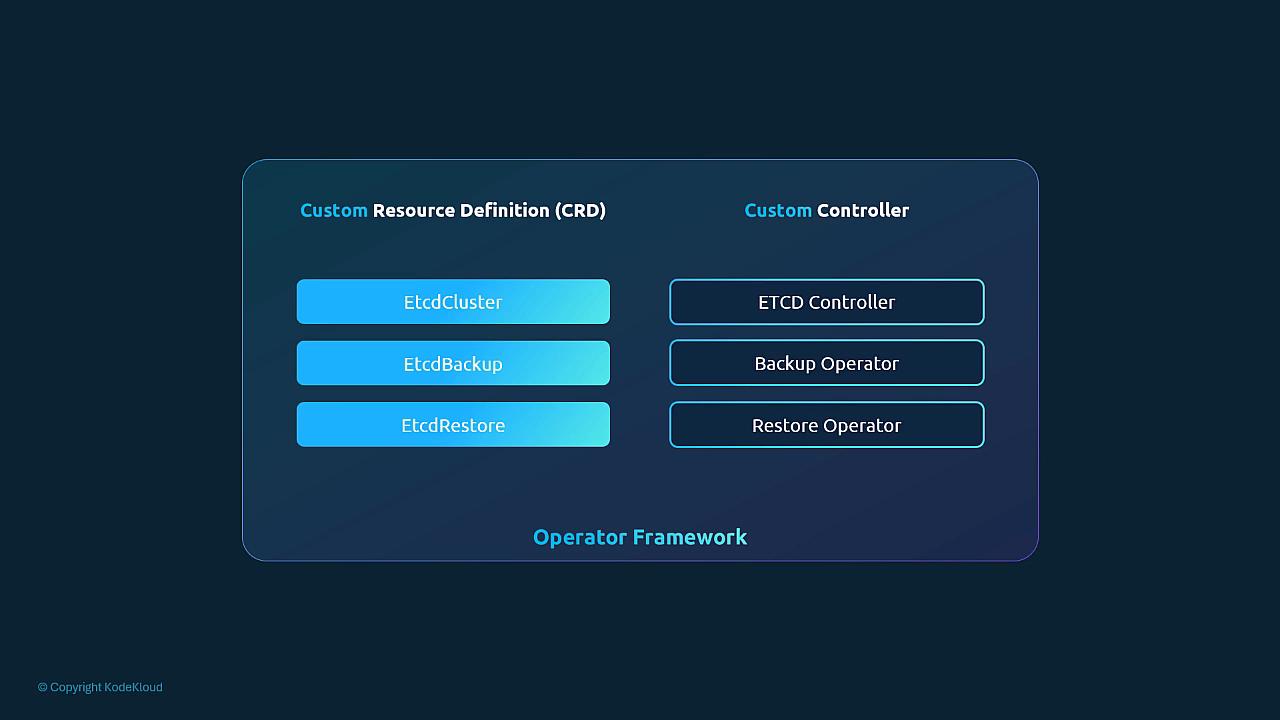
When you create a Deployment, the API server stores the object in etcd. The Deployment controller, a control-plane process, watches it and reconciles: it creates a ReplicaSet, and the ReplicaSet controller creates the Pods.
Each built-in kind (ReplicaSet, Deployment, Job, CronJob, StatefulSet, Namespace, …) has a matching controller.
kubectl create -f deployment.ymlkubectl get deploymentskubectl delete -f deployment.yml
[!CAUTION]
Correction: the course Deployment lists - image: nginx with no name. A container name is required, so the API server rejects the manifest. The YAML above adds it.
apiVersion: flights.com/v1 # <group>/<version> defined by the CRDkind: FlightTicketmetadata: name: my-flight-ticketspec: from: Mumbai to: London number: 2
If you create it before the CRD exists, it fails:
error: unable to recognize "flightticket.yml": no matches for kind "FlightTicket" in version "flights.com/v1"
Once the CRD is registered, kubectl create/get/delete work like any other kind. Creating the CR only stores it in etcd. To get side effects, e.g. calling bookflight.com/API, you need a custom controller that watches FlightTicket objects (see §7.31).
apiVersion: apiextensions.k8s.io/v1kind: CustomResourceDefinitionmetadata: name: flighttickets.flights.com # must be <plural>.<group>spec: group: flights.com # API group -> apiVersion flights.com/v1 scope: Namespaced # or Cluster names: kind: FlightTicket # used in YAML `kind:` singular: flightticket # used in CLI output and as an alias plural: flighttickets # used in REST path and `kubectl get flighttickets` shortNames: - ft # kubectl get ft versions: - name: v1 served: true # exposed via the API storage: true # version persisted in etcd (exactly one) schema: openAPIV3Schema: # server-side validation type: object properties: spec: type: object properties: from: type: string to: type: string number: type: integer minimum: 1 maximum: 10 # e.g. number: 11 is rejected by the API server
kubectl create -f flightticket-crd.yml# customresourcedefinition.apiextensions.k8s.io/flighttickets.flights.com createdkubectl create -f flightticket.ymlkubectl get flighttickets # or: kubectl get ftkubectl delete -f flightticket.yml
CRD field
Purpose
Example
group
API group of the custom resource
flights.com
names
kind, singular, plural, shortNames
kind: FlightTicket, plural: flighttickets
scope
Namespaced or Cluster
Namespaced
versions
Versions with served / storage flags
- name: v1, served: true, storage: true
schema
OpenAPI v3 validation
openAPIV3Schema with spec properties
Diagram (new): the CRD adds the API type, the CR is persisted in etcd, and a custom controller supplies the behaviour.
[!WARNING]
Exam traps / remember:
A CRD provides API wiring and validation only. It has no business logic; a controller supplies that.
metadata.name of the CRD must be exactly <plural>.<group>.
The CR's apiVersion is <group>/<version name> from the CRD, e.g. flights.com/v1. The CRD's own apiVersion is apiextensions.k8s.io/v1.
kind is CamelCase singular. plural and singular are lowercase.
[!NOTE]
Beyond the course:
In apiextensions.k8s.io/v1, every version must have a schema.openAPIV3Schema; a CRD without one is rejected. Exactly one version can have storage: true.
The CRD object itself is cluster-scoped. scope only controls its CRs.
Useful checks:
kubectl get crd # list CRDskubectl describe crd flighttickets.flights.comkubectl api-resources | grep -i flight # NAME, SHORTNAMES, APIVERSION, NAMESPACED, KINDkubectl explain flightticket.spec # works thanks to the schema
Built-in controllers are Go code too: controllerKind = apps.SchemeGroupVersion.WithKind("Deployment"), DeploymentController.Run(workers, stopCh) and addReplicaSet(obj) (recognition only; these explain the same watch/reconcile pattern).
A controller is a process running a reconcile loop. It watches the API for changes to specific objects and drives actual state toward desired state. Some people call a custom controller an "operator"; see §7.32 for the distinction.
For FlightTicket CRs (same YAML as §7.30), a controller would:
call the booking API when a ticket is created, and book, modify or cancel as the object changes;
write the outcome (confirmed / failed / pending) to .status;
retry on transient errors;
clean up when a ticket is cancelled or deleted.
CRs show no STATUS column in kubectl get by default. Inspect status with kubectl get flightticket my-flight-ticket -o yaml, or define custom printer columns in the CRD.
You can write a controller in any language. Go is the norm because client-go supplies tested building blocks, leaving you to write only the business logic.
git clone https://github.com/kubernetes/sample-controller.gitcd sample-controller# edit controller.go -> add FlightTicket logic (call booking API, update status)go build -o sample-controller ../sample-controller -kubeconfig=$HOME/.kube/config # run locally against the cluster# log: "Setting up event handlers" ... "Starting FlightTicket controller"
Typical Go skeleton (recognition only):
var controllerKind = flights.SchemeGroupVersion.WithKind("FlightTicket")// Run begins watching and syncing.func (c *FlightTicketController) Run(workers int, stopCh <-chan struct{})// Reconcile action for a FlightTicket event.func (c *FlightTicketController) callBookFlightAPI(obj interface{})
Packaging: build a container image and run it in the cluster as a Deployment, or a DaemonSet if needed. In-cluster config makes authentication simpler, and Kubernetes provides scheduling, restarts and HA.
kubebuilder or Operator Framework tooling can scaffold the CRD, controller wiring and RBAC boilerplate.
[!WARNING]
Exam scope: writing controllers is development work and is not expected in the CKA. You are expected to create and use CRDs, inspect CRs and their .status, and know the flow: CRD → controller watches CRs → acts → updates status.
[!NOTE]
Beyond the course: a controller running in-cluster needs a ServiceAccount plus RBAC (Role/ClusterRole) on its CRs, e.g. flighttickets in apiGroup flights.com including flighttickets/status. See §7.16 and §7.18. To make status columns show up, add this to the CRD version:
    subresources:
      status: {}                    # enables the /status subresource
    additionalPrinterColumns:
    - name: Status
      type: string
      jsonPath: .status.state       # shown as a column in `kubectl get ft`
Contents: CRD YAML (as in §7.30), controller (as in §7.31), and one manifest that deploys both:
kubectl create -f flight-operator.yaml # CRD(s) + controller Deployment (+ RBAC) in one manifest
[!CAUTION]
Correction: the course's "minimal" operator CRD has no schema under versions[]. With apiextensions.k8s.io/v1 the API server rejects that CRD (schemas are required). Use the full CRD from §7.30, which includes openAPIV3Schema.
# Install OLM (example release)curl -sL https://github.com/operator-framework/operator-lifecycle-manager/releases/download/v0.32.0/install.sh | bash -s v0.32.0# Install the etcd operator from OperatorHubkubectl create -f https://operatorhub.io/install/etcd.yaml# Check the ClusterServiceVersion (CSV) of installed operators (PHASE should become Succeeded)kubectl get csv -n my-etcd
Operators vary widely. Some only handle install and upgrade; others automate backup, restore and recovery. Before adopting one, read its CRDs, its ClusterServiceVersion (CSV) and its docs.
Exam focus: CRDs extend the API, controllers watch and reconcile, and you deploy CRDs and controllers either manually or as an operator.
[!WARNING]
Exam traps / remember:
Operator ≠ CRD. A CRD alone only stores data. An operator ships the CRD and the controller that acts on it.
csv is an OLM resource (ClusterServiceVersion). It exists only after OLM is installed.
[!NOTE]
Beyond the course: to install an operator in the exam you usually apply its manifests or a Helm chart, then check the result:
kubectl get crd # new CRDs registered?kubectl get pods -A # controller pod Running?kubectl api-resources --api-group=<group>

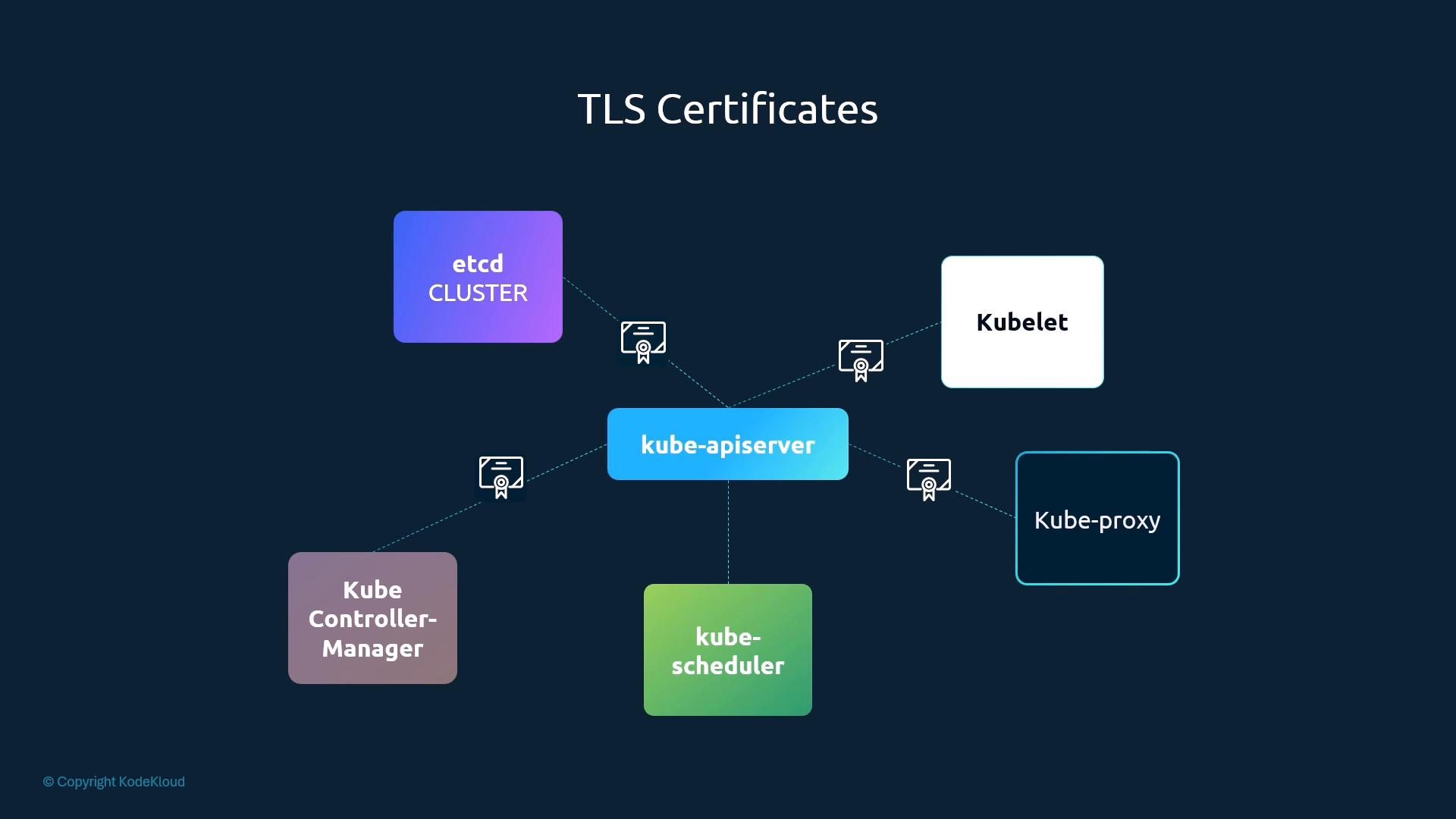
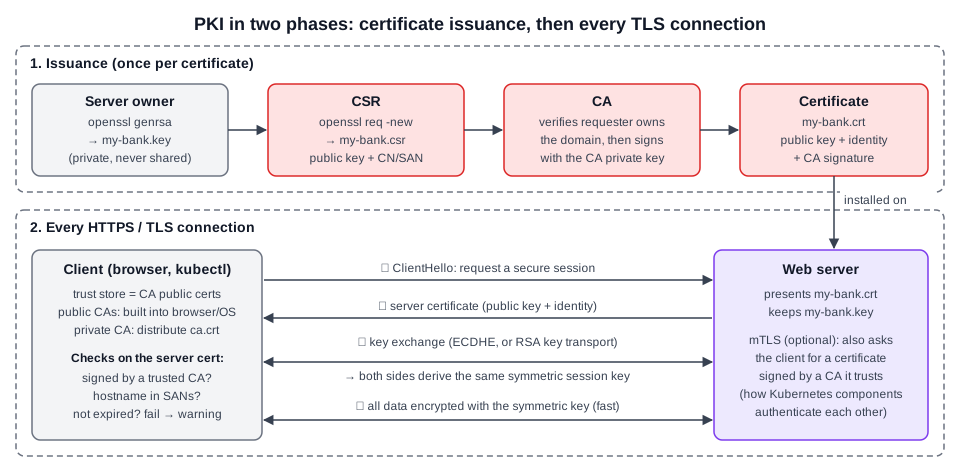 Diagram (new): PKI in two phases: CA issuance of the server certificate, then the per-connection handshake with symmetric session key.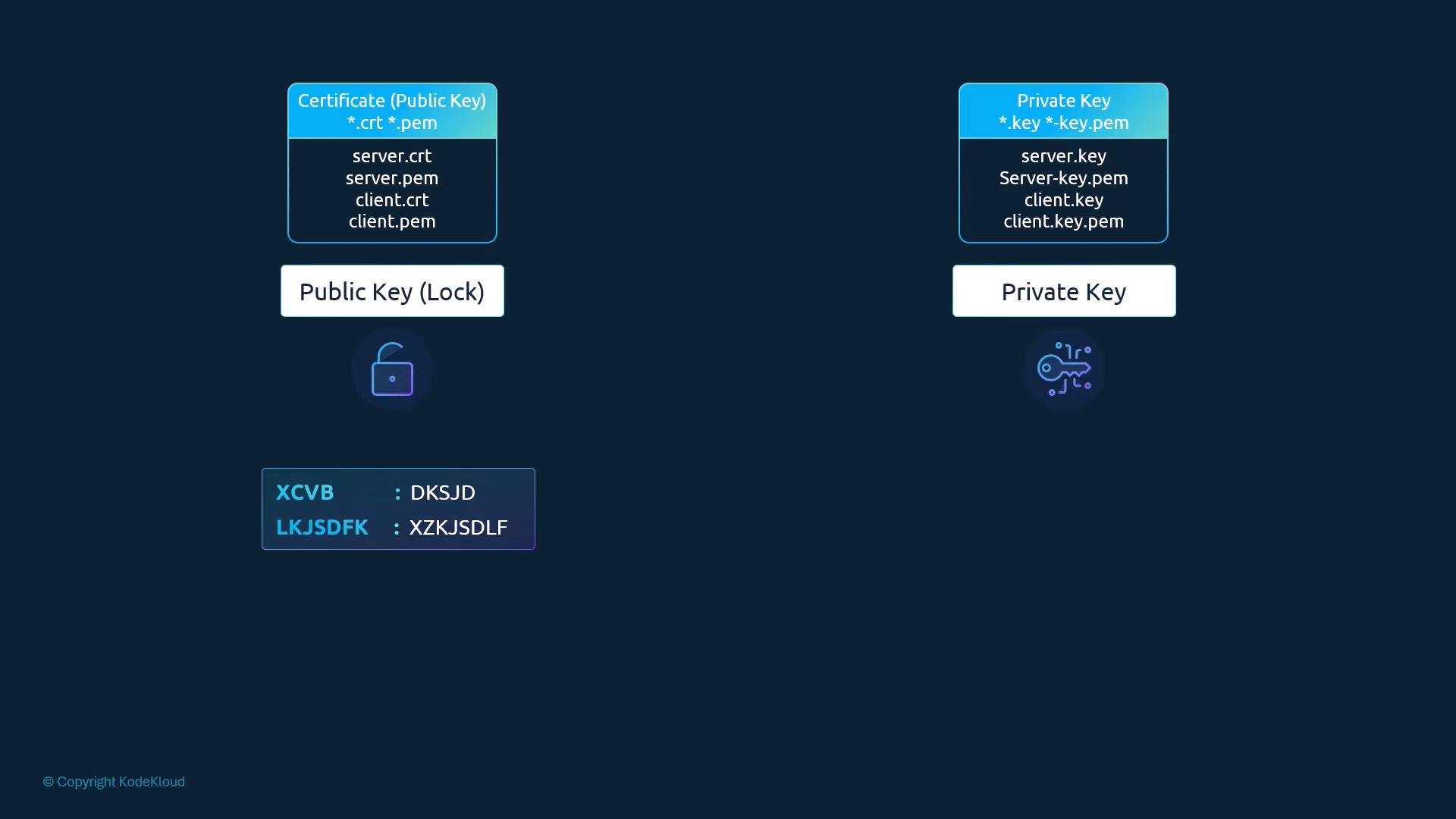
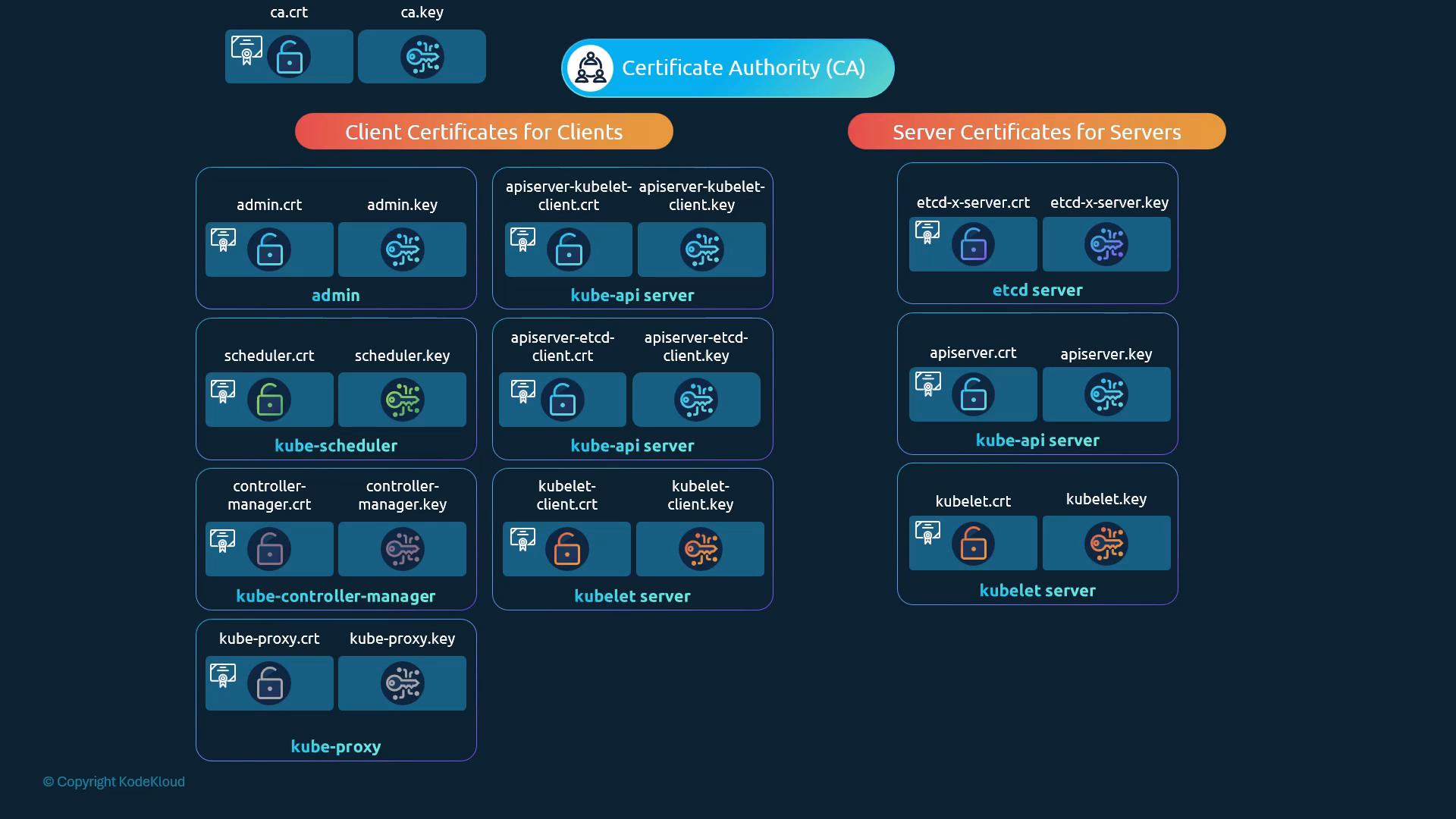
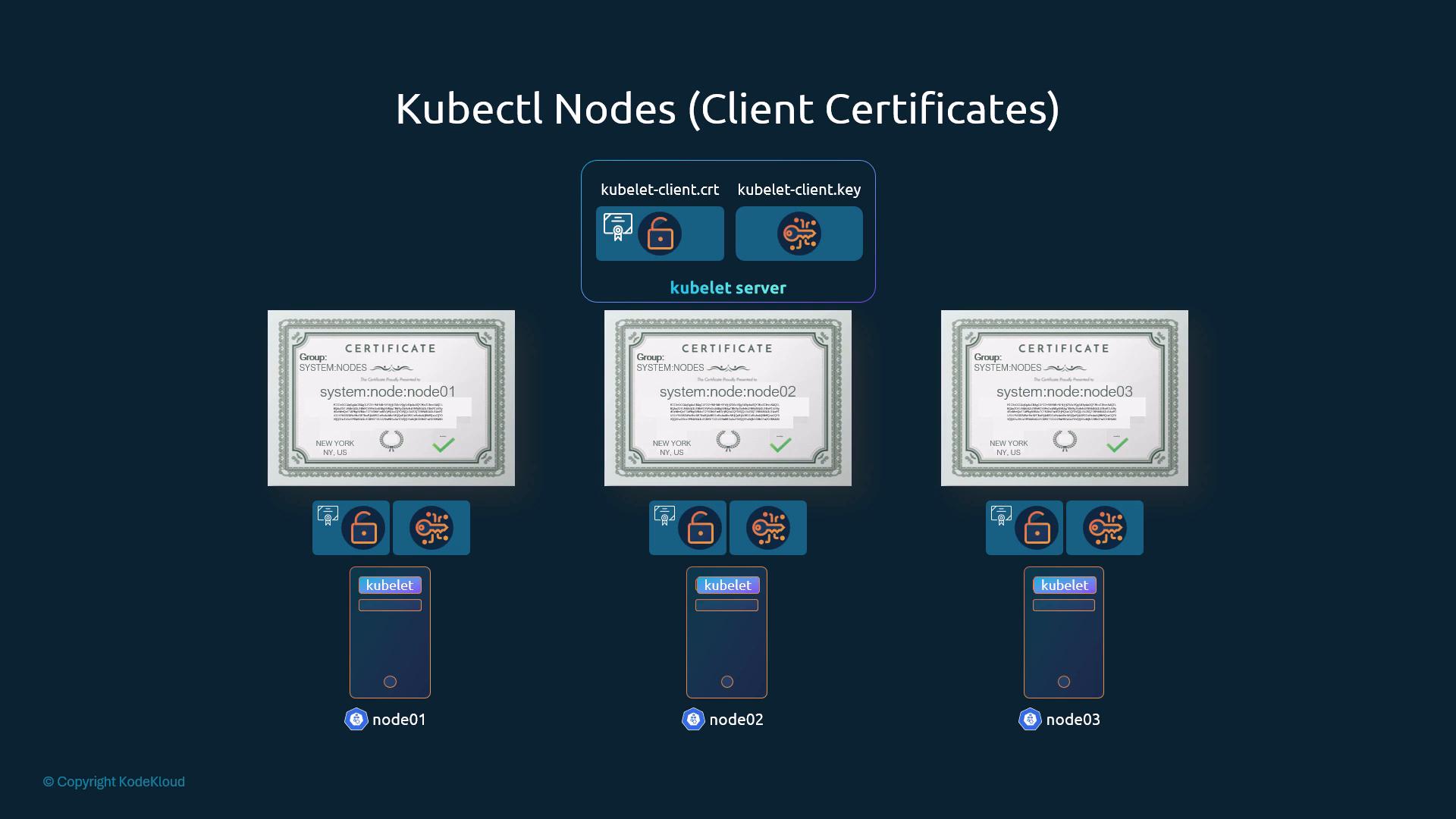
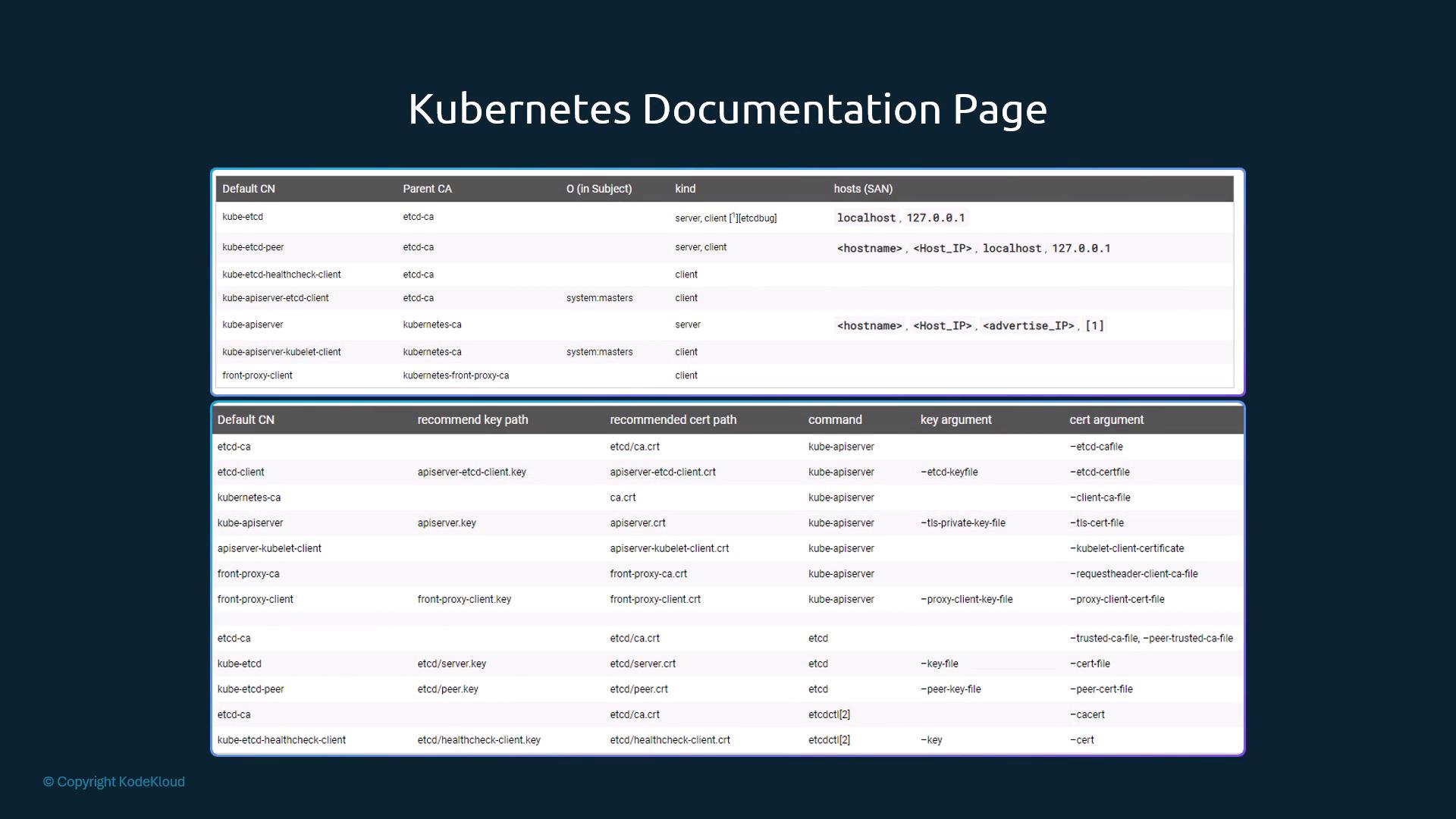
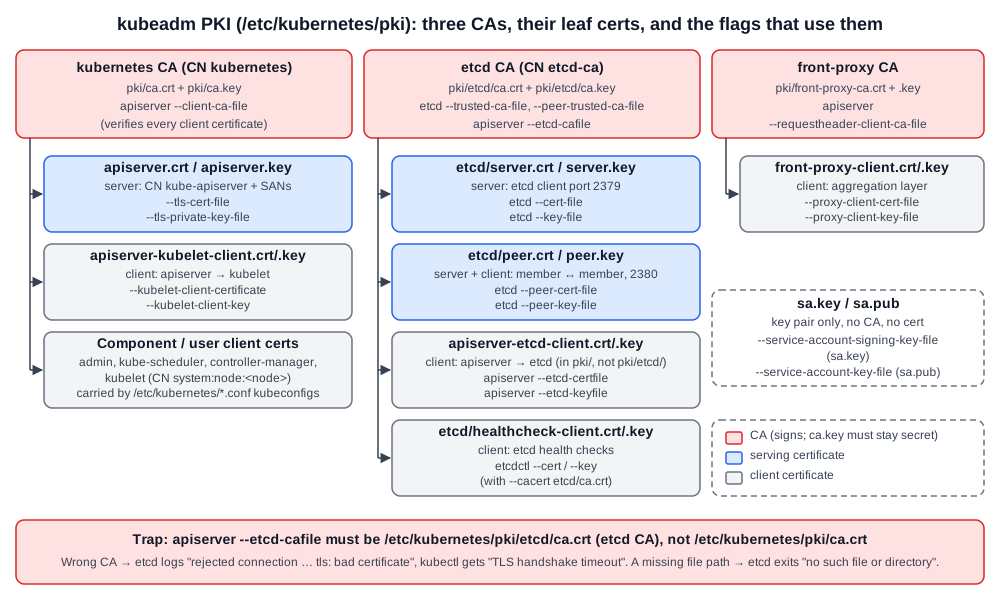 Diagram (new): kubeadm's three CAs, which certificates each one signs, and which kube-apiserver/etcd flags point at each file.
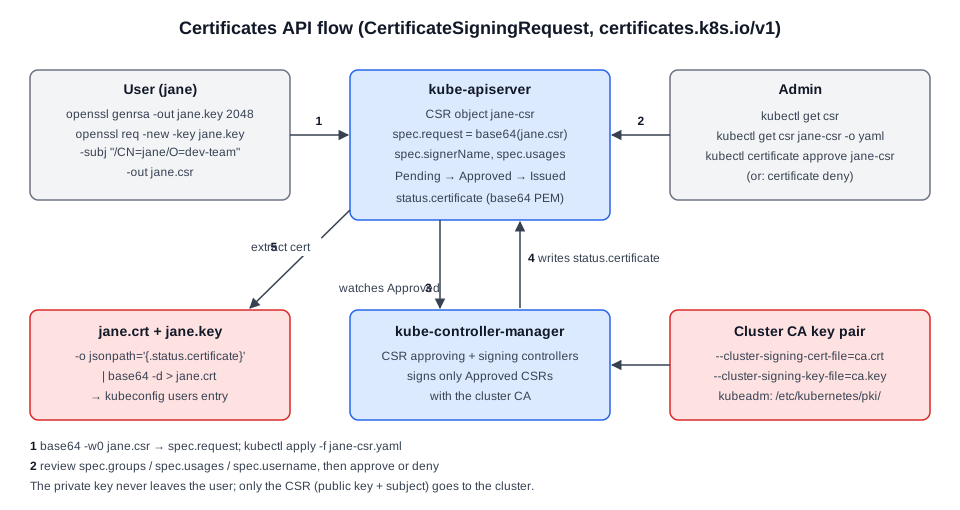 Diagram (new): CSR lifecycle from key generation to extracted certificate, and where the CA key is used.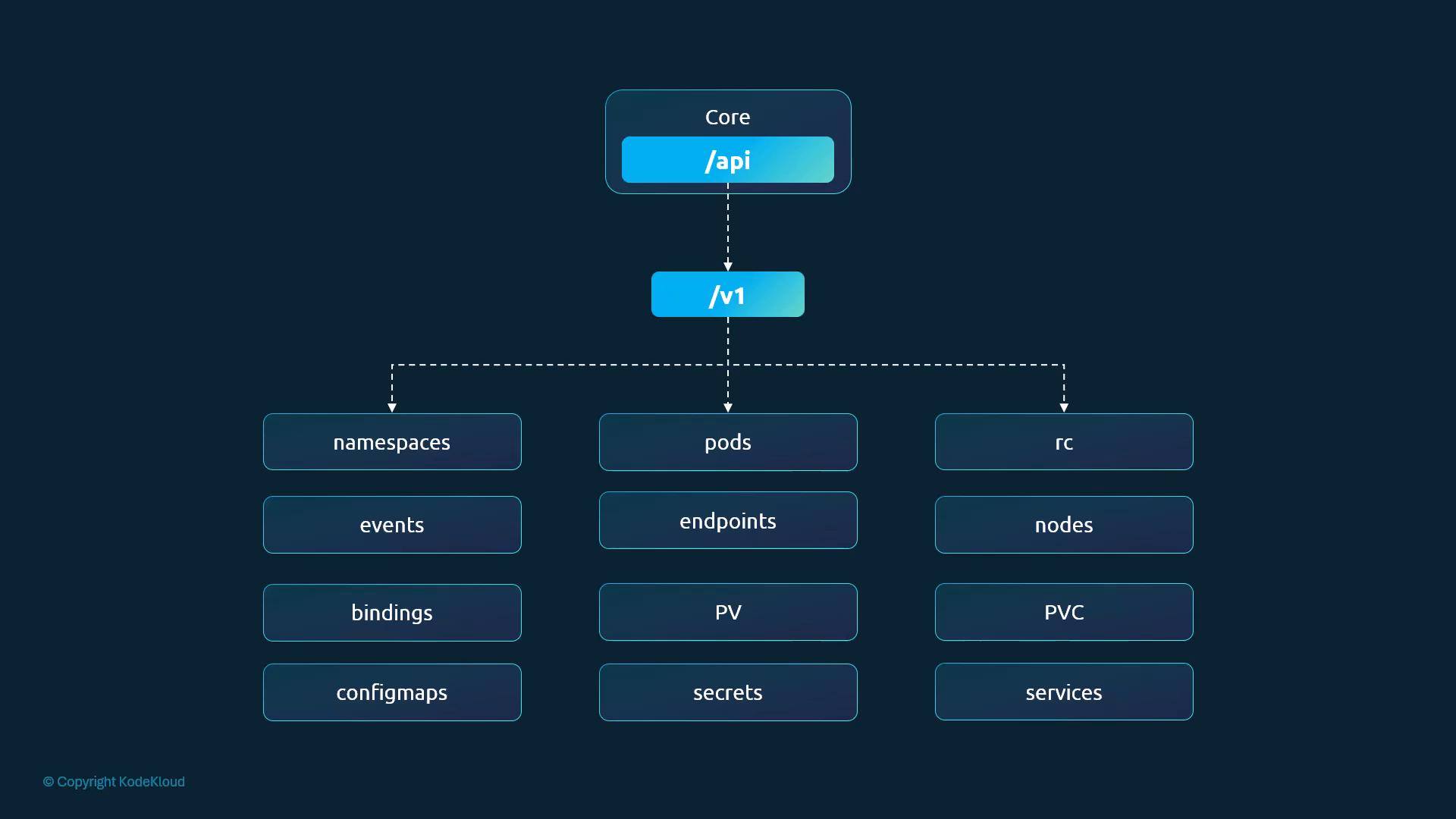
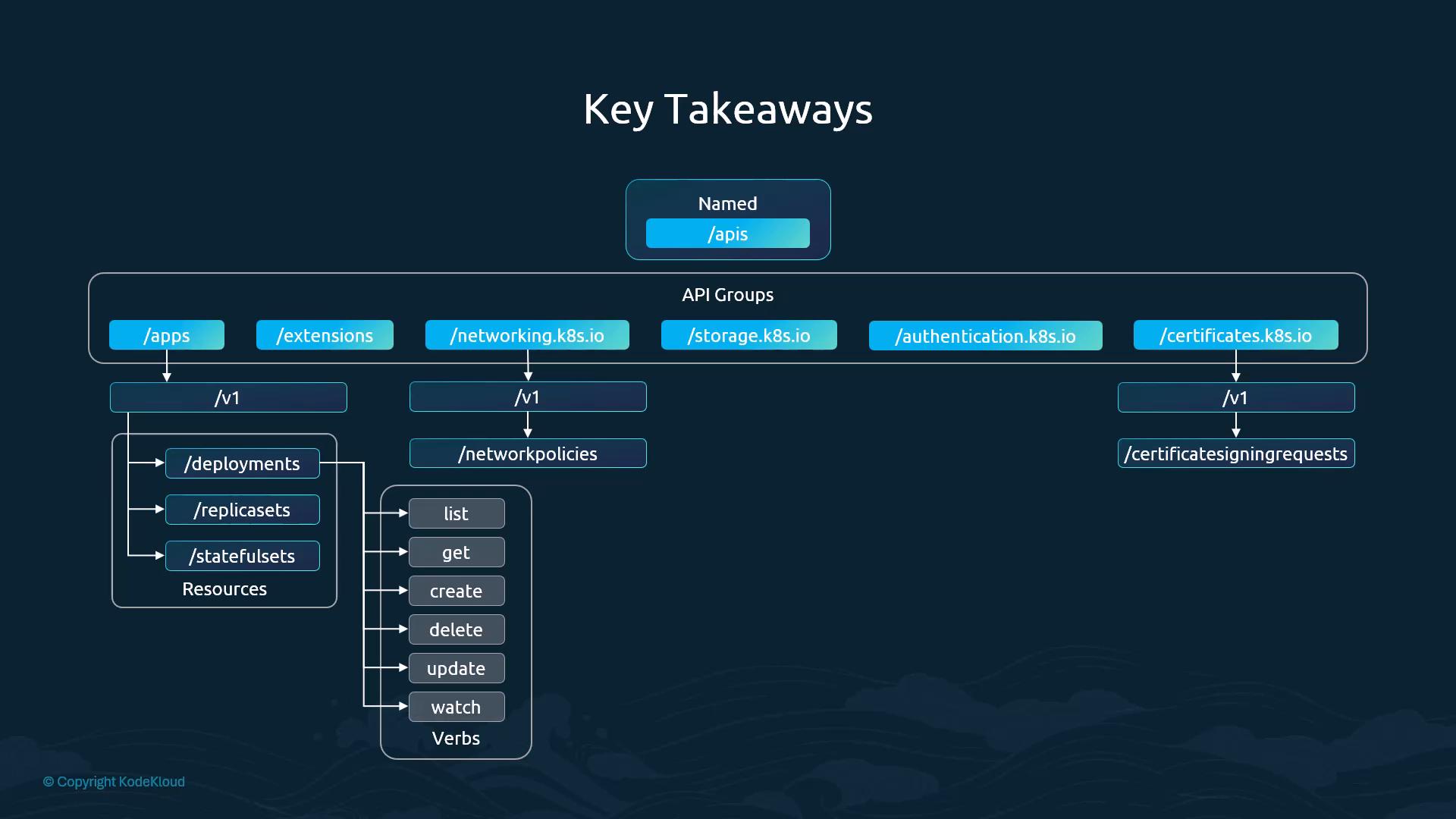
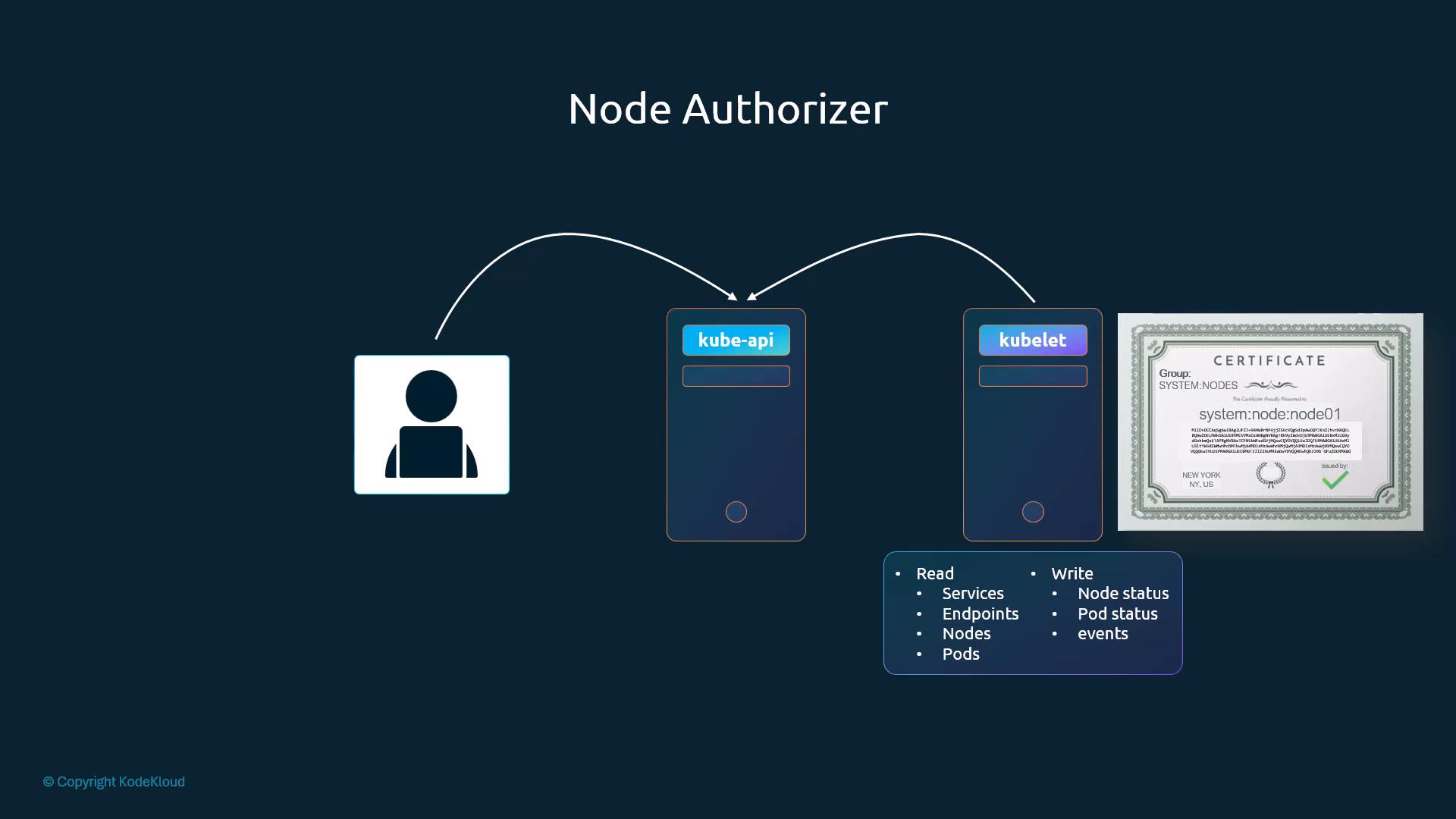
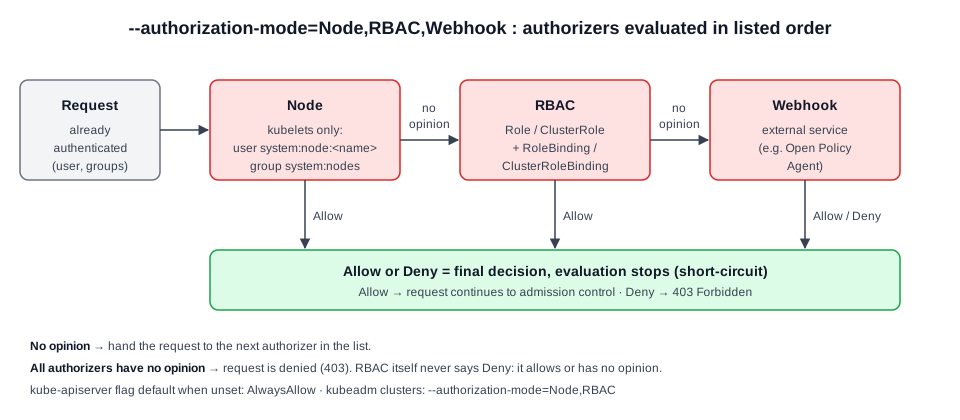 Diagram (new): short-circuit evaluation of a comma-separated
 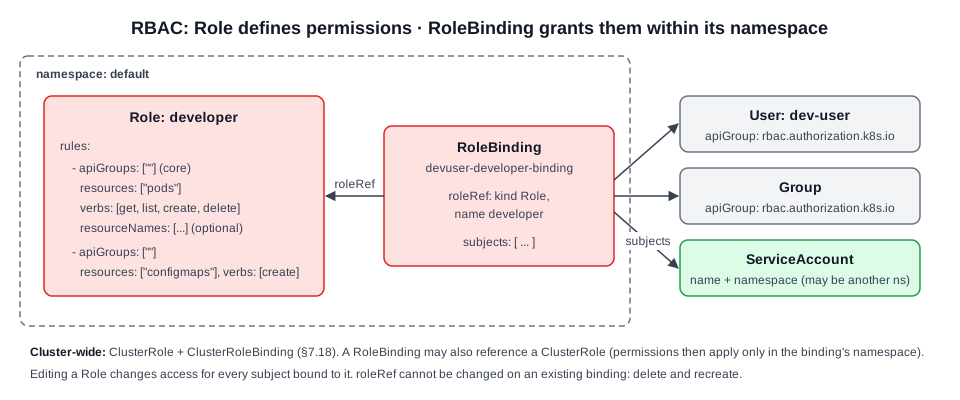 Diagram (new): how Role, RoleBinding and subjects relate inside a namespace.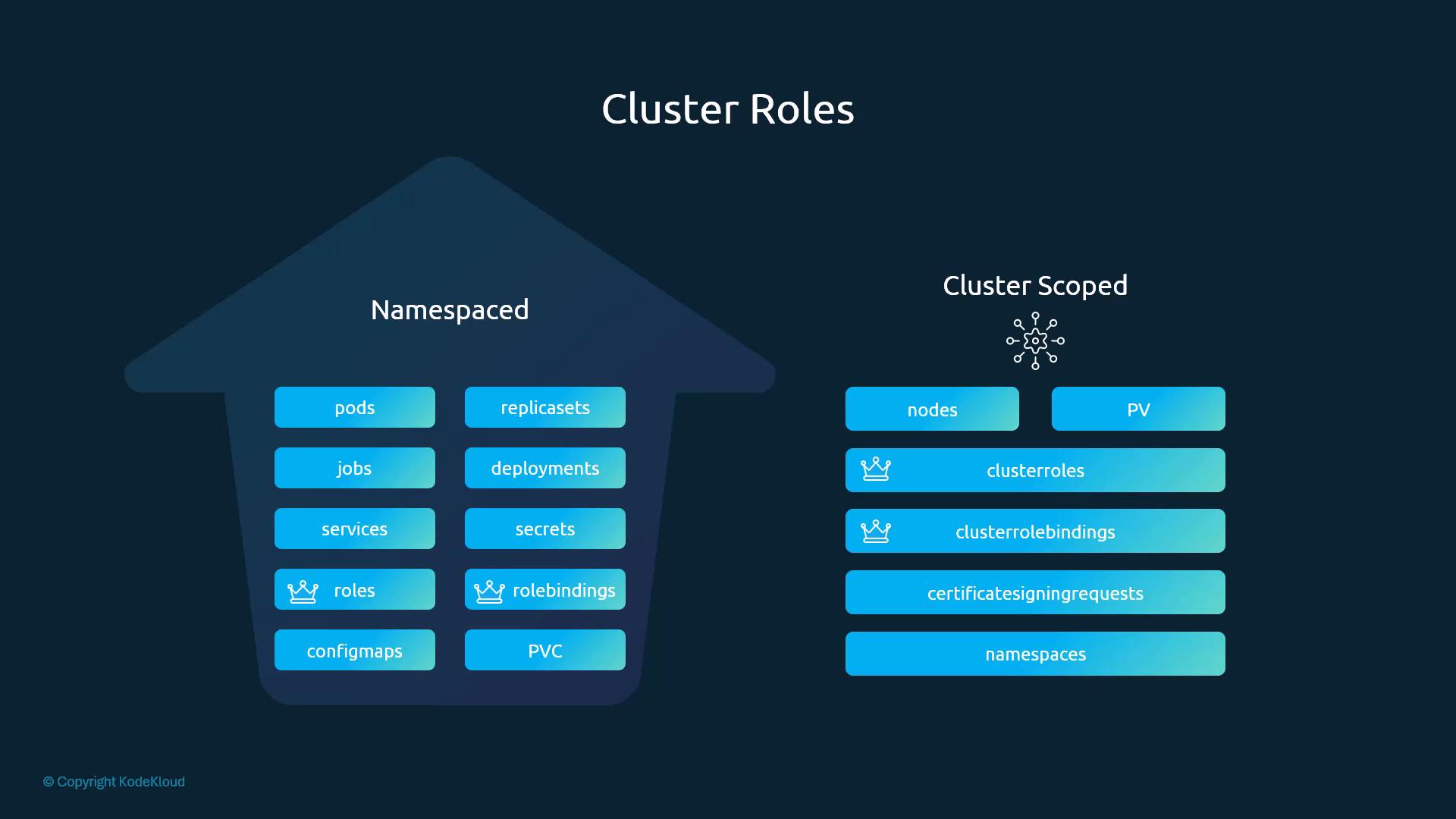
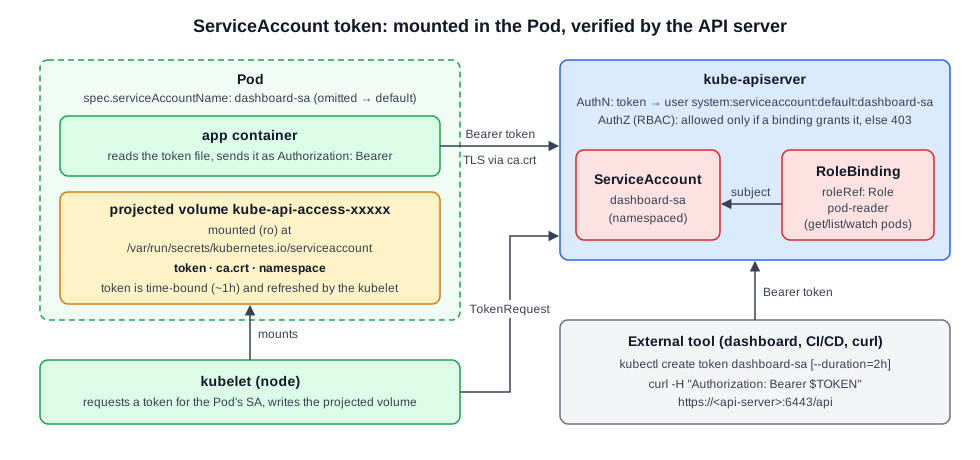 Diagram (new): the kubelet mounts a time-bound SA token into the Pod. The app or an external tool sends it as a Bearer token, and the API server authenticates and then checks RBAC.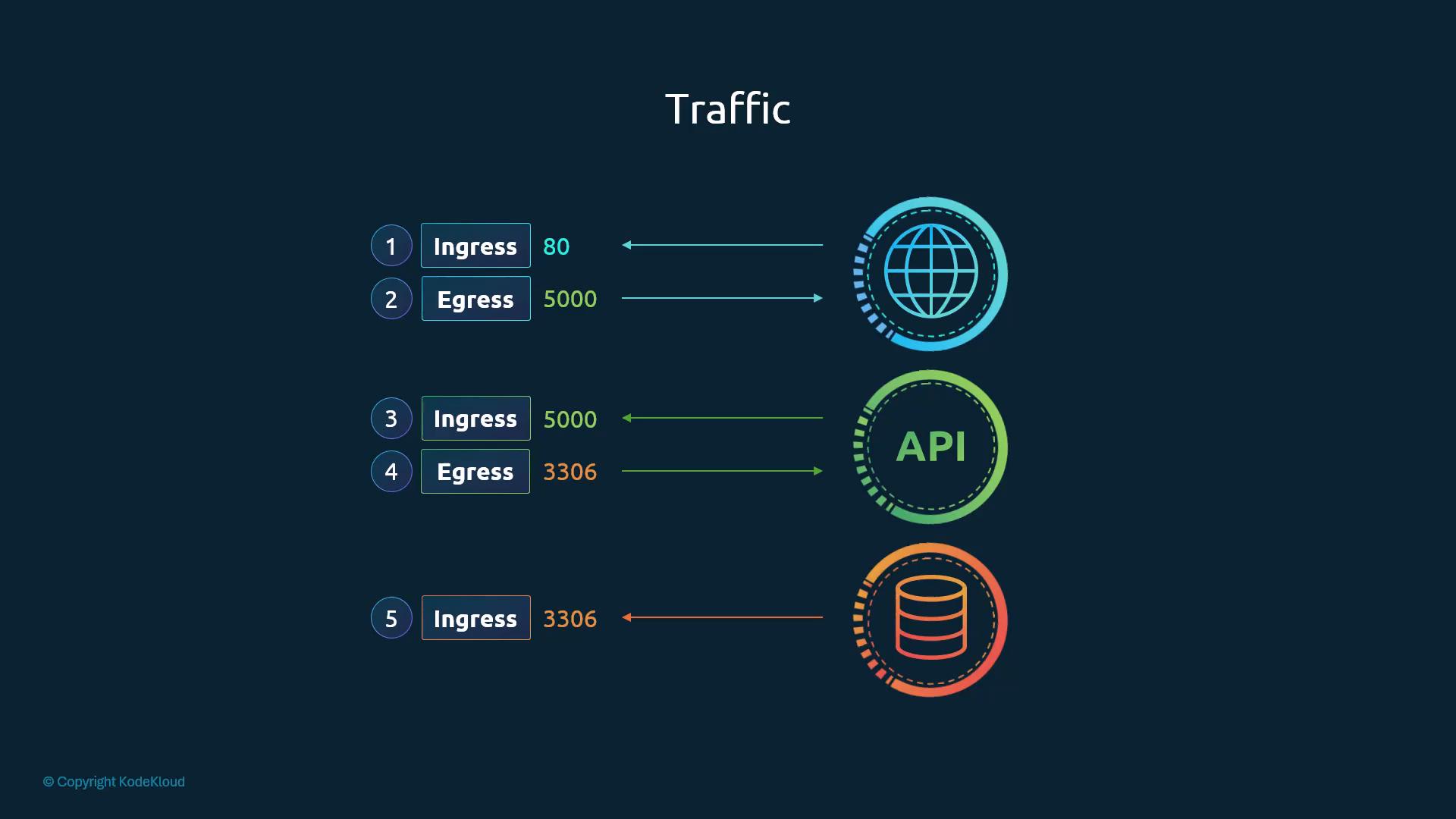
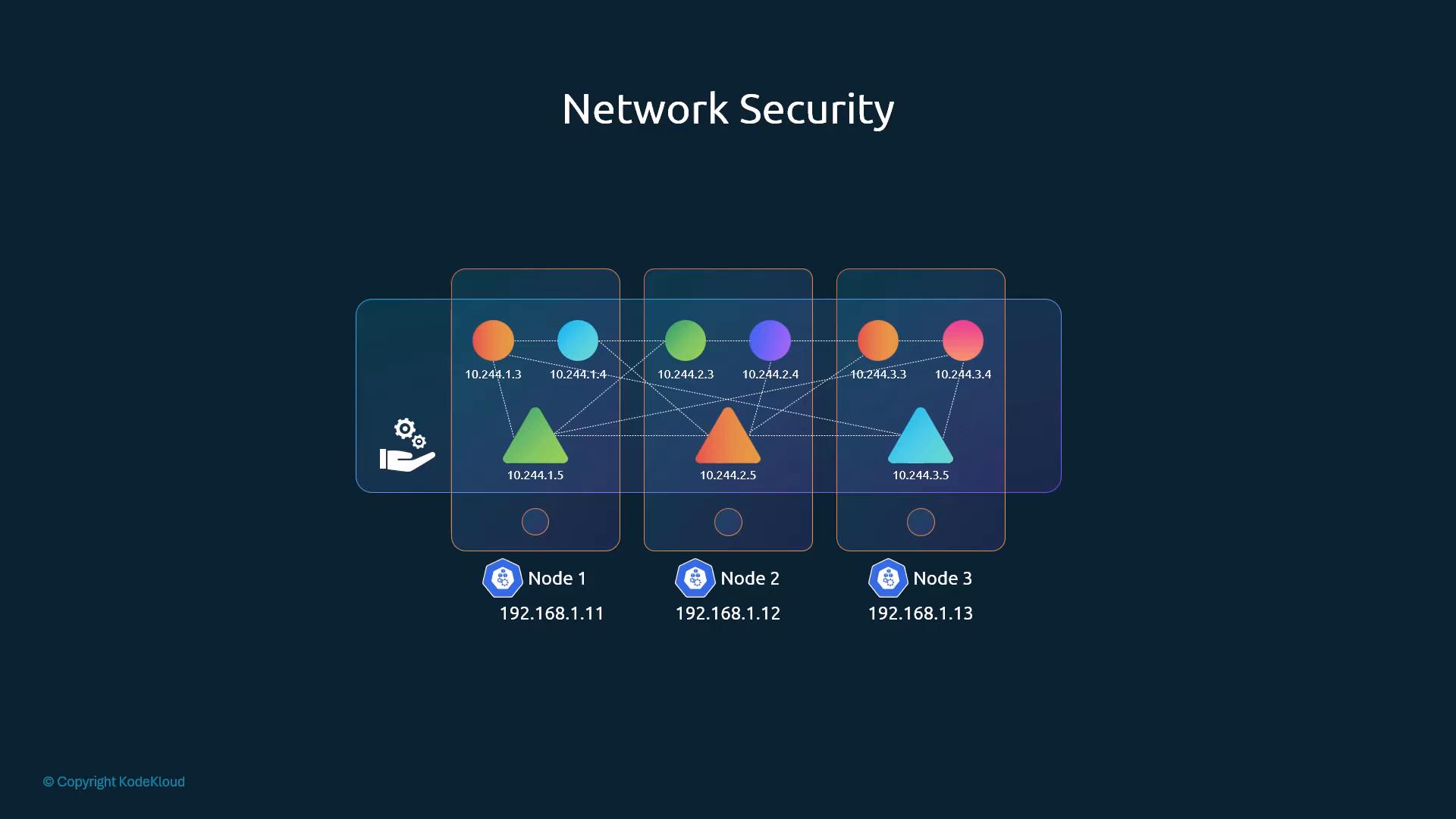
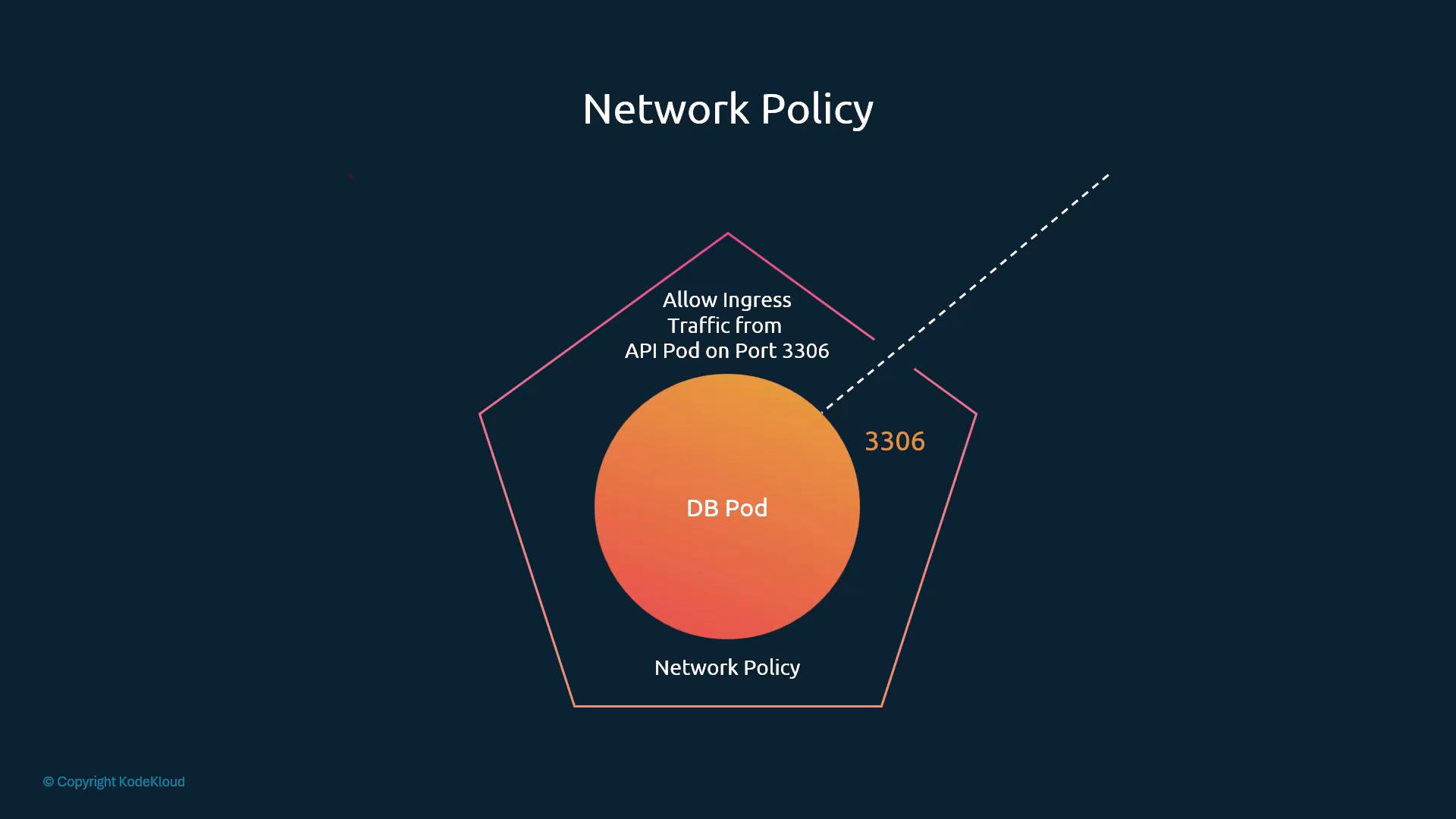
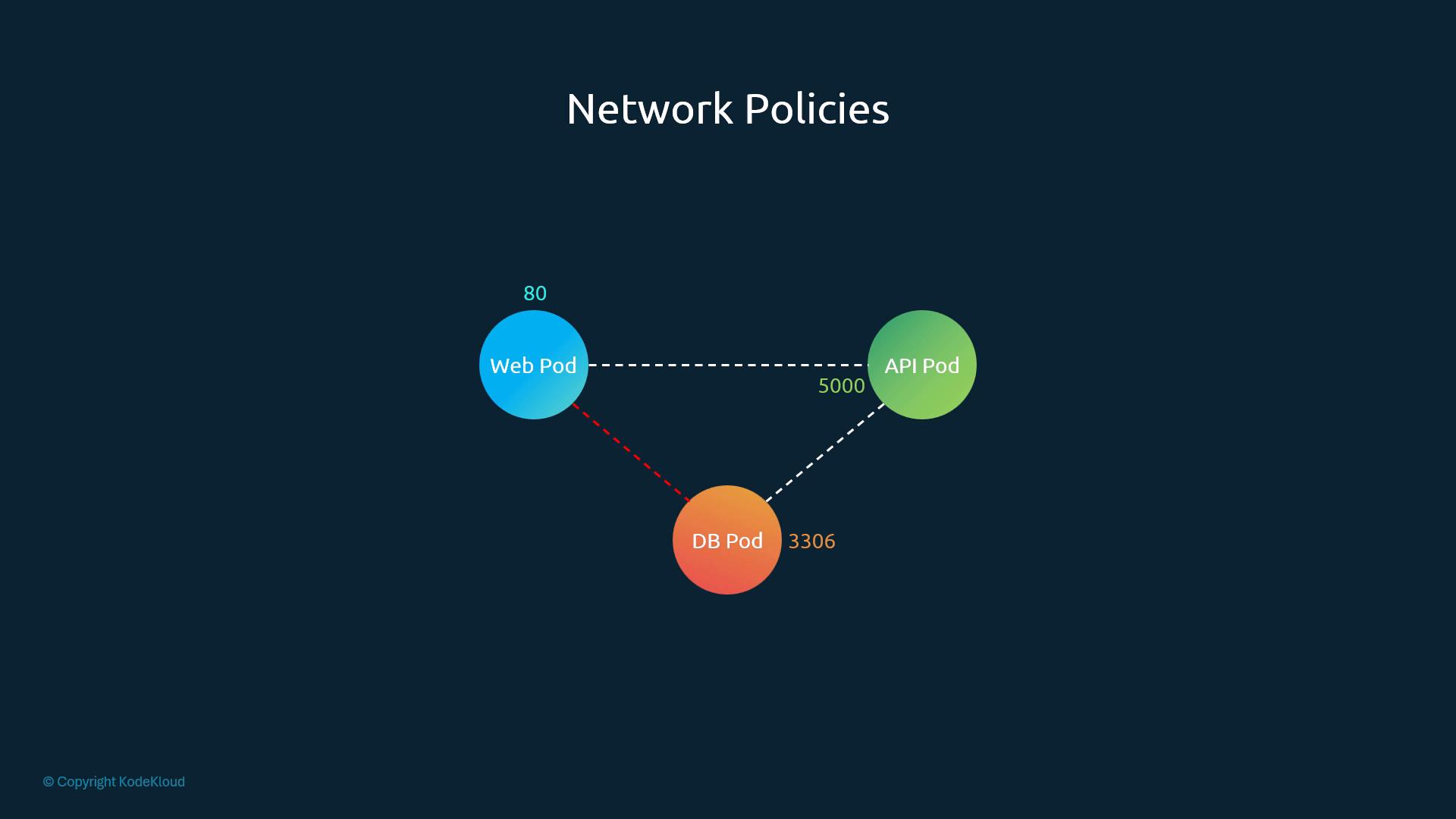
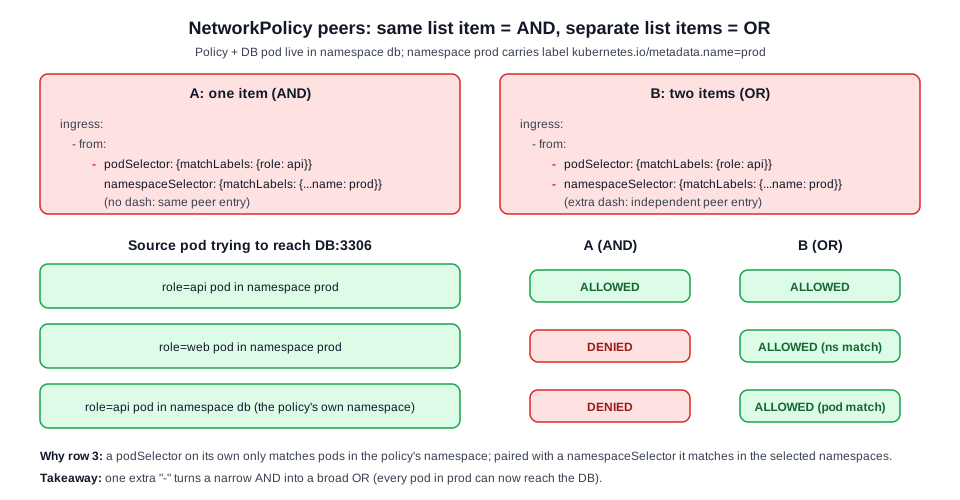 Diagram (new): one list item ANDs pod and namespace selectors; an extra dash turns them into two ORed peers.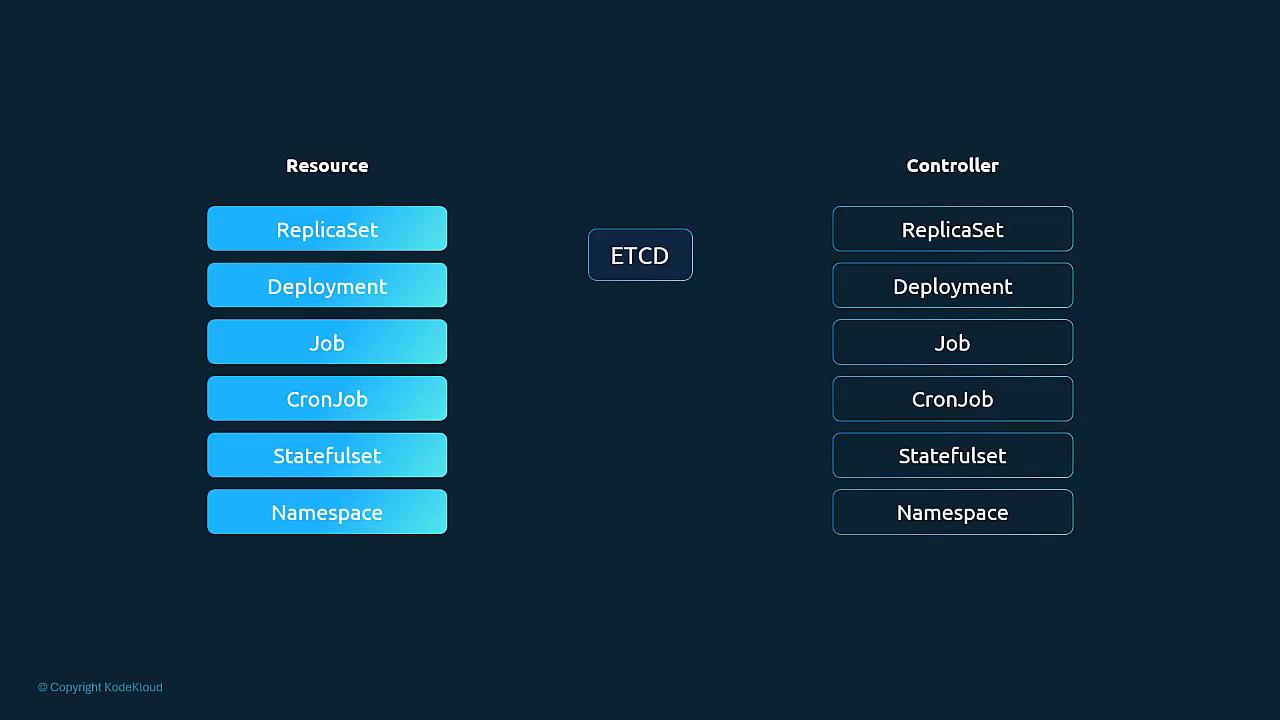
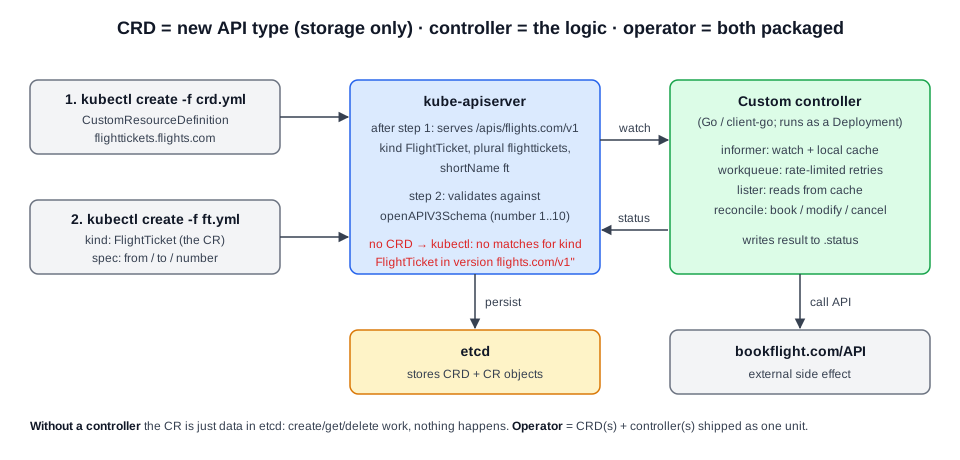 Diagram (new): the CRD adds the API type, the CR is persisted in etcd, and a custom controller supplies the behaviour.