# Inspectkubectl get pods --all-namespaces # -A is the short formkubectl get events --all-namespaceskubectl get nodes -o wide# Describe / inspectkubectl describe pod <pod> -n <ns>kubectl logs <pod> -c <container> -n <ns>kubectl exec -it <pod> -n <ns> -- /bin/sh# Rolloutskubectl rollout status deployment/<name> -n <ns>kubectl rollout undo deployment/<name> -n <ns># Cluster / control planekubectl get componentstatuses # deprecated: prefer API server health endpointskubectl get apiservices # aggregated APIs and their availability# Node levelkubectl describe node <node>journalctl -u kubelet -n 200 # run ON the node: last 200 kubelet log lines
[!NOTE]
Beyond the course: replacements for the deprecated componentstatuses, plus other useful exam commands:
kubectl get --raw='/readyz?verbose' # API server readiness checks (etcd, informers, ...)kubectl get --raw='/livez?verbose'kubectl get events -A --sort-by=.metadata.creationTimestamp # events in time orderkubectl logs <pod> --timestamps # prefix each log line with a timestamp
Example two-tier app: user → web-service → web Pod → db-service → db Pod.
Sketch the dependency chain before running commands, then decide where to start. If users report the app is down, start at the user-facing end and work down the chain.
curl http://<node-ip>:<node-port> # from outside: NodePort (or the LB URL)kubectl exec -it debug-pod -- curl http://10.96.0.156:8080 # from inside: ClusterIP or Service DNS name# failure example:# curl: (7) Failed to connect to <node-ip> port 31672: Connection timed out
Note the error type (timeout, connection refused, 5xx), then move to the Service.
2. Inspect the Service and check that it has endpoints
kubectl describe service web-service
Selector: name=webapp-mysqlType: NodePortIP: 10.96.0.156Port: <unset> 8080/TCPTargetPort: 8080/TCPNodePort: <unset> 31672/TCPEndpoints: 10.32.0.6:8080 # empty => selector does not match any Pod labels
apiVersion: v1kind: Podmetadata: name: webapp-mysql labels: app: example-app name: webapp-mysql # must match the Service selector (name=webapp-mysql)spec: containers: - name: webapp-mysql image: simple-webapp-mysql ports: - containerPort: 8080 # must match the Service targetPort
4. Read application logs (config errors, missing dependencies, port mismatches)
kubectl logs -f webapp-mysql # follow livekubectl logs -p webapp-mysql # --previous: logs of the crashed (previous) containerkubectl logs webapp-mysql -c <container-name> # pick a container in a multi-container Pod
5. Move to the DB layer if the web layer looks healthy: repeat Service → Pod → logs for db-service / db Pod. Look for auth errors, missing schema migrations, OOM kills.
6. kubectl describe pods <pod> for events, image-pull errors and failed probes.
Service has endpoints but traffic still fails → NetworkPolicies (§7.27), node firewall / security groups, kube-proxy status and mode.
In-cluster testing: launch a temporary debug Pod (busybox, curl image), kubectl exec -it <pod> -- /bin/sh, then curl Service IPs and Pod IPs.
Probe failures: compare the liveness/readiness probe definitions in the Pod spec with the probe-failure messages in events.
[!WARNING]
Exam traps / remember:
Common culprits: Service selector ≠ Pod labels (no endpoints), container port ≠ Service targetPort, NetworkPolicy/firewall blocking, kube-proxy problems. Rule these out before blaming the application.
kubectl logs -p shows the previous container’s logs; plain logs shows the current restart, which may be empty. Also inspect kubectl describe pod → Last State: Terminated, Reason and Exit Code (e.g. OOMKilled / 137).
[!TIP]
Quick label check: kubectl get pods --show-labels next to kubectl describe svc <svc> | grep -i selector.
Healthy webapp log example: 10.32.0.1 - - [01/Apr/2019 12:51:55] "GET / HTTP/1.1" 200 - (requests arriving and returning 200 = web tier serving; move on to the DB tier).
Lab setup: Flask web app on 8080, exposed as web-service NodePort 30081. MySQL on 3306 behind ClusterIP mysql-service → Pod mysql. Goal per namespace: page turns green (DB connected). A red page prints DB_Host, DB_User, DB_Password and the MySQL client error. Use that error to pick the layer to check.
kubectl config set-context --current --namespace=alpha # switch default ns per task (saves typing -n)kubectl get pods; kubectl get svccurl http://localhost:30081 # reproduce: shows env + MySQL errorkubectl describe deployment webapp-mysql # Env: DB_Host / DB_User / DB_Password
beta / gamma: edit the Service in place, then confirm endpoints
kubectl edit svc mysql-service # beta: targetPort 3306 | gamma: selector name: sql00001kubectl describe svc mysql-service # Endpoints: 10.42.x.x:3306 (must not be <none>)curl http://localhost:30081 # green page
epsilon / zeta: change env on a bare Pod. Pod env is immutable, so the Pod has to be replaced.
kubectl get pod mysql -o yaml > /tmp/updated-mysql-pod.yaml # edit MYSQL_ROOT_PASSWORD: paswrdkubectl replace --force -f /tmp/updated-mysql-pod.yaml # delete + recreate in one stepkubectl get pods # wait for Running, then curl
zeta: NodePort
kubectl get svc # web-service 8080:30088/TCPcurl http://localhost:30088 # option A: use the configured portkubectl edit svc web-service # option B: spec.ports[].nodePort: 30081kubectl get svc # web-service NodePort 8080:30081/TCP
After every Service change, re-check Endpoints in kubectl describe svc. They must show <ip>:<port> with the correct port.
Edit the controller (Deployment/StatefulSet), not its Pods. Edits to managed Pods are lost on recreation. Only bare Pods (like mysql here) are replaced directly.
Credentials in plain env vars are lab-only. In production use Secrets referenced from the controller.
Several faults can be stacked in one namespace (zeta). Re-test after each fix, because the error message changes.
[!CAUTION]
Correction: the notes say NodePort "can be immutable on some clusters". spec.ports[].nodePort is mutable: kubectl edit svc works if the value is in the NodePort range (default 30000–32767) and not already used. Deleting and recreating the Service is not needed. Only metadata.name (alpha) needs delete + recreate.
[!NOTE]
Beyond the course: if you run kubectl edit pod mysql and change the env, the API rejects it, but kubectl saves your edited copy as /tmp/kubectl-edit-<random>.yaml and prints that path. Then run kubectl replace --force -f /tmp/kubectl-edit-<random>.yaml. To change a Pod label without editing YAML: kubectl label pod mysql name=mysql --overwrite.
gamma: kubectl describe svc web-service → Endpoints: 10.42.0.14:8080 (web tier OK) → then kubectl describe svc mysql-service → Endpoints: <none> pins the fault to the DB Service selector.
kubectl get pods -n kube-system# coredns-x2, etcd-master, kube-apiserver-master, kube-controller-manager-master,# kube-scheduler-master, kube-proxy-xxxx (one per node), weave-net-xxxx (CNI, 2/2)
CrashLoopBackOff, ImagePullBackOff or not Ready → kubectl describe pod <p> -n kube-system (events) and kubectl logs <p> -n kube-system (startup, config and permission errors).
service kube-apiserver status # service wrappersudo systemctl status kube-apiserver # systemd directly (preferred)sudo systemctl status kube-controller-managersudo systemctl status kube-scheduler# on worker nodes:service kubelet statusservice kube-proxy status
Loaded: ... /etc/systemd/system/kube-apiserver.service; enabled and Active: active (running) = healthy.
kubectl logs kube-apiserver-master -n kube-system # Pod-managedsudo journalctl -u kube-apiserver # host-managed: also shows every FLAG: --xxx at startup
Startup logs list the loaded mutating/validating admission plugins and FLAG: values (e.g. --advertise-address, --allow-privileged, --apiserver-count=3). Useful for spotting a bad flag.
Certificates and clock: cert expiry, NTP/clock skew between nodes.
Recent changes: config edits, upgrades, package installs before the failure.
Resource pressure: CPU/memory/disk pressure destabilises control plane components.
[!WARNING]
Exam traps / remember:
With the API server down, kubelet and kube-proxy can still look healthy locally, but every cluster operation fails. Restore API server and etcd first.
kubeadm clusters: control plane = static Pods (manifests in /etc/kubernetes/manifests/, §3.16), but kubelet is always a systemd service. Use journalctl -u kubelet for kubelet, not kubectl logs.
[!NOTE]
Beyond the course: when the API server is down, kubectl returns connection refused ...:6443, so read container state directly on the control plane node:
crictl ps -a | grep kube-apiserver # container state / exit code (also shows exited containers)crictl logs <container-id> # logs of a crashed containerls /var/log/pods/ /var/log/containers/ # raw log files (kube-system_kube-apiserver-<node>_...)journalctl -u kubelet | grep -i apiserver # manifest parse errors appear in kubelet logs
Current clusters show role control-plane (not master), and node names come from the hostname (e.g. kube-apiserver-controlplane).
kubectl logs kube-apiserver-master -n kube-system on a healthy start shows: Version: v1.11.3, the loaded mutating/validating admission controllers, Using reconciler: lease, and W... Skipping API batch/v2alpha1 because it has no resources. These W-lines are harmless; look for E/F lines instead.
The historical startup log also dumps flags such as --address="127.0.0.1", --admission-control="[]", --api-audiences="[]". These are log evidence, not a current configuration recipe; current versions use component-specific bind/admission flags. Inspect the binary’s own help and the manifest before changing them.
alias k=kubectlsource <(kubectl completion bash) # completion in the current shellecho "source <(kubectl completion bash)" >> ~/.bashrc # persistcomplete -F __start_kubectl k # make completion work for the alias# zsh: source <(kubectl completion zsh)
Diagram (new): which component to suspect for each symptom and where its config lives.
k get pods -n kube-system → kube-scheduler-controlplane CrashLoopBackOff; k describe pod kube-scheduler-controlplane -n kube-system → exec: "kube-schedulerrr": executable file not found in $PATH, Exit Code: 127
Typo in command of /etc/kubernetes/manifests/kube-scheduler.yaml
command: - kube-scheduler
2
k scale deployment app --replicas=2 → stays 1/2
controller-manager CrashLoopBackOff; k logs kube-controller-manager-controlplane -n kube-system → stat /etc/kubernetes/controller-manager-XXXX.conf: no such file or directory
Wrong --kubeconfig in kube-controller-manager.yaml
k get nodes; k get deploy # app 0/1k describe deploy app # 0 available, Available=False MinimumReplicasUnavailablek get rs; k describe rs app-586bddbc54k get pods; k describe pod app-586bddbc54-hc779 # Pending, Node: <none> => scheduler problemk get pods -n kube-system
Fix #1 in /etc/kubernetes/manifests/kube-scheduler.yaml:
k get pods -n kube-system # scheduler Running 1/1 => Pending Pod gets scheduledk logs kube-scheduler-controlplane -n kube-system
Fixes #2 and #3 in /etc/kubernetes/manifests/kube-controller-manager.yaml:
spec:
  containers:
  - command:
    - kube-controller-manager
    - --kubeconfig=/etc/kubernetes/controller-manager.conf   # was controller-manager-XXXX.conf
    # ...
    volumeMounts:
    - mountPath: /etc/kubernetes/pki          # container path the CA is read from
      name: k8s-certs
      readOnly: true
    - mountPath: /etc/kubernetes/controller-manager.conf
      name: kubeconfig
      readOnly: true
  volumes:
  - hostPath:
      path: /etc/kubernetes/pki               # was /etc/kubernetes/WRONG-PKI-DIRECTORY
      type: DirectoryOrCreate
    name: k8s-certs
  - hostPath:
      path: /etc/kubernetes/controller-manager.conf
      type: FileOrCreate
    name: kubeconfig
k get pods -n kube-system -w # watch controller-manager come back Running/Readyk logs kube-controller-manager-controlplane -n kube-systemk scale deployment app --replicas=3 # verifyk get deploy app; k get pods; k describe deploy app # expect 3/3 READY, all Running
host /etc/kubernetes/pki exists, and hostPath volumes point to it
Static Pod manifest edited
kubelet
kubelet auto-recreates the Pod when the file changes
[!WARNING]
Exam traps / remember:
A "file not found" error inside a static Pod can be a volume problem: the file exists on the host, but the hostPath mount points elsewhere. Check volumes[].hostPath.path against volumeMounts[].mountPath.
type: DirectoryOrCreate silently creates the wrong (empty) host directory. The Pod starts, then fails when it reads the cert.
Exit code 127 = executable not found (bad command).
Keep manifest YAML valid. A malformed file means the component does not come back at all. On multi-control-plane clusters, keep manifests and mounts consistent on every control plane node.
ReplicaSet and Pod exist but the Pod is Pending → scheduler. Deployment spec.replicas changed but ReplicaSet/Pod counts do not follow → controller-manager.
[!NOTE]
Beyond the course:
Back up a manifest outside/etc/kubernetes/manifests/ (e.g. cp kube-scheduler.yaml /root/). kubelet tries to run every non-hidden file in that directory, so a .bak copy there causes conflicts.
Picking up a changed manifest can take up to a minute. Watch with watch crictl ps. If the mirror Pod never shows up, check journalctl -u kubelet for parse errors.
Current kubeadm manifests use registry.k8s.io/... images (k8s.gcr.io is frozen) and no longer pass --port=0 (the insecure port flag was removed).
Issuer: CN = KUBERNETES-CA # must be the cluster CAValidity Not Before: Mar 20 ... 2019 / Not After : Apr 19 ... 2019 # expired?Subject: CN = system:node:worker-1, O = system:nodes # node identity: CN system:node:<name>, group system:nodesX509v3 Subject Alternative Name: DNS:worker-1, IP Address:192.168.5.11
Fix: re-provision kubelet credentials or rotate certificates.
[!WARNING]
Exam traps / remember:
Unknown (kubelet not reporting / node unreachable) is a different problem from False (kubelet reporting, node unhealthy).
Node cert subject must be CN=system:node:<nodeName>, O=system:nodes (§7.8). A wrong CN/O breaks node authorisation.
[!CAUTION]
Correction:OutOfDisk is from old Kubernetes versions (the course output is v1.13). Current kubelets report MemoryPressure, DiskPressure, PIDPressure, Ready (plus NetworkUnavailable, set by some CNIs/cloud providers). Disk exhaustion now appears as DiskPressure.
[!NOTE]
Beyond the course:/var/lib/kubelet/<node>.crt is the "hard way" layout. On kubeadm nodes the kubelet client cert is /var/lib/kubelet/pki/kubelet-client-current.pem (auto-rotated) and the serving cert is /var/lib/kubelet/pki/kubelet.crt. Quick expiry check: openssl x509 -in <cert> -noout -enddate -subject.
In the course's Unknown example, OutOfDisk/MemoryPressure/DiskPressure/Ready = Unknown (NodeStatusUnknown) while PIDPressure still shows its last reported False. Don't read a remaining False as "node healthy"; Ready=Unknown is the signal.
Method: find the NotReady node from the control plane (alias k=kubectl; k get nodes), then ssh node01 and work on the kubelet (service → logs → config). After each fix, k get nodes on the control plane.
journalctl -u kubelet --since "5 minutes ago" → F... unable to load client CA file /etc/kubernetes/pki/WRONG-CA-FILE.crt
Bad authentication.x509.clientCAFile in /var/lib/kubelet/config.yaml
Set it to /etc/kubernetes/pki/ca.crt; service kubelet restart
3
active (running) but node still NotReady
logs → Unable to register node "node01" with API server: Post "https://controlplane:6553/api/v1/nodes": ... connection refused; failed to ensure lease exists ... kube-node-lease/leases/node01
Wrong API server port in /etc/kubernetes/kubelet.conf
server: https://controlplane:6443; service kubelet restart
# /etc/kubernetes/kubelet.conf (excerpt)clusters:- cluster: certificate-authority-data: <base64> server: https://controlplane:6443 # was :6553; API server secure port is 6443 name: default-clusterusers:- name: default-auth user: client-certificate: /var/lib/kubelet/pki/kubelet-client-current.pem client-key: /var/lib/kubelet/pki/kubelet-client-current.pem # cert + key in the same file
cp /var/lib/kubelet/config.yaml /var/lib/kubelet/config.yaml.bak # back up first; a bad edit stops kubelet (keep console access)service kubelet restart && service kubelet status# controlplane: k get nodes -> node01 Ready
Things to look for in kubelet logs:
Errors loading config or the client CA → paths in /var/lib/kubelet/config.yaml.
TLS/client-auth failures → cert paths in /etc/kubernetes/kubelet.conf and /var/lib/kubelet/pki/.
Connection refused / wrong port → server: must point to <controlplane>:6443.
[!WARNING]
Exam traps / remember:
Running kubelet ≠ healthy node. If the status is fine but the node is NotReady, read the logs for registration/connection errors.
kubelet config is read at startup only. Restart kubelet after every edit.
The kubelet is a systemd service, so there is no kubectl logs for it.
[!NOTE]
Beyond the course: find which files the kubelet actually uses with systemctl cat kubelet or ps aux | grep kubelet. The kubeadm drop-in (10-kubeadm.conf; on pkgs.k8s.io installs under /usr/lib/systemd/system/kubelet.service.d/) passes --kubeconfig=/etc/kubernetes/kubelet.conf --bootstrap-kubeconfig=/etc/kubernetes/bootstrap-kubelet.conf --config=/var/lib/kubelet/config.yaml, plus extra flags from /var/lib/kubelet/kubeadm-flags.env. If you edit a unit or drop-in file, run systemctl daemon-reload before restarting. Use journalctl -u kubelet -f to follow logs live.
Active: inactive (dead) + Main PID ... (code=exited, status=0/SUCCESS) = kubelet was stopped cleanly, so just start it. activating (auto-restart) (Result: exit-code) + status=255 = kubelet crashes at startup, so read journalctl for F-prefixed (fatal) lines.
kubectl get svc hostnames -o yamlkubectl get endpointslices -l kubernetes.io/service-name=hostnames -n default# NAME ADDRESSTYPE PORTS ENDPOINTS AGE# hostnames-abc IPv4 9376 10.244.0.5,10.244.0.6,10.244.0.7 1h
spec:
  selector:
    app: hostnames      # must match Pod labels
  ports:
  - port: 80            # Service port
    targetPort: 9376    # must equal the container's listening port
Empty ENDPOINTS → selector matches no Ready Pods, or a named targetPort cannot be resolved in the Pod. A wrong numeric targetPort can still produce endpoints with the wrong port (§12.3 beta): compare the Service port with the actual listener.
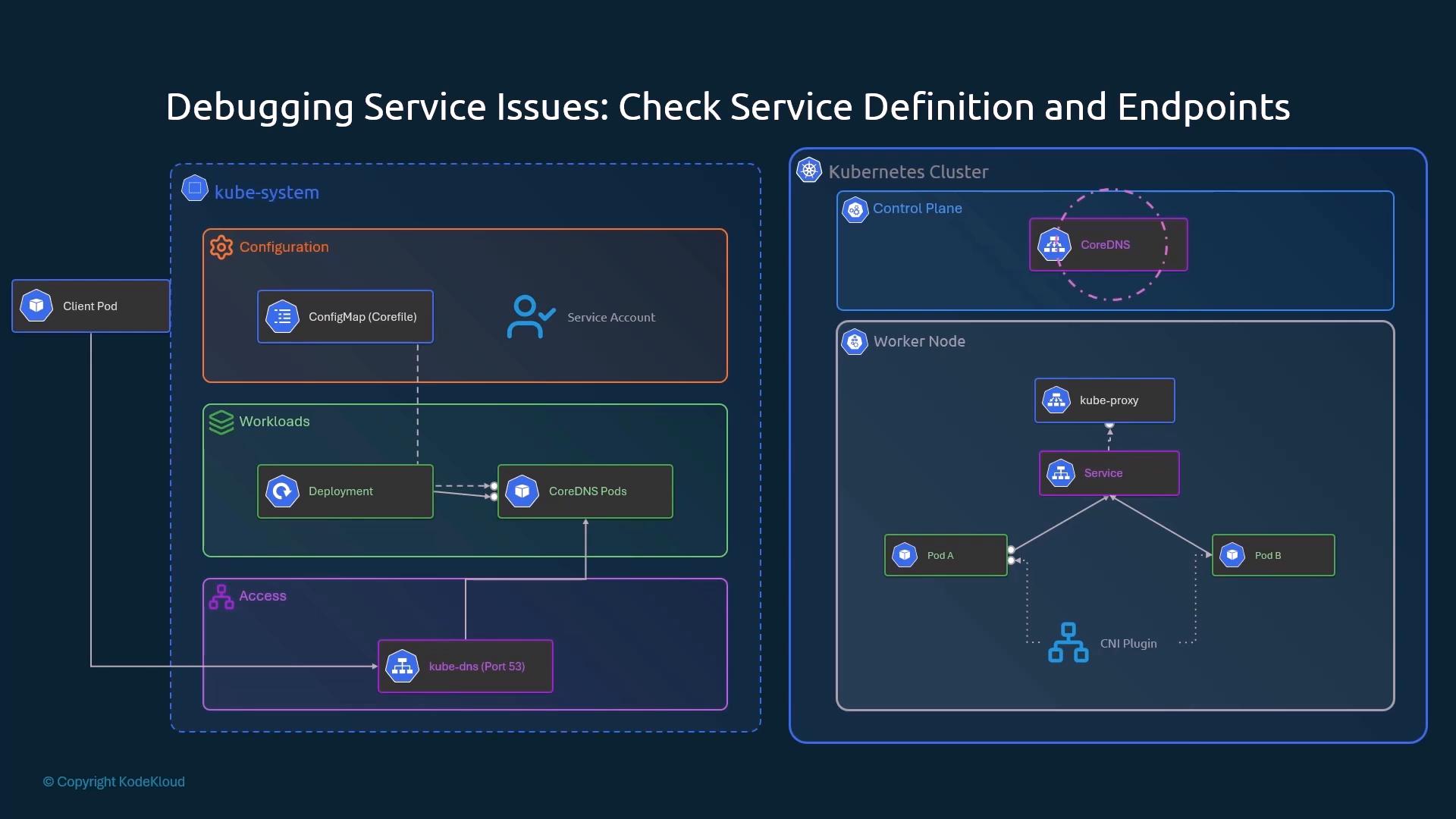
Runs in kube-system, exposed by the kube-dns Service (port 53). Pods carry the label k8s-app=kube-dns. Pieces: Deployment, Corefile ConfigMap, Service, ServiceAccount/RBAC (§9.16).
# Corefile excerpt (inside the .:53 { } server block of ConfigMap coredns)kubernetes cluster.local in-addr.arpa ip6.arpa { pods insecure fallthrough in-addr.arpa ip6.arpa ttl 30}forward . /etc/resolv.conf # non-cluster names go to the node's upstream resolvers
Broken/misconfigured CNI → Pods stuck Pending (or ContainerCreating), or Running but with no connectivity.
Flannel: simple overlay, does not enforce NetworkPolicy. Calico: supports NetworkPolicy, can run with or without an overlay (apply the manifest from the Calico project).
CoreDNS Pending right after cluster install = no CNI installed yet, not a DNS bug.
DNS label is k8s-app=kube-dns and the Service is named kube-dns, even though the Deployment/Pods are called coredns.
A Pod's /etc/resolv.confnameserver must equal the kube-dns ClusterIP (from the kubelet clusterDNS setting).
Not Ready Pods are excluded from endpoints. A failing readiness probe looks like a "Service down" problem.
[!CAUTION]
Correction:
The coreos/flannel raw URL is outdated. Flannel moved to flannel-io: kubectl apply -f https://github.com/flannel-io/flannel/releases/latest/download/kube-flannel.yml (default Pod CIDR 10.244.0.0/16).
The notes say the kubelet picks the first CNI config. Since dockershim was removed (v1.24), the container runtime (containerd / CRI-O) loads the CNI config from /etc/cni/net.d/. The "first file alphabetically wins" rule still applies.
[!NOTE]
Beyond the course:
kubectl get endpoints hostnames # older view (Endpoints API deprecated in favour of EndpointSlices, still works)kubectl run test --image=busybox:1.28 --rm -it --restart=Never -- nslookup kubernetes.default # 1.28: newer busybox nslookup is unreliableiptables -t nat -L KUBE-SERVICES -n | grep <svc-name> # iptables mode: Service rules on the nodeiptables-save | grep <svc-name>kubectl -n kube-system rollout restart deployment coredns # reload CoreDNS after Corefile edits (the reload plugin also re-reads it)
kube-proxy supports nftables in newer releases; choose a mode supported by the cluster version and host kernel. See virtual IP modes.

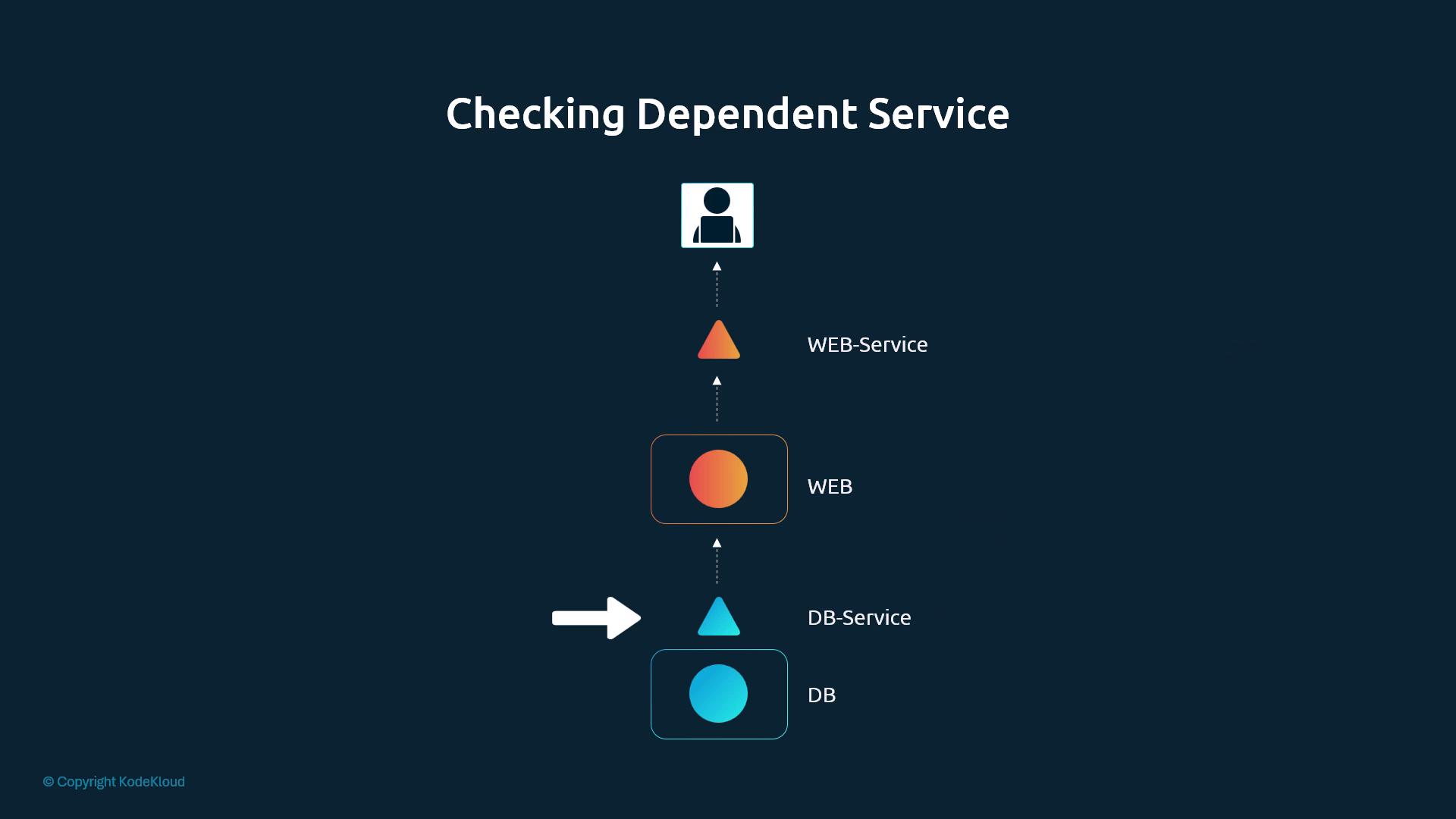
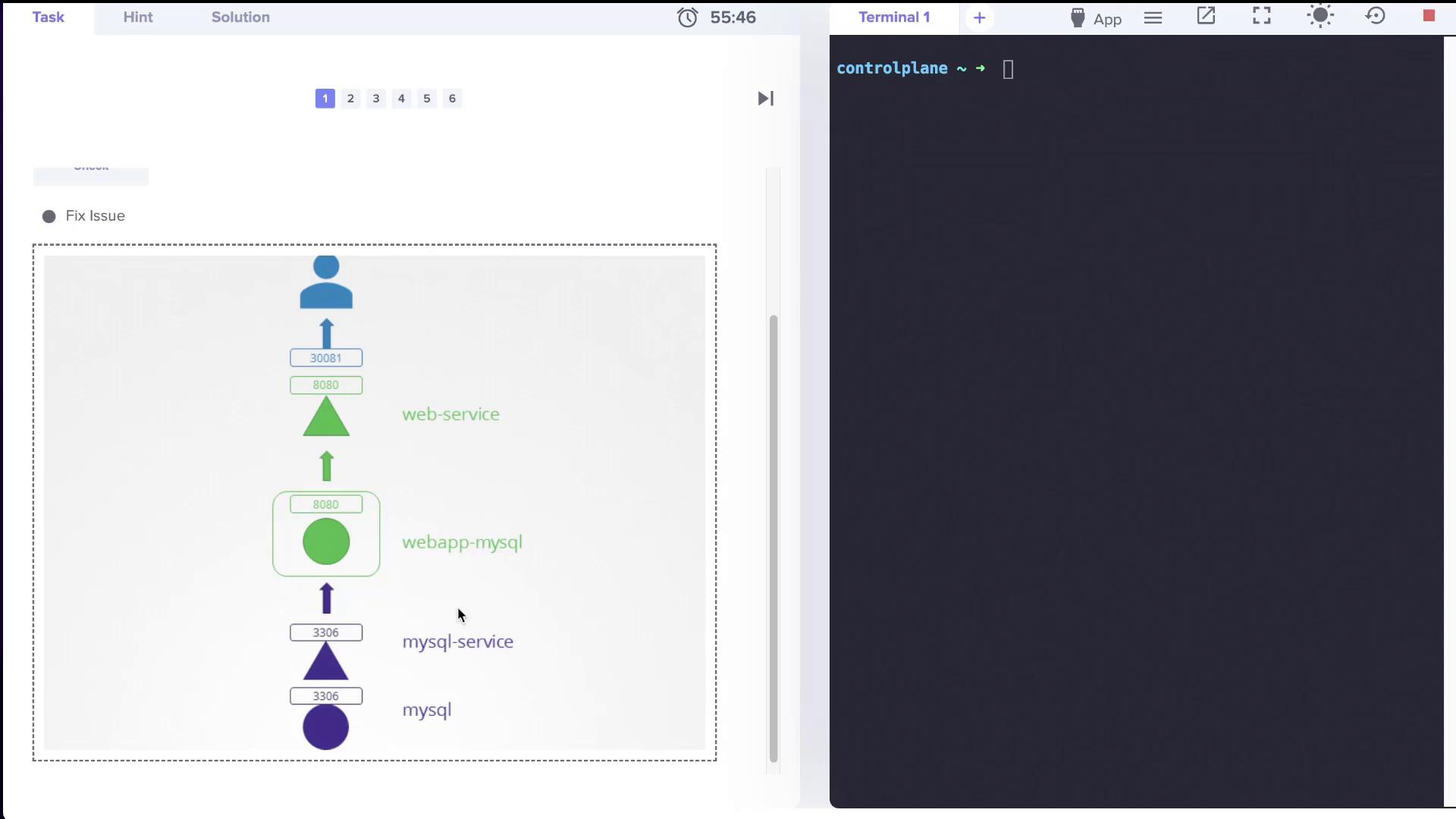
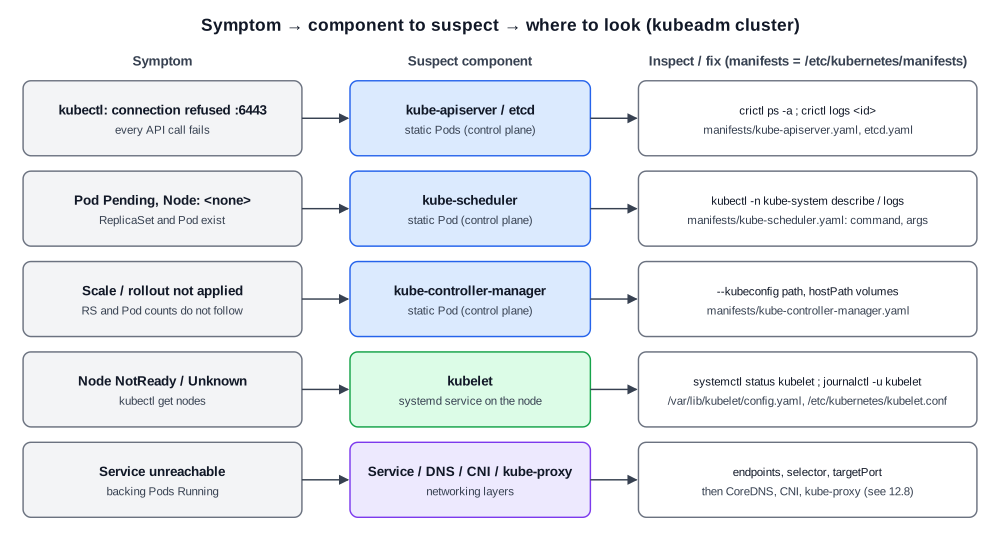 Diagram (new): which component to suspect for each symptom and where its config lives.
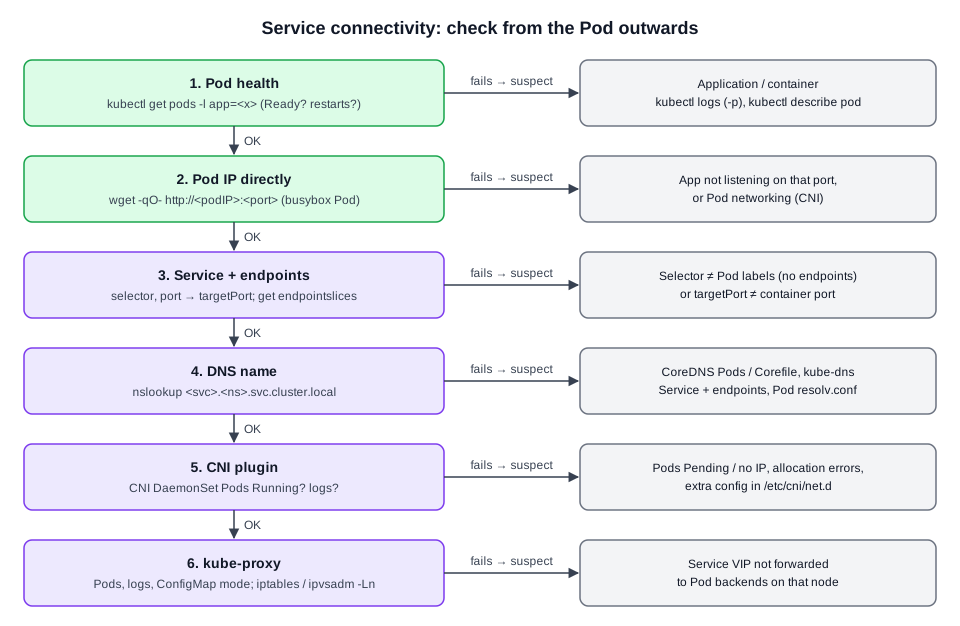 Diagram (new): ordered checks from the Pod outwards. The first failing step points to the faulty layer.