Decouple controllers from objects; flexible placement policies
metadata.labels, spec.selector
Resource requests & limits
Scheduler places Pods only where requested CPU/memory is free; bin-packing, avoid overcommit
resources.requests / resources.limits
Multiple schedulers
Custom policies or multi-tenancy via named schedulers
spec.schedulerName + extra scheduler process
Scheduler events
Debug failed/successful scheduling
kubectl describe pod, kubectl get events
Also covered later in the section: taints/tolerations (§3.6), node selectors (§3.8), node affinity (§3.9), taints vs node affinity combined (§3.11), resource requirements (§3.12), DaemonSets (§3.14), static Pods (§3.16), priority classes (§3.18), multiple schedulers + their events (§3.19–3.20), scheduler profiles (§3.21), admission controllers (§3.22).
[!CAUTION]
Correction: the course intro table lists kubectl create daemonset as an example — that command does not exist. Create a DaemonSet from YAML (e.g. generate a Deployment with kubectl create deployment ... --dry-run=client -o yaml, change kind to DaemonSet, remove replicas/strategy). See §3.14.
Every Pod has spec.nodeName; normally not set in your manifest.
Scheduler watches for Pods with empty nodeName → picks a node → creates a Binding object (v1Binding) for the Pod → API server sets nodeName → kubelet on that node starts it.
No scheduler running → Pods without nodeName stay Pending until manually bound or a scheduler is started.
Use cases for manual scheduling: no scheduler in the cluster, don't want to rely on it, need exact placement.
Diagram (new): scheduler watches unscheduled Pods and POSTs a Binding; the two manual alternatives bypass or mimic that step.
nodeName cannot be set or changed via kubectl edit/apply/patch on an existing Pod. Only post-creation path = a Binding (Option 2), which works once, on an unscheduled Pod. Once set, immutable.
kubectl proxy & # local unauthenticated proxy on 127.0.0.1:8001curl -X POST -H "Content-Type: application/json" \ --data-binary @binding.json \ http://127.0.0.1:8001/api/v1/namespaces/default/pods/nginx/binding
Endpoint: POST /api/v1/namespaces/<namespace>/pods/<pod>/binding; metadata.name = Pod name, target = Node.
Requires RBAC permission to create the pods/binding subresource — normally only the scheduler/controllers have it.
Without kubectl proxy, talk to the API server directly with a client cert/token.
Method
When
Notes
spec.nodeName in manifest
You control Pod creation
Immutable once set
Binding object
Pod already exists without nodeName
POST to .../pods/<pod>/binding; needs RBAC
Best practice: prefer controllers (Deployment, DaemonSet, StatefulSet) + nodeSelector / node affinity / taints & tolerations; manual scheduling is for labs, debugging, very specific placement. Control who can create Bindings via RBAC.
[!WARNING]
Exam traps / remember:
nodeName bypasses the scheduler → scheduler filtering/scoring is skipped, so NoSchedule taints don't block the Pod (kubelet-side checks still apply, see note below).
Can't edit nodeName on a running/pending Pod → delete and recreate (kubectl replace --force -f), see §3.3.
Pod Pending + Node: <none> + no events → suspect scheduler is down.
[!NOTE]
Beyond the course:nodeName skips only the scheduler. The kubelet still runs admission checks: nodeSelector / required node affinity, host ports, CPU/memory fit. Failing Pod → phase Failed, reason NodeAffinity / OutOfcpu / OutOfmemory (not Pending). NoSchedule taints are ignored, but an untolerated NoExecute taint still evicts the Pod.
replace --force = delete + recreate (nodeName can't be set on existing Pod)
Watch progress
kubectl get pods --watch → ContainerCreating → Running
—
Move it to controlplane
change to nodeName: controlplane → kubectl replace --force -f nginx.yaml
Pods are never live-migrated; must recreate
Verify node
kubectl get pods -o wide → NODE column
—
apiVersion: v1kind: Podmetadata: name: nginxspec: nodeName: node01 # added; controlplane for the second task containers: - image: nginx name: nginx
Deletion can take several seconds: runtime sends SIGTERM; Pod waits up to terminationGracePeriodSeconds (default 30 s) depending on how the process handles the signal — expected.
describe output shows default tolerations node.kubernetes.io/not-ready:NoExecute op=Exists for 300s and node.kubernetes.io/unreachable:NoExecute op=Exists for 300s (auto-added to every Pod; see §3.6tolerationSeconds). QoS Class: BestEffort = no requests/limits.
[!NOTE]
Beyond the course:
On kubeadm clusters the scheduler is a static Pod: manifest /etc/kubernetes/manifests/kube-scheduler.yaml (see §3.16). In an exam "Pod stuck Pending, no events" task, check that file / crictl ps on the control plane rather than only using nodeName.
Faster than editing: kubectl delete pod nginx --force --grace-period=0 then kubectl apply -f nginx.yaml.
Lab output is v1.20: roles control-plane,master and a default-token-xxxxx Secret volume. Since v1.22 Pods mount a projected kube-api-access-xxxxx token volume instead of the Secret; since v1.24 the ROLES column shows only control-plane.
Annotations: same key/value structure but non-identifying info (build version, CI/CD data, contact details, links to external tools). Never used for selection.
Key = optional DNS-subdomain prefix (≤ 253 chars) + / + name (≤ 63 chars), e.g. example.com/key.
Value ≤ 63 chars, may be empty; must start/end with alphanumeric; -, _, . allowed in between.
Conventionally lowercase; keys and values are case-sensitive.
Resource
Typical label usage
Example
Pod
app, role, environment
kubectl get pods -l app=app1
ReplicaSet / Deployment
selector manages Pods; template gets labels
kubectl describe rs simple-webapp
Service
selects Pods to route to
kubectl get svc -l app=app1
Namespace / Node
organisation and scheduling
kubectl label node node01 size=large
[!CAUTION]
Correction: the course says the selector "must match the pod template labels exactly". Precisely: every selector label must be present (same key and value) in the template labels; the template may have extra labels — the course's own example has function: front-end only in the template. A selector the template doesn't satisfy is rejected.
[!NOTE]
Beyond the course:
kubectl get pods --show-labels # show all labelskubectl get pods -L env,tier # labels as columnskubectl get pods -l 'env in (prod,dev)' # set-basedkubectl get pods -l 'env!=prod,!tier' # not-equal / key absentkubectl label pod web tier=frontend # addkubectl label pod web tier=backend --overwrite # change existing valuekubectl label pod web tier- # remove label keykubectl annotate pod web owner=team-a # add annotation
apps/v1 controllers require spec.selector, and it is immutable after creation.
Scheduling mechanism, not a security control. Analogy: node = person, taint = bug spray, pod = bug, toleration = bug's tolerance for that spray.
Taint → node: repels Pods that don't tolerate it. Toleration → Pod: lets it be scheduled on a node with a matching taint.
By default Pods have no tolerations → no Pod lands on a tainted node.
Taints restrict what a node accepts; they do not attract a Pod to that node. A tolerating Pod can still land on any untainted node. To direct Pods to nodes use nodeSelector / node affinity (podAffinity/podAntiAffinity for Pod-relative placement).
Control-plane nodes are tainted by default so workloads don't run there (keeps control-plane components isolated). Removing it exposes the control plane to user workloads — avoid unless intended.
[!CAUTION]
Correction:node-role.kubernetes.io/master was replaced by node-role.kubernetes.io/control-plane. Current kubeadm clusters taint control-plane nodes with node-role.kubernetes.io/control-plane:NoSchedule.
[!WARNING]
Exam traps / remember:
Taint = node, toleration = Pod. A toleration does not guarantee the Pod goes to that node — combine with node affinity to dedicate nodes (§3.11).
tolerationSeconds only makes sense with NoExecute.
Removal needs the trailing -, and the key/effect must match the existing taint.
operator defaults to Equal if omitted; with Exists don't set value.
[!NOTE]
Beyond the course:
kubectl taint nodes node1 app:NoSchedule- (key+effect) or kubectl taint nodes node1 app- (all effects for key) also remove taints.
Toleration with operator: Exists and no key tolerates every taint (used by many DaemonSets).
Every Pod automatically gets node.kubernetes.io/not-ready and node.kubernetes.io/unreachableNoExecute tolerations for 300 s (seen in §3.3 describe output) → Pods are evicted ~5 min after their node fails.
kubectl get pods -o wide → controlplane (bee stays on node01)
Pending Pod scheduled as soon as taint gone
Scheduler event for mosquito:
Warning FailedScheduling default-scheduler 0/2 nodes are available: 1 node(s) had taint {node-role.kubernetes.io/master:NoSchedule}, that the pod didn't tolerate, 1 node(s) had taint {spray=mortein:NoSchedule}, that the pod didn't tolerate.
Toleration syntax: search "taints tolerations" on kubernetes.io docs (allowed in exam). Two forms:
tolerations:- key: "key1" operator: "Equal" # key + value + effect must match value: "value1" effect: "NoSchedule"
Or use the alternative fragment:
tolerations:- key: "key1" operator: "Exists" # key + effect only, no value effect: "NoSchedule"
[!CAUTION]
Correction: on current clusters the control-plane taint is node-role.kubernetes.io/control-plane:NoSchedule → remove with
kubectl taint node controlplane node-role.kubernetes.io/control-plane:NoSchedule-. Check describe output and copy the exact key.
[!WARNING]
Exam traps / remember: untaint the control plane only when the task asks (single-node/test clusters) — not good practice in production.
Problem: by default any Pod can land on any node with enough resources → a heavy batch/data-processing Pod may land on a small node.
nodeSelector = simplest way to require nodes with given labels. Steps: label node → add nodeSelector to Pod → scheduler places Pod only on nodes having all listed labels.
Equality only — no OR (large or medium) and no NOT (not small).
Everything is required; no "preferred".
For these → node affinity (§3.9); for placement relative to other Pods → pod affinity / anti-affinity.
Feature
nodeSelector
Node affinity
Operators
Equality only
In, NotIn, Exists, DoesNotExist, Gt, Lt
Required vs preferred
Required only
requiredDuringSchedulingIgnoredDuringExecution and preferredDuringSchedulingIgnoredDuringExecution
Use case
Simple exact match (size=large)
OR/NOT, existence, weighted preferences
[!WARNING]
Exam traps / remember: label the node before (or soon after) creating the Pod — with no matching node the Pod sits Pending. nodeSelector sits under Pod spec (for Deployments: spec.template.spec).
Goal: ensure Pods land on particular nodes (e.g. data-processing Pod on large node01). Node affinity = nodeSelector + operators, logical combinations, existence checks and soft preferences.
affinity:
  nodeAffinity:
    preferredDuringSchedulingIgnoredDuringExecution:
    - weight: 50              # 1-100; scheduler maximises summed weight of matched preferences
      preference:             # a single nodeSelectorTerm (no nodeSelectorTerms list here)
        matchExpressions:
        - key: size
          operator: In
          values:
          - Large
spec:
  replicas: 3
  selector:
    matchLabels:
      app: blue
  template:
    metadata:
      labels:
        app: blue
    spec:
      affinity:                      # sibling of containers
        nodeAffinity:
          requiredDuringSchedulingIgnoredDuringExecution:
            nodeSelectorTerms:
            - matchExpressions:
              - key: color
                operator: In
                values:
                - blue
      containers:
      - name: nginx
        image: nginx
        imagePullPolicy: Always
red.yaml:
apiVersion: apps/v1kind: Deploymentmetadata: name: red labels: app: redspec: replicas: 2 selector: matchLabels: app: red template: metadata: labels: app: red spec: affinity: nodeAffinity: requiredDuringSchedulingIgnoredDuringExecution: nodeSelectorTerms: - matchExpressions: - key: node-role.kubernetes.io/master # course (v1.20); now node-role.kubernetes.io/control-plane operator: Exists # key present, value empty containers: - name: nginx image: nginx resources: {}
[!WARNING]
Exam traps / remember:
Indentation errors (e.g. did not find expected key) are the most common failure when editing --dry-run=client -o yaml output — affinity must sit directly under template.spec, aligned with containers.
Affinity only attracts; it doesn't override taints. In this lab the control plane had Taints: <none>. On a default cluster the control-plane taint would leave red Pending unless you add a toleration for node-role.kubernetes.io/control-plane:NoSchedule (or the task says to remove the taint).
[!CAUTION]
Correction: kubeadm has labelled control-plane nodes node-role.kubernetes.io/control-plane since v1.20 (ROLES control-plane,master in the lab = both labels present). The .../master label was dropped in v1.24 → use node-role.kubernetes.io/control-plane with Exists; it works on both old and new clusters. Confirm with kubectl get node controlplane --show-labels.
[!TIP]
Quick checks: kubectl get nodes -l color=blue (which nodes match a label) and kubectl get nodes --show-labels. kubectl edit on the Deployment triggers a rollout, so the new Pods replace the old ones automatically.
Shared cluster with other teams' nodes and pods. You own 3 nodes (blue, red, green) and 3 pods (blue, red, green).
Goal: each colour pod runs only on its colour node, and no other team's pod lands on your nodes. The second goal also means your pods stay off the other teams' nodes.
kubectl taint nodes node-blue color=blue:NoSchedule # node repels pods without a matching toleration
apiVersion: v1kind: Podmetadata: name: pod-bluespec: containers: - name: nginx image: nginx tolerations: # lets the pod onto node-blue; does NOT pull it there - key: "color" operator: "Equal" value: "blue" effect: "NoSchedule"
Other pods are kept off node-blue. That part works.
A toleration only permits placement on a tainted node. pod-blue can still be scheduled on any untainted node (another team's node), so you get no guaranteed placement.
Exclusivity needs the hard rule requiredDuringSchedulingIgnoredDuringExecution. preferredDuringSchedulingIgnoredDuringExecution is only a soft preference and gives no exclusivity.
Use a NoSchedule taint on the dedicated nodes, and give the toleration only to the pods meant to run there.
Each node advertises CPU and memory capacity. Every pod placed on it consumes some of that capacity, e.g. a pod requesting 2 CPU and 1 memory unit.
The scheduler compares the pod's requests with each node's free capacity. If no node fits, the pod stays Pending, and kubectl describe pod shows events like Insufficient cpu / Insufficient memory.
No requests or limits are set by default, unless a LimitRange applies. Without requests the scheduler reserves nothing, so one pod can monopolise a node.
Scenario
Scheduler
Runtime
When
No requests, no limits
Reserves nothing
Can use everything, which starves others
Avoid in prod
Limits only
Request is set equal to the limit
Reserves the full limit, capped at it
Guaranteed + capped
Requests + limits
Reserves the request
Capped at the limit
Predictable, for critical services
Requests, no limits
Reserves the request
Can burst into spare capacity
Often the best choice for CPU. Risky for memory
CPU: set requests and leave limits unset so bursty workloads can use idle CPU.
Memory: set both requests and limits, and size conservatively, because overuse leads to OOM kills.
Hard cap on the aggregate across all pods in a namespace: requests, limits, and also object counts. Useful in multi-tenant clusters.
apiVersion: v1kind: ResourceQuotametadata: name: my-resource-quotaspec: hard: requests.cpu: "4" # sum of all CPU requests in the ns <= 4 requests.memory: "4Gi" limits.cpu: "10" # sum of all CPU limits <= 10 limits.memory: "10Gi"
[!WARNING]
Exam traps / remember:
Requests drive scheduling. Limits drive runtime enforcement. A pod stuck in Pending with Insufficient cpu/memory has a request problem.
Limit without a request means request = limit.
CPU over the limit gets throttled. Memory over the limit gets OOMKilled.
0.1 = 100m. 1G ≠ 1Gi.
LimitRange works per container and has no effect on existing pods. ResourceQuota works on the namespace total.
[!NOTE]
Beyond the course:
QoS classes follow from these settings. Every container has requests == limits for both CPU and memory → Guaranteed. At least one request or limit set → Burstable. Nothing set → BestEffort, which is evicted first under node pressure. Check with kubectl get pod <p> -o jsonpath='{.status.qosClass}'.
If a ResourceQuota covers requests.cpu/limits.memory etc., new pods that don't specify those values are rejected, unless a LimitRange supplies defaults.
kubectl describe pod elephant → State: Waiting / CrashLoopBackOff, Last State: Terminated / Reason: OOMKilled, Exit Code: 1 (1 here because stress's parent exits after its worker is killed; an OOM-killed main process normally shows 137 = SIGKILL)
The reason sits in Last State, not State
4
Fix: memory limit 20Mi
Export, edit, then kubectl replace --force -f (below)
kubectl edit can't change resources on a running pod
5
Clean up
kubectl delete pod elephant
Why elephant fails: the container runs stress --vm 1 --vm-bytes 15M --vm-hang 1 (image polinux/stress, container mem-stress) and allocates 15M, but limits.memory: 10Mi (requests.memory: 5Mi). Fix: raise the limit above the allocation, e.g. 20Mi.
kubectl edit pod elephant # change limits.memory: 20Mi, then save → rejected:# pods "elephant" was not valid:# * spec: Forbidden: pod updates may not change fields other than `spec.containers[*].image`,# `spec.initContainers[*].image`, `spec.activeDeadlineSeconds`, `spec.tolerations`# (only additions to existing tolerations) or `spec.terminationGracePeriodSeconds`# kubectl saves your edited copy to /tmp/kubectl-edit-XXXX.yaml. Use it, or export afresh:kubectl get pod elephant -o yaml > /tmp/elephant-pod.yaml # then edit resources.limits.memory: 20Mikubectl replace --force -f /tmp/elephant-pod.yaml # deletes + recreates the pod# pod "elephant" deleted# pod/elephant replacedkubectl get pods # elephant 1/1 Runningkubectl describe pod elephant # Limits: memory 20Mi; Requests: memory 5Mi; Restart Count 0
# relevant fragment of the fixed specspec: containers: - name: mem-stress image: polinux/stress command: ["stress"] args: ["--vm", "1", "--vm-bytes", "15M", "--vm-hang", "1"] resources: limits: memory: 20Mi requests: memory: 5Mi
[!TIP]
Pods are mostly immutable. In practice the editable fields are image, activeDeadlineSeconds and tolerations (add only). terminationGracePeriodSeconds is listed but only in an edge case (set to 1 if it was previously negative; newer error messages say so). For anything else, use edit → save to file → kubectl replace --force -f <file>. For a Deployment, just kubectl edit deploy, because the pod template is mutable and a rollout follows.
[!NOTE]
Beyond the course: newer Kubernetes supports in-place pod resize (see §5.18) through the resize subresource, e.g. kubectl patch pod <p> --subresource resize --patch '...'. A plain kubectl edit pod of resources is still rejected, so in the exam, delete and recreate unless a task explicitly asks for an in-place resize.
kubectl apply -f daemonset.yaml # use kubectl create -f or kubectl apply -fkubectl get daemonsets # short name: ds# NAME DESIRED CURRENT READY UP-TO-DATE AVAILABLE AGE# monitoring-daemon 3 3 3 3 3 41mkubectl describe daemonset monitoring-daemon
[!CAUTION]
Correction: the original lists kubectl create daemonset monitoring-daemon --image=.... That subcommand does not exist. To generate a DS imperatively, use kubectl create deployment <n> --image=<img> --dry-run=client -o yaml > ds.yaml, then change kind: DaemonSet and remove replicas, strategy and status (see §3.15). Or copy the example from the docs.
Before v1.12: the DS controller set spec.nodeName on each pod itself, so pods were bound directly and bypassed the scheduler (as in manual scheduling, §3.2).
From v1.12: the controller creates pods without nodeName. It adds node affinity for the target node, and the default kube-scheduler places them. Taints, node conditions and other constraints are therefore respected like for any workload.
[!WARNING]
Exam traps / remember:
spec.selector is mandatory in apps/v1 and must match spec.template.metadata.labels (selector ⊆ template labels; the template may carry extra labels).
A DS has no replicas field. DESIRED equals the number of eligible nodes.
To run on tainted nodes such as the control plane, the DS pod template needs a matching toleration.
[!NOTE]
Beyond the course: the DS controller automatically adds tolerations such as node.kubernetes.io/not-ready, unreachable (NoExecute), disk-pressure, memory-pressure, pid-pressure and unschedulable (NoSchedule). That is why DS pods survive cordons and node problems. They are not given a toleration for the control-plane taint. For production CNI DaemonSets, use the vendor's manifests (e.g. the Calico docs).
kubectl describe daemonset kube-proxy -n kube-system → Desired/Current Number of Nodes Scheduled: 1. Cross-check kubectl get nodes (1 node: controlplane)
One pod per eligible node
5
Image of kube-flannel-ds?
kubectl describe ds kube-flannel-ds -n kube-system → quay.io/coreos/flannel:v0.13.1-rc1 (init container install-cni and container kube-flannel, which runs /opt/bin/flanneld)
Check Containers:, not Init Containers:
6
Deploy a fluentd logging DS
YAML below
Generate from a Deployment and convert
Useful describe ds fields: kube-proxy Image: k8s.gcr.io/kube-proxy:v1.20.0 (lab cluster v1.20; kubectl get nodes → controlplane Ready control-plane,master v1.20.0), Selector: k8s-app=kube-proxy, Node-Selector: kubernetes.io/os=linux, Number of Nodes Scheduled with Up-to-date Pods, ... with Available Pods, Number of Nodes Misscheduled: 0, Pods Status: 1 Running / 0 Waiting / 0 Succeeded / 0 Failed. The kube-proxy container runs /usr/local/bin/kube-proxy --config=/var/lib/kube-proxy/config.conf --hostname-override=$(NODE_NAME), with NODE_NAME taken from spec.nodeName. Mounts: /lib/modules (ro), /run/xtables.lock (rw). The get ds -A output also has a NODE SELECTOR column (kube-proxy: kubernetes.io/os=linux, flannel: <none>).
Running agents on control-plane nodes can affect stability and security. Only add the toleration deliberately.
This is a demo manifest. Production also needs RBAC, a ConfigMap for the fluentd config, volume permissions, security contexts, resource tuning and node selectors/affinity.
[!CAUTION]
Correction: the course toleration key node-role.kubernetes.io/master is obsolete. Current kubeadm control-plane nodes are tainted node-role.kubernetes.io/control-plane:NoSchedule, so use that key. On containerd/CRI-O nodes, container logs are under /var/log/pods and /var/log/containers, which the /var/log mount already covers. /var/lib/docker/containers only matters on Docker-based nodes.
[!NOTE]
Beyond the course: images from k8s.gcr.io now come from registry.k8s.io, so expect e.g. registry.k8s.io/kube-proxy:vX.Y.Z in current labs.
Normally the kubelet asks the kube-apiserver which pods to run, i.e. the ones the scheduler assigned to its node. It can also run pods without any control plane. It periodically reads pod manifests from a local directory, creates the pods through the container runtime, and keeps them running.
Only Pods. ReplicaSets, Deployments and Services need the control plane (API server, controllers, scheduler, etcd), so dropping their YAML into the directory does nothing.
file passed via --config= (kubeadm: /var/lib/kubelet/config.yaml)
staticPodPath: /etc/kubernetes/manifests
# course example of a kubelet unit using the flagExecStart=/usr/local/bin/kubelet \ --container-runtime=remote \ --container-runtime-endpoint=unix:///var/run/containerd/containerd.sock \ --kubeconfig=/var/lib/kubelet/kubeconfig \ --network-plugin=cni \ --register-node=true \ --pod-manifest-path=/etc/kubernetes/manifests \ --v=2
How to find the path on an unknown node: systemctl cat kubelet or cat /etc/systemd/system/kubelet.service.d/10-kubeadm.conf → find --config=<file> → grep staticPodPath <file>. If the unit has --pod-manifest-path, that is the answer.
[!CAUTION]
Correction: in the course unit file, --network-plugin=cni (removed with dockershim in v1.24) and --container-runtime=remote (removed in v1.27) no longer exist, and --pod-manifest-path is deprecated in favour of staticPodPath in the config file. Current kubeadm control-plane manifests are named kube-apiserver.yaml, kube-controller-manager.yaml, kube-scheduler.yaml and etcd.yaml. The course lists apiserver.yaml and controller-manager.yaml.
With no API server, kubectl doesn't work. Use the runtime CLI. The course showed docker ps, whose containers are named k8s_<container>_<pod>-<node>_<ns>_<uid>_0, plus one pause (sandbox) container per pod named k8s_POD_<pod>-<node>_<ns>_<uid>_0, image k8s.gcr.io/pause:3.1 (e.g. k8s_POD_myapp-pod-host01_default_..._0).
On containerd/CRI-O nodes, use crictl ps (or ctr -n k8s.io containers ls).
In a cluster: the kubelet also creates a read-only mirror pod in the API server, so kubectl get pods shows it. The name has the node name appended, e.g. static-web-node01. You can't edit it through the API. Changes go into the manifest file on the node.
Diagram (new): static pod lifecycle. The node's manifest file is the source of truth. The API server only holds a read-only mirror.
kubeadm writes the control-plane component manifests into the kubelet's static pod directory. The kubelet then starts and manages them without any API server, which is how kubeadm bootstraps the control plane.
Static pods, and pods with spec.nodeName preset (manual scheduling, §3.2), bypass the kube-scheduler. DaemonSet pods are placed by the default scheduler (since v1.12).
kubectl delete pod <static-pod> only deletes the mirror, and the kubelet recreates it. To remove a static pod for good, delete the manifest file on the node that runs it.
The static pod path may be non-default. Always check the kubelet config on that node.
[!NOTE]
Beyond the course: a static pod spec cannot reference other API objects such as ServiceAccounts, ConfigMaps or Secrets. The pod's ownerReferences shows kind: Node.
The kubelet recreates it. Transient ErrImagePull/ImagePullBackOff then Running; watch with kubectl get pods --watch
9
Delete static pod static-greenbox
Find its node, SSH there, find that kubelet's staticPodPath, rm the manifest
kubectl delete pod alone is undone by the kubelet
# Q1: kubectl get pod kube-apiserver-controlplane -n kube-system -o yaml (static pod)ownerReferences:- apiVersion: v1 controller: true kind: Node name: controlplane# vs coredns pod: apiVersion: apps/v1, kind: ReplicaSet, name: coredns-74ff55c5b
# Q7: kubectl options BEFORE --, container command AFTER --kubectl run static-busybox --image=busybox --restart=Never \ --dry-run=client -o yaml --command -- sleep 1000 > static-busybox.yamlcp static-busybox.yaml /etc/kubernetes/manifests/kubectl get pods # static-busybox-controlplane 1/1 Running (node name suffixed)
apiVersion: v1kind: Podmetadata: name: static-busybox labels: run: static-busyboxspec: containers: - name: static-busybox image: busybox # Q8: change to busybox:1.28.4 in the file on the node command: ["sleep", "1000"] restartPolicy: Never
The static pod lives on the node whose suffix it carries. Edit or delete the file on that node, not on controlplane.
Non-default staticPodPath values appear in labs and the exam. Always read the kubelet config.
A typo in an image or tag in a static manifest causes pull failures or restart loops. Check the final state after editing.
Editing or deleting control-plane manifests in /etc/kubernetes/manifests restarts or removes that component, so be deliberate.
[!NOTE]
Beyond the course: if the kubelet config location is unknown, run ps -ef | grep kubelet and look at --config=.... The same check works on any node.
Assigns an integer priority to pods. The scheduler places higher-priority pods first. If one doesn't fit, it can preempt (evict) lower-priority pods to make room.
PriorityClass is cluster-scoped (non-namespaced), so pods in any namespace can reference it.
Range: signed 32-bit, -2,147,483,648 to 2,147,483,647. A larger number means higher priority. System classes use about 2,000,000,000, above the app range, which tops out at 1,000,000,000.
kubectl get priorityclass # short name: pc# NAME VALUE GLOBAL-DEFAULT AGE PREEMPTIONPOLICY# system-cluster-critical 2000000000 false 7m33s PreemptLowerPriority# system-node-critical 2000001000 false 7m33s PreemptLowerPriority
Pending pods are queued by priority, so higher priority is scheduled first. A priority-7 pod goes before a priority-5 pod.
If a high-priority pod doesn't fit, the scheduler checks that pending pod'spreemptionPolicy:
PreemptLowerPriority: lower-priority pods may be evicted to free resources.
Never: no eviction. The pod waits in the queue until resources free up, but it still sits ahead of lower-priority pods in the queue.
Preemption happens only if evicting lower-priority pods actually makes the pod schedulable. The scheduler minimises the number of victims.
apiVersion: scheduling.k8s.io/v1kind: PriorityClassmetadata: name: high-priorityvalue: 1000000000description: "Priority class for mission critical pods"preemptionPolicy: PreemptLowerPriority # the default, written explicitly---apiVersion: scheduling.k8s.io/v1kind: PriorityClassmetadata: name: high-priority-nonpreemptvalue: 1000000000description: "Non-preempting priority class"preemptionPolicy: Never # never evicts running pods
Best practice: use high values sparingly and document them, because aggressive priorities cause eviction churn. Reserve very large values for system components. Watch evictions with kubectl get events, metrics and logs.
[!WARNING]
Exam traps / remember:
PriorityClass is not namespaced. priorityClassName goes at pod spec level.
The default preemptionPolicy is PreemptLowerPriority. Never means the pod is still queued first but evicts nobody.
Only one globalDefault: true is allowed. Without one, priority defaults to 0.
[!NOTE]
Beyond the course:
User-defined classes may use at most 1,000,000,000. Higher values are reserved for the built-in system-* classes.
Imperative: kubectl create priorityclass high-priority --value=1000000 --description="..." --preemption-policy=Never (add --global-default to make it the default).
The resolved number is stored in the pod: kubectl get pod <p> -o jsonpath='{.spec.priority}'. You can list them with kubectl get pods -o custom-columns=NAME:.metadata.name,PRIORITY:.spec.priorityClassName.
A pod that references a non-existent class is rejected. Changing globalDefault later does not change existing pods.
Default scheduler = default-scheduler (the kube-scheduler process); honours taints/tolerations, node affinity etc.
Need custom placement (own scoring, extra checks, different algorithm)? Run additional schedulers alongside the default — each with a unique schedulerName — or your own scheduler binary.
A Pod picks its scheduler with spec.schedulerName; omitted → default-scheduler.
Each scheduler instance gets its own config file (KubeSchedulerConfiguration) naming its schedulerName.
apiVersion: v1kind: Podmetadata: name: nginxspec: schedulerName: my-scheduler # must match a running scheduler's profile name containers: - name: nginx image: nginx
apiVersion: kubescheduler.config.k8s.io/v1kind: KubeSchedulerConfigurationprofiles:- schedulerName: my-scheduler # name Pods referenceleaderElection: leaderElect: true # needed when running >1 replica of THIS scheduler (HA) resourceNamespace: kube-system resourceName: lock-object-my-scheduler # lock name; unique per scheduler deployment
Leader election: with several replicas of the same scheduler, only the elected leader schedules. Single replica → leaderElect: false is fine. Multiple distinct custom schedulers → each needs its own resourceName so locks don't collide.
apiVersion: v1kind: Podmetadata: name: my-scheduler namespace: kube-systemspec: containers: - name: kube-scheduler image: k8s.gcr.io/kube-scheduler-amd64:v1.22.0 command: - kube-scheduler - --address=127.0.0.1 # removed in newer versions, see CAUTION - --kubeconfig=/etc/kubernetes/scheduler.conf # credentials to reach the API server - --config=/etc/kubernetes/my-scheduler-config.yaml # KubeSchedulerConfiguration file volumeMounts: - name: config-volume mountPath: /etc/kubernetes volumes: - name: config-volume configMap: name: my-scheduler-config
Create the referenced ConfigMap and kubeconfig before applying the Pod.
[!CAUTION]
Correction:--address (and the insecure healthz port 10251 seen in the course's log output) were removed from kube-scheduler; it now serves only on the secure port 10259 (HTTPS). k8s.gcr.io is frozen → images are now on registry.k8s.io. Also, mounting a ConfigMap at /etc/kubernetes hides any other file in that directory (e.g. scheduler.conf) unless the kubeconfig is in the same ConfigMap — the lab version (§3.20) avoids this by mounting at /etc/kubernetes/my-scheduler and using the Pod's ServiceAccount instead of --kubeconfig.
Steps: build/package scheduler binary into an image → push to registry → ServiceAccount + ClusterRoleBinding → config via ConfigMap mounted into the Deployment and passed with --config → leader election for HA.
git clone https://github.com/kubernetes/kubernetes.git && cd kubernetes && make # build from upstream# Dockerfile: FROM busybox + copy the kube-scheduler binarydocker build -t gcr.io/my-gcp-project/my-kube-scheduler:1.0 .gcloud auth configure-docker # auth Docker to GCRdocker push gcr.io/my-gcp-project/my-kube-scheduler:1.0
Pod never leaves Pending → kubectl describe pod <pod> / events.
Scheduler Pod healthy (liveness/readiness)? Correct --config (and --kubeconfig if used)?
RBAC: ServiceAccount must have system:kube-scheduler (or equivalent).
Several distinct scheduler deployments with leader election → unique resourceName each.
[!WARNING]
Exam traps / remember:
Field is spec.schedulerName (Pod spec level, not container level). Name must match the schedulerName in the scheduler's config profile exactly.
Verify who scheduled a Pod: kubectl get events -o wide → SOURCE of the Scheduled event.
Custom scheduler lives in kube-system; its config arrives via ConfigMap + --config.
[!NOTE]
Beyond the course:
A Pod whose schedulerName matches no running scheduler stays Pending with no scheduling events at all — a quick tell that the name is wrong or the scheduler is down.
schedulerName can't be changed on an existing Pod → delete and recreate (kubectl replace --force -f pod.yaml). For Deployments, set it under spec.template.spec.
Quick check: kubectl get pod nginx -o jsonpath='{.spec.schedulerName}'.
Newer kubectl get events -o wide columns differ from the course sample (LAST SEEN, TYPE, REASON, OBJECT, SUBOBJECT, SOURCE, MESSAGE…); SOURCE is still there.
system:kube-scheduler only allows lease get/update for the lease named kube-scheduler; a custom scheduler with leaderElect: true and its own resourceName needs that name added to the role (upstream docs) or extra RBAC — another reason the lab uses leaderElect: false.
[!NOTE]
Beyond the course: the upstream scheduler manifest also binds system:volume-scheduler, and in kube-system binds extension-apiserver-authentication-reader. These cover volume scheduling and reading delegated-authentication configuration; include them for the full deployment.
Provided config file (key = filename my-scheduler-config.yaml inside the ConfigMap):
apiVersion: kubescheduler.config.k8s.io/v1beta2 # see CAUTION: use v1 on current clusterskind: KubeSchedulerConfigurationprofiles: - schedulerName: my-schedulerleaderElection: leaderElect: false # single replica → no leader election
Scheduler Pod won't start → kubectl describe pod my-scheduler -n kube-system, kubectl logs my-scheduler -n kube-system.
Test Pod Pending → events + scheduler logs: is it receiving the Pod / blocked by RBAC? Can it reach the API?
Image version mismatch with the control plane → behaviour/API mismatches.
[!CAUTION]
Correction:kubescheduler.config.k8s.io/v1beta2 was removed in Kubernetes v1.28 (v1beta3 too, in v1.29); on current clusters use kubescheduler.config.k8s.io/v1, or the second scheduler crash-loops on startup — check its logs. The lab's "ClusterRole allowing get/list/watch pods" is not enough on its own: a scheduler must also create pods/binding and events and read nodes etc. — bind system:kube-scheduler plus system:volume-scheduler (full RBAC: §3.19). The sample kubectl get sa output showing SECRETS 1 predates v1.24 (token Secrets no longer auto-created → 0).
[!TIP]
Image without describe: kubectl get pod kube-scheduler-controlplane -n kube-system -o jsonpath='{.spec.containers[0].image}', or grep image: /etc/kubernetes/manifests/kube-scheduler.yaml. Get the ConfigMap key right: the --config path must be <mountPath>/<key>, and --from-file uses the file's basename as the key.
Old way: separate scheduler processes (default-scheduler, my-scheduler, my-scheduler-2) → more to operate; independent schedulers can race (place Pods on the same node without knowing about each other).
Since v1.18: one kube-scheduler process can run multiple profiles; each profile acts as its own scheduler with its own schedulerName.
Approach
Pros
Cons
Multiple scheduler binaries
Full isolation per binary
Operational overhead, many processes, race conditions
Multi-profile single kube-scheduler
One process, many logical schedulers
Profiles must be configured carefully to avoid overlap
apiVersion: kubescheduler.config.k8s.io/v1kind: KubeSchedulerConfigurationprofiles:- schedulerName: my-scheduler-2 plugins: score: enabled: - name: MyCustomPluginA - name: MyCustomPluginB disabled: - name: TaintToleration- schedulerName: my-scheduler-3 plugins: preScore: disabled: - name: '*' # wildcard = disable every plugin at this extension point score: disabled: - name: '*'- schedulerName: my-scheduler-4 # own customisations (or none)- schedulerName: default-scheduler
Under plugins:, every extension point takes enabled: / disabled: lists of exact plugin names or '*'.
All profiles in one process must use the same queueSort plugin (single shared queue).
Extra extension points exist (preEnqueue, multiPoint = enable/disable a plugin at all its points at once); score plugins can take a weight.
Loading the config on a kubeadm cluster: put the file on the control plane, add --config=<file> to /etc/kubernetes/manifests/kube-scheduler.yaml and mount it via a hostPath volume; kubelet restarts the static Pod (§3.16).
[!CAUTION]
Correction: the course illustrates the NodeName scheduler plugin with spec.nodeName. A Pod created with that field already set bypasses the scheduler entirely (§3.2); the plugin is not invoked for this example.
kubectl → HTTPS → kube-apiserver: Authentication (who: e.g. client cert from kubeconfig) → Authorization (allowed: e.g. RBAC) → Admission controllers (validate / mutate) → persist to etcd. See the diagram in §3.24.
RBAC works at API-operation level (verb + resource, optionally resourceNames); it never looks inside or changes the object.
[!CAUTION]
Correction: the course shows resourceNames restricting create to Pods named blue/orange. RBAC cannot restrict create (or deletecollection) by name — the name isn't known at authorization time — so such a rule matches no create requests at all. resourceNames works for get, update, patch, delete. Name-based checks on create are an admission-control job.
Validate (accept/reject), mutate (change object before it's stored), or cause other side effects (e.g. create a missing namespace).
Use cases: allow only an internal registry (block Docker Hub); forbid :latest tag; deny containers running as root; require labels/metadata; inject sidecars or default env vars.
Built-in controller
Does
AlwaysPullImages
Sets imagePullPolicy: Always on every Pod → image pulled at each start
DefaultStorageClass
Adds default StorageClass to PVCs without storageClassName
EventRateLimit
Rate-limits events to protect the API server
NamespaceExists
Rejects requests to namespaces that don't exist
NamespaceAutoProvision
Creates the missing namespace (not enabled by default)
[!CAUTION]
Correction: the course table calls it EventRateLimitAdmissionController; the plugin name to pass to --enable-admission-plugins is EventRateLimit (it also needs --admission-control-config-file).
kubectl run nginx --image nginx --namespace blue# NamespaceExists/NamespaceLifecycle: Error from server (NotFound): namespaces "blue" not found# NamespaceAutoProvision enabled: pod/nginx created → kubectl get namespaces shows "blue Active"
[!CAUTION]
Correction:NamespaceLifecycle replaces the namespace-existence check and protects default, kube-system, kube-public; it never creates namespaces. NamespaceAutoProvision is a separate opt-in plugin, unlike the course’s claim that both were replaced. See admission controllers.
kube-apiserver -h | grep enable-admission-plugins # lists default-enabled plugins# kubeadm (apiserver is a static Pod): run the binary inside its Podkubectl exec -it kube-apiserver-controlplane -n kube-system -- kube-apiserver -h | grep enable-admission-plugins
Flags: --enable-admission-plugins=A,B,... (in addition to defaults) · --disable-admission-plugins=X,Y,....
Where to edit: kubeadm → static Pod manifest /etc/kubernetes/manifests/kube-apiserver.yaml (kubelet recreates the Pod on save); "hard way" → systemd unit ExecStart.
--enable-admission-plugins adds to the defaults; to turn a default off you need --disable-admission-plugins.
Editing the static Pod manifest restarts kube-apiserver — kubectl fails ("connection refused") until it's back.
[!NOTE]
Beyond the course: while the API server restarts, watch it with watch crictl ps (or crictl ps -a | grep kube-apiserver) on the control-plane node; if it never comes back, a typo in the flags is likely → crictl logs <id> or /var/log/pods/kube-system_kube-apiserver-*.
AuthN source = kubeconfig (~/.kube/config): clusters[].cluster.certificate-authority-data (base64 CA) + server: https://<apiserver-ip>:6443, plus the user's client cert/key. kube-apiserver checks these before AuthZ/admission.
[!CAUTION]
Correction: the systemd/static-Pod blocks above are legacy course excerpts. --enable-swagger-ui no longer exists; current runtime-config syntax is --runtime-config=api/all=true; --apiserver-count is deprecated. Current images use registry.k8s.io/kube-apiserver:<version>. Preserve the cluster’s existing flags/image and change only the required admission-plugin settings.
--enable-admission-plugins strings admission plugins that should be enabled in addition to default enabled ones(NamespaceLifecycle, LimitRanger, ServiceAccount, TaintNodesByCondition, Priority, DefaultTolerationSeconds,DefaultStorageClass, StorageObjectInUseProtection, PersistentVolumeClaimResize, RuntimeClass, CertificateApproval,CertificateSigning, CertificateSubjectRestriction, DefaultIngressClass, MutatingAdmissionWebhook,ValidatingAdmissionWebhook, ResourceQuota).
# Q4: first attempt failskubectl run nginx --image=nginx -n blue # Error from server (NotFound): namespaces "blue" not foundvi /etc/kubernetes/manifests/kube-apiserver.yaml# - --enable-admission-plugins=NodeRestriction (before)# - --enable-admission-plugins=NodeRestriction,NamespaceAutoProvision (after)# save → kubelet recreates the static Pod; wait until kubectl responds againkubectl run nginx --image=nginx -n blue # pod/nginx createdkubectl get ns # blue Active 7s
# Q5: resulting manifest excerptspec: containers: - command: - kube-apiserver - --advertise-address=10.49.219.9 - --allow-privileged=true - --authorization-mode=Node,RBAC - --client-ca-file=/etc/kubernetes/pki/ca.crt - --enable-admission-plugins=NodeRestriction,NamespaceAutoProvision - --disable-admission-plugins=DefaultStorageClass # separate flag, not a "-" prefix in the enable list - --enable-bootstrap-token-auth=true
Q5 check after restart: create a PVC without storageClassName → it no longer gets the default class.
[!WARNING]
Exam traps / remember:
The manifest is the source of truth kubelet uses; ps shows what is actually running — if they differ, the new Pod hasn't come up (likely a flag typo).
NamespaceLifecycle does not auto-create namespaces. Create them explicitly; enable NamespaceAutoProvision only when the task demands it.
kube-apiserver -h shows the default list for that binary, not what this cluster has added/disabled.
[!NOTE]
Beyond the course: the default-enabled list grows over versions (newer releases also include e.g. PodSecurity, ValidatingAdmissionPolicy, ClusterTrustBundleAttest). Always read it from the cluster's own binary rather than memorising it. ps -ef | grep kube-apiserver | tr ' ' '\n' | grep admission gives a readable view.
DefaultStorageClass (adds storageClassName to PVCs), NamespaceAutoProvision
Validating
Accepts/rejects only, never modifies
After mutating
NamespaceExists
Why order matters: NamespaceAutoProvision must create the namespace before NamespaceExists checks it, otherwise the request would be rejected.
Any controller rejecting → API server returns an error, nothing applied.
Diagram (new): request path through kube-apiserver; mutating runs before validating, webhook plugins call out to an external server. (Schema-validation step and HTTP codes are beyond the course.)
Two built-in plugins call your external server: MutatingAdmissionWebhook (may return a JSONPatch) and ValidatingAdmissionWebhook (allow/deny only).
API server POSTs an AdmissionReview (JSON, admission.k8s.io/v1) and expects an AdmissionReview back with the same uid and allowed: true|false; denials may carry a status message; mutating responses add patch (base64 JSONPatch) + patchType: "JSONPatch".
Any language that can receive/return AdmissionReview JSON. Course shows a Go handler (k8s.io/api/admission/v1 types): read body (400 if empty) → unmarshal AdmissionReview → call admit() → wrap result in a response AdmissionReview (copy TypeMeta), set Response.UID = Request.UID → marshal → write with Content-Type: application/json (errors become metav1.Status{Message}).
Mutating example (Python/Flask): add label users=<requesting user> via JSONPatch; the patch must be JSON-encoded then base64-encoded.
from flask import Flask, request, jsonifyimport base64, jsonapp = Flask(__name__)@app.route("/mutate", methods=["POST"])def mutate(): req = request.json uid = req["request"]["uid"] user_name = req["request"]["userInfo"]["name"] patch = [{"op": "add", "path": "/metadata/labels/users", "value": user_name}] patch_b64 = base64.b64encode(json.dumps(patch).encode("utf-8")).decode("utf-8") return jsonify({ "apiVersion": "admission.k8s.io/v1", # required in v1 responses (missing in the course snippet) "kind": "AdmissionReview", "response": {"uid": uid, "allowed": True, "patch": patch_b64, "patchType": "JSONPatch"} })# serve over TLS (the API server only calls webhooks via HTTPS)
[!CAUTION]
Correction: with admissionReviewVersions: ["v1"] the reply must include apiVersion: admission.k8s.io/v1 and kind: AdmissionReview; the course's Flask snippet returned only response, which the API server rejects. (Also, a JSONPatch add to /metadata/labels/users fails if the object has no labels map.)
Hosting: in cluster as Deployment + Service (e.g. webhook-service), or outside the cluster via URL. TLS always required.
TLS: server cert SAN must contain the Service DNS name (<svc>.<ns>.svc); clientConfig.caBundle = base64 CA that signed it.
[!TIP]
Exam scope: you won't write webhook servers — know the flow (AdmissionReview in/out, mutating before validating), the configuration objects, and the TLS/caBundle requirement.
API server matches requests against rules → sends AdmissionReview → mutating patches applied → validators run on the mutated object.
Webhook unreachable → request may be denied, depending on failurePolicy.
Debug: test in a dev cluster with self-signed certs; log AdmissionReview requests/responses in the server.
[!WARNING]
Exam traps / remember:
Mutating runs before validating. Validating webhooks can't change objects.
Webhooks need TLS; cert must match <service>.<namespace>.svc; caBundle must hold the signing CA (base64).
Response uid must equal the request uid.
[!NOTE]
Beyond the course:failurePolicy defaults to Fail in v1 (Ignore lets requests through when the webhook is down) — a broken Fail webhook on Pods can block all Pod creation, so delete the configuration to recover (kubectl delete validatingwebhookconfiguration <name>). Other useful fields: namespaceSelector, objectSelector, timeoutSeconds (default 10), clientConfig.service.port (default 443). Kubernetes also has in-process ValidatingAdmissionPolicy (CEL expressions, GA v1.30) as a webhook-free alternative.
[!CAUTION]
Correction: a webhook certificate needs the Service DNS name in its SAN; a Common Name alone does not pass current hostname verification. See webhook authentication.
Files in the working directory: keys/, pod-with-defaults.yaml, pod-with-conflict.yaml, pod-with-override.yaml, webhook-configuration.yaml, webhook-deployment.yaml, webhook-service.yaml.
[!CAUTION]
Correction: the lab file may use admissionregistration.k8s.io/v1beta1 (and print a deprecation warning). v1beta1 was removed in v1.22; on current clusters use v1, which also makes admissionReviewVersions and sideEffects mandatory.
Pod without securityContext → mutated to runAsNonRoot: true, runAsUser: 1234.
Pod that explicitly sets runAsNonRoot: false → left alone (explicit choice respected).
Conflicting settings (runAsNonRoot: true + runAsUser: 0) → rejected by the lab’s validating admission controller after mutation. This is the lab’s policy, not a universal API schema check.
Test
Manifest
Expected
1 Defaults
pod-with-defaults.yaml
Mutated: runAsNonRoot: true, runAsUser: 1234
2 Explicit override
pod-with-override.yaml
Not mutated; runs as root
3 Conflict
pod-with-conflict.yaml
Denied at admission
# pod-with-defaults.yaml — no securityContext; would run as root (0) without the webhookapiVersion: v1kind: Podmetadata: name: pod-with-defaults labels: {app: pod-with-defaults}spec: restartPolicy: OnFailure containers: - name: busybox image: busybox command: ["sh", "-c", "echo I am running as user $(id -u)"]---# pod-with-override.yaml — explicit runAsNonRoot: false blocks the secure defaultsapiVersion: v1kind: Podmetadata: name: pod-with-override labels: {app: pod-with-override}spec: restartPolicy: OnFailure securityContext: runAsNonRoot: false containers: - name: busybox image: busybox command: ["sh", "-c", "echo I am running as user $(id -u)"]---# pod-with-conflict.yaml — Pod-level runAsNonRoot: true vs container runAsUser: 0apiVersion: v1kind: Podmetadata: name: pod-with-conflict labels: {app: pod-with-conflict}spec: restartPolicy: OnFailure securityContext: runAsNonRoot: true containers: - name: busybox image: busybox securityContext: runAsUser: 0 command: ["sh", "-c", "echo I am running as user $(id -u)"]
kubectl get pod pod-with-defaults -o yaml # securityContext: runAsNonRoot: true, runAsUser: 1234kubectl apply -f pod-with-conflict.yaml# Error from server: error when creating "pod-with-conflict.yaml": admission webhook "..." denied the request:# runAsNonRoot: true conflicts with runAsUser: 0 (wording illustrative)
[!WARNING]
Exam traps / remember:
Order of setup: namespace → TLS secret (in the webhook's namespace) → Deployment + Service → webhook configuration last.
kubectl create secret tls <name> --cert <crt> --key <key> -n <ns> — the secret name must match what the Deployment mounts.
Mutating sets defaults; explicit user values are respected; inconsistent combos are denied.
[!NOTE]
Beyond the course: register the webhook only after its server is up — with the default failurePolicy: Fail, Pod creation would otherwise fail. Quick checks — kubectl get mutatingwebhookconfigurations, kubectl logs pod-with-defaults (prints I am running as user 1234), kubectl logs pod-with-override (prints 0), kubectl get pod pod-with-defaults -o jsonpath='{.spec.securityContext}'.

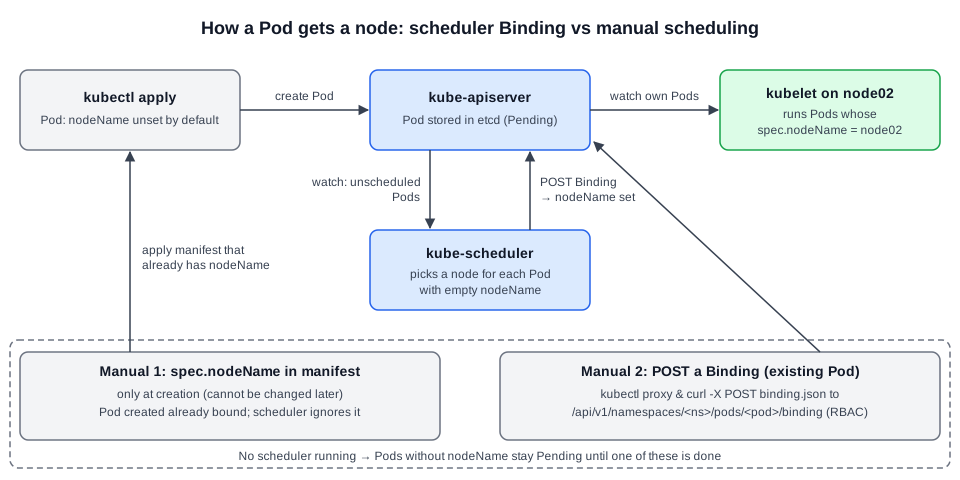 Diagram (new): scheduler watches unscheduled Pods and POSTs a Binding; the two manual alternatives bypass or mimic that step.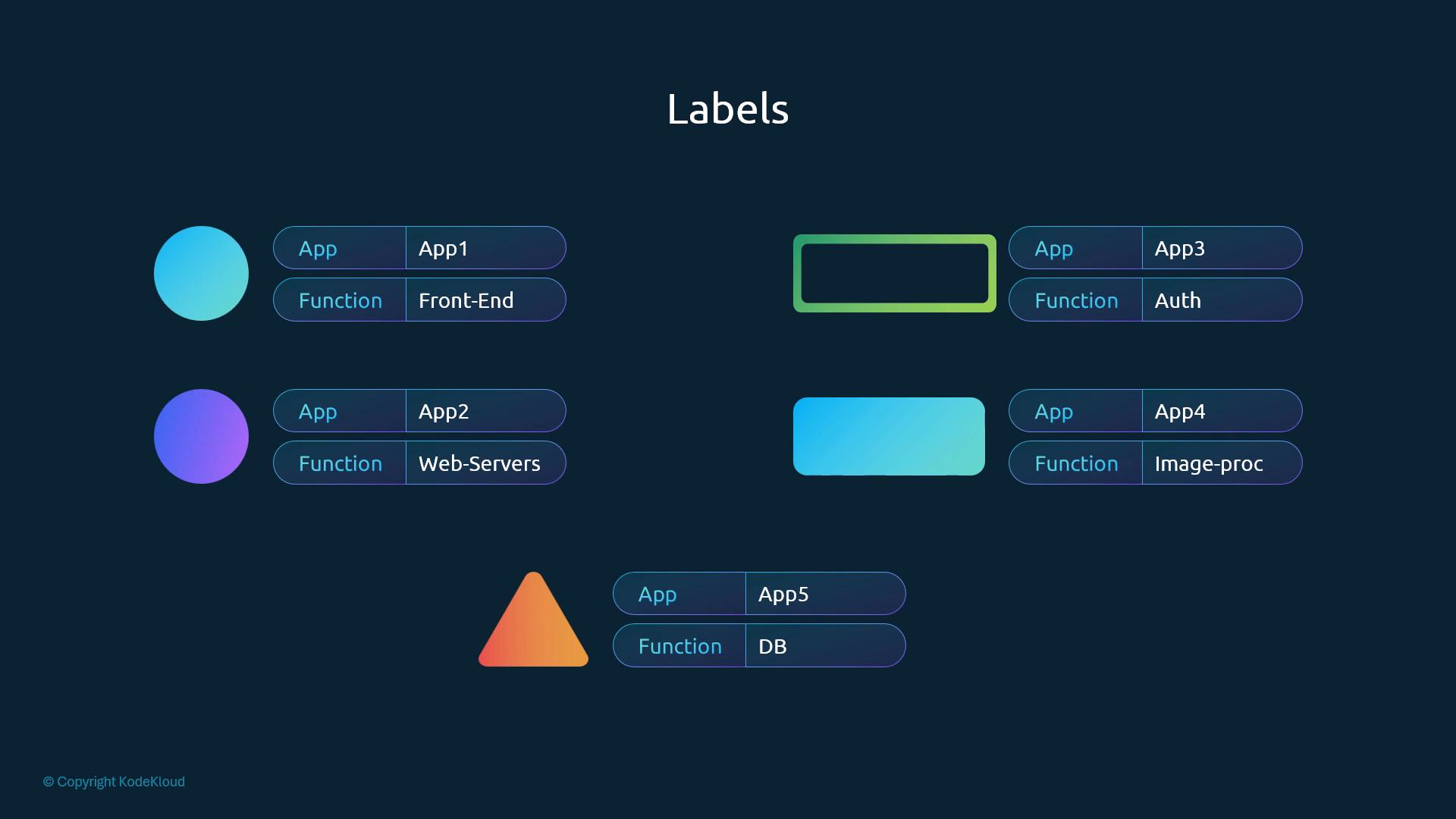
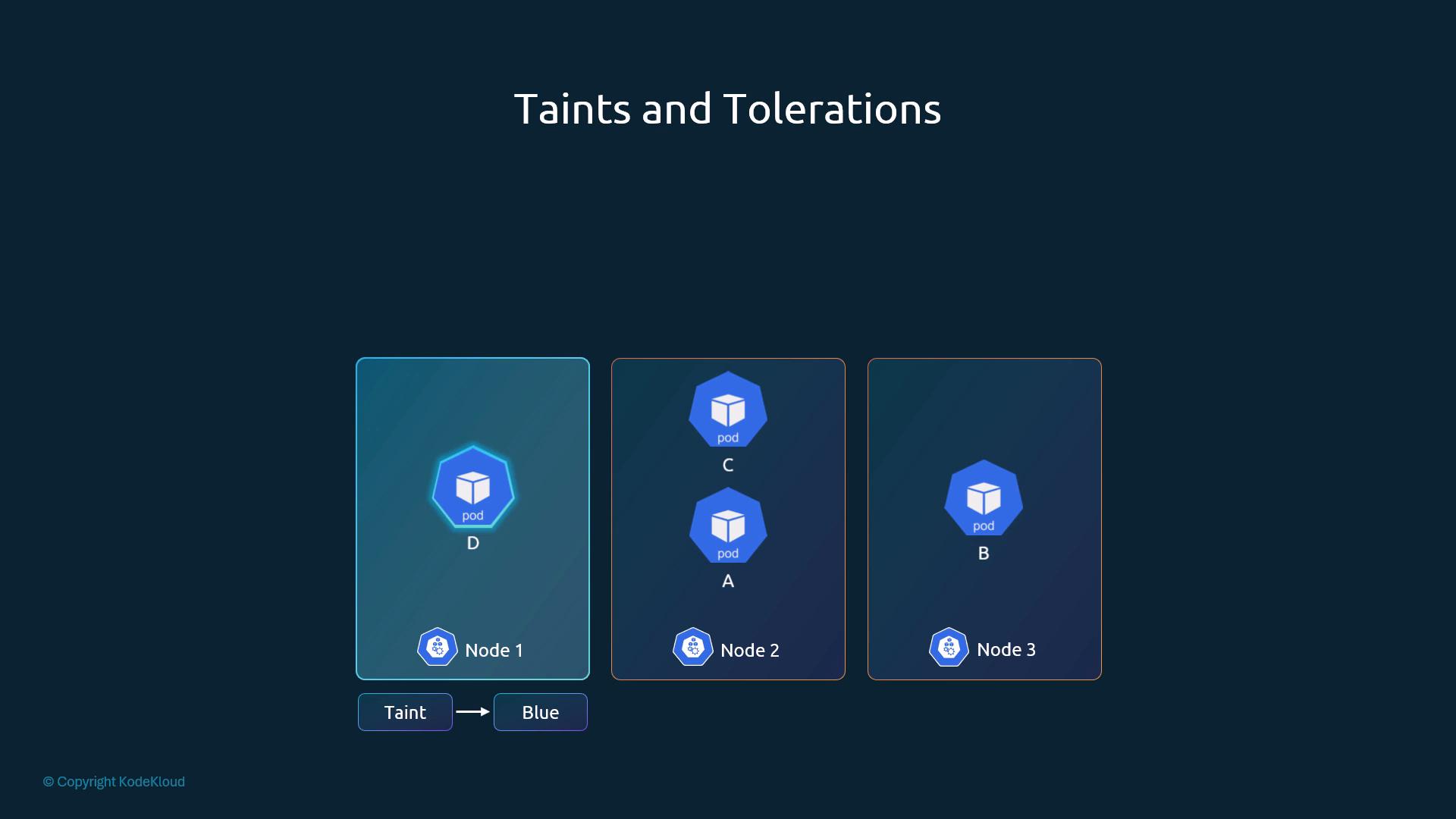
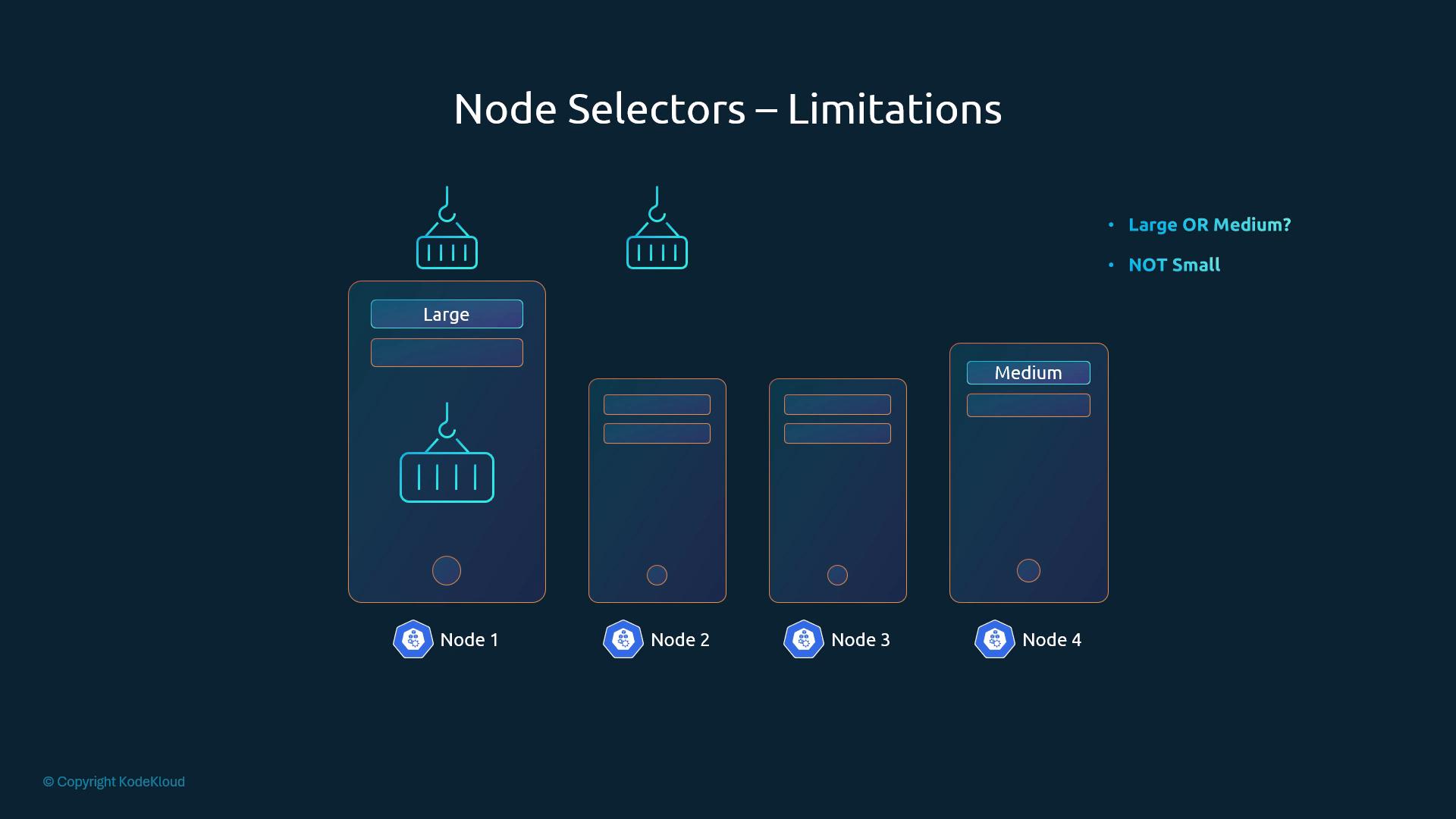
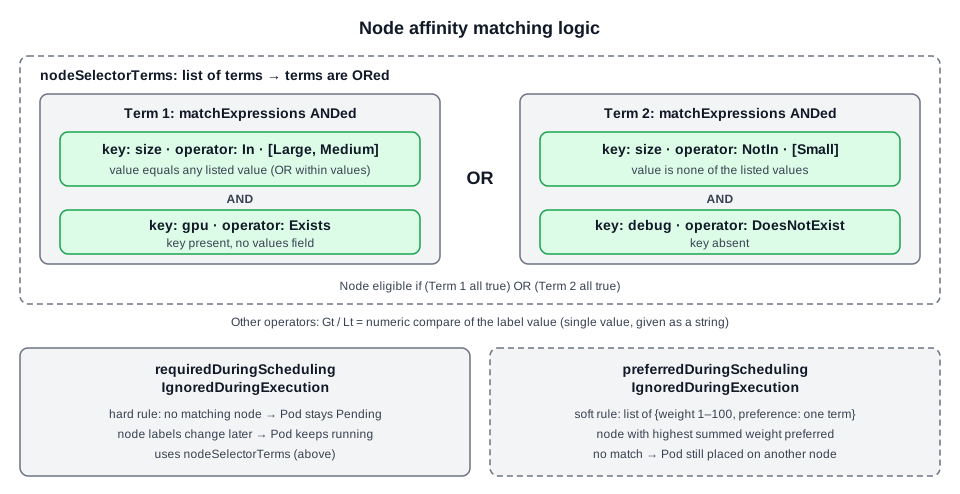 Diagram (new): terms ORed, expressions within a term ANDed, values within
 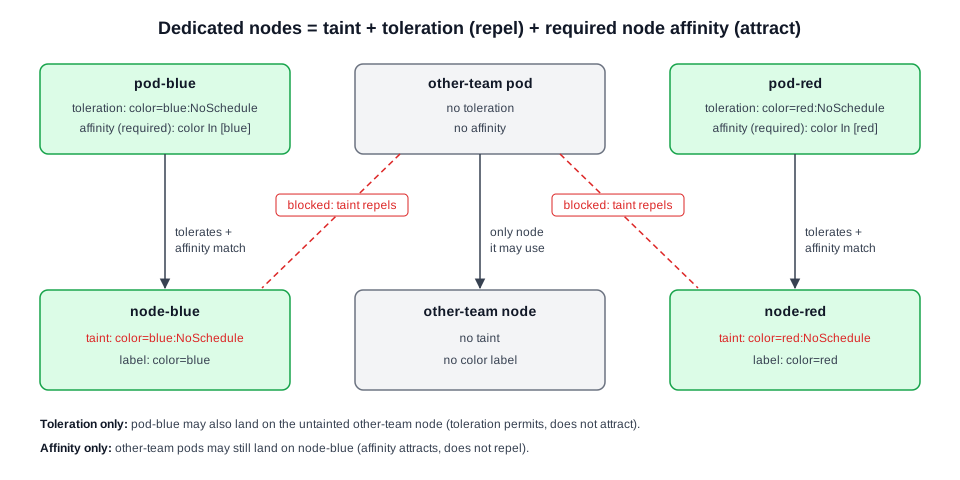 Diagram (new): the taint keeps foreign pods off the colour nodes, and required affinity keeps each colour pod on its own node.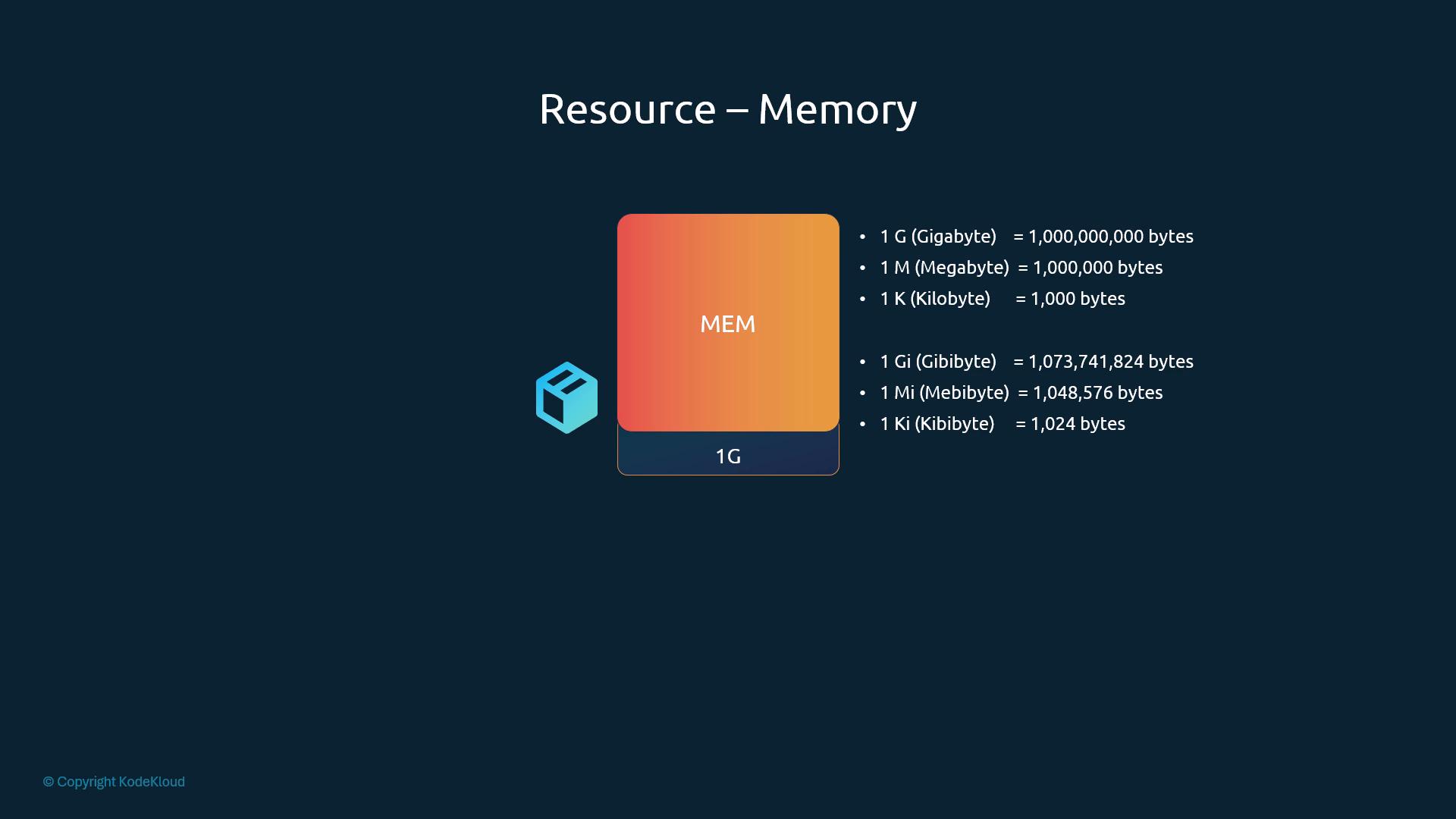
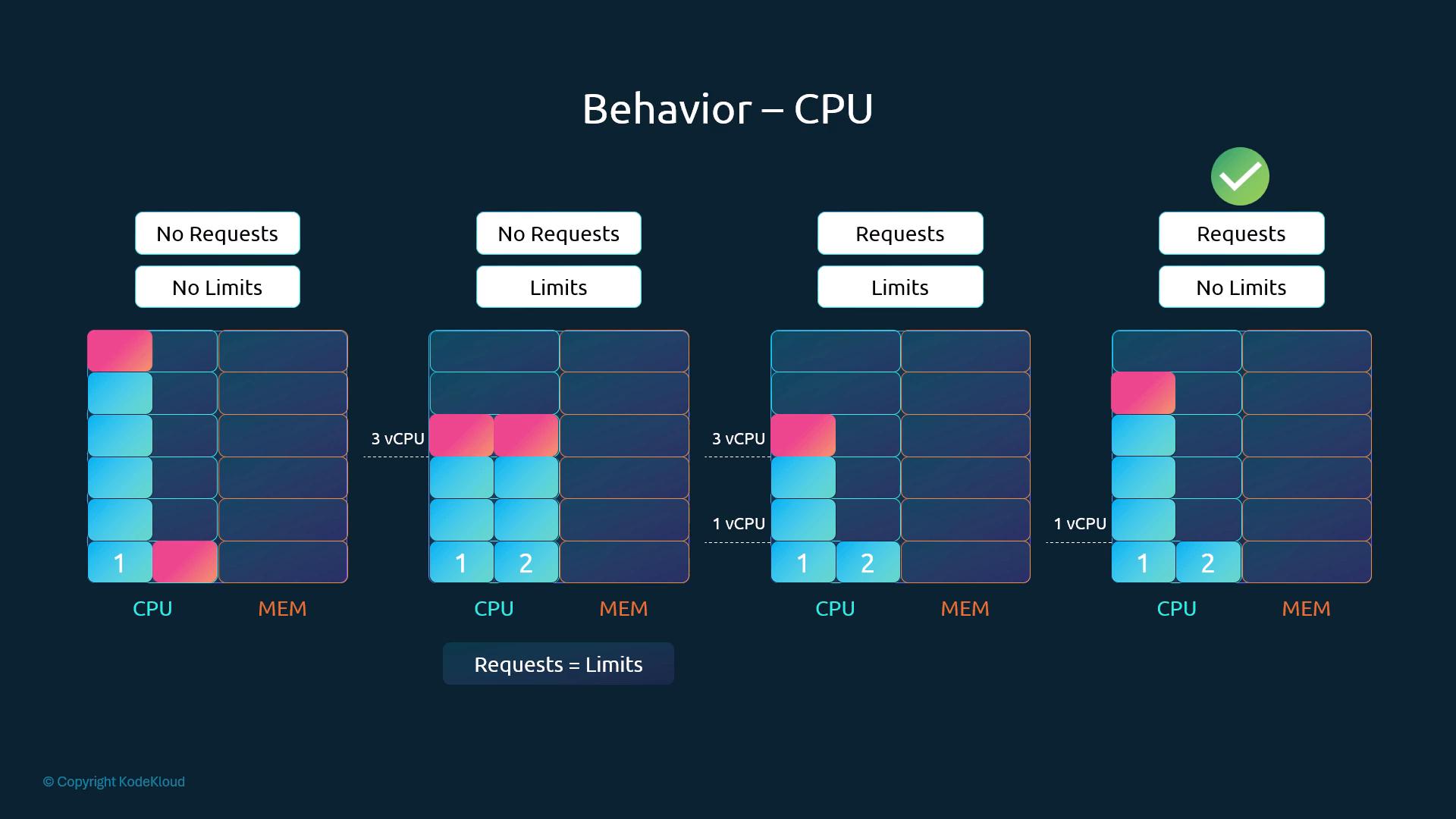
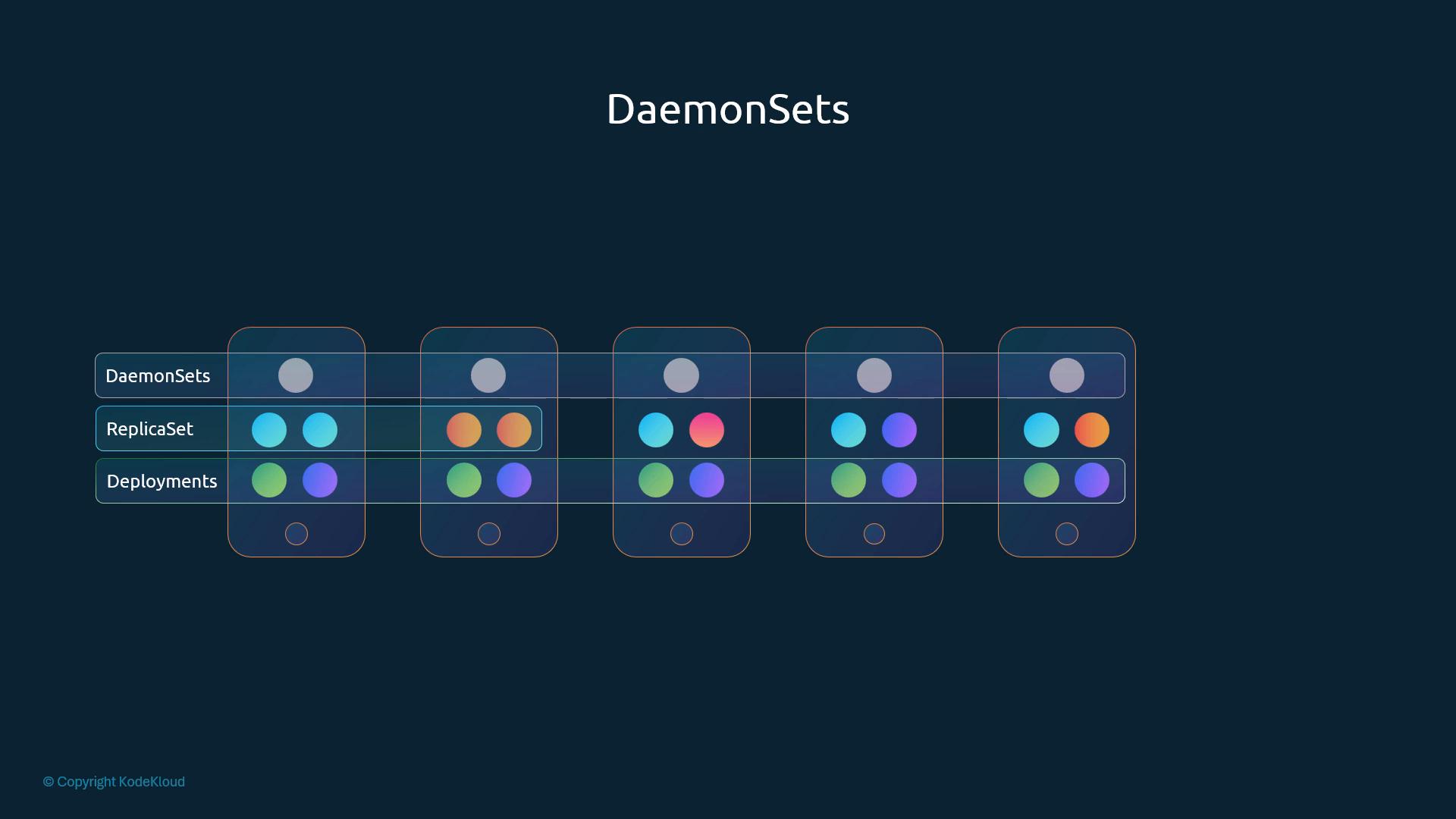
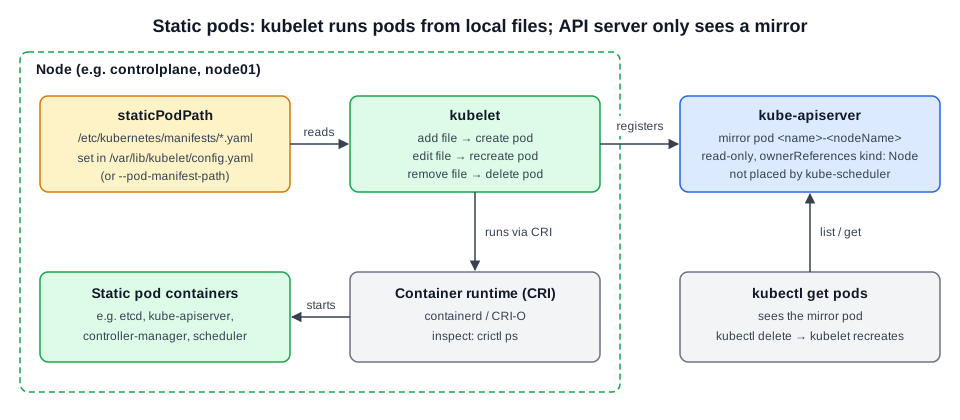 Diagram (new): static pod lifecycle. The node's manifest file is the source of truth. The API server only holds a read-only mirror.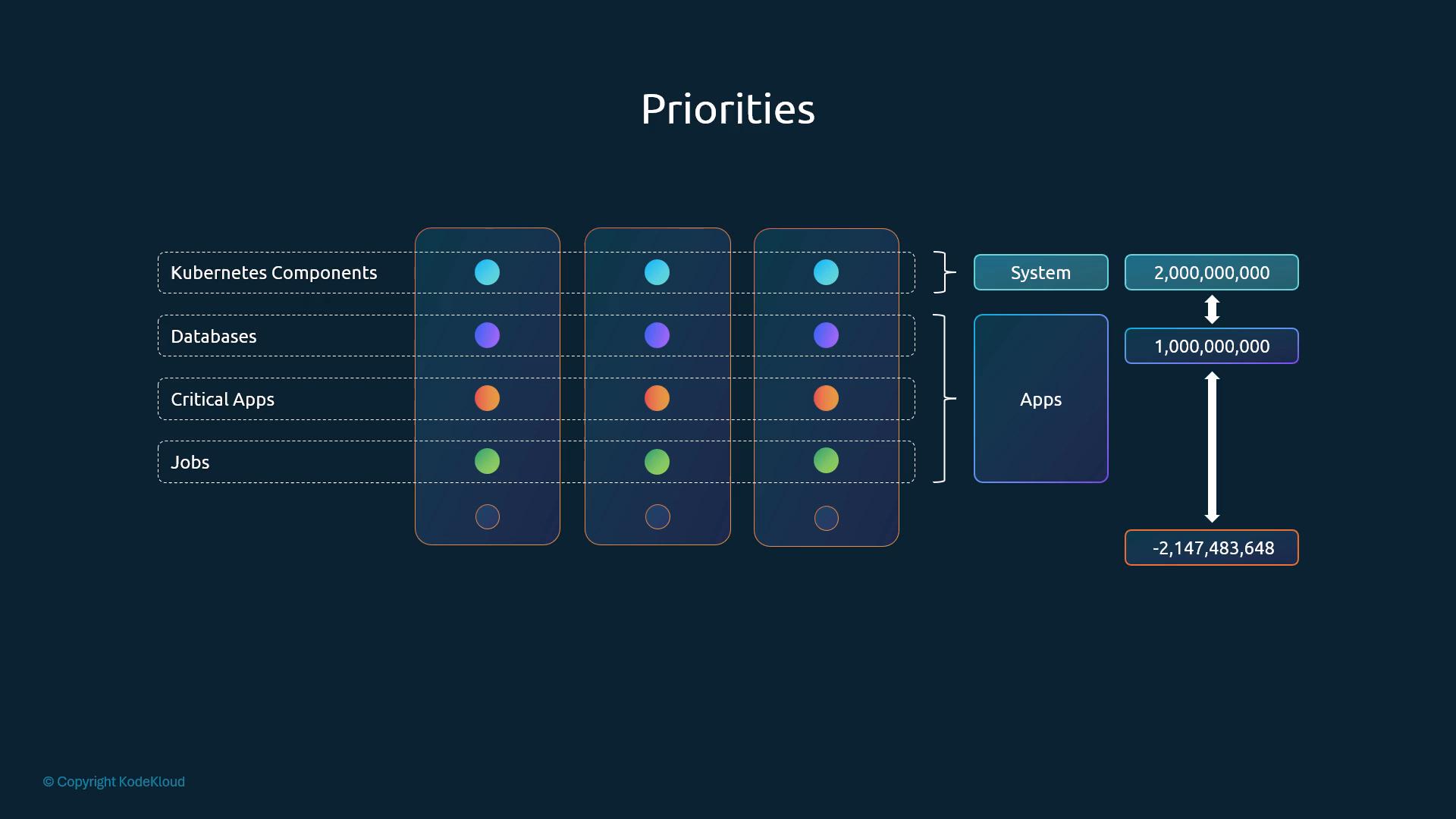
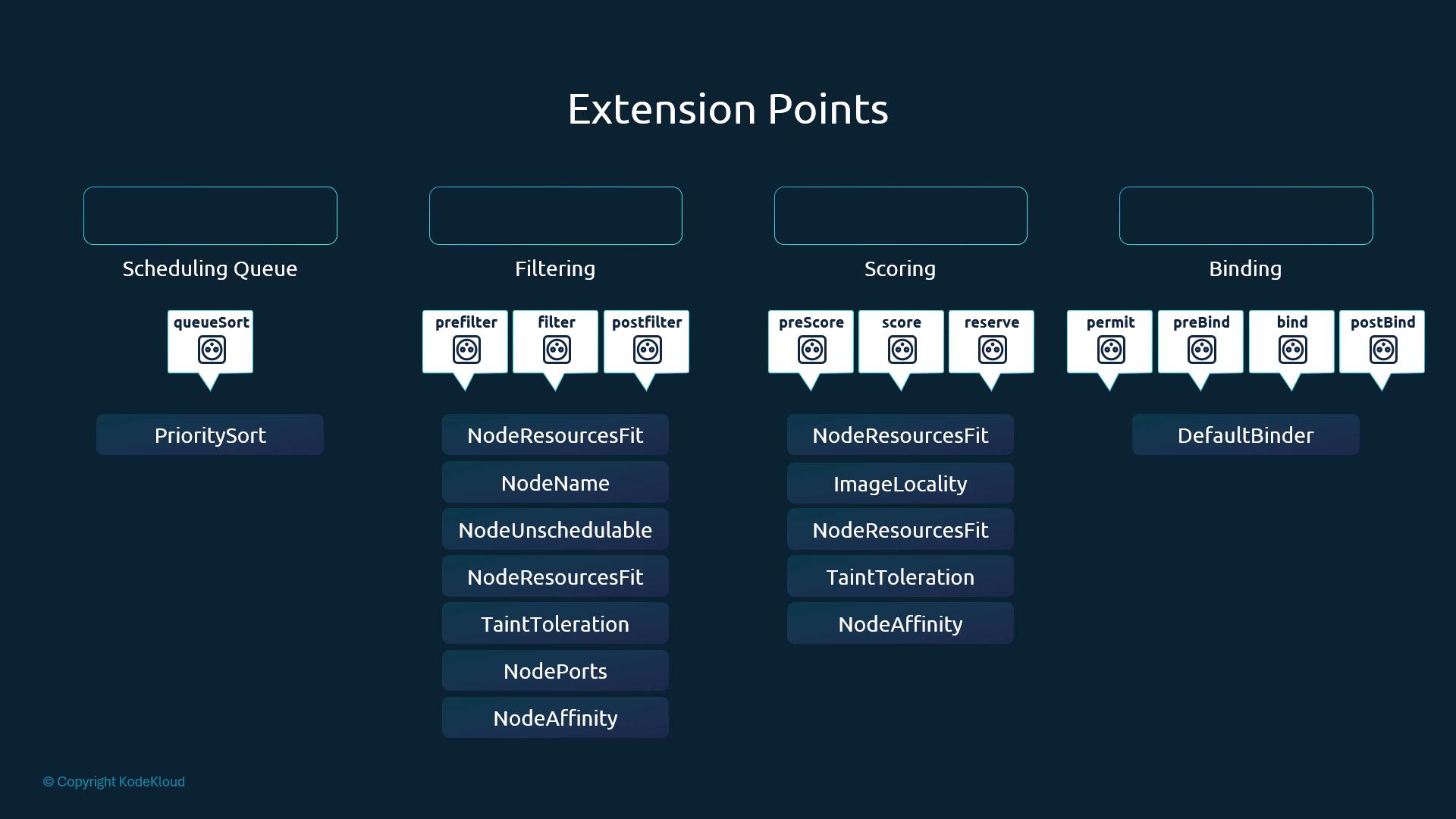
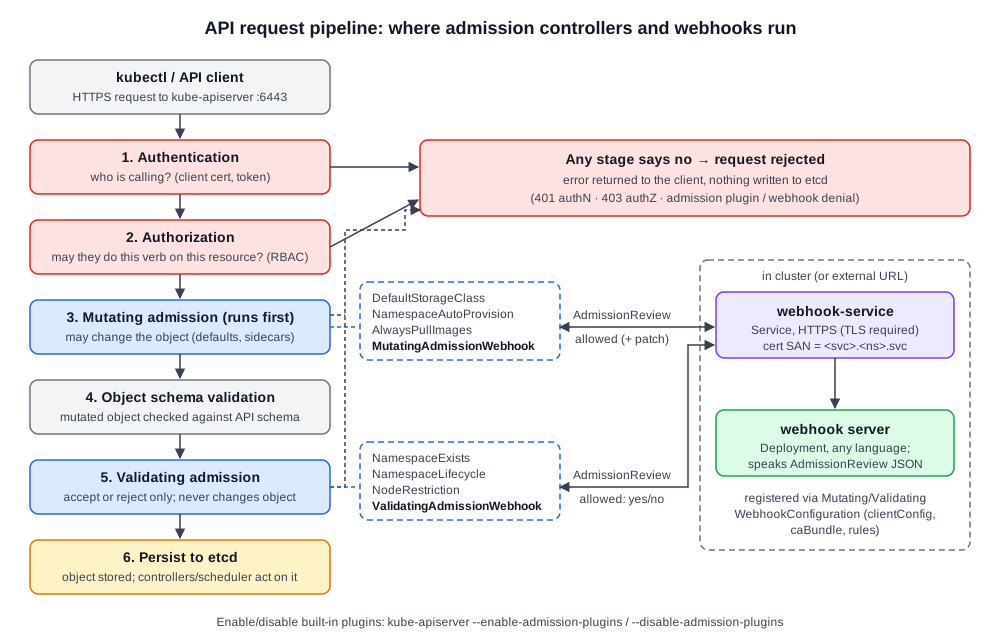 Diagram (new): request path through kube-apiserver; mutating runs before validating, webhook plugins call out to an external server. (Schema-validation step and HTTP codes are beyond the course.)