
Storage
← 07 Security · Index · 09 Networking →
Contents
- 8.1 Storage Section Introduction
- 8.2 Docker Storage Introduction
- 8.3 Storage in Docker
- 8.4 Volume Driver Plugins in Docker
- 8.5 Container Storage Interface
- 8.6 Volumes
- 8.7 Persistent Volumes
- 8.8 Persistent Volume Claims
- 8.9 Lab Solution Persistent Volumes and Persistent Volume Claims optional
- 8.10 Storage Class
- 8.11 Lab Solution Storage Class
8.1 Storage Section Introduction
Source: KodeKloud notes
Section scope
- Topics: PersistentVolumes (PV), PersistentVolumeClaims (PVC), access modes and reclaim policies, configuring Pods/Deployments to use persistent storage, Kubernetes storage objects (StorageClass), and how these map onto real backends (local, networked, cloud).
- Core idea: Kubernetes storage is a small set of primitives: PV, PVC, StorageClass, access modes. Once you know how they relate, any backend plugs in through its CSI driver. Some environments still use in-tree drivers; most modern integrations are CSI.
- Access modes control how a volume can be mounted (
ReadWriteOnce,ReadOnlyMany,ReadWriteMany). StorageClass + CSI driver control provisioning and lifecycle.
Storage options at a glance
| Storage type | Typical use | Examples / notes |
|---|---|---|
| Local disk | High-performance ephemeral or dedicated-node storage | Local SSD attached to one node |
| Block storage | Durable block device, single writer | AWS EBS, GCP Persistent Disk |
| Networked file systems | Shared read/write access across many Pods | NFS, SMB |
| Managed cloud storage | Fully managed PVs with dynamic provisioning | EBS, GCE PD via CSI |
| Object storage | Large-scale, eventually consistent (artifacts, backups) | S3-compatible stores (external integrations) |
[!WARNING] Exam traps / remember:
- Local storage is bound to one node. If the node fails, a Pod using node-local storage cannot be rescheduled elsewhere with its data.
- For durable, highly available apps, use networked or cloud-backed volumes with replication and backups.
8.2 Docker Storage Introduction
Source: KodeKloud notes
Two concepts: storage drivers vs volume driver plugins
- Storage drivers work at the container-runtime level. They manage the image layers and the container's writable layer on the host filesystem: copy-on-write, layer merging, where changed files are stored. Examples:
overlay2,aufs,devicemapper. - Volume driver plugins connect containers to external or specialised storage. The data outlives the container and can be shared, attached and detached. Examples: NFS, Amazon EBS, Google Persistent Disk, GlusterFS, third-party plugins.
| Concern | Storage drivers (runtime) | Volume plugins (external) |
|---|---|---|
| Purpose | Manage image and writable container layers on the host | Provide persistent, shareable mounts from external storage |
| Examples | overlay2, aufs, devicemapper | NFS, cloud block storage (EBS/GPD), third-party drivers |
| Scope | Per host, container runtime behaviour | Host- or cluster-level persistent storage, shareable |
| Lifespan | Tied to images/containers on the host | Outlives containers; can be attached/detached |
Inspect the storage driver
docker info                               # full output; look for "Storage Driver:"
docker info --format '{{json .Driver}}'   # print only the Driver field (e.g. "overlay2")
Mapping to Kubernetes
- On nodes, the container runtime still uses a storage driver for image and writable layers.
- Kubernetes adds PV/PVC for portable, declarative, managed storage for workloads.
- CSI standardises storage plugins so one driver works across orchestrators (§8.5).
[!NOTE] Beyond the course: Since v1.24 (dockershim removed), Kubernetes nodes run containerd or CRI-O, not Docker. The same ideas apply (containerd uses snapshotters such as overlayfs, with data under
/var/lib/containerd). On a node, usecrictl, notdocker.
8.3 Storage in Docker
Source: KodeKloud notes
Docker data on disk: /var/lib/docker
Subfolders depend on the storage driver in use.
Path under /var/lib/docker | Contents |
|---|---|
containers | Per-container runtime state, logs, writable-layer metadata |
image | Image metadata and data blobs used by the storage driver |
volumes | Named volumes (local driver): volumes/<name>/_data |
aufs / overlay2 / devicemapper / btrfs | Driver-specific on-disk layer data |
trust / network / swarm | Other subsystems: signatures, network state, Swarm metadata |
- Named volume
data_volumewith thelocaldriver is stored at/var/lib/docker/volumes/data_volume/_data.
Layered architecture
- An image is a stack of read-only layers. Each Dockerfile instruction usually adds one layer that stores only the delta from the layer below. Typical stack: base OS (Ubuntu) → OS packages → language deps (pip packages) → source code → entrypoint/config.
- Identical lower layers are reused from cache across images. This speeds up builds and saves disk space.
# Dockerfile (app1)
FROM ubuntu:20.04
RUN apt-get update && apt-get -y install python3 python3-pip
RUN pip3 install flask flask-mysql
COPY . /opt/source-code
ENTRYPOINT FLASK_APP=/opt/source-code/app.py flask run# Dockerfile2 (app2): first 3 layers identical → reused from cache
FROM ubuntu:20.04
RUN apt-get update && apt-get -y install python3 python3-pip
RUN pip3 install flask flask-mysql
COPY app2.py /opt/source-code
ENTRYPOINT FLASK_APP=/opt/source-code/app2.py flask rundocker build -t mmumshad/my-custom-app . # Dockerfile in current dir
docker build -f Dockerfile2 -t mmumshad/my-custom-app-2 . # -f = explicit Dockerfile nameContainer layer and copy-on-write
docker run mmumshad/my-custom-appadds a thin read-write container layer on top of the image layers. It holds logs, temp files, and any files the processes create or modify.- The container layer is ephemeral: it is deleted with the container. The image is unchanged and can be reused.
- Copy-on-write: if a process modifies a file that comes from an image layer (e.g.
app.py), Docker first copies it into the container layer and then edits the copy. The image file is never changed.
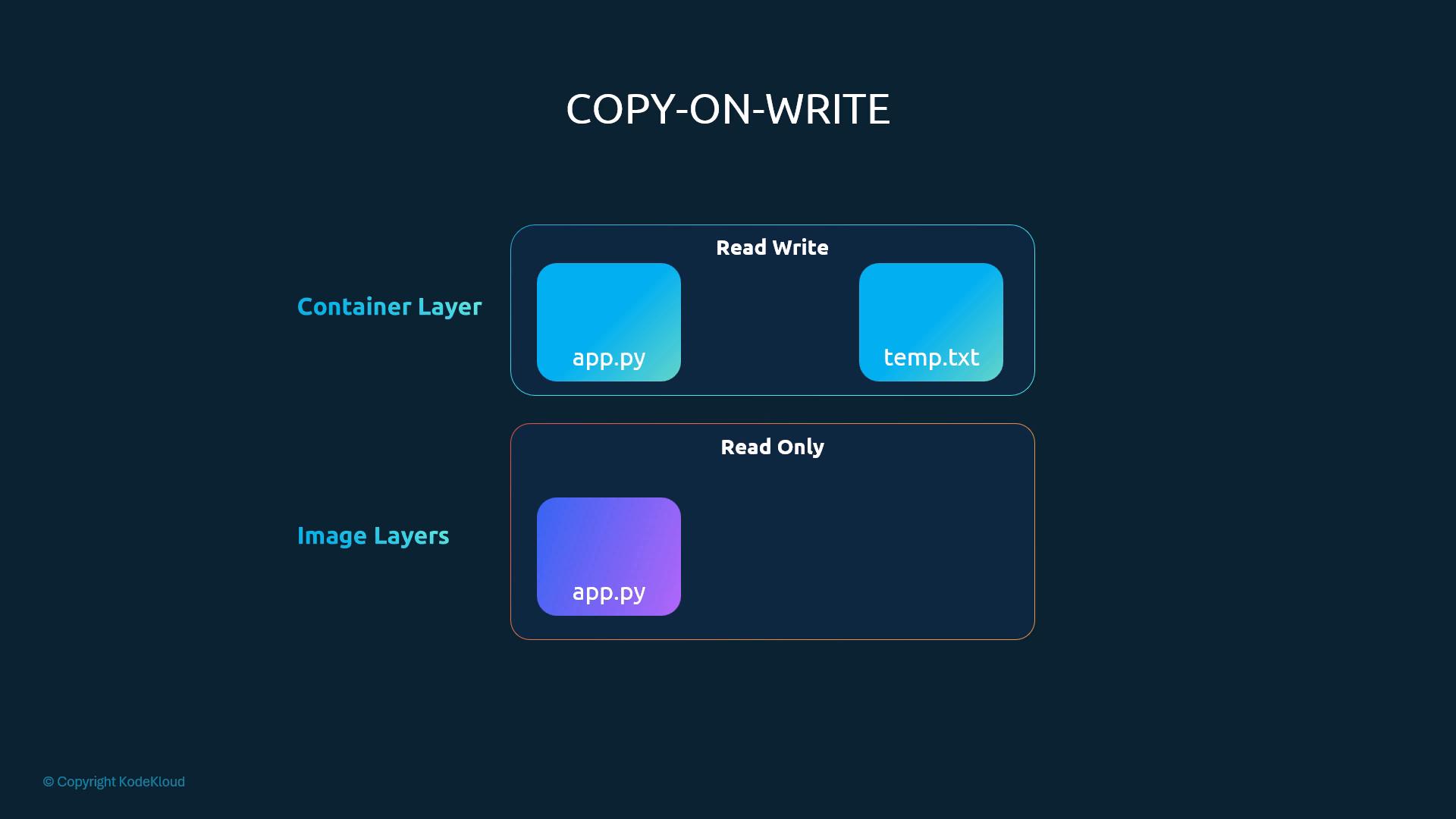
Persisting data: volumes vs bind mounts
| Volume mount | Bind mount | |
|---|---|---|
| Source | Docker-managed volume (local driver → /var/lib/docker/volumes/<name>/_data) | Any host directory (e.g. /data/mysql) |
| Use when | Portability, decoupling from host paths (preferred) | You need direct access to a specific host location |
docker volume create data_volume                         # create named volume
docker run -v data_volume:/var/lib/mysql mysql           # volume mount
docker run -v data_volume2:/var/lib/mysql mysql          # volume auto-created if missing
docker run -v /data/mysql:/var/lib/mysql mysql           # bind mount (absolute host path)

# Preferred explicit --mount syntax
docker run \
  --mount type=bind,source=/data/mysql,target=/var/lib/mysql \
  mysql
Storage drivers: who implements the layers
The storage driver implements the layered filesystem, layer storage on disk, and the CoW writable layer. Docker picks a default based on the kernel and distribution.
| Driver | Notes |
|---|---|
overlay2 | Modern default on most Linux distributions; recommended where supported |
aufs | Historically used on Ubuntu; now uncommon |
devicemapper | Block-device based; direct-lvm mode for production on some OSes |
btrfs | Uses Btrfs filesystem features where the kernel supports it |
vfs | Fallback, no CoW; simple but slow with many containers |
[!WARNING] Exam traps / remember:
- Never keep persistent data (e.g. DB files) in the container's writable layer.
docker rmdeletes it.- In
-v, an absolute path (/data/mysql) means a bind mount. A plain name (data_volume) means a named volume.--mountusessource=/target=(aliasessrc/dst);-vusessrc:dst.
[!NOTE] Beyond the course:
aufswas removed in Docker Engine 24 anddevicemapperin Docker Engine 25.overlay2is effectively the standard driver.
- Docker chooses the storage driver from kernel/distro support. Drivers differ in performance and stability; test against the host OS and workload.
8.4 Volume Driver Plugins in Docker
Source: KodeKloud notes
Storage driver vs volume driver
| Aspect | Storage driver | Volume driver / plugin |
|---|---|---|
| Purpose | Image/container filesystem layering (CoW) | Persistent data volumes for containers |
| Examples | overlay2, aufs | local, rexray/ebs, cloud/block-storage plugins |
| Data location | Layered image/container filesystems | Host path (/var/lib/docker/volumes) or external provider (EBS, GCE PD, NetApp…) |
| Managed by | Docker engine | Volume plugins installed/enabled on the host |
Volume drivers
- Default volume driver:
local. Data lives on the Docker host under/var/lib/docker/volumes. - Third-party plugins: Azure File Storage, DigitalOcean Block Storage, Google Persistent Disk, NetApp, GlusterFS, Portworx, VMware vSphere, and others.
- RexRay supports many backends: AWS EBS, S3, EMC Isilon / ScaleIO, Google PD, OpenStack Cinder.
Using a driver-backed volume
# Option 1: create the volume first, then mount it
docker volume create --driver rexray/ebs --name ebs-vol   # volume on AWS EBS via RexRay
docker run -it \
  --name mysql \
  --mount type=volume,source=ebs-vol,target=/var/lib/mysql \
  mysql:latest

# Option 2: create + attach inline (volume-driver set in --mount)
docker run -it \
  --name mysql \
  --mount 'type=volume,source=ebs-vol,target=/var/lib/mysql,volume-driver=rexray/ebs' \
mysql:latest- The data stays in EBS after the container exits and can be reused by other containers.
- Explicit create gives predictable names, lifecycle and pre-provisioning. Inline
--mountis convenient because Docker creates the volume with the given driver.
Inspect plugins and volumes
docker plugin ls                # installed plugins (incl. volume plugins)
docker volume ls                # volumes + their DRIVER
docker volume inspect ebs-vol   # driver, mountpoint, options
[!WARNING] Exam traps / remember:
- The plugin must be installed and enabled on every Docker host that creates or attaches its volumes. It often needs cloud credentials or IAM permissions (e.g. an IAM role for EBS).
- Driver names and options differ per plugin. Check the plugin's docs for the driver string, region and credentials.
- On mount or permission errors, check the plugin logs and the provider's access controls.
8.5 Container Storage Interface
Source: KodeKloud notes
The pluggable-interface pattern
| Interface | Decouples Kubernetes from | Example implementations |
|---|---|---|
| CRI (Container Runtime Interface) | Container runtimes. Early kubelet had Docker-specific code built in | rkt, containerd, CRI-O |
| CNI (Container Network Interface) | Networking solutions | Calico, Flannel, Cilium |
| CSI (Container Storage Interface) | Storage backends | Portworx, Amazon EBS, Azure Disk/Managed Disk, Dell EMC, GlusterFS, NetApp, Pure Storage, HPE, Nutanix |
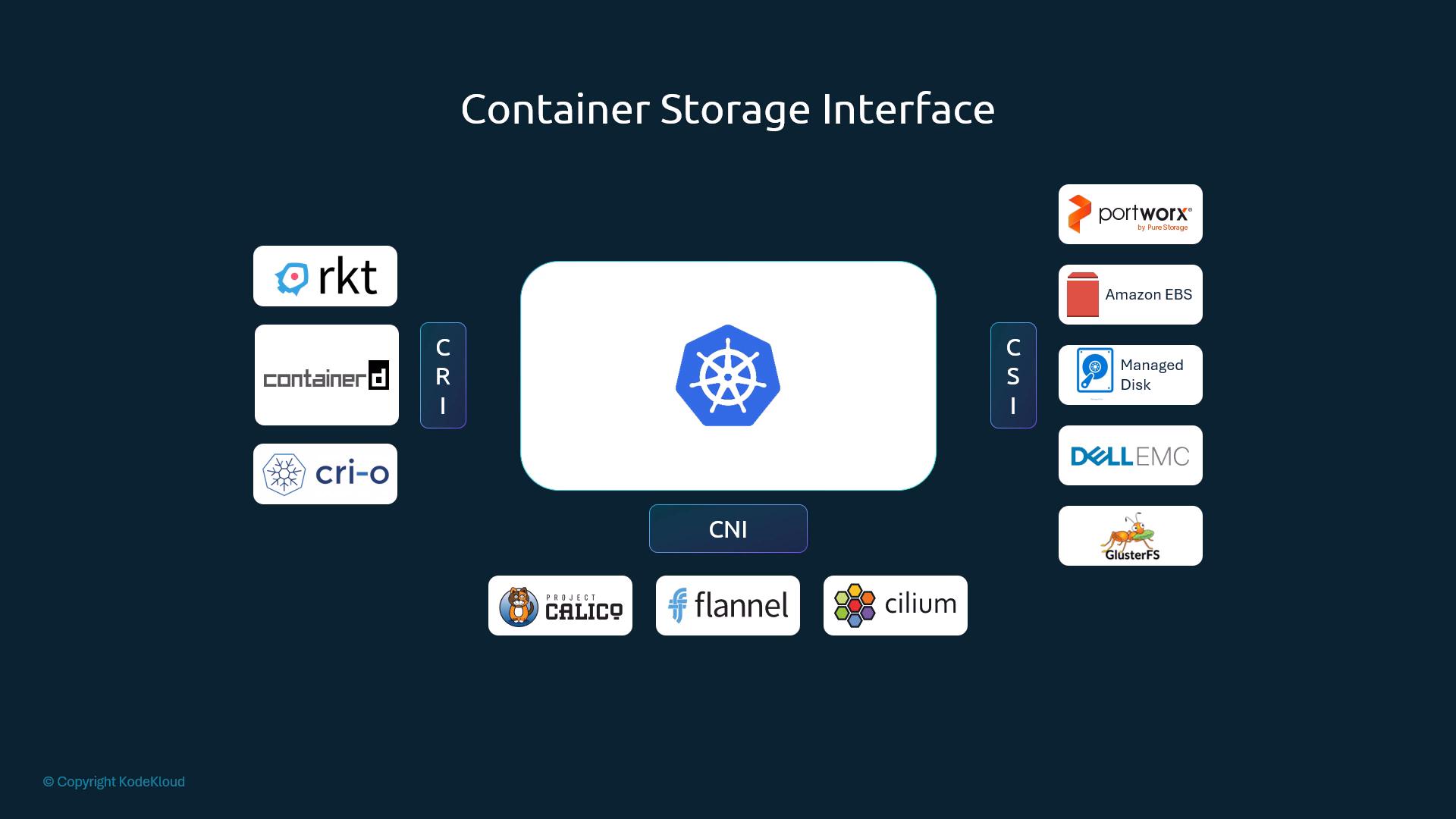
- CSI is a vendor-neutral spec, not Kubernetes-specific. A vendor writes one driver and it works with every orchestrator that implements CSI (Kubernetes, Cloud Foundry, Mesos).
- The spec defines RPCs over gRPC. The orchestrator calls them and the driver implements them. The spec also fixes signatures, responses, error codes and versioning: https://github.com/container-storage-interface/spec
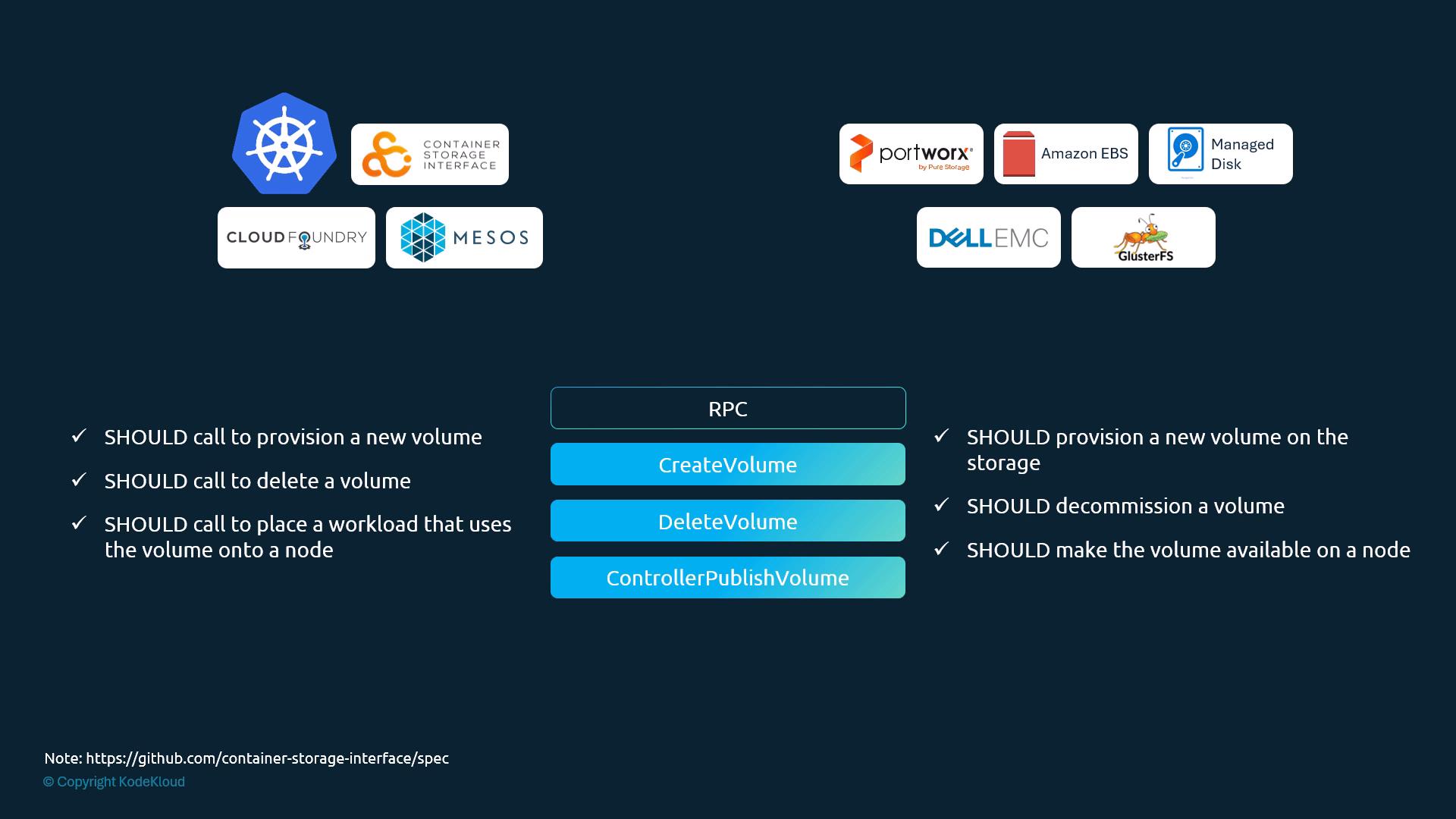
CSI RPCs
| RPC | Scope | Purpose |
|---|---|---|
CreateVolume | Controller | Provision a new backend volume (capacity, parameters, name) |
DeleteVolume | Controller | Delete (decommission) the backend volume |
ControllerPublishVolume | Controller | Attach the volume to a specific node (if backend needs attach) |
ControllerUnpublishVolume | Controller | Detach from the node |
NodeStageVolume | Node | Optional node-level setup: format, mount to a staging path |
NodePublishVolume | Node | Bind/mount the staged volume into the Pod's path |
NodeUnpublishVolume | Node | Unmount from the Pod's path |
NodeUnstageVolume | Node | Undo staging (unmount, remove temp dirs) |
- Controller RPCs = cluster-level calls. Node RPCs = calls made on each node.
- Contract from the slide: the orchestrator SHOULD call
CreateVolumeto provision,DeleteVolumeto delete, andControllerPublishVolumewhen a workload using the volume is placed on a node. The driver SHOULD then provision on the storage, decommission, and make the volume available on the node.
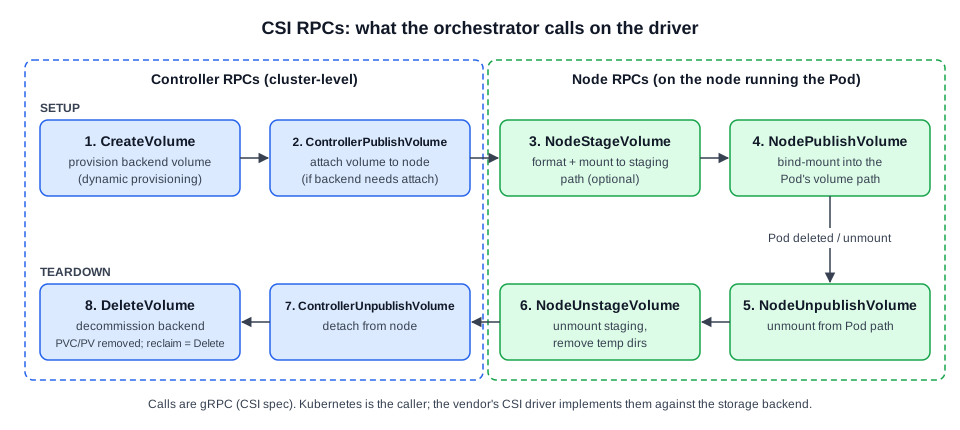 Diagram (new): CSI RPC sequence for a Pod using a dynamically provisioned PV, and the reverse teardown.
Teardown (Pod ends or PVC deleted): NodeUnpublishVolume → NodeUnstageVolume → ControllerUnpublishVolume → DeleteVolume. DeleteVolume runs only if the reclaim policy is Delete.
[!NOTE] Beyond the course: In a cluster, a CSI driver runs as Pods: a controller plugin (Deployment/StatefulSet with sidecars such as
external-provisionerandexternal-attacher) and a node plugin (DaemonSet withnode-driver-registrar). The kubelet makes the node RPC calls. Useful commands:kubectl get csidrivers,kubectl get csinodes,kubectl get volumeattachments. Most in-tree cloud volume plugins have been migrated to CSI.
[!NOTE] Beyond the course: rkt in the original interface diagram is discontinued; containerd and CRI-O are current CRI examples.
8.6 Volumes
Source: KodeKloud notes
Why volumes
- Containers and Pods are transient. Data written inside the container filesystem is lost when the container or Pod is deleted.
- Mount a volume so the data goes to storage outside the container. The data can then outlive the Pod.
- Not all volume types persist.
emptyDiris ephemeral and is deleted with the Pod. To keep data beyond the Pod, use a backend that exists independently of it:hostPath(node FS), NFS/GlusterFS/CephFS, cloud block/file (AWS EBS, Azure Disk/File, GCP PD), or PVs provisioned by a CSI driver.
Example: without and with a volume
# No volume: /opt/number.out is lost when the Pod is deleted
apiVersion: v1
kind: Pod
metadata:
  name: random-number-generator
spec:
  containers:
  - name: alpine
    image: alpine
    command: ["/bin/sh", "-c"]
    args:
- shuf -i 1-100 -n 1 >> /opt/number.out# hostPath volume: /opt in the container = /data on the node
apiVersion: v1
kind: Pod
metadata:
name: random-number-generator
spec:
restartPolicy: Never # one-shot task; avoid restart loop after exit
containers:
- name: alpine
image: alpine
command: ["/bin/sh", "-c"]
args:
- shuf -i 1-100 -n 1 >> /opt/number.out
volumeMounts: # container side: where to mount
- name: data-volume # must match volumes[].name
mountPath: /opt
volumes: # Pod side: what backs it
- name: data-volume
hostPath:
path: /data # directory on the node
type: DirectoryOrCreate # create /data if missing- Result: the file persists on the node at
/data/number.outafter the Pod is deleted.
[!CAUTION] Correction: The original warns that Alpine may not include
shuf. Alpine's BusyBox does include ashufapplet, so the example runs as written.
Volume storage options
| Category | When to use | Examples / notes |
|---|---|---|
| Node-local | Fast local disk; data tied to one node | hostPath. Not for multi-node production |
| Network file systems | Share files across many Pods/nodes | NFS, GlusterFS, CephFS. Good for ReadWriteMany |
| Block storage | High performance, often single AZ | AWS EBS, GCE PD, Azure Disk. Typically ReadWriteOnce, per zone |
| Managed cloud file | Shared file storage from the provider | Azure File, AWS EFS, Google Filestore. Often ReadWriteMany |
| CSI-backed | Modern extensible driver model (recommended) | Any storage with a CSI driver |
# In-tree AWS EBS volume (illustration only)
volumes:
- name: data-volume
  awsElasticBlockStore:
    volumeID: <volume-id>
    fsType: ext4
[!WARNING] Exam traps / remember:
hostPathbinds data to one node's filesystem, with no sharing or replication across nodes. Use it only for single-node, dev or test clusters.- EBS-style block storage is usually tied to one AZ. Pods on several nodes cannot mount it read-write at the same time unless the plugin supports multi-attach.
volumeMounts[].namemust equalvolumes[].name.mountPathis the path inside the container.hostPath.pathis the path on the node.- Best practice: PV/PVC with dynamic provisioning through a StorageClass + CSI driver. Pick storage by access mode (RWX → shared file storage). Use StorageClasses for performance tiers.
[!CAUTION] Correction: The in-tree
awsElasticBlockStoredriver was removed in v1.27, andgcePersistentDisk(§8.10) in v1.28. The API fields still exist, but they only work through CSI migration, which needs the matching CSI driver (ebs.csi.aws.com,pd.csi.storage.gke.io) installed. Treat these course snippets as syntax illustrations.
[!NOTE] Beyond the course:
hostPath.typevalues:""(default, no check),DirectoryOrCreate,Directory,FileOrCreate,File,Socket,CharDevice,BlockDevice. UseemptyDir: {}for scratch space shared between containers of one Pod.
8.7 Persistent Volumes
Source: KodeKloud notes
Problem PVs solve
- If volumes are defined inline in each Pod (e.g.
awsElasticBlockStorewithvolumeID/fsType), every Pod author must know the backend details, and a backend change means editing many manifests. - With PVs, the admin manages storage centrally as a cluster-wide pool (or enables dynamic provisioning through a StorageClass). Users request storage with PVCs, and the control plane binds each PVC to a matching PV.
| Object | Role |
|---|---|
| PersistentVolume (PV) | Cluster-scoped piece of storage, created by admin or dynamically |
| PersistentVolumeClaim (PVC) | User's request for storage; gets bound to a PV |
| StorageClass | Optional; enables dynamic PV provisioning |
| Binding | Matches a PVC to an available PV by size, access mode, selectors (§8.8) |
Access modes
| Mode | Short | Meaning | Typical use |
|---|---|---|---|
ReadWriteOnce | RWO | Read-write by a single node | Block storage (EBS, GCE PD) |
ReadOnlyMany | ROX | Read-only by many nodes | Shared static/config data |
ReadWriteMany | RWX | Read-write by many nodes | NFS, some CSI drivers |
PV manifest
apiVersion: v1
kind: PersistentVolume
metadata:
  name: pv-vol1
spec:
  accessModes:
    - ReadWriteOnce
  capacity:
    storage: 1Gi
  hostPath:              # demo only; replace with nfs/CSI/cloud volume in production
path: /tmp/datakubectl create -f pv-definition.yaml
kubectl get persistentvolumes # or: kubectl get pvProvisioning approaches
| Type | How | Examples |
|---|---|---|
| Static | Admin creates PV objects that point to existing storage | hostPath, pre-provisioned NFS, manually created EBS/GCE PD |
| Dynamic | Kubernetes creates PVs on demand through a StorageClass (§8.10) | CSI drivers; legacy kubernetes.io/aws-ebs, kubernetes.io/gce-pd (prefer CSI) |
[!WARNING] Exam traps / remember:
- Never use
hostPathPVs in multi-node or production clusters. The data is not portable and is effectively lost if the Pod is rescheduled to another node.- RWO means one node, not one Pod. Several Pods on the same node can share an RWO volume.
[!NOTE] Beyond the course: A fourth mode,
ReadWriteOncePod(RWOP, GA v1.29), limits the volume to a single Pod in the whole cluster (CSI volumes only). A PV can also setvolumeMode: Filesystem(default) orBlock,storageClassName,nodeAffinity(required forlocalvolumes) andmountOptions.kubectl createhas no imperative generator for PV or PVC. Copy a YAML template from the docs.
8.8 Persistent Volume Claims
Source: KodeKloud notes
Roles
- Admins create PVs. Users create PVCs. Kubernetes binds them.
- Binding is 1:1. One PVC binds to exactly one PV. Spare capacity on a bound PV cannot be used by any other claim.
Binding criteria
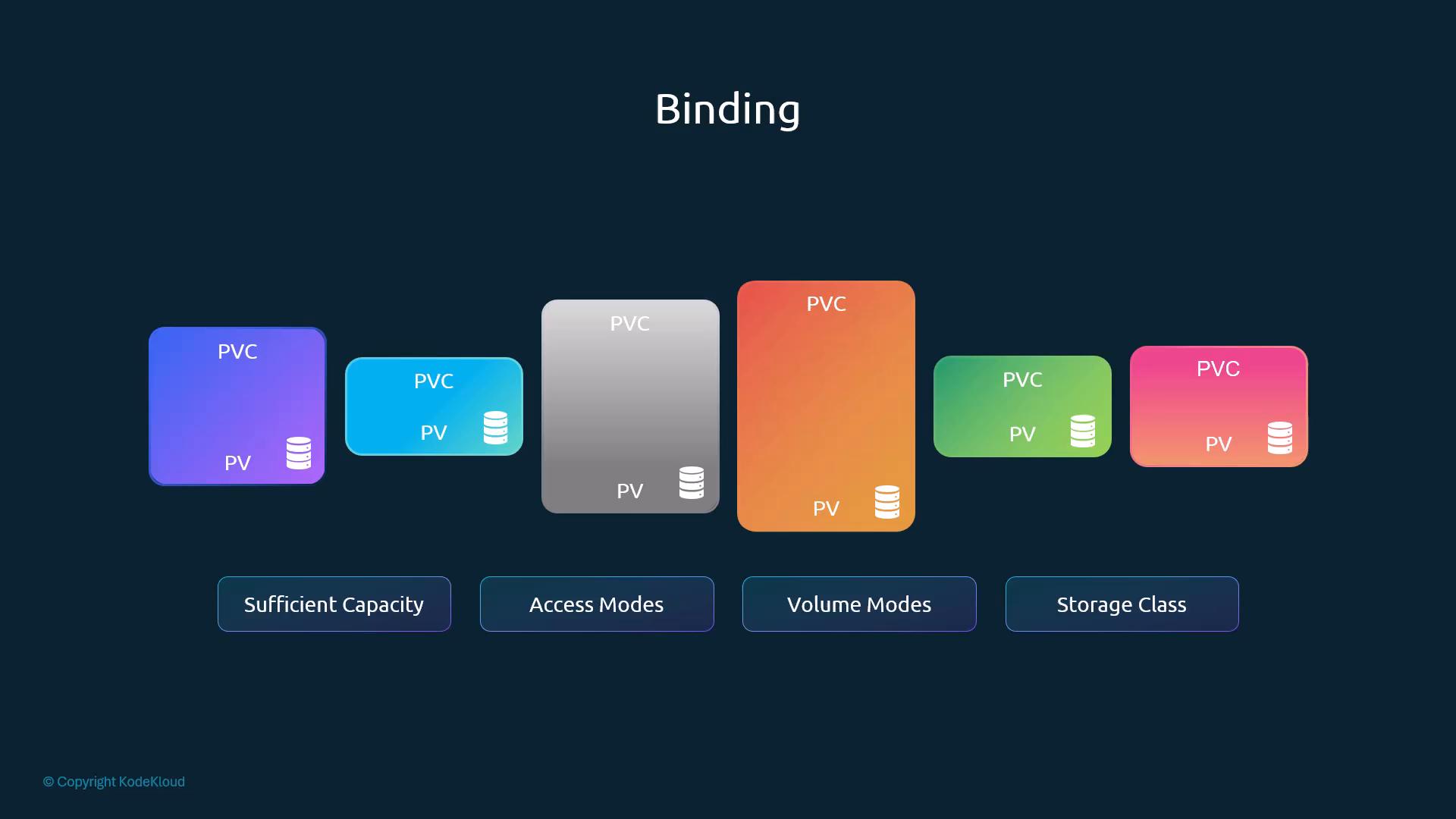
- Kubernetes looks for a PV that has sufficient capacity, supports the requested access modes, and matches the volume mode and storage class (and the selector, if one is set).
- If several PVs match, Kubernetes picks one. A smaller claim can bind to a larger PV when all other criteria match and no better fit exists.
- If nothing matches, the PVC stays
Pendinguntil a matching PV is created or dynamically provisioned. - To pin a PVC to a specific PV, put a label on the PV and a selector on the PVC:
# PV
metadata:
  labels:
    name: my-pv
---
# PVC
spec:
  selector:
    matchLabels:
      name: my-pv
Create a PVC
# pvc-definition.yaml
apiVersion: v1
kind: PersistentVolumeClaim
metadata:
  name: myclaim
spec:
  accessModes:
    - ReadWriteOnce
  resources:
    requests:
storage: 500Mi # request; binds to the 1Gi PV below# pv-definition.yaml (existing PV)
apiVersion: v1
kind: PersistentVolume
metadata:
name: pv-vol1
spec:
capacity:
storage: 1Gi
accessModes:
- ReadWriteOnce
persistentVolumeReclaimPolicy: Retain # set on the PV, not the PVC
awsElasticBlockStore: # in-tree example; prefer CSI / dynamic provisioning
volumeID: "<volume-id>"
fsType: ext4kubectl create -f pvc-definition.yaml
kubectl get pvc # or: kubectl get pvc myclaim
kubectl get pv # PV STATUS Bound, CLAIM default/myclaim
kubectl get pv,pvc
kubectl describe pvc myclaim # Events show why a claim is Pending
kubectl describe pv pv-vol1- The 500Mi claim binds to the 1Gi PV, and the PVC then reports capacity 1Gi (the PV's size).
Delete a PVC: reclaim policy
kubectl delete pvc myclaimpersistentVolumeReclaimPolicy | What happens to the PV after its PVC is deleted |
|---|---|
Retain | PV object and data are kept. PV goes to Released and is not reusable by new claims until an admin intervenes. Safe choice for static PVs |
Delete | PV and the backend storage (cloud disk) are deleted automatically. For dynamically provisioned PVs whose provisioner supports deletion (e.g. CSI) |
Recycle | Deprecated. Did a basic scrub (rm -rf /thevolume/*, contents only) and made the PV available again |
Why Recycle was deprecated: it was a best-effort file delete with no secure erase. It ignored snapshots, provider metadata and encrypted volumes, and it only worked with some in-tree plugins. Proper cleanup needs unmount/detach, reformat, snapshot handling or provider-level deletes. Use StorageClass + CSI dynamic provisioning instead, because CSI handles create/delete, snapshots, encryption and resize.
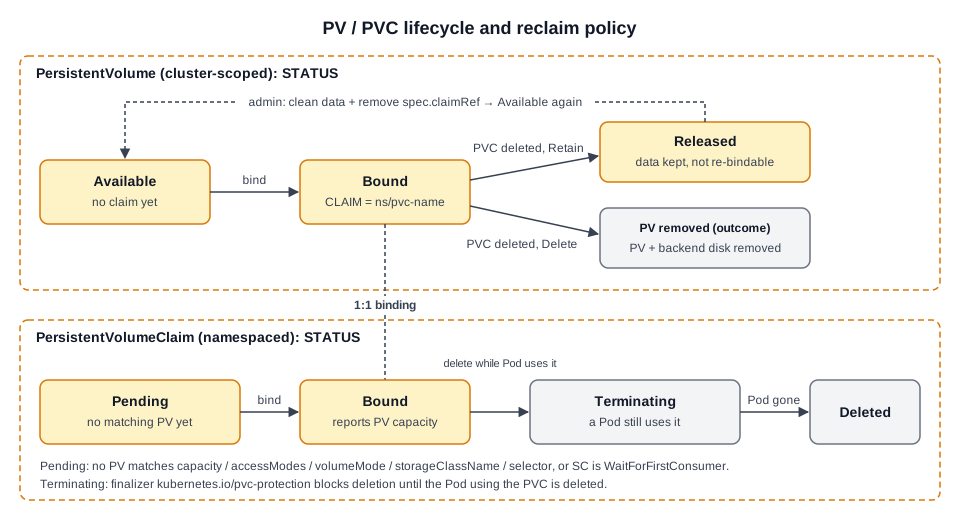 Diagram (new): PV and PVC phases, reclaim-policy outcomes, and the pvc-protection finalizer.
[!WARNING] Exam traps / remember:
- The reclaim policy is a PV field (
spec.persistentVolumeReclaimPolicy), not a PVC field.- A
ReleasedPV withRetainwill not bind to a new PVC, even an identical one, until it is cleaned up.- PVC
Pending? Runkubectl describe pvcand compare capacity, accessModes, volumeMode, storageClassName and selector againstkubectl get pv.
[!NOTE] Beyond the course:
- PVs are cluster-scoped. PVCs are namespaced, and a Pod can only use a PVC in its own namespace.
- Default reclaim policy: a manually created PV defaults to
Retain. A dynamically provisioned PV inherits the StorageClassreclaimPolicy, which defaults toDelete.- To make a
ReleasedPVAvailableagain, remove its claimRef:kubectl patch pv pv-vol1 -p '{"spec":{"claimRef":null}}'. Clean the data first if needed.- Change a PV's policy:
kubectl patch pv pv-vol1 -p '{"spec":{"persistentVolumeReclaimPolicy":"Retain"}}'.
8.9 Lab Solution Persistent Volumes and Persistent Volume Claims optional
Source: KodeKloud notes
Theory: §8.6 (volumes), §8.7 (PV), §8.8 (PVC, binding, reclaim).
Drill
| # | Task | Command / answer | Gotcha |
|---|---|---|---|
| 1 | Where does webapp write logs? | kubectl exec webapp -- cat /log/app.log | App (image kodekloud/event-simulator) writes to /log/app.log inside the container |
| 2 | Are logs persisted? | kubectl describe pod webapp → Volumes: only shows kube-api-access-xxxxx (Projected, mounted ro at /var/run/secrets/kubernetes.io/serviceaccount) | No app volume, so logs die with the Pod |
| 3 | Add hostPath /var/log/webapp mounted at /log | YAML A below; kubectl replace --force -f webapp-pod.yaml | Pod volumes are immutable. kubectl edit saves a copy to /tmp/kubectl-edit-XXXX.yaml → kubectl replace --force -f /tmp/kubectl-edit-XXXX.yaml |
| 4 | Verify on the node | ls /var/log/webapp; cat /var/log/webapp/app.log | Path is on the node running the Pod |
| 5 | Create PV pv-log: 100Mi, RWX, Retain, hostPath /pv/log | YAML B; kubectl create -f pv.yaml; kubectl get pv → Available | |
| 6 | Create PVC claim-log-1: 50Mi, RWO | YAML C (RWO); kubectl get pvc → Pending | Access mode mismatch: PV is RWX, PVC asks RWO |
| 7 | Fix binding | Change PVC to ReadWriteMany; kubectl replace --force -f pvc.yaml | PVC accessModes cannot be edited in place → replace |
| 8 | PVC capacity once bound? | kubectl get pvc → 100Mi RWX, VOLUME pv-log; PV CLAIM default/claim-log-1 | A bound PVC reports the PV's capacity, not the 50Mi requested |
| 9 | Switch the Pod to the PVC | YAML D; kubectl replace --force -f webapp-pod.yaml; ls /pv/log; cat /pv/log/app.log | Logs now land in the PV's hostPath /pv/log |
| 10 | Reclaim policy of pv-log? | kubectl get pv pv-log -o yaml → persistentVolumeReclaimPolicy: Retain (or RECLAIM POLICY column) | |
| 11 | What happens to PV if PVC deleted? | Not deleted. Goes to Released, data stays at /pv/log | Admin must clean up and reset the PV before reuse |
| 12 | kubectl delete pvc claim-log-1 while Pod runs | kubectl get pvc → STATUS Terminating | Finalizer kubernetes.io/pvc-protection blocks deletion while a Pod uses the PVC. kubectl delete waits; use --wait=false (or Ctrl+C, leaving deletion pending), then inspect the PVC |
| 13 | Why stuck? | kubectl describe pvc claim-log-1 → Finalizers: [kubernetes.io/pvc-protection], Used By: webapp | |
| 14 | Unstick, then PV status | kubectl delete pod webapp → PVC gone; kubectl get pv pv-log → Released | Do not force-remove finalizers. Delete or update the consuming Pod first |
YAML
# A: hostPath volume in the Pod (containers[] + volumes[] excerpt of spec)
containers:
  - name: event-simulator
    image: kodekloud/event-simulator
    volumeMounts:
      - mountPath: /var/run/secrets/kubernetes.io/serviceaccount
        name: kube-api-access-lmntb
        readOnly: true
      - mountPath: /log
        name: log-volume
volumes:
  - name: log-volume
    hostPath:
      path: /var/log/webapp
  - name: kube-api-access-lmntb        # auto-injected SA token volume (keep as-is in edited YAML)
    projected:
      defaultMode: 420
# ...sources unchanged# B: pv.yaml
apiVersion: v1
kind: PersistentVolume
metadata:
name: pv-log
spec:
capacity:
storage: 100Mi
accessModes:
- ReadWriteMany
persistentVolumeReclaimPolicy: Retain
hostPath:
path: /pv/log# C: pvc.yaml (final version; first attempt used ReadWriteOnce → Pending)
apiVersion: v1
kind: PersistentVolumeClaim
metadata:
name: claim-log-1
spec:
accessModes:
- ReadWriteMany
resources:
requests:
storage: 50Mi# D: Pod volume switched to the PVC
containers:
- name: event-simulator
image: kodekloud/event-simulator
volumeMounts:
- mountPath: /log
name: log-volume
volumes:
- name: log-volume
persistentVolumeClaim:
claimName: claim-log-1Expected outputs (recognise them)
NAME     CAPACITY  ACCESS MODES  RECLAIM POLICY  STATUS     CLAIM
pv-log   100Mi     RWX           Retain          Available
pv-log   100Mi     RWX           Retain          Bound      default/claim-log-1
pv-log 100Mi RWX Retain Released default/claim-log-1| Resource | Purpose | Lab example |
|---|---|---|
| PV | Cluster resource representing physical storage | pv-log, hostPath: /pv/log |
| PVC | Request for storage, bound to a PV | claim-log-1, 50Mi, RWX |
| Pod volume | Mounts the PV through the PVC | persistentVolumeClaim.claimName: claim-log-1 |
[!WARNING] Exam traps / remember:
- A
PendingPVC is almost always a mismatch (accessModes, size, storageClassName). Check both sides withkubectl get pv,pvc.- With
Retain, deleting the PVC never deletes the data, and the PV ends upReleased, notAvailable.- A PVC stuck in
Terminatingmeans a Pod still uses it. Find it viaUsed By:inkubectl describe pvc.
[!NOTE] Beyond the course: The lab's PVC has no
storageClassName. If the cluster has a default StorageClass, the admission controller fills it in, and the PVC will then not bind to a class-less PV (it gets dynamically provisioned or stays Pending). To bind a PVC to a class-less static PV in such a cluster, setstorageClassName: ""on the PVC.
8.10 Storage Class
Source: KodeKloud notes
Static vs dynamic provisioning
| Static | Dynamic (StorageClass) | |
|---|---|---|
| Who creates the cloud disk | Operator/admin, beforehand | Provisioner (cloud/CSI driver) |
| Who creates the PV object | Operator/admin | Provisioner, automatically |
| When the disk is created | Before the PVC is applied | When a PVC referencing the StorageClass is created |
| Downside / upside | Manual; PV defs must stay in sync with disks | No manual PVs. A PV still exists, it is just auto-created |
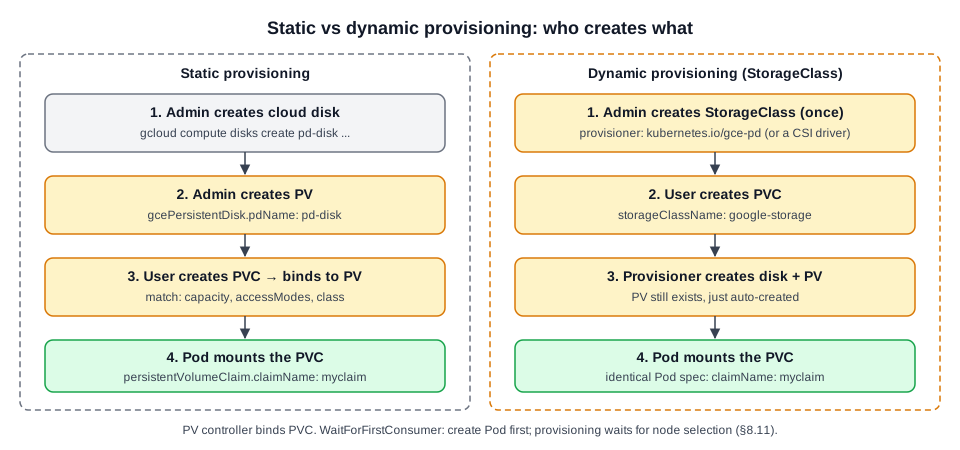 Diagram (new): who creates what in static vs StorageClass-based dynamic provisioning.
Static provisioning (GCE example)
# Create the disk first (course command, see Correction below)
gcloud beta compute disks create pd-disk \
  --size=1GB \
--region=us-east1apiVersion: v1
kind: PersistentVolume
metadata:
name: pv-vol1
spec:
accessModes:
- ReadWriteOnce
capacity:
storage: 500Mi
gcePersistentDisk: # in-tree GCE PD (see §8.6 correction)
pdName: pd-disk # must match the disk created above
fsType: ext4
---
apiVersion: v1
kind: PersistentVolumeClaim
metadata:
name: myclaim
spec:
accessModes:
- ReadWriteOnce
resources:
requests:
storage: 500Mi
---
apiVersion: v1
kind: Pod
metadata:
name: random-number-generator
spec:
containers:
- name: alpine
image: alpine
command: ["/bin/sh","-c"]
args: ["shuf -i 0-100 -n 1 >> /opt/number.out;"]
volumeMounts:
- mountPath: /opt
name: data-volume
volumes:
- name: data-volume
persistentVolumeClaim:
claimName: myclaim # Pod references the PVC, never the PV[!CAUTION] Correction:
--regioncreates a regional PD, and that also requires--replica-zones=ZONE1,ZONE2. For an ordinary zonal disk usegcloud compute disks create pd-disk --size=10GB --zone=us-east1-b. Thebetacomponent is not needed.
Dynamic provisioning
apiVersion: storage.k8s.io/v1          # note: storage.k8s.io, not v1
kind: StorageClass
metadata:
  name: google-storage
provisioner: kubernetes.io/gce-pd      # legacy in-tree; GKE CSI: pd.csi.storage.gke.io
---
apiVersion: v1
kind: PersistentVolumeClaim
metadata:
  name: myclaim
spec:
  accessModes:
    - ReadWriteOnce
  storageClassName: google-storage     # links PVC → StorageClass
  resources:
    requests:
storage: 500Mi- No PV manifest is needed. On PVC creation the provisioner creates the GCE disk, then the PV, then binds the PVC. The Pod spec is unchanged (still
claimName: myclaim).
Provisioner parameters and classes of service
Parameters depend on the provisioner. In-tree GCE PD:
| Parameter | Meaning | Values |
|---|---|---|
type | Disk type | pd-standard, pd-ssd |
replication-type | Replication mode | none, regional-pd |
apiVersion: storage.k8s.io/v1
kind: StorageClass
metadata:
  name: silver
provisioner: kubernetes.io/gce-pd
parameters:
  type: pd-standard
  replication-type: none
---
apiVersion: storage.k8s.io/v1
kind: StorageClass
metadata:
  name: gold
provisioner: kubernetes.io/gce-pd
parameters:
  type: pd-ssd
  replication-type: none
---
apiVersion: storage.k8s.io/v1
kind: StorageClass
metadata:
  name: platinum
provisioner: kubernetes.io/gce-pd
parameters:
  type: pd-ssd
replication-type: regional-pd- Users then pick a tier with
storageClassName: silver|gold|platinumin the PVC.
[!WARNING] Exam traps / remember:
- StorageClass is
apiVersion: storage.k8s.io/v1. Fieldsprovisioner,parameters,reclaimPolicyandvolumeBindingModeare top-level. There is nospec:.- StorageClass is cluster-scoped.
kubectl get sclists them.- Production clusters use CSI provisioners (GKE:
pd.csi.storage.gke.io). Check the cluster docs for the right provisioner name.
[!NOTE] Beyond the course:
- Other StorageClass fields:
reclaimPolicy(defaultDelete),volumeBindingMode(defaultImmediate, orWaitForFirstConsumer, see §8.11),allowVolumeExpansion: true(lets you grow a PVC by editingresources.requests.storage; shrinking is never allowed),mountOptions.- Default class: annotation
storageclass.kubernetes.io/is-default-class: "true", shown as(default)inkubectl get sc. A PVC with nostorageClassNamegets the default class. SetstorageClassName: ""to opt out.
[!CAUTION] Correction: the historical regional-disk command above also uses an undersized 1 GB disk. Use a size supported by the chosen disk type; regional Standard Persistent Disk has a 200 GiB minimum. See regional Persistent Disk.
8.11 Lab Solution Storage Class
Source: KodeKloud notes
Theory: §8.10.
Drill
| # | Task | Command / answer | Gotcha |
|---|---|---|---|
| 1 | How many StorageClasses? | kubectl get storageclass / kubectl get sc → 1: local-path (default), provisioner rancher.io/local-path | (default) marks the default SC |
| 2 | Which SC does not support dynamic provisioning? | kubectl get sc → local-storage (PROVISIONER kubernetes.io/no-provisioner) | no-provisioner = static only; PVs must be pre-created |
| 3 | volumeBindingMode of local-storage? | VOLUMEBINDINGMODE column → WaitForFirstConsumer | |
| 4 | Provisioner of portworx-io-priority-high? | kubernetes.io/portworx-volume (binding Immediate) | Third-party dynamic provisioner |
| 5 | Is a PVC consuming PV local-pv? | kubectl get pv → local-pv 500Mi RWO Retain Available, SC local-storage; kubectl get pvc → none | CLAIM column empty = unclaimed |
| 6 | Create PVC local-pvc to bind local-pv | YAML below; kubectl create -f pvc.yaml → STATUS Pending | Match size (500Mi), access mode (RWO) and storageClassName: local-storage |
| 7 | Why Pending? | kubectl describe pvc local-pvc → event WaitForFirstConsumer … waiting for first consumer to be created before binding (from persistentvolume-controller) | Not an error. Binding is deliberately delayed |
| 8 | Create Pod nginx (nginx:alpine) using local-pvc at /var/www/html | YAML below; kubectl create -f nginx-pod.yaml; kubectl get pvc → Bound to local-pv | Scheduling the Pod triggers the binding |
| 9 | Create SC delayed-volume-sc: no-provisioner + WaitForFirstConsumer | YAML below; kubectl create -f delayed-volume-sc.yaml; verify kubectl get sc |
Expected kubectl get sc (after extra classes are added)
NAME                        PROVISIONER                     RECLAIMPOLICY  VOLUMEBINDINGMODE     ALLOWVOLUMEEXPANSION
local-path (default)        rancher.io/local-path           Delete         WaitForFirstConsumer  false
local-storage               kubernetes.io/no-provisioner    Delete         WaitForFirstConsumer  false
portworx-io-priority-high   kubernetes.io/portworx-volume   Delete         Immediate             false
delayed-volume-sc           kubernetes.io/no-provisioner    Delete         WaitForFirstConsumer  false
YAML
# pvc.yaml
apiVersion: v1
kind: PersistentVolumeClaim
metadata:
  name: local-pvc
spec:
  accessModes:
    - ReadWriteOnce
  resources:
    requests:
      storage: 500Mi
storageClassName: local-storage # must match the PV's class# nginx-pod.yaml
apiVersion: v1
kind: Pod
metadata:
name: nginx
labels:
run: nginx
spec:
containers:
- name: nginx
image: nginx:alpine
volumeMounts:
- name: local-pvc-volume
mountPath: /var/www/html
restartPolicy: Always
volumes:
- name: local-pvc-volume
persistentVolumeClaim:
claimName: local-pvc# delayed-volume-sc.yaml
apiVersion: storage.k8s.io/v1
kind: StorageClass
metadata:
name: delayed-volume-sc
provisioner: kubernetes.io/no-provisioner # static PVs only
volumeBindingMode: WaitForFirstConsumer # bind when a consuming Pod is scheduled
reclaimPolicy: DeletevolumeBindingMode
| Mode | When the PVC binds/provisions | Use |
|---|---|---|
Immediate | As soon as the PVC is created | Network storage reachable from any node |
WaitForFirstConsumer | Only when a Pod using the PVC is scheduled. The scheduler picks the node, then the PV-controller binds a PV usable on that node | Local volumes and topology-constrained storage |
[!TIP] Fast path:
kubectl create pvcdoes not exist. Copy the PVC/PV/SC YAML from the docs (kubernetes.io → "persistent volumes" / "storage classes") and edit it. To read the SC answer columns quickly:kubectl get sc -o custom-columns=NAME:.metadata.name,PROV:.provisioner,MODE:.volumeBindingMode.
[!WARNING] Exam traps / remember:
- A PVC
Pendingwith eventWaitForFirstConsumeris expected. Create the consuming Pod; do not "fix" the PVC.- To bind to a specific static PV, the PVC's
storageClassNamemust equal the PV's.kubernetes.io/no-provisioner+WaitForFirstConsumeris the standard pairing for local PVs.
[!NOTE] Beyond the course: With
WaitForFirstConsumer, do not setspec.nodeNameon the Pod. It bypasses the scheduler and the PVC stays Pending. UsenodeSelectoror node affinity instead.
- A Pending
local-pvcalready hasFinalizers: [kubernetes.io/pvc-protection],VolumeMode: Filesystem,Used By: <none>. Protection is installed before binding; it blocks deletion while a Pod uses the claim.
← 07 Security · Index · 09 Networking →
Reference
Based on the KodeKloud Certified Kubernetes Administrator (CKA) course notes.