Node size grows with cluster size. Cloud providers recommend or auto-select instance types.
[!CAUTION]
Correction: the official large-cluster guidance (and kubelet's default --max-pods / maxPods) is 110 pods per node, not 100. The other three limits (5,000 nodes / 150,000 pods / 300,000 containers) match upstream. The instance types in the slide (GCP n1-standard-*, AWS m3.*/c4.*) are older generations. Treat them as relative sizing only.
High performance: SSD-backed block storage (low latency, high IOPS).
Many concurrent connections: network-based storage (NFS, CSI-backed volumes).
Shared access across many pods: persistent shared volumes.
Label nodes by disk type, then use nodeSelector to place apps on nodes with that disk. Pod affinity/anti-affinity and taints/tolerations also help (taints reserve nodes for special or sensitive workloads). See §3.6, §3.8, §3.9.
Define a StorageClass per tier (e.g. fast-ssd, standard-hdd, nfs-shared). PVCs reference the right class (§8.10).
Stateful workloads: the backend must support the replication, snapshot and restore you need.
kubectl label node node01 disktype=ssd # label the node with its disk type# then in the pod spec: nodeSelector: { disktype: ssd }
Nodes can be physical or virtual (the course labs use VirtualBox VMs). Size vCPU/memory/disk to match pod requests and limits.
Control plane hosts kube-apiserver, kube-controller-manager, kube-scheduler and etcd. In production run several control-plane nodes across failure domains so none is a single point of failure.
kubeadm and similar installers taint control-plane nodes NoSchedule, so normal workloads stay off them.
Workers run kubelet, kube-proxy and the pods. Steer placement with taints/tolerations, labels and affinity.
All nodes: 64-bit Linux.
Large clusters: run etcd on dedicated nodes, separate from the control plane. This isolates etcd's disk I/O and memory and gives better performance, isolation and recovery options (see §10.3 and §10.4). Multi-region and advanced HA layouts need deeper planning; the provider's and Kubernetes' architecture guides cover them.
[!NOTE]
Beyond the course: the kubeadm control-plane taint is node-role.kubernetes.io/control-plane:NoSchedule (it replaced node-role.kubernetes.io/master). Check it with kubectl describe node controlplane | grep Taints.
[!WARNING]
Exam traps / remember: the exam does not test exact capacity numbers. Know the concepts: single vs multi-node, managed vs self-hosted, storage tiers and classes, HA control-plane patterns, and that dedicated etcd nodes are the large-cluster pattern.
On a laptop, on physical or virtual servers on-prem, or in the cloud. Choose by ops overhead, scalability, cloud integrations, cost and workload types.
Linux host: you can install the binaries and build a local cluster by hand, but it is tedious and error-prone. Automation tools are faster.
Windows host: the Linux control-plane binaries cannot run natively. Use virtualization (Hyper-V, VMware Workstation, VirtualBox) to create Linux VMs. Some tools run the components as Docker containers inside those VMs. The images are Linux-based either way.
Windows worker nodes do exist, but only to run Windows containers. The control plane and core components stay on Linux.
Minikube
kubeadm
Provisions VMs?
Yes: creates the VM/container itself (drivers: VirtualBox, Hyper-V, Docker)
No: VMs or physical hosts must already be provisioned and prepared
Cluster size
Single-node
Single- or multi-node
Use
Dev, learning
Bootstrapping real clusters; more control over topology and lifecycle
GKE (Google Kubernetes Engine; the slide uses the old name "Google Container Engine"), AKS (Azure), EKS (AWS), OpenShift Online (Red Hat hosted).
They simplify provisioning, upgrades and HA. Compare networking, IAM integration, logging/monitoring and pricing.
Rule of thumb: experiment locally (Minikube, kind, local VMs). For production, a managed service or a well-supported turnkey platform cuts the ops burden.
3 VirtualBox VMs on a laptop: 1 control-plane (master) + 2 workers.
Prepare every VM: container runtime, required kernel modules, network settings.
kubeadm bootstraps the control plane and joins the workers.
Install a pod network plugin (Calico, Flannel…) and check that nodes and pods are Ready. See §11.2–§11.4.
[!WARNING]
Exam traps / remember: Minikube = deploys its own VM, single node. kubeadm = needs pre-provisioned VMs, single or multi node. Turnkey = you provision and maintain the VMs. Hosted = the provider does. kops is the AWS turnkey example; GKE is the hosted example.
kind (Kubernetes-in-Docker): runs the cluster nodes as Docker containers; a local or CI option like Minikube.
Clients (kubectl, kubelets, controllers) should use one virtual endpoint instead of individual master IPs.
https://master1:6443 # individual apiservers (don't point clients here)https://master2:6443https://load-balancer:6443 # point kubeconfig 'server:' here
Use an L4/L7 LB such as NGINX or HAProxy in front of all apiservers.
Several instances run, but only the leader acts. This prevents duplicate actions such as two controllers both creating pods.
Enabled by default (--leader-elect=true). The lock is a Lease object in the API; older versions used an Endpoints object.
# Defaults shown. lease-duration = how long a lease is valid;# renew-deadline = leader must renew within this or give up leadership;# retry-period = how often candidates try to acquire / the leader renews.kube-controller-manager --leader-elect=true \ --leader-elect-lease-duration=15s \ --leader-elect-renew-deadline=10s \ --leader-elect-retry-period=2s# kube-scheduler: same flags, same defaults
[!NOTE]
Beyond the course: to see the current leaders, run kubectl -n kube-system get lease. The kube-controller-manager and kube-scheduler leases have spec.holderIdentity = the leader's node/pod.
Only kube-apiserver talks to etcd. Whatever the topology, the apiserver needs the list of etcd members (--etcd-servers). List several so it tolerates member failures.
etcd best practice: odd number of members (3 or 5) to keep quorum, a dedicated network where possible, and automated, tested backups and restores (§6.8).
Several master nodes, each running kube-apiserver.
An LB in front of the apiservers; clients use the LB endpoint.
Several controller-manager and scheduler instances, with leader election keeping one active of each.
etcd stacked or external, with an odd member count and backups.
[!NOTE]
Beyond the course:--apiserver-count is deprecated. The default --endpoint-reconciler-type=lease tracks apiservers automatically. In a kubeadm cluster the etcd flags live in /etc/kubernetes/manifests/kube-apiserver.yaml. If --etcd-servers is https://127.0.0.1:2379 and there is an etcd static pod, the etcd is stacked. If it points at other IPs and there is no etcd pod, it is external. kubeadm HA is built with kubeadm init --control-plane-endpoint "<LB>:6443" --upload-certs, then kubeadm join <LB>:6443 --token <t> --discovery-token-ca-cert-hash sha256:<h> --control-plane --certificate-key <key> on additional control planes. The uploaded certificate Secret expires after 2h; regenerate with kubeadm init phase upload-certs --upload-certs when needed.
[!WARNING]
Exam traps / remember:
apiserver = active-active; controller-manager and scheduler = active-standby (leader election, on by default). Do not mix these up.
A distributed, reliable key-value store: simple, secure, fast.
Each key holds an independent value or document (JSON/YAML), so changing one key leaves the others alone. Documents need not share a schema; the course example has one record with salary and organization and another with Grade instead.
[ { "name": "John Doe", "age": 45, "location": "New York", "salary": 5000 }, { "name": "Dave Smith", "age": 34, "location": "New York", "salary": 4000, "organization": "ACME" }, { "name": "Aryan Kumar", "age": 10, "location": "New York", "Grade": "A" }]
Run as a cluster. Every member holds a full copy of the data, and every member serves reads/writes on 2379.
Reads: any member can answer from its local copy. This is fast but possibly stale. A linearizable (strongly consistent) read must be confirmed with the leader.
Writes: only the leader processes writes. A follower that receives a write forwards it to the leader. The leader appends it to its log and replicates it to the followers. The write is committed only after a majority has persisted it.
An offline follower catches up when it rejoins.
Diagram (new): etcd/Raft write path in a 3-member cluster and the commit-on-majority rule.
Raft provides leader election (one leader serialises writes), log replication (leader → followers) and heartbeats (leader → followers at intervals).
Election: members start with no leader, each with a randomized election timeout. The first to time out becomes a candidate and requests votes. With a majority of votes it becomes leader and starts sending heartbeats.
Leader dies or is partitioned → followers stop getting heartbeats → a new election starts.
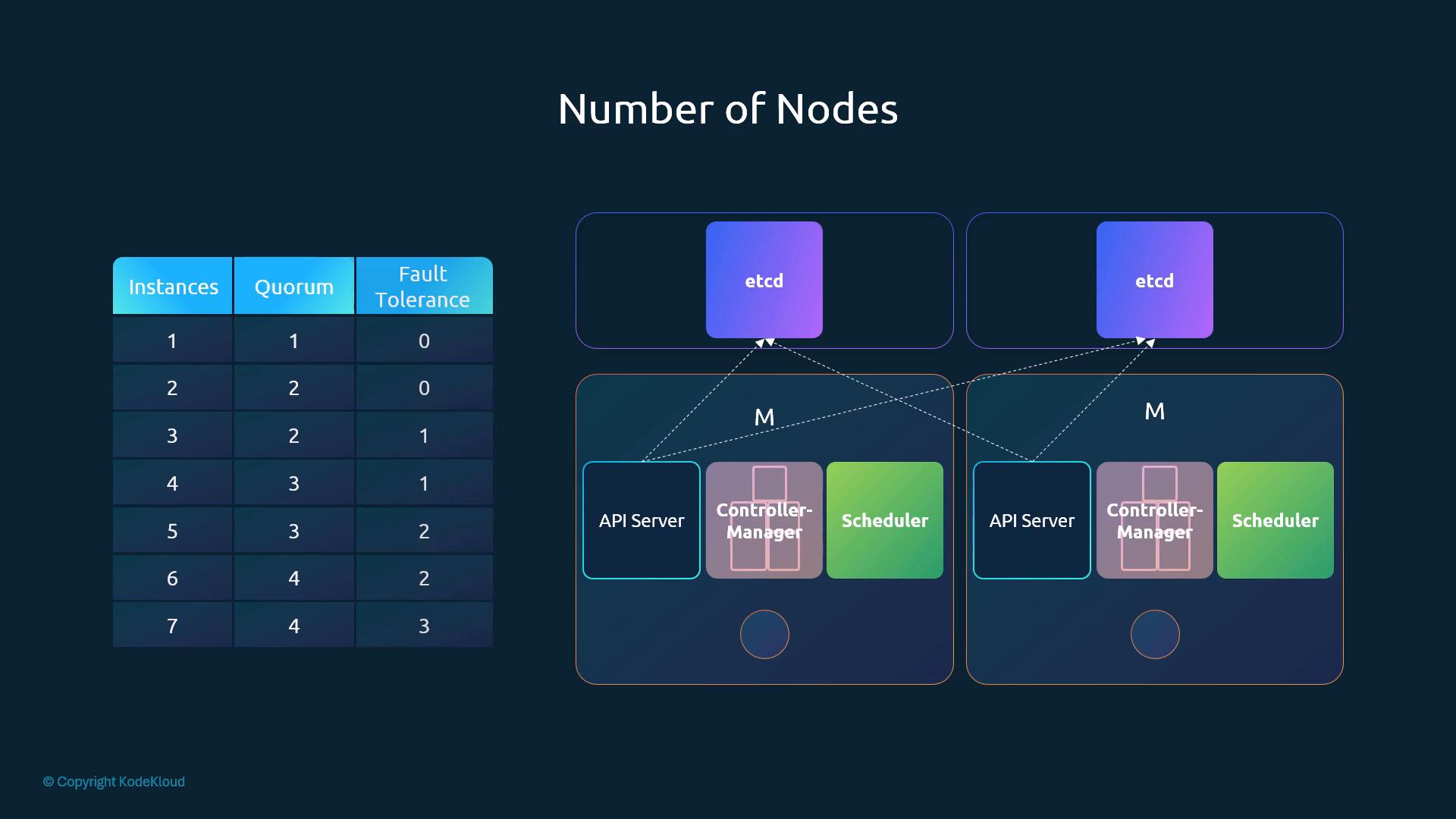
Quorum = floor(N/2) + 1. Fault tolerance = N − quorum.
Instances
Quorum
Fault tolerance
1
1
0
2
2
0 (no better than 1)
3
2
1
4
3
1
5
3
2
6
4
2
7
4
3
Minimum for HA: 3 (survives 1 failure). Production uses 3 or 5. Avoid more than 5 unless needed, because more members means more coordination overhead.
Prefer odd sizes: adding a member to make an even count raises the quorum without raising fault tolerance (4 tolerates 1, like 3). An even cluster can also split into two equal halves where neither side has quorum.
Never run production etcd as a single node. Have a tested backup and recovery plan.
Labs and demos may use fewer members because of limited resources.
[!CAUTION]
Correction: the original calls even-sized clusters "more vulnerable to split-brain". Raft never allows two leaders, so true split-brain cannot happen. The real risk is that an equal split leaves no partition with quorum, so the whole cluster stops accepting writes.
[!NOTE]
Beyond the course: the repo is now github.com/etcd-io/etcd (the coreos URL redirects), and v3.3.9 is very old. Use an etcd release supported by your Kubernetes version; kubeadm pins the etcd image for its release.
Member name; must match its entry in --initial-cluster
--cert-file / --key-file
Server cert for client connections (2379)
--peer-cert-file / --peer-key-file
Cert for peer (member-to-member) traffic (2380)
--trusted-ca-file / --peer-trusted-ca-file
CA used to verify clients / peers
--client-cert-auth / --peer-client-cert-auth
Require client certs (mTLS)
--listen-*-urls / --advertise-*-urls
Where it listens / what it tells others. 2379 = client, 2380 = peer
--initial-cluster
All initial members (name=peerURL,...) so members can find each other at bootstrap
--initial-cluster-token, --initial-cluster-state new
Unique cluster ID token; bootstrapping a new cluster
--data-dir
Data location (/var/lib/etcd)
Replace the placeholders ETCD_NAME, INTERNAL_IP, PEER1_IP and PEER2_IP on every node.
[!NOTE]
Beyond the course:--initial-cluster must list every initial member, including the local one, and the names must match each member's --name. Two entries is fine for a 2-member demo; a 3-member cluster needs three.
Keep the etcdctl version in step with the server. Pass endpoints and TLS each time, or set environment variables.
export ETCDCTL_API=3 # REQUIRED with etcd 3.3.x (etcdctl defaulted to v2); harmless on 3.4+etcdctl --endpoints=https://127.0.0.1:2379 \ --cacert=/etc/etcd/ca.pem --cert=/etc/etcd/kubernetes.pem --key=/etc/etcd/kubernetes-key.pem \ put name john # write a keyetcdctl --endpoints=https://127.0.0.1:2379 \ --cacert=/etc/etcd/ca.pem --cert=/etc/etcd/kubernetes.pem --key=/etc/etcd/kubernetes-key.pem \ get name # read it backetcdctl --endpoints=https://127.0.0.1:2379 \ --cacert=/etc/etcd/ca.pem --cert=/etc/etcd/kubernetes.pem --key=/etc/etcd/kubernetes-key.pem \ get "" --prefix --keys-only # list all keys
For automation, set ETCDCTL_API, ETCDCTL_ENDPOINTS and the TLS variables (ETCDCTL_CACERT, ETCDCTL_CERT, ETCDCTL_KEY) once instead of repeating flags.
[!CAUTION]
Correction: the course runs these commands without ETCDCTL_API=3. With the v3.3.9 binaries it installs, etcdctl defaults to the v2 API, where put and --cacert/--cert/--key do not exist. Export ETCDCTL_API=3 first. etcd v3.4+ defaults to v3.
[!NOTE]
Beyond the course (useful HA checks):
etcdctl member list -w table # members, peer/client URLsetcdctl endpoint health --cluster # health of every memberetcdctl endpoint status --cluster -w table # IS LEADER column, DB size, raft term
(Add the same --endpoints/--cacert/--cert/--key flags as above.)
Writes always go through the leader and commit on a majority. Followers forward writes.
etcdctl needs all three TLS flags (--cacert --cert --key) plus --endpoints against a TLS etcd. Forgetting one gives a hang or a "bad certificate" error.
Why a leader: if any member could accept writes, two members could get conflicting values for the same key at once (e.g. name=John on one, name=Joe on another). Raft avoids this by sending every write through one leader, which serialises them.
[!NOTE]
Beyond the course: etcd v3 reads are linearizable by default. etcdctl get <key> --consistency=s explicitly requests a serializable local read, which can be stale. See etcd API guarantees.

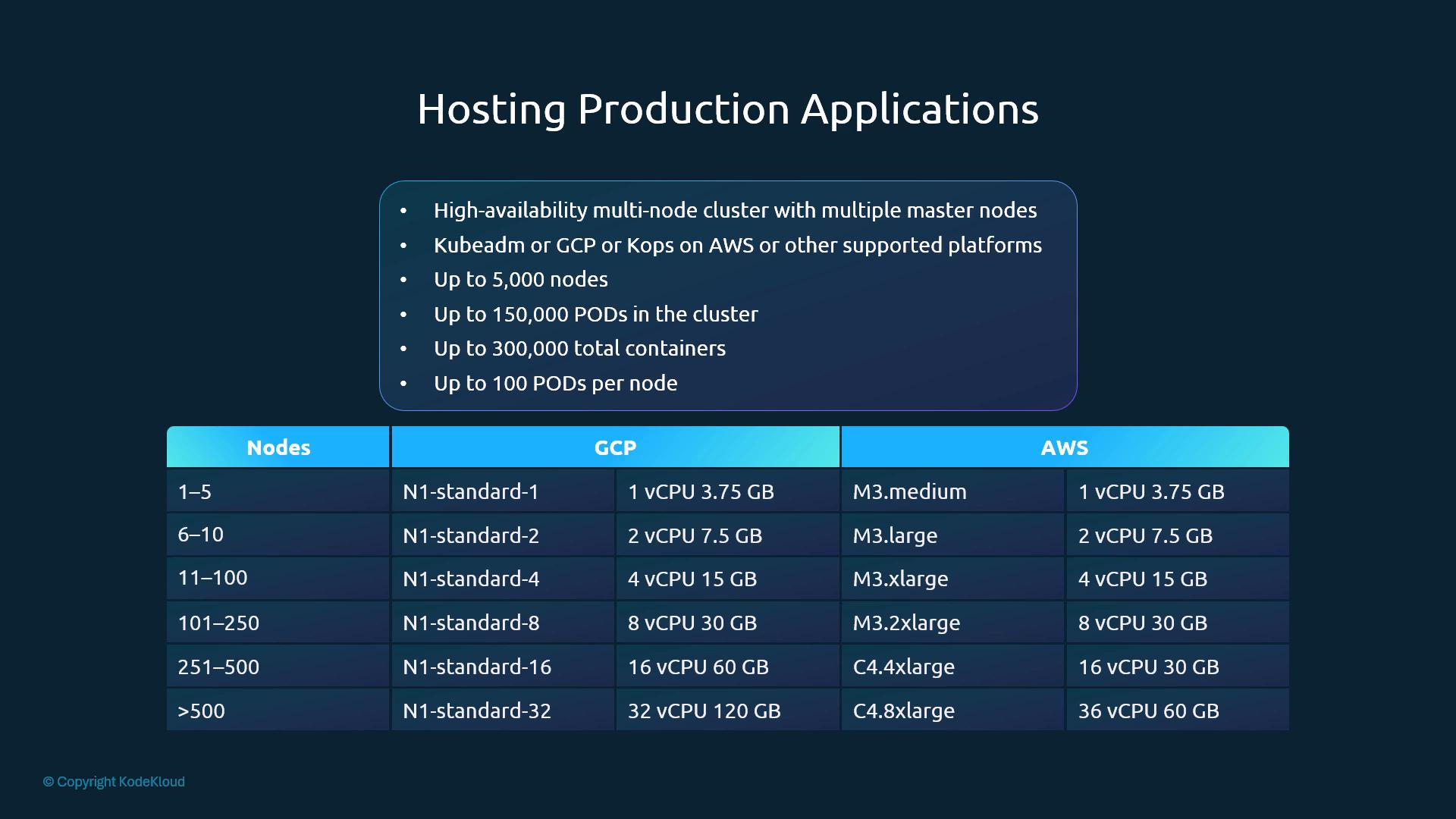
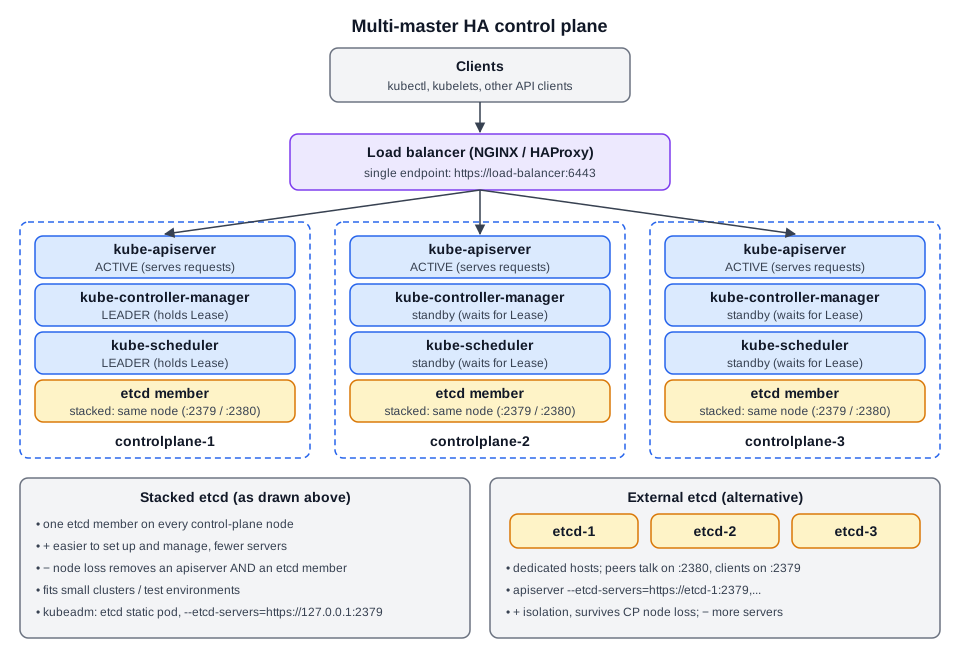 Diagram (new): HA control plane with an API load balancer, per-component HA mode, and stacked vs external etcd placement.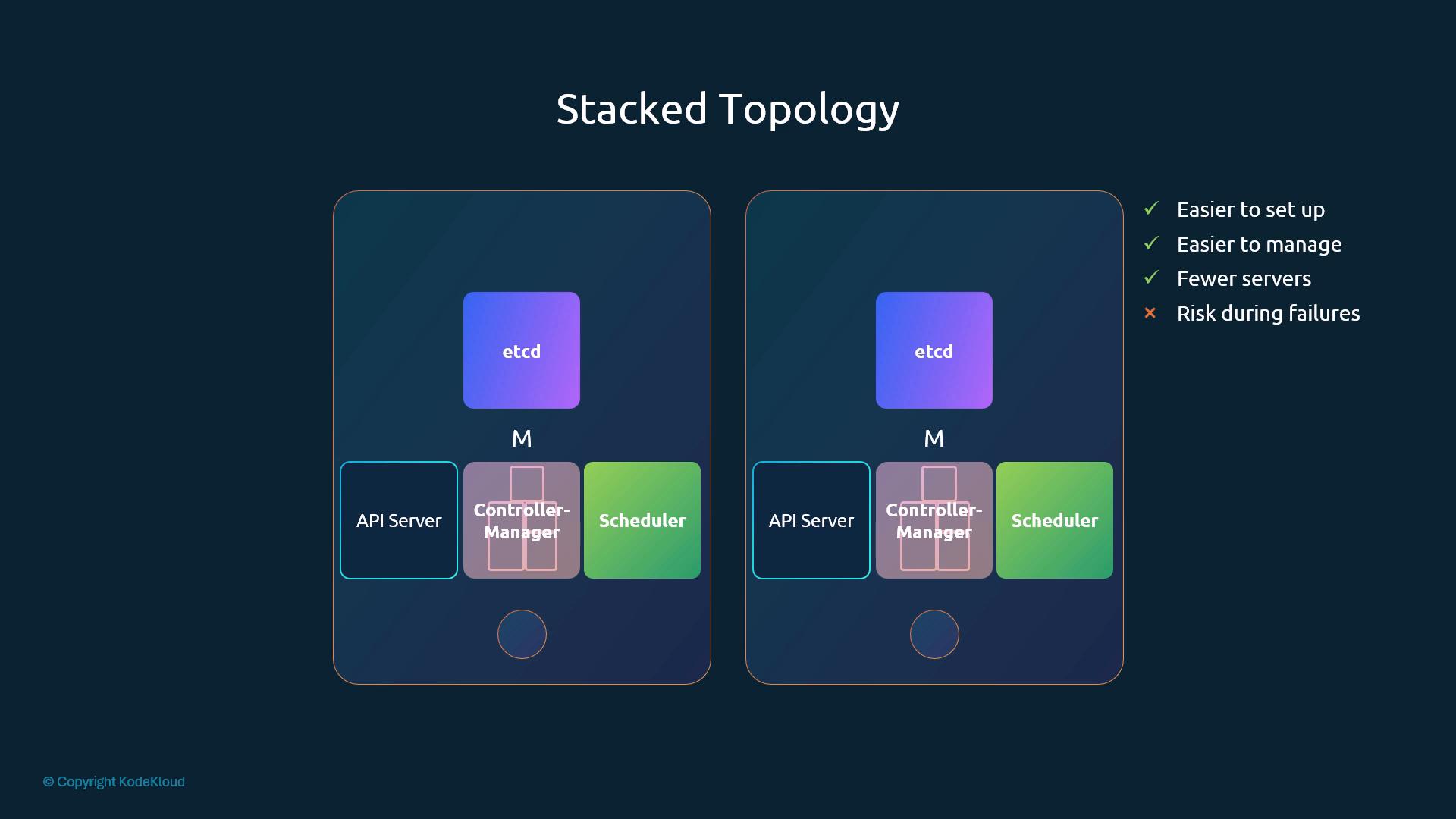
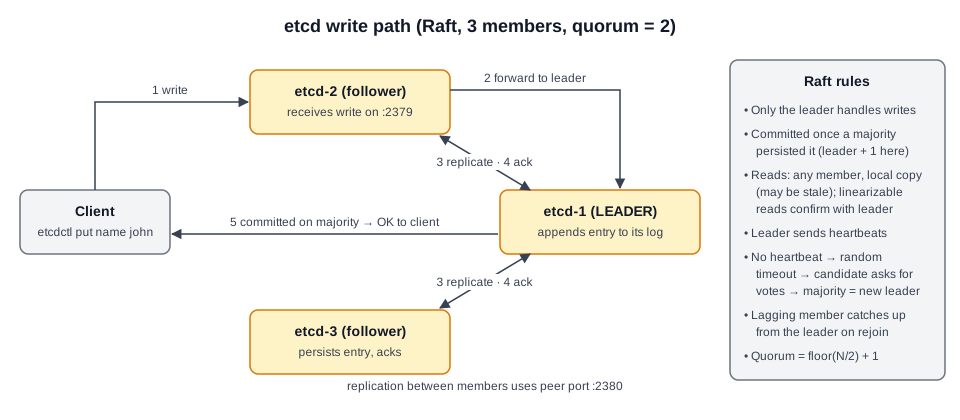 Diagram (new): etcd/Raft write path in a 3-member cluster and the commit-on-majority rule.